
Solved AHCI trouble

msalton1

New member
Member
VIP
Local time
3:12 PM
Messages
325
Machine: Toshiba M305D-S4831
History: Came with Vista 64 bit installed. Several years ago, I installed Win 7 64 bit. It's been so long, I honestly can't remember if I installed in in AHCI mode (it was a fairly recent technology back then).
I partitioned the (only) drive into 3 partitions (I dumped the recovery partition).

Recently, I attached a Thermaltake BlackX esata (also usb2) drive dock to the combo USB/eSata port. The system wouldn't recognize it. I checked the bios. The only sata setting is for the sata controller mode. It's set to AHCI (as opposed to "compatibility mode").

I then checked the reg key HKEY_LOCAL_MACHINE\SYSTEM\CurrentControlSet\services\msahci --> Start

The key value is '0', as it should be. There is no iastorV folder in the HKLM tree, but my understanding is that it's not necessary.

Device manager does NOT show an AHCI device. (see image).

Maybe it's something simple, but I don't see it. All seems to be as it should be, but no AHCI in device manager and no esata.

Any help appreciated.
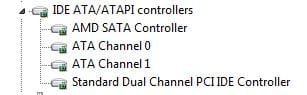

Device Manager.JPG
 

My Computer

Computer type
PC/Desktop
Computer Manufacturer/Model Number
custom
OS
windows 7 Pro 64 Bit
CPU
i5 4670K
Motherboard
Asus Max Hero 1150 socket
Memory
16GB DDR3@933mhz
Graphics Card(s)
Radeon R9 390 8192mb
Monitor(s) Displays
Dell U2415 x3
Screen Resolution
1920 (5760) x 1200 x3
Hard Drives
System: Kingston 128GB SSD

Installing to Samsung 860 EVO 500GB
WD Black 2 TB & 1 TB
PSU
Corsair CX750M
Cooling
Hyper 312
Internet Speed
50mbps
No one has any ideas? :confused:
 

My Computer

Computer type
PC/Desktop
Computer Manufacturer/Model Number
custom
OS
windows 7 Pro 64 Bit
CPU
i5 4670K
Motherboard
Asus Max Hero 1150 socket
Memory
16GB DDR3@933mhz
Graphics Card(s)
Radeon R9 390 8192mb
Monitor(s) Displays
Dell U2415 x3
Screen Resolution
1920 (5760) x 1200 x3
Hard Drives
System: Kingston 128GB SSD

Installing to Samsung 860 EVO 500GB
WD Black 2 TB & 1 TB
PSU
Corsair CX750M
Cooling
Hyper 312
Internet Speed
50mbps
Do you have to select between USB and eSATA operation on that combo port? Maybe they're mutually exclusive.

(If I understand this correctly.)
 

My Computer

Computer type
PC/Desktop
Computer Manufacturer/Model Number
Mellon Labs (custom build)
OS
Win 7 Pro x64/Win 10 Pro x64 dual boot
CPU
AMD FX 8350 Vishera @ 4200
Motherboard
ASUS M5A97 R2.0
Memory
16 GB Mushkin Blackline DDR3-2400 @ 1866 (9-10-10-10-31)
Graphics Card(s)
XFX Radeon R9 280 Double D Black Edition
Sound Card
Realtek HD Audio on MB. Sounds great.
Monitor(s) Displays
Acer 24", Acer 22"
Screen Resolution
3840 x 1080
Hard Drives
1 x Mushkin Chronos 120 GB SSD (Win 10)
1 x Samsung 850 EVO 250 GB SSD (Win 7)
1 x WD 1TB SATA Blue
1 x WD 1TB SATA Green
PSU
Corsair TX-750
Case
CoolerMaster HAF 912+
Cooling
Coolermaster Seidon 240M Liquid AIO. 6 case fans
Keyboard
Logitech G710+
Mouse
Logitech G500s
Internet Speed
Much better since I got fiber, but still way overpriced.
Antivirus
MSE, Malware Bytes for scanning
Browser
Firefox
Other Info
Corsair VOID USB headphones.

A Mellon Labs X-1 - LCD Smartie driven system status display.

Brought to you by the letter E
Hi Mellon. Thanks for the response. That's an excellent question that hadn't occurred to me. I actually called Toshiba after reading your remarks just to see. Unfortunately, Toshiba says that both USB and esata are active all the time on the combo port.

I've pretty much exhausted my options. I did find that Thermaltake dock was bad. I tried multiple cables, mutliple drives, flashed the latest bios. Nada.

I guess I just have to assume that the esata portion of the port is bad. The reg entry for esata is there, the amd esata driver is present. sata is set to AHCI in the bios. Not sure what else it could be but the port.

I guess the only option for that laptop is to get a USB 3.0 express card. I'm not sure it'll be as fast as esata, especially given that it's not 'native' to the motherboard, but it may be the fastest option available.

Again, thank you for your response.
 

My Computer

Computer type
PC/Desktop
Computer Manufacturer/Model Number
custom
OS
windows 7 Pro 64 Bit
CPU
i5 4670K
Motherboard
Asus Max Hero 1150 socket
Memory
16GB DDR3@933mhz
Graphics Card(s)
Radeon R9 390 8192mb
Monitor(s) Displays
Dell U2415 x3
Screen Resolution
1920 (5760) x 1200 x3
Hard Drives
System: Kingston 128GB SSD

Installing to Samsung 860 EVO 500GB
WD Black 2 TB & 1 TB
PSU
Corsair CX750M
Cooling
Hyper 312
Internet Speed
50mbps
Sorry it didn't work out for you. Maybe the USB3.0 option will hold some success.
 

My Computer

Computer type
PC/Desktop
Computer Manufacturer/Model Number
Mellon Labs (custom build)
OS
Win 7 Pro x64/Win 10 Pro x64 dual boot
CPU
AMD FX 8350 Vishera @ 4200
Motherboard
ASUS M5A97 R2.0
Memory
16 GB Mushkin Blackline DDR3-2400 @ 1866 (9-10-10-10-31)
Graphics Card(s)
XFX Radeon R9 280 Double D Black Edition
Sound Card
Realtek HD Audio on MB. Sounds great.
Monitor(s) Displays
Acer 24", Acer 22"
Screen Resolution
3840 x 1080
Hard Drives
1 x Mushkin Chronos 120 GB SSD (Win 10)
1 x Samsung 850 EVO 250 GB SSD (Win 7)
1 x WD 1TB SATA Blue
1 x WD 1TB SATA Green
PSU
Corsair TX-750
Case
CoolerMaster HAF 912+
Cooling
Coolermaster Seidon 240M Liquid AIO. 6 case fans
Keyboard
Logitech G710+
Mouse
Logitech G500s
Internet Speed
Much better since I got fiber, but still way overpriced.
Antivirus
MSE, Malware Bytes for scanning
Browser
Firefox
Other Info
Corsair VOID USB headphones.

A Mellon Labs X-1 - LCD Smartie driven system status display.

Brought to you by the letter E
Back
Top