Ahh! Help reinstalling

yaco78

New member
Local time
2:28 PM
Messages
64
My computer has been working great then randomly yesterday Windows started locking up whenever i try using it. Its very strange... it works for around 5 minutes perfectly well and then bam i get a spinning wheel and have to do a manual shutdown. Ive tried all recovery options and nothing has stopped this from reoccurring. Ive restarted my computer probably 40 times in the last day, each time trying to back up a little bit more data before the inevitable freeze. Now that ive manafed to back everything important up, i am hoping a reinstallation will help. I think it is hard drive related because it said something about a corrupt volume after i scanned for issues, and it always tries running chkdsk on startup even though it never fixes anything. The weird thing is that if my hd was totally broken, then why am i able to use my computer with full functionality for a few minutes after startup?

Well to get to my main question, how can i run my installation disk without having to load windows? I tried to install it by accessing the disk through the explorer,
but the explorer freezes before windows can finish reinstalling. more specifically, it freezes once it finishes copying windows files and begins gathering files, settings, and programs. Can i have it do all this via command prompt or something so i dont need to worry about the explorer crashing mid-installation? Im not even sure if reinstalling will fix the issue but i at least want to try before buying a new hard drive

thanks!
 

My Computer

Computer Manufacturer/Model Number
Toshiba Satellite A305-S6858 Special Edition
OS
Windows 7 Ultimate
CPU
Intel 2 Core Duo T5750 @ 2.0Ghz x 2.0Ghz
Memory
4GB

My Computer

Computer type
PC/Desktop
Computer Manufacturer/Model Number
Dell XPS 420
OS
Windows 10, Home Clean Install
CPU
Intel Core2 processsor Q8200(2.33Ghz 1333FSB) Quad Core Tech
Motherboard
Dell
Memory
6 gb
Graphics Card(s)
ATI Radeon 256MB HD3650
Sound Card
Intergrated 7.1 Channel Audio
Monitor(s) Displays
Dell SP2009W 20"
Hard Drives
640 GB Serial ATA Hard drive
Cooling
Fan
Keyboard
Dell USB Keyboard
Mouse
Dell Premium Optical USB
Internet Speed
DSL 2.85
Hello yaco78.


If you're sure you have everything you need to save from the old install, have a look at this first tutorial at the links below, it over-writes everything on the entire Hard Disk Drive (HDD) and gives you the best possible "clean" place to try the install; sometimes it helps these issues; also have a look at the second tutorial.


SSD / HDD : Optimize for Windows Reinstallation

Clean Install Windows 7
 

My Computer

Computer Manufacturer/Model Number
* BFK Customs *
OS
W 7 64-bit Ultimate
CPU
Intel Q9550 Yorkfield
Motherboard
ASUS P5Q Pro
Memory
8GB Dominator 8500C5D
Graphics Card(s)
ATI : XFX 5870
Sound Card
Realtek HD Audio 7-1
Monitor(s) Displays
1x 47" LCD HDMI & 3x 26" LCD HDMI
Screen Resolution
1920x1080P & 1920x1200
Hard Drives
1x 80GB Intel X25-M G2 SSD : 1x 500GB & 1x 640GB WD Caviar Black(s)
PSU
Corsair 620HX
Case
Cooler Master RC-690
Cooling
Tuniq Tower 120, 2x 140mm and 3x 120mm case fans
Keyboard
Microsoft 500
Mouse
Razer Diamondback 3G
Internet Speed
14 Mb/s
Other Info
1x Koutech 3Gb/s SATA HDD Hot Swap Rack
When i try to boot using cd/dvd, the system just pauses for a few seconds then shuts off every time! But once i take the cd out, then windows will start up just fine (but still freezes after couple min). And i know the cd works because i used it to install windows in the first place and because it runs when i accesa it through "my computer". I have a toshiba satellite a305 and i can safely say this will be my last toshiba if this problem cant be resolved. All i want to do is reinstall windows!!! Ughhh
 

My Computer

Computer Manufacturer/Model Number
Toshiba Satellite A305-S6858 Special Edition
OS
Windows 7 Ultimate
CPU
Intel 2 Core Duo T5750 @ 2.0Ghz x 2.0Ghz
Memory
4GB
With your computer, did you get a DVD? If not you can restore to factory specs, by pushing a certain F key at boot. Get your computer manual to find which key.

If you installed the OS yourself, the restore partition may have been removed.
 

My Computer

Computer type
PC/Desktop
Computer Manufacturer/Model Number
Dell XPS 420
OS
Windows 10, Home Clean Install
CPU
Intel Core2 processsor Q8200(2.33Ghz 1333FSB) Quad Core Tech
Motherboard
Dell
Memory
6 gb
Graphics Card(s)
ATI Radeon 256MB HD3650
Sound Card
Intergrated 7.1 Channel Audio
Monitor(s) Displays
Dell SP2009W 20"
Hard Drives
640 GB Serial ATA Hard drive
Cooling
Fan
Keyboard
Dell USB Keyboard
Mouse
Dell Premium Optical USB
Internet Speed
DSL 2.85
Test the hardware so you know for sure.

Run memtest86 CD for 5-6 passes to test your RAM. Remove some RAM to try running that way, swap sticks to try again.

Next run HD maker's full diag/repair CD scan: Hard Drive Diagnostics Tools and Utilities (Storage) - TACKtech Corp. Look in Device Manager to determine your HD maker.

Make sure you have the latest BIOS version update from Toshiba's Support Downloads webpage for your model. If so, reset the CMOS: Clear CMOS - 3 Ways to Clear the CMOS - Reset BIOS

Next time you try reinstall make sure SATA controller is set to AHCI: http://www.sevenforums.com/tutorials/61869-ahci-enable-windows-7-vista.html?ltr=A

Next check in the Event Viewer>Admin View to google repeat errors to find out how others have solved them. Ditto the Performance Log on Advanced Tools page accessed by clicking through WEI score at Computer>Properties. Look for cued issues at top of Tools page, then Generate a System Health Report.

Check System File integrity: http://www.sevenforums.com/tutorials/1538-sfc-scannow-command-system-file-checker.html

Finally, the last resort before clean reinstall is to run a http://www.sevenforums.com/tutorials/3413-repair-install.html?ltr=R
 
Okay, since it wouldnt boot my win7 disc for whatever reason, i found my recovery disc that came with the comp that has vista on it. Its installing right now and i will see if windows will remain working after this completes, then i will try upgrading back to 7. Thanks greg i will attempt to follow your instructions when it goes back on, although i really have no idea how to do any of that stuff since im definitely not a hardware guy. Hopefully this will fix itself with the clean install otherwise i will have to pinpoint the hardware issue and have someone look at it for me. Thanks for the help ill post back when this is done
 

My Computer

Computer Manufacturer/Model Number
Toshiba Satellite A305-S6858 Special Edition
OS
Windows 7 Ultimate
CPU
Intel 2 Core Duo T5750 @ 2.0Ghz x 2.0Ghz
Memory
4GB
Suggest you run Vista for awhile to see if problems replicate. If not, then you know it's install or something happened in Win7. If so, run the hardware checks before something fails.

But I would not do an inferior in-place Upgrade Install from Vista. Instead I would go clean and wipe the HD before clean reinstalling Win7 from booted DVD: http://www.sevenforums.com/tutorials/91339-ssd-hdd-optimize-windows-reinstallation.html
http://www.sevenforums.com/tutorials/1649-clean-install-windows-7-a.html

Where did you get Win7? Did you burn the DVD yourself? Did you boot this same DVD to install Win7 originally or did you run it from Vista for an inferior upgrade install - which itself could have caused these problems?

Did the Vista DVD boot correctly? Why do you think the Win7 wouldn't boot? Is it dirty? Are you following these steps to boot DVD: http://pcsupport.about.com/od/tipstricks/ht/bootcddvd.htm
 
I started with vista, then created a 2nd partition which i put the win7 RC on, then when the retail version came out i got it through my university and clean installed it over the original vista drive. I did not have any problems with it for a very long time. I have always been concerned about the hardware on this laptop... the built in webcam is only recognized when the screen is nearly shut, the battery lasts 15 minutes, the cd rom only reads discs when i give it a love tap on the bottom of the machine, and the machine has a history of overheating, which has caused it to shut down many times (i bought a cooling fan which attaches via usb and keeps it cool, but i dont always have it with me). Surprisingly, none of this has really stopped the machine from performing well until this recent crisis. I am good at maintaining windows and dealing with software, but hardware issues are a new thing to me.

Currently, vista is reinstalling my drivers. I will then test it out for few hours and if there are no crashes i will follow your instructions on putting win7 back on
 

My Computer

Computer Manufacturer/Model Number
Toshiba Satellite A305-S6858 Special Edition
OS
Windows 7 Ultimate
CPU
Intel 2 Core Duo T5750 @ 2.0Ghz x 2.0Ghz
Memory
4GB
If you have problem with overheating you might want to consider installing SpeedFan to monitor temps and give your fans variable speeds if available.

I would blow out any visible dust when you remove covers of components. Here is how to do it: Video: How to Clean Your Laptop Use can of compressed air or plastic only vacuum attachment. Do not drop screws or touch electronics without touching metal case first.

Don't be afraid to test your hardware as it will teach you a whole new aspect of computers and build your confidence.
 
Last edited:
Thanks a lot, the thing that really irritates me about all this is that the laptop isnt even 2 years old. It has pretty nice specs for a $700 laptop and im really hoping to get out of this situation without having to drop another dime on it. Im almost positive that these issues were somehow caused by overheating or poor physical maintenance. But i do think toshiba is to blame for the cd rom not always detecting discs and for the webcam since ive read others having the same issue with this model.

Anyways vista is done installing my drivers and has not locked up like it was doing before. Looks like i might get out alive. Will i have problems reinstalling my win7 disc since i already used the product key when i originally put it on?
 

My Computer

Computer Manufacturer/Model Number
Toshiba Satellite A305-S6858 Special Edition
OS
Windows 7 Ultimate
CPU
Intel 2 Core Duo T5750 @ 2.0Ghz x 2.0Ghz
Memory
4GB
The rule with keys is one key at a time. If you are on the same computer there is no problem

When asked for the key, do not give it. When asked if you want to activate automatically when you are online, say no

When it is all running the way you want activate by phone.
http://www.sevenforums.com/tutorials/18715-activate-windows-7-phone.html?ltr=A

If the key is not accepted a rep will come on, you explain and he will activate you
 

My Computer

Computer type
PC/Desktop
Computer Manufacturer/Model Number
Dell XPS 420
OS
Windows 10, Home Clean Install
CPU
Intel Core2 processsor Q8200(2.33Ghz 1333FSB) Quad Core Tech
Motherboard
Dell
Memory
6 gb
Graphics Card(s)
ATI Radeon 256MB HD3650
Sound Card
Intergrated 7.1 Channel Audio
Monitor(s) Displays
Dell SP2009W 20"
Hard Drives
640 GB Serial ATA Hard drive
Cooling
Fan
Keyboard
Dell USB Keyboard
Mouse
Dell Premium Optical USB
Internet Speed
DSL 2.85
You can reinstall retail or OEM Win7 as often as you want. It shouldn't require a robocall unless there is a change of hardware.

Are you using retail Win7 or Toshiba upgrade kit DVD?

Have you ever wiped the HD of factory code? If you have Vista recovery disks or DVD you don't need the Recov partition, and factory utilities links are lost when you clean install Win7.

But if you're using Vista Recov disks to reinstall Vista now, then you may have links to Toshiba diagnostics you can now run.

If you want to post a screenshot of Disk Mgmt drive map for us to take a look for you, use Snipping Tool in Start Menu.

If your fan is running a lot, you might want to consider installing SpeedFan to monitor temps and give your fans variable speeds if available.

The HD diagnostics CD scans I posted don't have one for Toshiba, but your HD might not be Toshiba brand, so check now in Device Manager what brand it is. If Toshiba, use GWScan which works on most all models: http://support.gateway.com/support/drivers/getFile.asp?id=21280&dscr=GWSCAN%205.12&uid=27543171
 
Working on it.. i have to go out for a few hours i will post back later tonite with an update on the tests and computer status
 

My Computer

Computer Manufacturer/Model Number
Toshiba Satellite A305-S6858 Special Edition
OS
Windows 7 Ultimate
CPU
Intel 2 Core Duo T5750 @ 2.0Ghz x 2.0Ghz
Memory
4GB
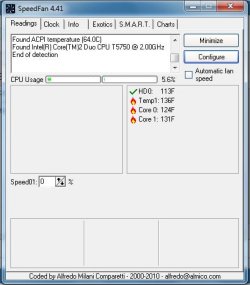
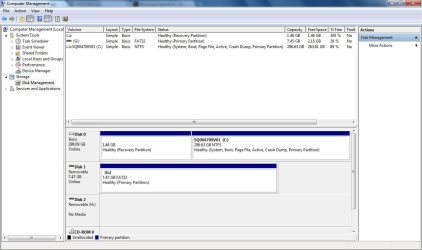
Okay, I'm back! And I'm happy to say I'm typing this on my crash-free Windows 7 Ultimate machine! I did the clean install as instructed and replaced Vista. I attached a picture of my disk - ignore that G drive, that is my flash drive. Yes, I used the recovery disk, but it does appear that there is a Toshiba recovery partition. I also installed the SpeedFan and attached a picture of my current temps. I have my cooling fan plugged in right now and the laptop does not feel warm at all, so I'm guessing these temps aren't too bad. How should I configure this program to make my internal fan work better? Also, the link to GWScan worked, but when I click the link to download the file, it never loads.

Anyways, it appears that everything is working fine for me. I would still like to take preemptive measures to prevent future problems though. I think SpeedFan will be helpful. The Windows diagnostics told me that the original problem was a bad or corrupt volume label. I'm not exactly sure what that means, but hopefully the reinstall was a permanent cure. I still find it pretty bizarre how I was able to use the computer perfectly fine, writing and deleting files, for anywhere between 1-15 minutes until Windows would suddenly freeze up. I guess we will never know the cause of the problem, but hopefully there is nothing inherently wrong with my hardware
 

Attachments

  • fan.jpg
    fan.jpg
    47 KB · Views: 5
  • disk.jpg
    disk.jpg
    95.2 KB · Views: 5

My Computer

Computer Manufacturer/Model Number
Toshiba Satellite A305-S6858 Special Edition
OS
Windows 7 Ultimate
CPU
Intel 2 Core Duo T5750 @ 2.0Ghz x 2.0Ghz
Memory
4GB
Glad that is all worked out for you yaco78
 

My Computer

Computer type
PC/Desktop
Computer Manufacturer/Model Number
Dell XPS 420
OS
Windows 10, Home Clean Install
CPU
Intel Core2 processsor Q8200(2.33Ghz 1333FSB) Quad Core Tech
Motherboard
Dell
Memory
6 gb
Graphics Card(s)
ATI Radeon 256MB HD3650
Sound Card
Intergrated 7.1 Channel Audio
Monitor(s) Displays
Dell SP2009W 20"
Hard Drives
640 GB Serial ATA Hard drive
Cooling
Fan
Keyboard
Dell USB Keyboard
Mouse
Dell Premium Optical USB
Internet Speed
DSL 2.85
You can tick the box shown in the screenshot for Automatic Fan Speed and it will adjust your fans if mobo has that capability.

You said you used Toshiba factory recovery disks to reinstall Win7, or on the earlier Vista reinstall? Did you save the Vista Recovery partition because you know for sure it works?

I would still test the RAM with memtest86 CD for 5-6 passes, and test your HD using GWScan when you can figure out how to download it.

Be sure to check optional Windows Updates for newer drivers, then any drivers missing in Device Manager can be found on the Support Downloads webpage for your computer or device model.

Install programs slowly over time to gauge performance changes. Don't let any write themselves into msconfig>Startup except AV and gadgets, as other are freeloaders on RAM/CPU and can spy on you. Use a lightweight free AV like MS Security Essentials with the Windows firewall.

Finish by cleaning and ordering the HD perfectly with free state-of-the-art CCleaner and Auslogics Disk and Registry Defraggers monthly. Then save a Win7 backup image externally so you never have to reinstall again.
 
Back
Top