AIMP 2 Format Conversion Woes

Maxxwire

New member
Guru
Local time
2:27 PM
Messages
1,251
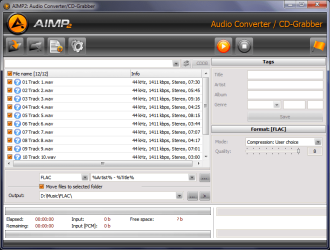
I am trying to convert .wav files to .flac using AIMP 2 v2.6.1.583 and when I try to convert a set of 12 .wav files into the .flac lossless format AIMP 2 processes all of the tracks, but only one 12-16 MB trac shows up in the file even though the GUI shows that all of the files were converted.

I really like using AIMP 2 and I would like to learn how to convert .wav to losless .flac using this player and any help would be appreciated.

~Maxx~

WMC_F_Small.png
 

Attachments

  • ...AIMP.png
    ...AIMP.png
    32.8 KB · Views: 41

My Computer

Computer Manufacturer/Model Number
HP HPE 270f
OS
Windows 7 x64 Home Premium
CPU
Intel Core i7 930 @ 2.8 Ghz Socket 1366 LGA
Motherboard
Pegatron Truckee v1.04E41
Memory
8 GB 1366 Mhz DDR3 (PC3-10700) RAM
Graphics Card(s)
ATI Radeon 5770 1 GB DDR5 RAM
Sound Card
Realtech High Definition
Monitor(s) Displays
32" Sony Bravia
Screen Resolution
1366 X 768
Hard Drives
Intel 25nm 120 GB Series 320 SSD HD Tune- 265 MBps Read/ 130 MBps Write

LaCie 1TB + 1TB RAID 0 eSATA Drive HD Tune- 160 MBps Read/ 90 MBps Write
Keyboard
Logitech Illuminated
Mouse
Logitech MX Revolution
Internet Speed
36.4 Mbps Maximum on a 37 Mbps Motorola SB501 Modem
Can you give me a snippy of the options the FLAC encoder gives you? And/or any other file conversion options in AIMP2?
 

My Computer

Computer type
Laptop
Computer Manufacturer/Model Number
Custom
OS
Windows 7 Home Premium x64
CPU
Intel Core i5 2500K
Motherboard
MSI MS-7750
Memory
8GB DDR3
Graphics Card(s)
nVidia GeForce GTX650 Ti BOOST
Sound Card
Realtek
Monitor(s) Displays
21' Philips
Screen Resolution
Full HD
Hard Drives
1TB
PSU
500W
gornot- I have searched for the information with regards to the flac encoding options in the AIMP 2 Audio converter, but I can find nothing more than is in the screen shot I originally posted. The program allows one to choose the format and compression rate, but there ate no other details. I've tried dozens of times to get AIMP 2 Audio converter to work correctly, but each time it only converts a single file out of the entire batch.

~Maxx~

WMC_F_Small.png
 

My Computer

Computer Manufacturer/Model Number
HP HPE 270f
OS
Windows 7 x64 Home Premium
CPU
Intel Core i7 930 @ 2.8 Ghz Socket 1366 LGA
Motherboard
Pegatron Truckee v1.04E41
Memory
8 GB 1366 Mhz DDR3 (PC3-10700) RAM
Graphics Card(s)
ATI Radeon 5770 1 GB DDR5 RAM
Sound Card
Realtech High Definition
Monitor(s) Displays
32" Sony Bravia
Screen Resolution
1366 X 768
Hard Drives
Intel 25nm 120 GB Series 320 SSD HD Tune- 265 MBps Read/ 130 MBps Write

LaCie 1TB + 1TB RAID 0 eSATA Drive HD Tune- 160 MBps Read/ 90 MBps Write
Keyboard
Logitech Illuminated
Mouse
Logitech MX Revolution
Internet Speed
36.4 Mbps Maximum on a 37 Mbps Motorola SB501 Modem
The FLAC encoder made single audio files and CLUE sheets popular, so I'm not really surprised that it does that; however, it's baffling that you cannot choose not to have this. If the "Mode" dropdown list doesn't give you any results, I'm afraid you'd just have to compress your music elsewhere. Now, I won't shove any "alternatives" in your face, but the FLAC encoder can be downloaded and used as CLI, or you can poke around SourceForge and see if you can find a GUI for the encoder and try that. Those kind of GUIs are usually only portable versions that need to have the encoder dlls and exes in the same folder and you're all set.
 

My Computer

Computer type
Laptop
Computer Manufacturer/Model Number
Custom
OS
Windows 7 Home Premium x64
CPU
Intel Core i5 2500K
Motherboard
MSI MS-7750
Memory
8GB DDR3
Graphics Card(s)
nVidia GeForce GTX650 Ti BOOST
Sound Card
Realtek
Monitor(s) Displays
21' Philips
Screen Resolution
Full HD
Hard Drives
1TB
PSU
500W
Back
Top