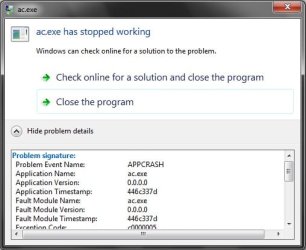
air conflict stopped working

Tanvir Khan

New member
Local time
3:04 AM
Messages
8
Location
Bangladesh
i installed the game air conflict

then i double clicked the incon on the desktop

after about 1 second it says me "ac.exe has stopped working"

means the game has stopped working.

but y?
any1 plis replay
thnx!!!!!
 

My Computer My Computer

Computer Manufacturer/Model Number
Intel DG31PR
OS
Windows 7 Ultimate 32 bit
CPU
Pentium(R) Dual-Core E5200 2.50GHz
Motherboard
INTEL DG31PR
Memory
2GB
Graphics Card(s)
Intel(R) G33/G31 Express Chipset Family 256.00 MB
Sound Card
HD Audio Device
Monitor(s) Displays
1024*768
Screen Resolution
1024x768
Hard Drives
Hitachi HDT721016SLA380 ATA Device 149.05 GB
PSU
Standered Desktop Power Supply
Case
Standered Desktop Case
Cooling
Standered Desktop Cooling
Windows 7 16x bit? :shock: :eek: never heard of it.

Did you check the Game requirements? do you meet or pass these requirements?

Have you updated your Audio and Video drivers? perhaps they are corrupt.
 

My Computer My Computer

Computer type
PC/Desktop
Computer Manufacturer/Model Number
Custom Built... Intel/Nvidia/ASRock
OS
Windows 7 x64 (Ultimate)
CPU
Intel i5-4670K
Motherboard
ASRock Z87 Extreme 6
Memory
8GBs Ripjaws 2133Mhz
Graphics Card(s)
Asus GTX660 (2GBs)
Sound Card
Onboard Realtek HD
Monitor(s) Displays
Acer AL2216W
Screen Resolution
1680 x 1050
Hard Drives
Samsung 840 SSD 120GBs
Samsung 750GB 32MB cache
1.5 TB
PSU
PC Cooling 750w Silencer
Case
Thermaltake Spedo Advance
Cooling
Std Cooler
Keyboard
Logitech G15
Mouse
Logitech G9
Internet Speed
Comcast 20Mbit
Antivirus
Avast
Browser
Firefox
ok its not actually 16 x bit its 32. means x86 i gess!!!
!!!it was my fault sorry!!!:p

so u told me that did i meat the requirments

yes!!
but i m not sure with the vedio memory requirement they said i need
Video memory: 32 MiB (GeForce2+)
GeForce 2 or equivalent graphic card with 32 MiB of VRAM
but i have Intel(R) G33/G31 Express Chipset Family 256.00 MB
does it meets the requirement??:huh:

and im sure that my audio and vedio drivers ar up to date

but i dont know it is corrupted or not

here i attached the pic which is shown after double clicking the desktop icon
 

Attachments

  • Untitled.jpg
    Untitled.jpg
    28.3 KB · Views: 13

My Computer My Computer

Computer Manufacturer/Model Number
Intel DG31PR
OS
Windows 7 Ultimate 32 bit
CPU
Pentium(R) Dual-Core E5200 2.50GHz
Motherboard
INTEL DG31PR
Memory
2GB
Graphics Card(s)
Intel(R) G33/G31 Express Chipset Family 256.00 MB
Sound Card
HD Audio Device
Monitor(s) Displays
1024*768
Screen Resolution
1024x768
Hard Drives
Hitachi HDT721016SLA380 ATA Device 149.05 GB
PSU
Standered Desktop Power Supply
Case
Standered Desktop Case
Cooling
Standered Desktop Cooling
Checking system requirements is not my forte as I always get confused by what they mean... someone else might have to guide you here. I just know that Onboard video chipset hardly do what they are supposed to for every day use, let alone for gaming.... regardless of what you hear or read. ;)

You are sure that your video/audio drivers are up to date but yet, you are not sure if they are corrupt, well... uninstalling and installing a fresh copy of both will put you at an advantage, wouldn't you say? ;) this way, you know that, indeed, they are the latest and that they are not corrupt! :D

 

My Computer My Computer

Computer type
PC/Desktop
Computer Manufacturer/Model Number
Custom Built... Intel/Nvidia/ASRock
OS
Windows 7 x64 (Ultimate)
CPU
Intel i5-4670K
Motherboard
ASRock Z87 Extreme 6
Memory
8GBs Ripjaws 2133Mhz
Graphics Card(s)
Asus GTX660 (2GBs)
Sound Card
Onboard Realtek HD
Monitor(s) Displays
Acer AL2216W
Screen Resolution
1680 x 1050
Hard Drives
Samsung 840 SSD 120GBs
Samsung 750GB 32MB cache
1.5 TB
PSU
PC Cooling 750w Silencer
Case
Thermaltake Spedo Advance
Cooling
Std Cooler
Keyboard
Logitech G15
Mouse
Logitech G9
Internet Speed
Comcast 20Mbit
Antivirus
Avast
Browser
Firefox
Back
Top