Album art in WMP library won't load

johnivanovich

New member
Local time
7:54 AM
Messages
42
WMP is showing music library at opening, but it won't load any album art. When I go to some of the music library submenus (artist, album, year...), it shows album art, and after that when I go back to main music menu, there is album art, too. Hope you can get what I'm saying. Any ideas why it won't load when starting WMP?
 

My Computer My Computer

At a glance

Windows 7 Ultimate x64
OS
Windows 7 Ultimate x64
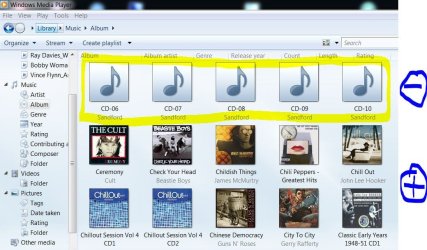
I'd recommend using an id3 editor to embed the album artwork into the mp3 metadata. Then it will always show up in WMP or any other media player. I use Tagscanner to add artist, track title, album, year, genre, artwork.. to my MP3s See the difference:
 

Attachments

  • Capture.JPG
    Capture.JPG
    109.2 KB · Views: 32

My Computer My Computer

At a glance

Windows 7 Home Premium x64 OEM --> RTM clean ...Intel T44004Gb? - Mobile Intel(R) 4 Series Express Chipset ...
Computer Manufacturer/Model Number
Toshiba Satellite L500
OS
Windows 7 Home Premium x64 OEM --> RTM clean install
CPU
Intel T4400
Motherboard
? - laptop inbuilt ?
Memory
4Gb
Graphics Card(s)
? - Mobile Intel(R) 4 Series Express Chipset Family ?
Sound Card
Realtek
Monitor(s) Displays
? + extended to a 42" LG55PC plasma tele!
Screen Resolution
1366 * 768
Hard Drives
320Gb 5500rpm
PSU
?
Case
?
Cooling
?
Internet Speed
3Meg, when it works.
Other Info
A LOWLY LAPTOP!
I'd recommend using an id3 editor to embed the album artwork into the mp3 metadata. Then it will always show up in WMP or any other media player. I use Tagscanner to add artist, track title, album, year, genre, artwork.. to my MP3s See the difference:

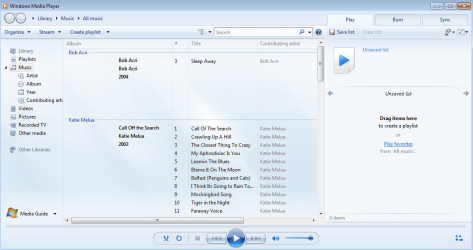
Problem is not that I don't have album art at all, it just won't load when starting WMP. I will upload screenshots, so you can get what I'm saying.

1) I open WMP, and at it's set to Library => Musc => All music, but it wont' load any album art. I see album name, artist, and everything else, but no album art. I tried to wait, but even after hour or so everything's still same.

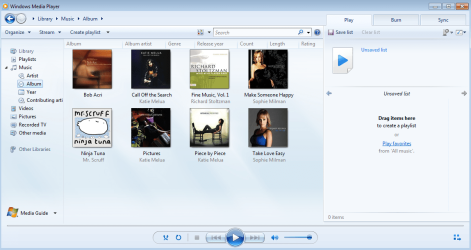
2) I go to album submenu (or any ohter), and than it shows album art normally.

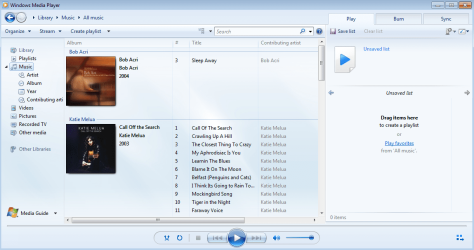
3) After that, I go back to All music, and then I can see album art there, as well.
 

Attachments

  • 1.png
    1.png
    82.1 KB · Views: 19
  • 2.png
    2.png
    105.7 KB · Views: 14
  • 3.png
    3.png
    97.3 KB · Views: 19

My Computer My Computer

At a glance

Windows 7 Ultimate x64
OS
Windows 7 Ultimate x64
One more thing to add - this started to happen yesterday, but I can't remember that I've changed any settings. I have only add one ore two new albums to library.
 

My Computer My Computer

At a glance

Windows 7 Ultimate x64
OS
Windows 7 Ultimate x64
If it only started yesterday, you could system restore to beforehand. First I'd just try a fresh boot and run CCleaner, just to blow any cobwebs out. If it still happens try the restore point to the day before yesterday.
 

My Computer My Computer

At a glance

Windows 7 Home Premium x64 OEM --> RTM clean ...Intel T44004Gb? - Mobile Intel(R) 4 Series Express Chipset ...
Computer Manufacturer/Model Number
Toshiba Satellite L500
OS
Windows 7 Home Premium x64 OEM --> RTM clean install
CPU
Intel T4400
Motherboard
? - laptop inbuilt ?
Memory
4Gb
Graphics Card(s)
? - Mobile Intel(R) 4 Series Express Chipset Family ?
Sound Card
Realtek
Monitor(s) Displays
? + extended to a 42" LG55PC plasma tele!
Screen Resolution
1366 * 768
Hard Drives
320Gb 5500rpm
PSU
?
Case
?
Cooling
?
Internet Speed
3Meg, when it works.
Other Info
A LOWLY LAPTOP!
If it only started yesterday, you could system restore to beforehand. First I'd just try a fresh boot and run CCleaner, just to blow any cobwebs out. If it still happens try the restore point to the day before yesterday.

I've tried system restore but it didn't help. Thank you anyway for your answer.
Any other suggestions?
 

My Computer My Computer

At a glance

Windows 7 Ultimate x64
OS
Windows 7 Ultimate x64
The problem is solved!

After system restore and troubleshooter didn't worked out, I've tried to restore columns in all music, and after that album art appeared. It's a bit strange because the only colums that I've hide were rating, composer, size and parental rating (album art column was checked all the time - it even can't be hidden, it's grayed out), but that was the solution.
 

My Computer My Computer

At a glance

Windows 7 Ultimate x64
OS
Windows 7 Ultimate x64
Back
Top