Hello. There's a small bug in Windows 7 that's caught my eye a long time ago.
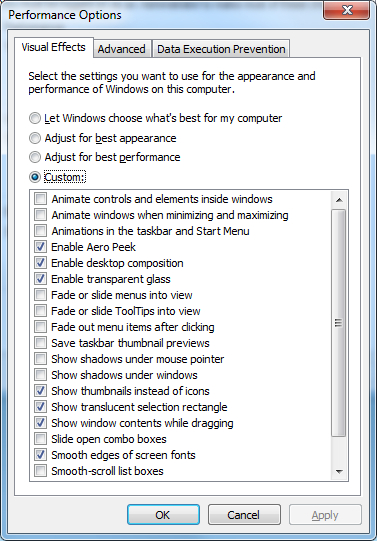
It's about the Minimize / Maximize / Close buttons. I've disabled all animations in Performance Options, but they are still animated when you move your mouse over them (a subtle fade-in / fade-out animation). Every single bit of animation throughout Windows is gone, but those 3 buttons remain animated.
Is there any registry hack or something else to disable their animation, or it's hard-coded? The only way to get rid of it is to use the Windows Basic theme and disable Aero, but the interface seems to have better performance with the Aero enabled. Thanks in advance.
Hi and welcome to SevenForums,
I don't like all of the sliding open of all that stuff either seems like a waste of time
But I don't see any delay as you speak of
Then again I have a Intel and NVidia systems too :/
I'd say if you know someone with similar to that I refer to that friend and compare
It could be the 1gb gpu = graphic's card ?
My Computer
At a glance
Win-7-Pro64bit 7-H-Prem-64biti7-5930K 2nd i9-9940x both water blocked VRM'...Trident-z 3200C14 2nd Trident-z 3600C16EVGA 1080ti ftw3 2nd Titan Xp both water blocked
Computer type
PC/Desktop
Computer Manufacturer/Model Number
Custom assembled by me :}
OS
Win-7-Pro64bit 7-H-Prem-64bit
CPU
i7-5930K 2nd i9-9940x both water blocked VRM's too
2nd ASUS X299 Apex/Intel i9-9940x with Custom water loop/7H-Prem-x64/Corsair 450D case/Ram Trident-z 3600C16 4x8gb / Samsung970Evo plus 500gb SSD/Dual ssd EZ swap evo/PSU EVGA SuperNova 1200w-P2 80+Platinum/GPU Titan Xp /8-ML-140 on push-pull on 2-280GTX rads
Try enabling the "Show shadows under windows" option - it makes the fade in / fade out effect more visible (watch the red glow of the Close button). Like I said, all animations are gone, but animations of those three buttons remain.
You might not see them very well - the fade in / fade out is fast, but it's still there. Those three buttons act like the "Animate controls and elements inside windows" option is enabled. Try enabling that option and move your mouse across the dialog box buttons (OK / Cancel / Apply).
Now disable that option and move your mouse across them again. Notice how there's no fade in / fade out animation anymore? The only problem is that it doesn't apply to Minimize / Maximize / Close buttons - they are always animated.
I don't see how graphics card or its memory relate to this bug.
Hi,
Yea the shadows I never liked either
I was shooting in the dark I've never actually used a AMD system I've always gone Intel and NVidia
Which is why I said if you know anyone with one I'd ask them to test the issue so you can see first hand
1gb should be enough for graphic's I have a little asus GT 640 it was less than 80.us and it's pretty good for a low end 6 y.o. Acer desktop.
My Computer
At a glance
Win-7-Pro64bit 7-H-Prem-64biti7-5930K 2nd i9-9940x both water blocked VRM'...Trident-z 3200C14 2nd Trident-z 3600C16EVGA 1080ti ftw3 2nd Titan Xp both water blocked
Computer type
PC/Desktop
Computer Manufacturer/Model Number
Custom assembled by me :}
OS
Win-7-Pro64bit 7-H-Prem-64bit
CPU
i7-5930K 2nd i9-9940x both water blocked VRM's too
2nd ASUS X299 Apex/Intel i9-9940x with Custom water loop/7H-Prem-x64/Corsair 450D case/Ram Trident-z 3600C16 4x8gb / Samsung970Evo plus 500gb SSD/Dual ssd EZ swap evo/PSU EVGA SuperNova 1200w-P2 80+Platinum/GPU Titan Xp /8-ML-140 on push-pull on 2-280GTX rads