All downloads failing, firefox/IE they just disappear.

yepimonfire

New member
Local time
8:34 PM
Messages
3
In chrome it says "virus detected, download failed". i have AVG antivirus on the computer i'm working on and have disabled it/killed all background processes running in task manager and still have the problem. Any ideas?
 

My Computer My Computer

At a glance

Windows 7 Home Premium 64bitIntel Pentium Dual Core4gbIntel HD
Computer type
Laptop
Computer Manufacturer/Model Number
Acer
OS
Windows 7 Home Premium 64bit
CPU
Intel Pentium Dual Core
Memory
4gb
Graphics Card(s)
Intel HD
I would definitely run a good anti-virus scan for starters. A scan with Malwarebytes wouldn't hurt either. If the infection is too deeply entrenched you may be looking at a fresh install.

Welcome to the forums by the way!:D
 

My Computer My Computer

At a glance

Windows 10x64 Build 1709Intel i7 7700HQ Kaby Lake16 GB DDR4 @2400Nvidia Geforce GTX 1060
Computer type
Laptop
Computer Manufacturer/Model Number
MSI GE72VR Apache Pro-416
OS
Windows 10x64 Build 1709
CPU
Intel i7 7700HQ Kaby Lake
Motherboard
Micro-Star Intl. MS-179B (U3C1)
Memory
16 GB DDR4 @2400
Graphics Card(s)
Nvidia Geforce GTX 1060
Screen Resolution
1920x1080 120Hz
Hard Drives
256 GB Nvme M.2 SSD

1TB HDD@7200
Cooling
Cooler Blast 4
Keyboard
Steel Series
Antivirus
Bit Defender Free
Browser
Edge
I did run a scan, also a scan with malwarebytes, nothing. If there is any way to fix this other than re-installing windows i'd like to know considering this computer doesn't even belong to me and has a crap load of things on it (programs installed).
 

My Computer My Computer

At a glance

Windows 7 Home Premium 64bitIntel Pentium Dual Core4gbIntel HD
Computer type
Laptop
Computer Manufacturer/Model Number
Acer
OS
Windows 7 Home Premium 64bit
CPU
Intel Pentium Dual Core
Memory
4gb
Graphics Card(s)
Intel HD
Have you tried a system restore to a point before this started? Also, did you run the scans in safe mode?
 

My Computer My Computer

At a glance

Windows 10x64 Build 1709Intel i7 7700HQ Kaby Lake16 GB DDR4 @2400Nvidia Geforce GTX 1060
Computer type
Laptop
Computer Manufacturer/Model Number
MSI GE72VR Apache Pro-416
OS
Windows 10x64 Build 1709
CPU
Intel i7 7700HQ Kaby Lake
Motherboard
Micro-Star Intl. MS-179B (U3C1)
Memory
16 GB DDR4 @2400
Graphics Card(s)
Nvidia Geforce GTX 1060
Screen Resolution
1920x1080 120Hz
Hard Drives
256 GB Nvme M.2 SSD

1TB HDD@7200
Cooling
Cooler Blast 4
Keyboard
Steel Series
Antivirus
Bit Defender Free
Browser
Edge
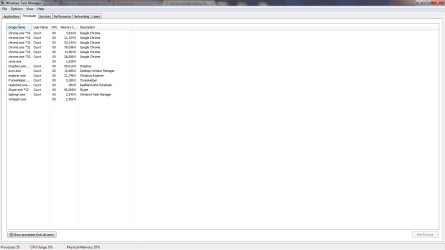
Also as you can see, there is nothing suspicious running in the background.
 

Attachments

  • tskmngrdump.jpg
    tskmngrdump.jpg
    62.8 KB · Views: 7

My Computer My Computer

At a glance

Windows 7 Home Premium 64bitIntel Pentium Dual Core4gbIntel HD
Computer type
Laptop
Computer Manufacturer/Model Number
Acer
OS
Windows 7 Home Premium 64bit
CPU
Intel Pentium Dual Core
Memory
4gb
Graphics Card(s)
Intel HD
Have heard of itunes helper causing issues in some machines. Have you tried setting it to manual and/or disabling it?

Actually I'd suggest using a different A/V myself. MSE or Avast.
 

My Computer My Computer

At a glance

Windows 10x64 Build 1709Intel i7 7700HQ Kaby Lake16 GB DDR4 @2400Nvidia Geforce GTX 1060
Computer type
Laptop
Computer Manufacturer/Model Number
MSI GE72VR Apache Pro-416
OS
Windows 10x64 Build 1709
CPU
Intel i7 7700HQ Kaby Lake
Motherboard
Micro-Star Intl. MS-179B (U3C1)
Memory
16 GB DDR4 @2400
Graphics Card(s)
Nvidia Geforce GTX 1060
Screen Resolution
1920x1080 120Hz
Hard Drives
256 GB Nvme M.2 SSD

1TB HDD@7200
Cooling
Cooler Blast 4
Keyboard
Steel Series
Antivirus
Bit Defender Free
Browser
Edge
Please do the following to check what may be the cause of the problem...


:info: First, please download the Farbar Recovery Scan Tool
Select the 64-bit version.


Save it to the Desktop.
  • Double-click the downloaded file to run it.
  • When the tool opens click Yes to disclaimer.
  • Press the Scan button.
  • FRST64 makes a log (FRST.txt) in the same directory from which the tool is run (Desktop).
Please provide the FRST.txt in your reply. <<---

The first time the tool is run, it also makes another log: Addition.txt
Also post the Addition.txt in your reply. <<---


:info: Also, download Farbar Service Scanner


Save to the Desktop
  • Make sure the following options are checked:
    • Internet Services
    • Windows Firewall
    • System Restore
    • Security Center
    • Windows Update
    • Windows Defender
  • Press: Scan
  • FSS creates a log, FSS.txt, on the Desktop.
Please provide the FSS.txt in your reply. <<---

However, to provide the above reports, please start a new topic at the System Security Forum:
http://www.sevenforums.com/system-security/

If there is malware on the computer, we'll take care of it there.

Thanks!
 

My Computer My Computer

At a glance

Windows 7 Home Premium
Computer type
PC/Desktop
Computer Manufacturer/Model Number
An ol' eMachines
OS
Windows 7 Home Premium
Internet Speed
Fine for me...I'm retired!
Back
Top