all emails disappeared from folder

paascal

New member
Member
Local time
10:23 AM
Messages
74
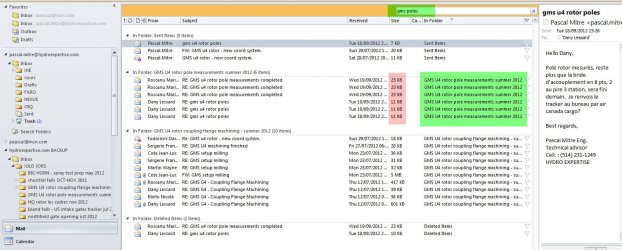
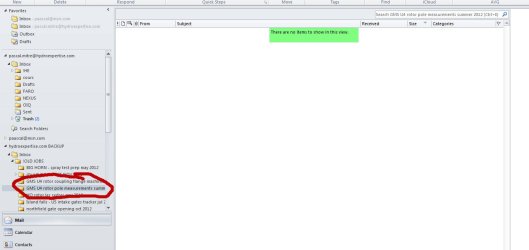
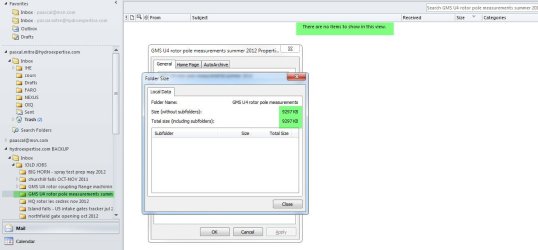
hello i run outlook 2010 64 bit. i was backin up folders as PST... in 2 folders AAAAAAAALL the emails dont appear anymore. if i do a search in the folder nothing... i need to selec try again in all folders then, it says the emails are in the folder but none show!, if i righ click on the folder and ask properties it says there 9meg in data but nowthing shows! anyone have an idea?!

please help im reaaaaally screwed!
 

Attachments
  • 10-01-2013 02-50-45.jpg
    10-01-2013 02-50-45.jpg
    61.3 KB · Views: 13
  • 10-01-2013 02-52-05.jpg
    10-01-2013 02-52-05.jpg
    166 KB · Views: 12
  • 10-01-2013 02-56-23.jpg
    10-01-2013 02-56-23.jpg
    45.5 KB · Views: 11

My Computer

Computer type
PC/Desktop
Computer Manufacturer/Model Number
lenovo w520
OS
win 7 u x64
Memory
8gb
Graphics Card(s)
intel hd graphics 3000 & nvidia quadro 1000m
Hi paascal,

Since the Emails appear when you try searching, you may 'select, drag & drop' the required 'Emails' into a new 'folder'.

You may also try to repair the 'PST file' in 'Outlook'; appears to be a corrupt backup. Please refer to the following 'Microsoft article': How to use Inbox Repair tool to repair pst file in Outlook

Note: The 'Inbox Repair Tool' cannot repair every problem that is detected. In some cases, items may not be recovered if they were permanently deleted or corrupted beyond repair.

Hope this helps.
 

My Computer

OS
Windows 7 64bit
i tried repairing, nothing changed

tried copiing the folder in a new pst file, same deal info is there but i can see it... unless i search for it. problem is it,s hard to search for email names or infor when you dont know it.
 

My Computer

Computer type
PC/Desktop
Computer Manufacturer/Model Number
lenovo w520
OS
win 7 u x64
Memory
8gb
Graphics Card(s)
intel hd graphics 3000 & nvidia quadro 1000m
Hi paascal,

It is likely that there is a filter on the 'View Settings'. You may try to 'reset' the 'view settings' to clear 'filters', if any. To restore view settings click 'View' > 'View Settings' > 'Reset Current View' > Check the results

If the issue persists, try tapping <Ctrl><6> to view the complete 'Folder List'; browse for the missing 'emails'. If it is still missing, try to 'clear and regenerate' the 'Navigation Pane' for the 'Current Profile'. To clear the 'navigation pane' settings, click 'Start icon' > Type 'outlook.exe /resetnavpane' (without quotations) in 'Search Programs and Files' text-box > Tap 'Enter' > Tap <Ctrl><6> again to view the 'Folder List' > Look for the Emails now

Hope this helps. Do reply if you have any further questions; would be glad to assist.
 
Last edited:

My Computer

OS
Windows 7 64bit
great you fixed it :)
 

My Computer

Computer type
PC/Desktop
Computer Manufacturer/Model Number
lenovo w520
OS
win 7 u x64
Memory
8gb
Graphics Card(s)
intel hd graphics 3000 & nvidia quadro 1000m
Hi paascal,

Glad that you found the emails; thank you for confirming :)
Would like to know if resetting the 'Current View' fixed it or the 'key combination(Ctrl+6)' worked.
 

My Computer

OS
Windows 7 64bit
Back
Top