Solved All hard drives and dvd drive disappearing randomly

Cllex

New member
Local time
4:57 AM
Messages
9
To start with, about 3 weeks ago I installed a new wireless adapter, Asus PCE-N53 Dual-Band Wireless-N600 Adapter. My computer froze up while installing the driver, but after I rebooted everything seemed fine, so I tried to install the drivers again. I don't remember exactly what happened, but I ended up doing a system restore to before I tried installing, and was able to get the adapter working fine.

After that I found that my second HDD, WD2003FZEX 2TV 7200 RPM, would suddenly disappear, along with my dvd drive. Sometimes going to disk management and rescanning would fix it, otherwise I had to do a full reboot. The issue went away when I moved the wireless adapter to a new slot, but came back a few days ago. I tried everything I could think of or find online to fix it, including buying a new hard drive, Samsung SSD 850 Evo 500gb. Problem still persists, except now even the new ssd disappears too, and my computer has started locking up for 3-5 minutes at a time before they disappear.

Things I've tried so far are

Changing out cables and ports
Reseating all of the drives
Taking out wireless adapter
Reformatted both boot drive (adata 64gb ssd) and the WD drive
Updated bios to latest version
Installed sata drivers from the motherboard website, seemed to fix it for a day but then came back again.

At this point I'm just considering buying a new motherboard, but I'd prefer not to fork out the money for that and have to rebuild it myself if I don't have to.

Intel i5-4670K Haswell Quad-core 2.4GHz LGA 1150
Asus Z87-A LGA 1150 Intel Z87 motherboard
16GB DDR3 1600 RAM
Nvidia GeForce GTX 760
Adata 64GB SSD - boot drive
WD2003FZEX 2TB 7200 RPM
Samsung SSD 850 Evo 500GB
Corsair HX750 750W power supply

Forgot to mention that all the drives show up just fine in the bios. Sometimes don't show up even after a reboot now, even after rescanning disk.
 

My Computer My Computer

At a glance

windows 7 Ultimate x64Intel i5-4670K CPU @3.40GHzG.SKILL Ripjaws Series 8GB (2 x 4GB) 240-Pin ...Nvidia GeForce GTX 760
Computer type
PC/Desktop
Computer Manufacturer/Model Number
Custom build
OS
windows 7 Ultimate x64
CPU
Intel i5-4670K CPU @3.40GHz
Motherboard
ASUS Z87-A LGA 1150
Memory
G.SKILL Ripjaws Series 8GB (2 x 4GB) 240-Pin DDR3 SDRAM DDR3
Graphics Card(s)
Nvidia GeForce GTX 760
Hard Drives
Adata SP900 64gb sata SSD
WD 2tb HDD
Samsung SSD 850 evo 500gb
Antivirus
None
Browser
Firefox
Hi Cllex,

Welcome to Seven Forums! I hope we will be of assistance.

Firstly this could be a number of issues but seen as though you have changed and swapped some of the hardware and the problem still persists; I think we should try look at what has gone wrong in the software.

In the way you have described it, am I right in saying this issue first came about when you failed to install a network card?

--------------------------------
MistUnleashed
 

My Computer My Computer

At a glance

Windows 7 Ultimate x64Intel Core i7 Socket 1156 LGACorsair Dominator 4GB DDR3Gainward GTX 460
Computer type
PC/Desktop
Computer Manufacturer/Model Number
Custom Build
OS
Windows 7 Ultimate x64
CPU
Intel Core i7 Socket 1156 LGA
Motherboard
Asus P7P55D-E LX
Memory
Corsair Dominator 4GB DDR3
Graphics Card(s)
Gainward GTX 460
Monitor(s) Displays
Acer V243HL
Screen Resolution
1920x1080
Hard Drives
Western Digital 1TB HDD
PSU
Antec TruePower 650W
Case
Antec 300
Cooling
Thermalrite CPU Cooler
Antivirus
Avast Anti-Virus
That's right, it first started happening after the driver failed to install. I've done a full reformat since then though, and the problem is still persisting.
 

My Computer My Computer

At a glance

windows 7 Ultimate x64Intel i5-4670K CPU @3.40GHzG.SKILL Ripjaws Series 8GB (2 x 4GB) 240-Pin ...Nvidia GeForce GTX 760
Computer type
PC/Desktop
Computer Manufacturer/Model Number
Custom build
OS
windows 7 Ultimate x64
CPU
Intel i5-4670K CPU @3.40GHz
Motherboard
ASUS Z87-A LGA 1150
Memory
G.SKILL Ripjaws Series 8GB (2 x 4GB) 240-Pin DDR3 SDRAM DDR3
Graphics Card(s)
Nvidia GeForce GTX 760
Hard Drives
Adata SP900 64gb sata SSD
WD 2tb HDD
Samsung SSD 850 evo 500gb
Antivirus
None
Browser
Firefox
Is the Network Card currently installed into the PCI slot in the PC?

---------------------------
MistUnleashed
 

My Computer My Computer

At a glance

Windows 7 Ultimate x64Intel Core i7 Socket 1156 LGACorsair Dominator 4GB DDR3Gainward GTX 460
Computer type
PC/Desktop
Computer Manufacturer/Model Number
Custom Build
OS
Windows 7 Ultimate x64
CPU
Intel Core i7 Socket 1156 LGA
Motherboard
Asus P7P55D-E LX
Memory
Corsair Dominator 4GB DDR3
Graphics Card(s)
Gainward GTX 460
Monitor(s) Displays
Acer V243HL
Screen Resolution
1920x1080
Hard Drives
Western Digital 1TB HDD
PSU
Antec TruePower 650W
Case
Antec 300
Cooling
Thermalrite CPU Cooler
Antivirus
Avast Anti-Virus
Yes, I moved it to a different PCI slot after the hard drive disappeared the first time and it seemed to fix it for a couple weeks. There were still occasions where they would disappear, but only once or twice every few days.
 

My Computer My Computer

At a glance

windows 7 Ultimate x64Intel i5-4670K CPU @3.40GHzG.SKILL Ripjaws Series 8GB (2 x 4GB) 240-Pin ...Nvidia GeForce GTX 760
Computer type
PC/Desktop
Computer Manufacturer/Model Number
Custom build
OS
windows 7 Ultimate x64
CPU
Intel i5-4670K CPU @3.40GHz
Motherboard
ASUS Z87-A LGA 1150
Memory
G.SKILL Ripjaws Series 8GB (2 x 4GB) 240-Pin DDR3 SDRAM DDR3
Graphics Card(s)
Nvidia GeForce GTX 760
Hard Drives
Adata SP900 64gb sata SSD
WD 2tb HDD
Samsung SSD 850 evo 500gb
Antivirus
None
Browser
Firefox
I have a hunch which may work out; please could you follow these steps:

  1. Turn off PC
  2. Remove SATA cable from the Motherboard to the DVD Drive
  3. Remove SATA Power Cable from the dvd drive
  4. Turn on PC
Basically I'm asking you to completely disconnect your DVD drive.


Please let me know if this resolves your issue.
 
Last edited:

My Computer My Computer

At a glance

Windows 7 Ultimate x64Intel Core i7 Socket 1156 LGACorsair Dominator 4GB DDR3Gainward GTX 460
Computer type
PC/Desktop
Computer Manufacturer/Model Number
Custom Build
OS
Windows 7 Ultimate x64
CPU
Intel Core i7 Socket 1156 LGA
Motherboard
Asus P7P55D-E LX
Memory
Corsair Dominator 4GB DDR3
Graphics Card(s)
Gainward GTX 460
Monitor(s) Displays
Acer V243HL
Screen Resolution
1920x1080
Hard Drives
Western Digital 1TB HDD
PSU
Antec TruePower 650W
Case
Antec 300
Cooling
Thermalrite CPU Cooler
Antivirus
Avast Anti-Virus
I've disconnected the power and removed the sata cable from the case entirely. So far it seems to be working, but I can't really tell yet since sometimes it can go hours without issues. I'll post back if it happens again, or if it's still working later today. Thanks MistUnleashed, if this works you're my new best friend.

What makes you think it was the dvd drive causing it though?
 

My Computer My Computer

At a glance

windows 7 Ultimate x64Intel i5-4670K CPU @3.40GHzG.SKILL Ripjaws Series 8GB (2 x 4GB) 240-Pin ...Nvidia GeForce GTX 760
Computer type
PC/Desktop
Computer Manufacturer/Model Number
Custom build
OS
windows 7 Ultimate x64
CPU
Intel i5-4670K CPU @3.40GHz
Motherboard
ASUS Z87-A LGA 1150
Memory
G.SKILL Ripjaws Series 8GB (2 x 4GB) 240-Pin DDR3 SDRAM DDR3
Graphics Card(s)
Nvidia GeForce GTX 760
Hard Drives
Adata SP900 64gb sata SSD
WD 2tb HDD
Samsung SSD 850 evo 500gb
Antivirus
None
Browser
Firefox
No worries, we're all here to help!

I don't think the DVD drive is the issue per se, I think the issue must be with your power supply. After you installed the PCI card, your motherboard naturally draws more power as it now has a new card to run as well as the rest of the peripherals connected. If your Motherboard along with you hard drives and your DVD drive(s) is pulling the maximum power from your PSU then the PC will try juggle between them and try power them all and it will fail therefore some things will not show up as they aren't receiving the power they require.

What is the Model of your PSU?
 

My Computer My Computer

At a glance

Windows 7 Ultimate x64Intel Core i7 Socket 1156 LGACorsair Dominator 4GB DDR3Gainward GTX 460
Computer type
PC/Desktop
Computer Manufacturer/Model Number
Custom Build
OS
Windows 7 Ultimate x64
CPU
Intel Core i7 Socket 1156 LGA
Motherboard
Asus P7P55D-E LX
Memory
Corsair Dominator 4GB DDR3
Graphics Card(s)
Gainward GTX 460
Monitor(s) Displays
Acer V243HL
Screen Resolution
1920x1080
Hard Drives
Western Digital 1TB HDD
PSU
Antec TruePower 650W
Case
Antec 300
Cooling
Thermalrite CPU Cooler
Antivirus
Avast Anti-Virus
It's a Corsair HX750 750W power supply. I actually just replaced the cable from the PSU to the hard drives and changed the port for that also while I was disconnecting the dvd drive. If it's just that the PSU can't provide enough power to everything instead of it failing then that's a relief.
 

My Computer My Computer

At a glance

windows 7 Ultimate x64Intel i5-4670K CPU @3.40GHzG.SKILL Ripjaws Series 8GB (2 x 4GB) 240-Pin ...Nvidia GeForce GTX 760
Computer type
PC/Desktop
Computer Manufacturer/Model Number
Custom build
OS
windows 7 Ultimate x64
CPU
Intel i5-4670K CPU @3.40GHz
Motherboard
ASUS Z87-A LGA 1150
Memory
G.SKILL Ripjaws Series 8GB (2 x 4GB) 240-Pin DDR3 SDRAM DDR3
Graphics Card(s)
Nvidia GeForce GTX 760
Hard Drives
Adata SP900 64gb sata SSD
WD 2tb HDD
Samsung SSD 850 evo 500gb
Antivirus
None
Browser
Firefox
By running this PSU Wattage Calculator: eXtreme Outer Vision - eXtreme tools for computer enthusiasts

I was able to determine that you are only really using 400W of the power, which is totally fine, but it's just something you should be aware of.

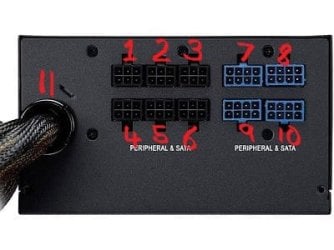
Now with regards to the power, please can you describe to me using the diagram below what each 'module' of the PSU is connected to - E.g - 1 connects to the Hard Drive 1 & 2. 2 connects to the DVD drive etc.

Please try to be as descriptive as you can!

-------------------------------
MistUnleashed
 

Attachments

  • $_1.JPG
    $_1.JPG
    17.3 KB · Views: 23

My Computer My Computer

At a glance

Windows 7 Ultimate x64Intel Core i7 Socket 1156 LGACorsair Dominator 4GB DDR3Gainward GTX 460
Computer type
PC/Desktop
Computer Manufacturer/Model Number
Custom Build
OS
Windows 7 Ultimate x64
CPU
Intel Core i7 Socket 1156 LGA
Motherboard
Asus P7P55D-E LX
Memory
Corsair Dominator 4GB DDR3
Graphics Card(s)
Gainward GTX 460
Monitor(s) Displays
Acer V243HL
Screen Resolution
1920x1080
Hard Drives
Western Digital 1TB HDD
PSU
Antec TruePower 650W
Case
Antec 300
Cooling
Thermalrite CPU Cooler
Antivirus
Avast Anti-Virus
11 has two cables both connected to the motherboard
2 is connected to all 3 hard drives
6 is connected to 3 fans for the case
9 and 10 are both connected to the video card

Before i had #3 connected to all 3 hard drives and the dvd drive as well, with nothing being connected to #2. So far it seems to be working still.
 

My Computer My Computer

At a glance

windows 7 Ultimate x64Intel i5-4670K CPU @3.40GHzG.SKILL Ripjaws Series 8GB (2 x 4GB) 240-Pin ...Nvidia GeForce GTX 760
Computer type
PC/Desktop
Computer Manufacturer/Model Number
Custom build
OS
windows 7 Ultimate x64
CPU
Intel i5-4670K CPU @3.40GHz
Motherboard
ASUS Z87-A LGA 1150
Memory
G.SKILL Ripjaws Series 8GB (2 x 4GB) 240-Pin DDR3 SDRAM DDR3
Graphics Card(s)
Nvidia GeForce GTX 760
Hard Drives
Adata SP900 64gb sata SSD
WD 2tb HDD
Samsung SSD 850 evo 500gb
Antivirus
None
Browser
Firefox
Ah, this may be where the problem is lying!

Personally I wouldn't run all 3 hard-drives off one module, too risky and puts strain on one module.

What I suggest:


  1. Connect a supplied lead to #1 and connect to it: Your Operating System HDD
  2. Connect #2 to the other 2 'slave' hard-drives
  3. Connect a supplied lead to #3 and connect to it: DVD Drive
Note: Turn off your PC and disconnect it from the socket before carrying out the above instructions.

This should split the load on the PSU to a safe amount.


Please try this and let me know how you get on!


MistUnleashed
 

My Computer My Computer

At a glance

Windows 7 Ultimate x64Intel Core i7 Socket 1156 LGACorsair Dominator 4GB DDR3Gainward GTX 460
Computer type
PC/Desktop
Computer Manufacturer/Model Number
Custom Build
OS
Windows 7 Ultimate x64
CPU
Intel Core i7 Socket 1156 LGA
Motherboard
Asus P7P55D-E LX
Memory
Corsair Dominator 4GB DDR3
Graphics Card(s)
Gainward GTX 460
Monitor(s) Displays
Acer V243HL
Screen Resolution
1920x1080
Hard Drives
Western Digital 1TB HDD
PSU
Antec TruePower 650W
Case
Antec 300
Cooling
Thermalrite CPU Cooler
Antivirus
Avast Anti-Virus
I'll give it a shot and let you know how it works out. Thanks for all your help with solving this. It's been driving me crazy for days now.
 

My Computer My Computer

At a glance

windows 7 Ultimate x64Intel i5-4670K CPU @3.40GHzG.SKILL Ripjaws Series 8GB (2 x 4GB) 240-Pin ...Nvidia GeForce GTX 760
Computer type
PC/Desktop
Computer Manufacturer/Model Number
Custom build
OS
windows 7 Ultimate x64
CPU
Intel i5-4670K CPU @3.40GHz
Motherboard
ASUS Z87-A LGA 1150
Memory
G.SKILL Ripjaws Series 8GB (2 x 4GB) 240-Pin DDR3 SDRAM DDR3
Graphics Card(s)
Nvidia GeForce GTX 760
Hard Drives
Adata SP900 64gb sata SSD
WD 2tb HDD
Samsung SSD 850 evo 500gb
Antivirus
None
Browser
Firefox
No worries, let me know how it goes!
 

My Computer My Computer

At a glance

Windows 7 Ultimate x64Intel Core i7 Socket 1156 LGACorsair Dominator 4GB DDR3Gainward GTX 460
Computer type
PC/Desktop
Computer Manufacturer/Model Number
Custom Build
OS
Windows 7 Ultimate x64
CPU
Intel Core i7 Socket 1156 LGA
Motherboard
Asus P7P55D-E LX
Memory
Corsair Dominator 4GB DDR3
Graphics Card(s)
Gainward GTX 460
Monitor(s) Displays
Acer V243HL
Screen Resolution
1920x1080
Hard Drives
Western Digital 1TB HDD
PSU
Antec TruePower 650W
Case
Antec 300
Cooling
Thermalrite CPU Cooler
Antivirus
Avast Anti-Virus
Well after a few hours of it seeming to be alright, the hard drives disappeared again. There were a few times where it locked up for a minute also, but they didn't disappear for a while at least.
 

My Computer My Computer

At a glance

windows 7 Ultimate x64Intel i5-4670K CPU @3.40GHzG.SKILL Ripjaws Series 8GB (2 x 4GB) 240-Pin ...Nvidia GeForce GTX 760
Computer type
PC/Desktop
Computer Manufacturer/Model Number
Custom build
OS
windows 7 Ultimate x64
CPU
Intel i5-4670K CPU @3.40GHz
Motherboard
ASUS Z87-A LGA 1150
Memory
G.SKILL Ripjaws Series 8GB (2 x 4GB) 240-Pin DDR3 SDRAM DDR3
Graphics Card(s)
Nvidia GeForce GTX 760
Hard Drives
Adata SP900 64gb sata SSD
WD 2tb HDD
Samsung SSD 850 evo 500gb
Antivirus
None
Browser
Firefox
Okay, so we can say that the PSU was causing part of the problem but now we have isolated that so we can move onto the problems in the software.

Most likely this is caused by a bad block on one of your hard drives.

Can you follow the steps below and let me know the outcome:


  1. Download CCleaner: CCleaner - Download
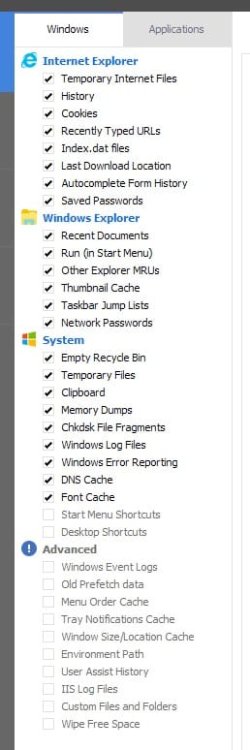
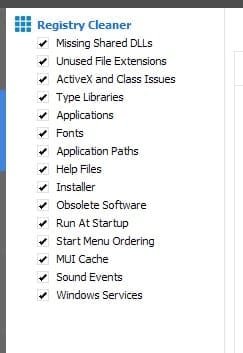
  2. In CCleaner there will be 2 tabs - 'Windows' & 'Applications'; in 'Windows' tick/select the settings as I have attached in a picture below, In Applications, tick/select everything.
  3. Press 'Run Cleaner'
  4. Then go to the 'Registry' Window: Scan For Issues > Fix Issues > Make A Backup (on your desktop) > Press 'Fix All'.
  5. After this Download Defraggler: https://www.piriform.com/defraggler
  6. Open Defraggler > Select a Drive > Analyse (Please make a note of Fragmented Files in GB and post here) > Defrag
  7. Repeat Step 6 for all drives - Except SYSTEM RESERVED - If it shows up in the list.
  8. After this, go to: Start > Type in 'cmd' > Right-click on 'cmd' > Run as administrator
  9. Type: SFC /SCANNOW > Press Enter - Let this run fully.
  10. Restart the PC
Please note: defragging will take some time, please be patient.


Thanks


MistUnleashed
 

Attachments

  • CCleanerSettings.jpg
    CCleanerSettings.jpg
    31.2 KB · Views: 0
  • CCleanerSettings2.jpg
    CCleanerSettings2.jpg
    12.2 KB · Views: 23

My Computer My Computer

At a glance

Windows 7 Ultimate x64Intel Core i7 Socket 1156 LGACorsair Dominator 4GB DDR3Gainward GTX 460
Computer type
PC/Desktop
Computer Manufacturer/Model Number
Custom Build
OS
Windows 7 Ultimate x64
CPU
Intel Core i7 Socket 1156 LGA
Motherboard
Asus P7P55D-E LX
Memory
Corsair Dominator 4GB DDR3
Graphics Card(s)
Gainward GTX 460
Monitor(s) Displays
Acer V243HL
Screen Resolution
1920x1080
Hard Drives
Western Digital 1TB HDD
PSU
Antec TruePower 650W
Case
Antec 300
Cooling
Thermalrite CPU Cooler
Antivirus
Avast Anti-Virus
SSDs don't need defragging whatever the fragmentation. System restore does run a defrag on even SSDs once a month anyway.
 

My Computer My Computer

At a glance

Windows 7 Ultimate x64 SP1AMD Phenom 2 1090T2x8GB Kingston HyperX Fury Black 1600Mhz Unga...MSI GTX 970 Gaming 4G
Computer type
PC/Desktop
Computer Manufacturer/Model Number
Custom Build
OS
Windows 7 Ultimate x64 SP1
CPU
AMD Phenom 2 1090T
Motherboard
Gigabyte GA-890FXA-UD5
Memory
2x8GB Kingston HyperX Fury Black 1600Mhz Unganged
Graphics Card(s)
MSI GTX 970 Gaming 4G
Sound Card
Realtek On-Board HD 7.1 Audio / Logitech G35
Monitor(s) Displays
3xAcer GD245HQ
Screen Resolution
1920x1080
Hard Drives
Samsung 850 Pro 512GB SSD - OS /
WD Caviar Black SATA 3 - 1 TBx2 - Dynamic RAID 0 /
WD Caviar Green SATA 2 - 640GBx2 - Dynamic RAID 0 /
WD Caviar Green SATA 2 - 640GB - Internal Backup /
Seagate Barracude SATA 3 - 3TB - External Backup/ Sync
PSU
HighPower 1000W
Case
Cooler Master HAF 932
Cooling
Noctua NH-D14
Keyboard
Logitech G19
Mouse
Logitech G500
Internet Speed
100/4 Mbit Cable (100GB quota)
Antivirus
ZoneAlarm Extreme Security / MBAM Pro / MBAE Free / SAS Free
Browser
IE 11 - Firefox - Chrome
Other Info
Logitech F710/ G27/ G940/ Z5500 // TrackIR 5 // Nvidia 3D Surround Vision
Has this been resolved?
 

My Computer My Computer

At a glance

Windows 7 Ultimate x64Intel Core i7 Socket 1156 LGACorsair Dominator 4GB DDR3Gainward GTX 460
Computer type
PC/Desktop
Computer Manufacturer/Model Number
Custom Build
OS
Windows 7 Ultimate x64
CPU
Intel Core i7 Socket 1156 LGA
Motherboard
Asus P7P55D-E LX
Memory
Corsair Dominator 4GB DDR3
Graphics Card(s)
Gainward GTX 460
Monitor(s) Displays
Acer V243HL
Screen Resolution
1920x1080
Hard Drives
Western Digital 1TB HDD
PSU
Antec TruePower 650W
Case
Antec 300
Cooling
Thermalrite CPU Cooler
Antivirus
Avast Anti-Virus
It seems like everything has been going well so far. I did a defrag on the WD which took all day, but it had a good 25% fragmentation. But I think what actually fixed it was removing the sound card from my computer. I forgot I even had it in there since I wasn't using it for anything.
 

My Computer My Computer

At a glance

windows 7 Ultimate x64Intel i5-4670K CPU @3.40GHzG.SKILL Ripjaws Series 8GB (2 x 4GB) 240-Pin ...Nvidia GeForce GTX 760
Computer type
PC/Desktop
Computer Manufacturer/Model Number
Custom build
OS
windows 7 Ultimate x64
CPU
Intel i5-4670K CPU @3.40GHz
Motherboard
ASUS Z87-A LGA 1150
Memory
G.SKILL Ripjaws Series 8GB (2 x 4GB) 240-Pin DDR3 SDRAM DDR3
Graphics Card(s)
Nvidia GeForce GTX 760
Hard Drives
Adata SP900 64gb sata SSD
WD 2tb HDD
Samsung SSD 850 evo 500gb
Antivirus
None
Browser
Firefox
It seems like everything has been going well so far. I did a defrag on the WD which took all day, but it had a good 25% fragmentation. But I think what actually fixed it was removing the sound card from my computer. I forgot I even had it in there since I wasn't using it for anything.

Good to hear! So it was a driver conflict then?

Since this has now been resolved, please use the
tick.png
Mark this thread as solved link at the top of your thread.

If you have any more problems, re-open this thread.

Good Luck,

MistUnleashed
 
Last edited:

My Computer My Computer

At a glance

Windows 7 Ultimate x64Intel Core i7 Socket 1156 LGACorsair Dominator 4GB DDR3Gainward GTX 460
Computer type
PC/Desktop
Computer Manufacturer/Model Number
Custom Build
OS
Windows 7 Ultimate x64
CPU
Intel Core i7 Socket 1156 LGA
Motherboard
Asus P7P55D-E LX
Memory
Corsair Dominator 4GB DDR3
Graphics Card(s)
Gainward GTX 460
Monitor(s) Displays
Acer V243HL
Screen Resolution
1920x1080
Hard Drives
Western Digital 1TB HDD
PSU
Antec TruePower 650W
Case
Antec 300
Cooling
Thermalrite CPU Cooler
Antivirus
Avast Anti-Virus
Back
Top