
Airedale360
New member
- Local time
- 1:21 AM
- Messages
- 11
All maximized windows leave a invisible desktop bar on top.
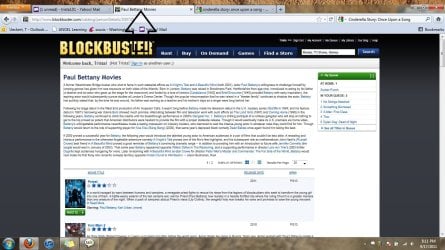
I have install windows 7 pro on my brand new laptop and already having issues. when i maximize any screen: word, web browser I get this empty space at the every top. I have tried snap and it doesn't recognized that top section as part of the window. I have tried restore and dragging the window to the far top corner with no success. Someone suggested turning off snap but when I follow the directions it takes me to my mouse options and nothing to do with snap. please view the photo.
I can move my desktop items up to the corners but they eventually drop to where my windows lay.. Its like I have a hidden taskbar.
Another thing that may also be gone for the same reason is in my web browser I have not bottom bar. I usually turned this off in vista but I'm wondering it its there but I can see it. Please any suggestions would be great.
I have install windows 7 pro on my brand new laptop and already having issues. when i maximize any screen: word, web browser I get this empty space at the every top. I have tried snap and it doesn't recognized that top section as part of the window. I have tried restore and dragging the window to the far top corner with no success. Someone suggested turning off snap but when I follow the directions it takes me to my mouse options and nothing to do with snap. please view the photo.
I can move my desktop items up to the corners but they eventually drop to where my windows lay.. Its like I have a hidden taskbar.
Another thing that may also be gone for the same reason is in my web browser I have not bottom bar. I usually turned this off in vista but I'm wondering it its there but I can see it. Please any suggestions would be great.
Attachments
Last edited:
My Computer
At a glance
Windows 64 bit
- OS
- Windows 64 bit
