All my ram used all of a sudden.

G4ndY

New member
Local time
6:47 PM
Messages
5
Hi all

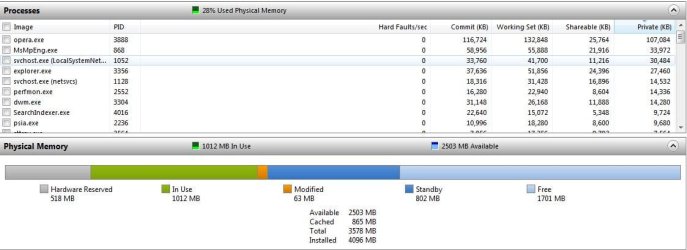
I have a problem, my pc is in not way top notch anymore, but it should still hold its own :). My problem is i keep getting something that uses up all my ram. Normally my system is running on like 20% of my max RAM, but sometimes something happens and all of the sudden my RAM skyrockets to 98%used and my pc lags as hell. It doesnt have to be that im in a game when tha lag starts, yesterday i was just browsing folders on my pc when i noticed it lagging, i looked at RAM used and what do you know 98% used. I have tried running bitdefender antivirus, spybot S&D, CClceaner but the problem is still remains. Anybody have any tips and trix on what i should do?

Thx in advance

/G4ndY


My speccs are :

CPU : Intel i7 950
GPU : Ati Radeon 5870
Ram : Corsair 12Gb
 

My Computer My Computer

At a glance

Windows 7 Ultimate x64Intel i7 950Corsair 16gbAti Radeon Hd4960
Computer type
PC/Desktop
Computer Manufacturer/Model Number
G4ndY
OS
Windows 7 Ultimate x64
CPU
Intel i7 950
Motherboard
Asus
Memory
Corsair 16gb
Graphics Card(s)
Ati Radeon Hd4960
Hi,

Firstly I would uninstall SpyBot as Windows 7 does not require such Registry Cleaners.

Then Run SFC to check the integrity of all Windows 7 system files:

Click on the Start > Type in search cmd
Right click cmd at top and Run as Administrator
Type SFC /scannow at the prompt
(Note: there is a space between SFC and /scannow)

:ar: http://www.sevenforums.com/tutorials/1538-sfc-scannow-command-system-file-checker.html

You could also try:
Free up the startup.
Click on the Start button
Type “msconfig (without quotes), click the resulting link. It will open the System Configuration window.
Select the “Startup” tab.
Deselect all items other than the antivirus.
Apply > OK
Accept then restart.

Your Anti-Virus maybe hogging your resourses (Just a suggestion)

I would recommend MSE:

Microsoft Security Essentials.
Has better compatibility & stability compared to other antiviruses/internet security software.
Has a light footprint and is free.

:ar: Microsoft Security Essentials - Microsoft Windows

Uninstall all unnecessary programs that you no longer use.

Also Press Ctrl>Alt>Delete simultaneously and click Start Task Manager then choose the process tab.
Look under the memory column and it may give you a clue to what process is using the most RAM.


Hope that helps

Cheers

Dave
 

My Computer My Computer

At a glance

Windows 7 Professional 64bitAMD Athlon (tm) X2 5200+ Dual Core 2712 Mhz4GBNividia GeForce 8600 GTS- DIED 25/7/2013 R.I.P
Computer type
PC/Desktop
OS
Windows 7 Professional 64bit
CPU
AMD Athlon (tm) X2 5200+ Dual Core 2712 Mhz
Motherboard
Asus
Memory
4GB
Graphics Card(s)
Nividia GeForce 8600 GTS- DIED 25/7/2013 R.I.P
Sound Card
None
Monitor(s) Displays
22" Yuraku LCD (Dont ask)
Screen Resolution
1280x960
Hard Drives
2TB WD Caviar green
PSU
Windy up type
Case
Scout cm Storm
Cooling
Hair dryer on full cool power ;-)
Keyboard
QWERTY
Mouse
Microsoft Special
Internet Speed
BT Infinity 9.38Mb/s Wheeeeeeeeeeeeeeee!!
Antivirus
MSE
Browser
Internet Explore 10 and Chrome
Other Info
Don't shout...I've got a Hangover!
i have spybot installed and scan my pc regularly, and i only use the microsoft security essentials :) no other antivirus program atm.

Im scanning now with the SFC /scannow and it says no problems was found.

Namnlös.jpg
 

My Computer My Computer

At a glance

Windows 7 Ultimate x64Intel i7 950Corsair 16gbAti Radeon Hd4960
Computer type
PC/Desktop
Computer Manufacturer/Model Number
G4ndY
OS
Windows 7 Ultimate x64
CPU
Intel i7 950
Motherboard
Asus
Memory
Corsair 16gb
Graphics Card(s)
Ati Radeon Hd4960
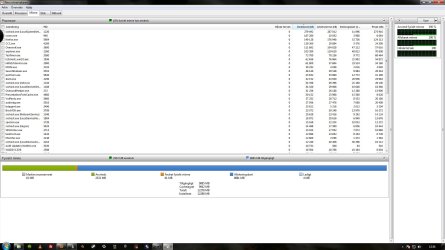
The Memory Manager seems to be have a reserved the remaining amount of RAM for other processes, also FireFox is also using a large amount of RAM and is known to have Memory Leak problems, which I'm not completely sure if they have resolved in updates.

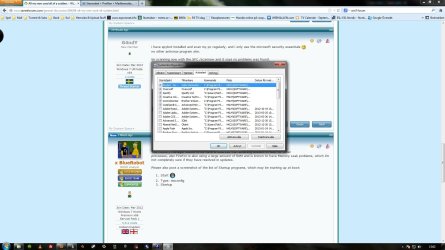
Please also post a screenshot of the list of Startup programs, which may be starting up at boot:
  1. Start :orb:
  2. Type: msconfig
  3. Startup
vsserv.exe is another problematic program, and seems to linked to Bullguard Internet Security and BitDefender Antivirus.
 

My Computer My Computer

Computer type
Laptop
Yeah firefox is known to have memory problems, but it cant be the one reason to use all my 12gb ram. I have uninstalled bitdefender so the vsserv.exe isnt there anymore

Namnlös.jpg
 

My Computer My Computer

At a glance

Windows 7 Ultimate x64Intel i7 950Corsair 16gbAti Radeon Hd4960
Computer type
PC/Desktop
Computer Manufacturer/Model Number
G4ndY
OS
Windows 7 Ultimate x64
CPU
Intel i7 950
Motherboard
Asus
Memory
Corsair 16gb
Graphics Card(s)
Ati Radeon Hd4960
Untick all the programs, is Spybot a scanner or a real-time protection program?
 

My Computer My Computer

Computer type
Laptop
... also FireFox is also using a large amount of RAM and is known to have Memory Leak problems, which I'm not completely sure if they have resolved in updates.

I find your definition of "... using a large amount of RAM ..." unusual. :)

My Firefox is currently using (41 open tabs):

  • Private Bytes: ~300 MB
  • Working Set: ~320 MB
  • Virtual Size: ~660 MB
If you want to see a browser using a large amount of RAM, check out what Chrome uses when it is running.

@G4andY
You'll need to take your screenshot when your RAM is being used up.
That shot seems to indicate that 9885 MB is "Available".
 

My Computer My Computer

At a glance

W7 Ultimate SP1, LM19.2 MATE, W10 Home 1703, ...AMD Phenom II x6 1100T, 3.3 GHz12GB DDR3 1333 G-Skill (4GB x 2), G-Skill (2G...NVIDIA GeForce GTX 660
Computer type
PC/Desktop
Computer Manufacturer/Model Number
n/a
OS
W7 Ultimate SP1, LM19.2 MATE, W10 Home 1703, W10 Pro 1703 VM, #All 64 bit
CPU
AMD Phenom II x6 1100T, 3.3 GHz
Motherboard
ASUS M4A88T-M/USB3 (AM3)
Memory
12GB DDR3 1333 G-Skill (4GB x 2), G-Skill (2GB x 2)
Graphics Card(s)
NVIDIA GeForce GTX 660
Sound Card
Realtek?
Monitor(s) Displays
Samsung S23B350
Screen Resolution
1920x1080
Hard Drives
WD Green 2TB (SATA), WD Green 3TB (SATA), WD Blue 4TB (SATA), WD Blue 6TB (SATA)
PSU
Cooler Master
Case
Antec GX300 Tower
Cooling
3x Antec TRICOOL 120mm Fans
Mouse
Wired Optical
Internet Speed
DSL
Antivirus
Avast
Browser
Pale Moon (64 bit)
Other Info
2018-12-27 Upgraded HDDs
2015-12-10 Upgraded case, graphics card, storage
2015-08-15 Upgraded motherboard & RAM
2015-07-15 Upgraded LM17.1 to LM17.2
I'm confused about why a large amount has been cached for other processes which are inactive :confused:
 

My Computer My Computer

Computer type
Laptop
The spybot is a real time protection
 

My Computer My Computer

At a glance

Windows 7 Ultimate x64Intel i7 950Corsair 16gbAti Radeon Hd4960
Computer type
PC/Desktop
Computer Manufacturer/Model Number
G4ndY
OS
Windows 7 Ultimate x64
CPU
Intel i7 950
Motherboard
Asus
Memory
Corsair 16gb
Graphics Card(s)
Ati Radeon Hd4960

My Computer My Computer

At a glance

Windows 7 Ultimate x64Intel i7 950Corsair 16gbAti Radeon Hd4960
Computer type
PC/Desktop
Computer Manufacturer/Model Number
G4ndY
OS
Windows 7 Ultimate x64
CPU
Intel i7 950
Motherboard
Asus
Memory
Corsair 16gb
Graphics Card(s)
Ati Radeon Hd4960
You will need to either select Spybot or MSE as your real-time protection program, and then enable the selected program to boot at Startup.

Personally, I prefer to use MSE it is the most lightweight program (memory consumption) and the most stable with the Windows operating system. The definition updates are delivered through Windows Update almost daily.

   Warning
DO NOT select both programs to boot at Startup, or run both programs at the same time, this will cause severe conflicts and problems such as crashes.
 

My Computer My Computer

Computer type
Laptop
Sorry for jumping in. Don't mean to step on anyone's toes. :)

One thing about Windows 7 that takes some getting used to is how it utilizes RAM. The Windows 7 philosophy is very simple: unused RAM is wasted RAM. Even if a computer has 16GB installed, just about all of it will be assigned a specific function. Some might be cached, some might be in standby, etc. But it's gonna get used somehow, someway.

You could also try running a Clean Startup (AKA: Clean Boot) to see if any of your installed programs or services are causing a conflict.

http://www.sevenforums.com/tutorial...ation-conflicts-performing-clean-startup.html
 

My Computer My Computer

At a glance

Win 7 Pro 64-bitIntel i5 2.4 Ghz8GB DDR3Intel HD 3000
Computer type
Laptop
Computer Manufacturer/Model Number
Sony Vaio VPCEB47GM Laptop
OS
Win 7 Pro 64-bit
CPU
Intel i5 2.4 Ghz
Memory
8GB DDR3
Graphics Card(s)
Intel HD 3000
Sound Card
IDT High Definition
Monitor(s) Displays
15.6 WGXA Anti-Glare LED
Screen Resolution
1280x800
Hard Drives
640Gb 7200rpm
Antivirus
MSE
Browser
Opera (primary) with IE9 backup
Back
Top