
All of a sudden my Internet Explorer back button won't work properly after a Google search.
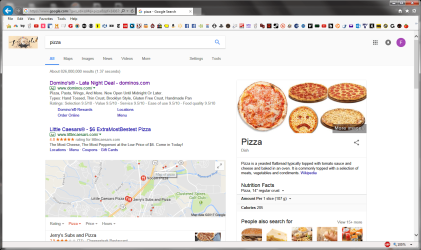
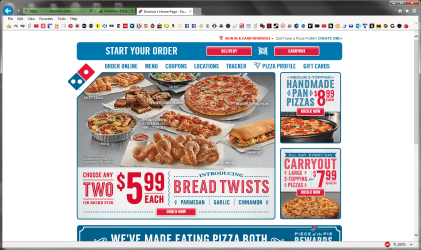
As shown in the screenshots 01) I go to Google search and type Pizza. 02) I search Pizza and click the first result. 03) Then I click the back button and get this empty page.
It only happens from search If I use a shortcut or favorite to enter a site the back button works fine
I have tried refreshing the page, disabling add ons, resetting IE to defaults, I even tried a System Restore.
Malwarebytes finds nothing. It does not happen in Chrome. Appreciate any help.
Windows 7 Ultimate SP1
Internet Explorer 11
Everything is up to date.
As shown in the screenshots 01) I go to Google search and type Pizza. 02) I search Pizza and click the first result. 03) Then I click the back button and get this empty page.
It only happens from search If I use a shortcut or favorite to enter a site the back button works fine
I have tried refreshing the page, disabling add ons, resetting IE to defaults, I even tried a System Restore.
Malwarebytes finds nothing. It does not happen in Chrome. Appreciate any help.
Windows 7 Ultimate SP1
Internet Explorer 11
Everything is up to date.
Attachments

My Computer
At a glance
Windows 7 x64Intel(R) Core(TM)2 Quad CPU Q66008.00 GBNVIDIA GeForce 9800 GTX/9800 GTX+
- Computer Manufacturer/Model Number
- HP Pavilion Media Center m8430f Desktop PC
- OS
- Windows 7 x64
- CPU
- Intel(R) Core(TM)2 Quad CPU Q6600
- Motherboard
- Asus IPIBL-LB
- Memory
- 8.00 GB
- Graphics Card(s)
- NVIDIA GeForce 9800 GTX/9800 GTX+
- Monitor(s) Displays
- Samsung SyncMaster T260HD
- Screen Resolution
- 1900X1200
- Hard Drives
- Hitachi 700GB HDS721075KLA330
- PSU
- BFG GX5500


