Solved All printing functions stopped after failed Epson XP-312 installation

ikbol

New member
Local time
3:25 AM
Messages
55
Win 7 - 64 computer.

After failed installation of Epson XP-312, all printing functions are now impossible - I can't open Devices and Printers, or "Add Printer". "Print" on progs like Notepad and Paint either crashes the prog. or shows nothing, and Word won't open at all.

I have tried to remove all traces of Epson - nothing shows now on Programs.

I also tried to do a SYstem Restore to before the installation - it *failed*.

The installation failed both from the CD - on InstallNavi.exe, and, separately, when I tried to install the printer driver file d/l from the Epson site. The installation/unzipping just stopped after the blue line had gone a bit across the page - perhaps immediately after the files had been unzipped.

The Epson Scan program *succeeded* in installing, and I was able to scan a page into the computer. But I have now removed every trace as far as I can of Epson.

One early symptom, which no longer appears, was that I got: "The Active Directory Domain Services is currently unavailable" box, when fiddling with Print functions, I think.

Another pos. symptom is that Procexp currently shows:

GUI.exe
ouc.exe
csrss.exe
winlogon.exe
lsm.exe

running but with " [Error opening process] "

I also tried stopping Print Spooler in Local Services - but it didn't make any difference to anything.

Any help to restore my printing functions v. gratefullly received.
 

My Computer My Computer

At a glance

Windows 7
OS
Windows 7
Do you still need assistance with this issue?
 

My Computer My Computer

At a glance

Microsoft Windows 7 Ultimate 64-bit 7601 Mult...Intel(R) Core(TM) i7 CPU 950 @ 3.07GHz16.0GB Dual-Channel DDR3 @ 534MHz (8-8-8-20)1023MB NVIDIA GeForce GTX 650 (EVGA)
Computer type
PC/Desktop
Computer Manufacturer/Model Number
Custome Built
OS
Microsoft Windows 7 Ultimate 64-bit 7601 Multiprocessor Free Service Pack 1
CPU
Intel(R) Core(TM) i7 CPU 950 @ 3.07GHz
Motherboard
ASUSTeK Computer INC. SABERTOOTH X58 (LGA1366)
Memory
16.0GB Dual-Channel DDR3 @ 534MHz (8-8-8-20)
Graphics Card(s)
1023MB NVIDIA GeForce GTX 650 (EVGA)
Sound Card
(1) NVIDIA High Definition Audio (2) High Definition Audio
Monitor(s) Displays
HP W2072a LED Backlit
Screen Resolution
1920x1080@60Hz
Hard Drives
(1) SAMSUNG MMCRE28G5MXP-0VB SCSI Disk Device
(2) ST1000DM 003-1CH162 SCSI Disk Device
(3) WDC WD10EURX-73FH1Y0 SCSI Disk Device
PSU
XION XON-1000P14F
Cooling
Fans
Antivirus
Windows Security Essentials
Browser
Mozilla Firefox
Other Info
BIOS Version/Date
American Megatrends Inc. 1402, 8/9/2012
SMBIOS Version 2.5
Hi - yes please

I have already with guidance done a lot of work on this, incl. the steps suggested below.

The situation now is that there appears to be still something wrong with the print spooler - perhaps some registry entry - because

1) i can print via notepad / Word once

but I cannot print a *2nd* time - nor then open Devices and Printers etc - all print related functions are then blocked

but if I then try a manual fix:

2) stop Print Spooler in Services and then restart it - I can again print and operate other print related functions

but only one time

All the remedies suggested below don't work - the MS Printer fixit prog. simply hangs when it checks Print Spooler

SO, as I said, this seems to require some print spooler fix - but not the standard ones below. I note from googling that this appears to be a not uncommon problem. Print spooler can go wrong in various ways.

Any help gratefully received.

P.S. Here are a set of standard MS suggestions I received, wh. do *not* work:

**Try the steps provided below and see if it helps.

Method 1
I would suggest you to follow the steps provided in the following tutorial.

Fix printing problems by resetting the print spooler
Printer problems in Windows - Microsoft Windows

Method 2
Try to remove the printer and add it again:

Install a printer
Install a printer - Microsoft Windows Help

Add or remove a printer

Method 3
Try to run the fixit provided in the following link and see if it helps.

Diagnose and fix printer and printing problems automatically
***
 

My Computer My Computer

At a glance

Windows 7
OS
Windows 7

My Computer My Computer

At a glance

Microsoft Windows 7 Ultimate 64-bit 7601 Mult...Intel(R) Core(TM) i7 CPU 950 @ 3.07GHz16.0GB Dual-Channel DDR3 @ 534MHz (8-8-8-20)1023MB NVIDIA GeForce GTX 650 (EVGA)
Computer type
PC/Desktop
Computer Manufacturer/Model Number
Custome Built
OS
Microsoft Windows 7 Ultimate 64-bit 7601 Multiprocessor Free Service Pack 1
CPU
Intel(R) Core(TM) i7 CPU 950 @ 3.07GHz
Motherboard
ASUSTeK Computer INC. SABERTOOTH X58 (LGA1366)
Memory
16.0GB Dual-Channel DDR3 @ 534MHz (8-8-8-20)
Graphics Card(s)
1023MB NVIDIA GeForce GTX 650 (EVGA)
Sound Card
(1) NVIDIA High Definition Audio (2) High Definition Audio
Monitor(s) Displays
HP W2072a LED Backlit
Screen Resolution
1920x1080@60Hz
Hard Drives
(1) SAMSUNG MMCRE28G5MXP-0VB SCSI Disk Device
(2) ST1000DM 003-1CH162 SCSI Disk Device
(3) WDC WD10EURX-73FH1Y0 SCSI Disk Device
PSU
XION XON-1000P14F
Cooling
Fans
Antivirus
Windows Security Essentials
Browser
Mozilla Firefox
Other Info
BIOS Version/Date
American Megatrends Inc. 1402, 8/9/2012
SMBIOS Version 2.5
Hi,

[Sorry - no email notification of this - just seen it]

Yes I have tried Ccleaner and a whole lot of accompanying cleanup/ protection progs.

What's the 2nd step?

P.S. Don't know if this is relevant, but

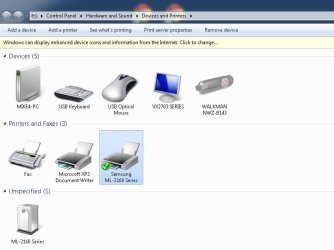
Printers & Faxes shows 4 entries -

Fax
Ms XPS Doc. Writer
Samsung ML-2160 [default printer on this pc]
Samsung ML-2160 [ on other networked pc]

I installed the same printer on both computers - has that confused the system?
 

My Computer My Computer

At a glance

Windows 7
OS
Windows 7

My Computer My Computer

At a glance

Microsoft Windows 7 Ultimate 64-bit 7601 Mult...Intel(R) Core(TM) i7 CPU 950 @ 3.07GHz16.0GB Dual-Channel DDR3 @ 534MHz (8-8-8-20)1023MB NVIDIA GeForce GTX 650 (EVGA)
Computer type
PC/Desktop
Computer Manufacturer/Model Number
Custome Built
OS
Microsoft Windows 7 Ultimate 64-bit 7601 Multiprocessor Free Service Pack 1
CPU
Intel(R) Core(TM) i7 CPU 950 @ 3.07GHz
Motherboard
ASUSTeK Computer INC. SABERTOOTH X58 (LGA1366)
Memory
16.0GB Dual-Channel DDR3 @ 534MHz (8-8-8-20)
Graphics Card(s)
1023MB NVIDIA GeForce GTX 650 (EVGA)
Sound Card
(1) NVIDIA High Definition Audio (2) High Definition Audio
Monitor(s) Displays
HP W2072a LED Backlit
Screen Resolution
1920x1080@60Hz
Hard Drives
(1) SAMSUNG MMCRE28G5MXP-0VB SCSI Disk Device
(2) ST1000DM 003-1CH162 SCSI Disk Device
(3) WDC WD10EURX-73FH1Y0 SCSI Disk Device
PSU
XION XON-1000P14F
Cooling
Fans
Antivirus
Windows Security Essentials
Browser
Mozilla Firefox
Other Info
BIOS Version/Date
American Megatrends Inc. 1402, 8/9/2012
SMBIOS Version 2.5
Thx. Shows no integrity violations. But did this too before.
 

My Computer My Computer

At a glance

Windows 7
OS
Windows 7
When you go into Devices and Printers do you see this? The little Green arrow. If not right click on the printer of choice and select Set as Default

Are you trying to print wired or wifi?

Devices and Printers today only.PNG
 

My Computer My Computer

At a glance

Windows 10 Pro. 64/ version 1709 Windows 7 Pr...Intel i7-6800K @ 4.3Corsair Platinum 16 gig @2400EVGA GTX 1070 OC
Computer type
PC/Desktop
Computer Manufacturer/Model Number
Home made Desktop
OS
Windows 10 Pro. 64/ version 1709 Windows 7 Pro/64
CPU
Intel i7-6800K @ 4.3
Motherboard
ASUS X-99 Deluxe II
Memory
Corsair Platinum 16 gig @2400
Graphics Card(s)
EVGA GTX 1070 OC
Monitor(s) Displays
Asus 27" LED LCD/VE278Q
Screen Resolution
1920-1080 or 1280-720 HDMI
Hard Drives
INTEL SSD 730-240 Gb Sata 3.0/
PSU
EVGA Platium 1200W
Case
Phanteks Luxe Tempered Glass 8 fans/ one radiator
Cooling
XSPC/ Water Cooled CPU
Keyboard
Das 4 Professional
Mouse
Logitech M705/MX Anywhere 2-S
Internet Speed
100 mbits
Antivirus
Microsoft Security Essentials/ Malwarebytes Premium 3.0/ SAS
Browser
I.E. 11 default/Firefox/ ISP Time Warner Cable/Spectrum
Other Info
LG BluRay Burner/
Sound system-KLipsch-THX/
Icy Dock ssd Hot Swap bays.
For my 2 cents worth mate try running these to eliminate the simple stuff first

http://www.sevenforums.com/tutorials/1538-sfc-scannow-command-system-file-checker.html

http://www.sevenforums.com/tutorials/433-disk-check.html

http://www.superantispyware.com/

http://www.malwarebytes.org/products/malwarebytes_free/

http://www.bleepingcomputer.com/download/adwcleaner/

download from bleeping computer – delete any rubbish these find.
If these do not work then try the Emsisoft Emergency Kit https://www.emsisoft.com/en/software/download/ go to the very bottom download and run the first item (emergency kit scanner).

Pending on what thee do will determine what to do next.
 

My Computer My Computer

At a glance

Desk1 7 Home Prem / Desk2 10 Pro / Main lap A...Desk1 i5 3750K / Laptop i7 GTX 860M / Desk2 i...Desk1 8GB (1866) / Desk2 16GB (1333) / Laptop...Desk 1& 2NVidia GTX 650 & Laptops on board Intel
Computer type
PC/Desktop
Computer Manufacturer/Model Number
Own build (new) Desk1 / Asus ROG Win 7 / Desk2 1st build
OS
Desk1 7 Home Prem / Desk2 10 Pro / Main lap Asus ROG 10 Pro 2 laptop Toshiba 7 Pro Asus P2520 7 & 10
CPU
Desk1 i5 3750K / Laptop i7 GTX 860M / Desk2 i5 2500
Motherboard
Desk1 Asus P877-V / Desk2 Gigabyte H67 UD3H / Laptop ?
Memory
Desk1 8GB (1866) / Desk2 16GB (1333) / Laptop 8Gb DDR3
Graphics Card(s)
Desk 1& 2NVidia GTX 650 & Laptops on board Intel
Sound Card
Desk 1 & 2 -XONAR DG Realtek High Def audio Laptop
Monitor(s) Displays
Desk 1 Benq HD 2450 / Desk2 Philips 24" / Laptop 17.5"
Screen Resolution
1920x1080 D1 & D2 & Laptop 1
Hard Drives
Desk1 Samsung 120GB 830 SSD
Asus ROG 256GB 850 Pro SSD
Desk2 Samsung 840 256 SSD
Toshiba 120GB EVO
PSU
Desk 1 Corsair HX 1050/ Laptop ? / Desk 2 Corsair HX 650
Case
Desk 1 Cooler HAF XM ? Toshiba laptop / Desk2 Coolermaster
Cooling
Fans on all Desk1 -2 Desk2 - all Coolermasters 5 Laptop ?
Keyboard
Desk 1 MS Sidewinder X6 Desk 2 MS Sidewinder X 4
Mouse
Desk 1&2 - Gigabyte MS 900 gamer - laptop - Logitec wireless
Internet Speed
ADSL2+
Other Info
One other Desktop (tester) and spare Toshba laptop both with SSD's
Running Kaspersky 2016 ISS on all machines config'd identically
Logitec audio stereo systems on each machine (x3)
Canon MG5250MFC
Router/modem TP-Link running WPA2SK

My Computer My Computer

At a glance

Windows 7 64 Bit Home Premium SP1i7-3820GSkill F3-14900CL9Q - 16GBEVGA GeForce GTX660 - Driver 352.86
Computer type
PC/Desktop
Computer Manufacturer/Model Number
Home Built - Jan 2013
OS
Windows 7 64 Bit Home Premium SP1
CPU
i7-3820
Motherboard
Asus P9X79-PRO - Bios 4608
Memory
GSkill F3-14900CL9Q - 16GB
Graphics Card(s)
EVGA GeForce GTX660 - Driver 352.86
Sound Card
On board Realtek ALC898
Monitor(s) Displays
Acer S271HL
Screen Resolution
1920 x 1080
Hard Drives
#1- Samsung 840 Pro Series
#2- Western Digital WD1002FAEX Sata3 Black
#3- Western Digital WD1002FAEX Sata3 Black
PSU
Corsair CMPSU-850TX-V2 - 850 watt (by Seasonic)
Case
Corsair Obsidian 550D
Cooling
Standard 3 120mm case fans, Cooler Master Hyper 212 EVO
Keyboard
MS KC-0405
Mouse
Intellimouse 5-button
Internet Speed
56 Mbits/Sec (on a good day)
Antivirus
Avast & Malwarebytes
Browser
Firefox
Other Info
Asus DVD - DRW-24B1ST 24X
After following the advice already given by other SF members, try this:
The printing troubleshooter can fix problems with installing and connecting to a printer.
MS Printer Trouble shooter (immediate download)
 

My Computer My Computer

At a glance

x64 (6.3.9600) Win8.1 Pro & soon dual boot x6...AMD A6-3420M APU with Radeon(tm) HD Graphics6.00 GBAMD Radeon(TM) HD 6520G
Computer type
Laptop
Computer Manufacturer/Model Number
HP Pavilion dv6-6c10us
OS
x64 (6.3.9600) Win8.1 Pro & soon dual boot x64 (6.1.7601) Win7_SP1 HomePrem
CPU
AMD A6-3420M APU with Radeon(tm) HD Graphics
Motherboard
Hewlett-Packard 1805
Memory
6.00 GB
Graphics Card(s)
AMD Radeon(TM) HD 6520G
Sound Card
(1) AMD High Definition Audio Device (2) IDT High Definiti
Monitor(s) Displays
HP W2072a 20" LCD (1600 x 900) @ 60 Hz
Screen Resolution
1366 x 768 x 32 bits (4294967296 colors) @ 60 Hz
Hard Drives
ST640LM0 00 HM641JI SATA Disk Device
Keyboard
Logitech k520 wireless KB
Mouse
Logitech m320 wireless mouse (bundled with KB)
Internet Speed
15/5 | 54 MB Wireless 'n'
Antivirus
Realtime: Defender or Avast | On-demand: Malwarebytes, ESET
Browser
IE 11 on Win8, IE 10 on win 7
Other Info
Media: [Gimp, Audacity, VLC] || Comm: [WEmail 2012, Skype] || Productivity: [OpenOffice,| Textpad] || Utils: [Sysinternals, cCleaner, Speccy, Defraggler]
Many thx guys - but new version of nightmare now.

Followed TVeblen's suggestion (already cleaned pc) - d/l cleanspl.exe - wouldn't run - other than on Win NT 4.0/5.0 - not on my version 6.1.

So tried new Ms PrinterFixIt - MicrosoftFixit50979 which ran completely. (Previous versions tried - MicrosoftFixit.Printing.LB.196313811635166538.1.1.Run /MicrosoftFixit.Printing.RNP.31313517747372337.1.1.Run) couldn't get past checking spooler and just hung.

Result : only printer Samsung ML-2165 disappeared from Printers. So re-installed.

But *nothing now prints* , not even first time. Jobs get stuck in print queue. After removal of queue, fails to print again from Word. Printer Troubleshooter test page also gets stuck in queue.

PC restarts don't change anything - print jobs still get stuck.

Previous to PrinterFixit the Samsung did print at least the once.

Any ideas now ? (Am temporarily exhausted from googling)

P.S. TVeblen seemed on right trail - my problem, like others' problems, resulted from trying to install a new printer/printer driver and consequent damage to the spooler service. This seems not uncommon.
 

My Computer My Computer

At a glance

Windows 7
OS
Windows 7
Just to be clear:
You stopped the Print Spooler service > then deleted all of the files in \spool\printers > then restarted the service?

Try this:
(Assuming you are running Home Premium)
Go to Devices & Printers > click on any printer (ex: XPS Doc Writer) > in the menu bar click on Print Server Properties > Then click on the Drivers Tab > and see if you can find the problem printer listed.
If it is, delete it's driver there.

Then if it were me I would clean out
\spool\printers again.

Also:
Yes I see now that
cleanspl.exe does not run on W7. Sorry about that.
But this is something else to try:
cleanspl.exe for windows vista
It lets you do manually what cleanspl.exe did automatically.

EDIT: you should always create a new System Restore Point before doing any steps that we might suggest here (or make any change to your system). That way, if something goes wrong you have a path back.
 

My Computer My Computer

At a glance

Windows 7 64 Bit Home Premium SP1i7-3820GSkill F3-14900CL9Q - 16GBEVGA GeForce GTX660 - Driver 352.86
Computer type
PC/Desktop
Computer Manufacturer/Model Number
Home Built - Jan 2013
OS
Windows 7 64 Bit Home Premium SP1
CPU
i7-3820
Motherboard
Asus P9X79-PRO - Bios 4608
Memory
GSkill F3-14900CL9Q - 16GB
Graphics Card(s)
EVGA GeForce GTX660 - Driver 352.86
Sound Card
On board Realtek ALC898
Monitor(s) Displays
Acer S271HL
Screen Resolution
1920 x 1080
Hard Drives
#1- Samsung 840 Pro Series
#2- Western Digital WD1002FAEX Sata3 Black
#3- Western Digital WD1002FAEX Sata3 Black
PSU
Corsair CMPSU-850TX-V2 - 850 watt (by Seasonic)
Case
Corsair Obsidian 550D
Cooling
Standard 3 120mm case fans, Cooler Master Hyper 212 EVO
Keyboard
MS KC-0405
Mouse
Intellimouse 5-button
Internet Speed
56 Mbits/Sec (on a good day)
Antivirus
Avast & Malwarebytes
Browser
Firefox
Other Info
Asus DVD - DRW-24B1ST 24X
Please post the following screen shots
See: http://www.sevenforums.com/tutorials/9733-screenshots-files-upload-post-seven-forums.html

1. Devices and Printers

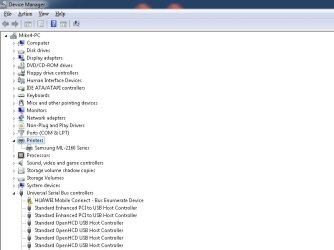
2. Device Management: Printers category
:note: You might have to open the View menu; select Show Hidden Devices to see printers.

Also, Open an http://www.sevenforums.com/tutorials/783-elevated-command-prompt.html (Cmd) and enter the following commands in the Cmd window:
dir /s /a %WINDIR%\system32\spool\printers > C:\SpoolerFiles.txt
exit

Attach C:\SpoolerFiles.txt to the same post as the screen shots.

Thanks.
 

My Computer My Computer

At a glance

x64 (6.3.9600) Win8.1 Pro & soon dual boot x6...AMD A6-3420M APU with Radeon(tm) HD Graphics6.00 GBAMD Radeon(TM) HD 6520G
Computer type
Laptop
Computer Manufacturer/Model Number
HP Pavilion dv6-6c10us
OS
x64 (6.3.9600) Win8.1 Pro & soon dual boot x64 (6.1.7601) Win7_SP1 HomePrem
CPU
AMD A6-3420M APU with Radeon(tm) HD Graphics
Motherboard
Hewlett-Packard 1805
Memory
6.00 GB
Graphics Card(s)
AMD Radeon(TM) HD 6520G
Sound Card
(1) AMD High Definition Audio Device (2) IDT High Definiti
Monitor(s) Displays
HP W2072a 20" LCD (1600 x 900) @ 60 Hz
Screen Resolution
1366 x 768 x 32 bits (4294967296 colors) @ 60 Hz
Hard Drives
ST640LM0 00 HM641JI SATA Disk Device
Keyboard
Logitech k520 wireless KB
Mouse
Logitech m320 wireless mouse (bundled with KB)
Internet Speed
15/5 | 54 MB Wireless 'n'
Antivirus
Realtime: Defender or Avast | On-demand: Malwarebytes, ESET
Browser
IE 11 on Win8, IE 10 on win 7
Other Info
Media: [Gimp, Audacity, VLC] || Comm: [WEmail 2012, Skype] || Productivity: [OpenOffice,| Textpad] || Utils: [Sysinternals, cCleaner, Speccy, Defraggler]
Thx for advice.

1.Tveblen - cleaned out Spool/Printers files - only one *.spl file there - made no diff.

BTW in dir:

spool/prtprocs

were these files:

jnwppr.dll
ssj1mpc.dll
winprint.dll

Looked at manual removal you suggested -

regedit showed in

Print Processors dir arere

ssj1MPC/ssj1MPC.dll
winprint/winprint.dll

Didn't touch these files though.Should I?

2. Slartybartt

Have attached files requested

Many thanks again guys
 

Attachments

  • devices and printers.jpg
    devices and printers.jpg
    38.1 KB · Views: 1
  • printers.jpg
    printers.jpg
    44.1 KB · Views: 1
  • SpoolerFiles.txt
    SpoolerFiles.txt
    378 bytes · Views: 1

My Computer My Computer

At a glance

Windows 7
OS
Windows 7
Reference - HUAWEI Mobile Connect - Bus Enumerate Device
A black exclamation point (!) on a yellow field indicates the device is in a problem state. Note that a device that is in a problem state can be functioning.
Troubleshooting Device Conflicts with Device Manager

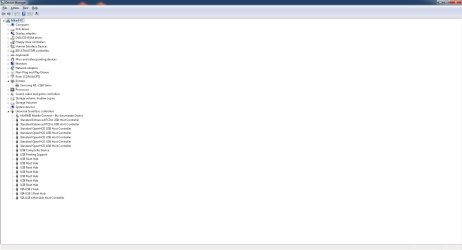
You did not post the complete Device Manager.
 

My Computer My Computer

At a glance

Microsoft Windows 7 Ultimate 64-bit 7601 Mult...Intel(R) Core(TM) i7 CPU 950 @ 3.07GHz16.0GB Dual-Channel DDR3 @ 534MHz (8-8-8-20)1023MB NVIDIA GeForce GTX 650 (EVGA)
Computer type
PC/Desktop
Computer Manufacturer/Model Number
Custome Built
OS
Microsoft Windows 7 Ultimate 64-bit 7601 Multiprocessor Free Service Pack 1
CPU
Intel(R) Core(TM) i7 CPU 950 @ 3.07GHz
Motherboard
ASUSTeK Computer INC. SABERTOOTH X58 (LGA1366)
Memory
16.0GB Dual-Channel DDR3 @ 534MHz (8-8-8-20)
Graphics Card(s)
1023MB NVIDIA GeForce GTX 650 (EVGA)
Sound Card
(1) NVIDIA High Definition Audio (2) High Definition Audio
Monitor(s) Displays
HP W2072a LED Backlit
Screen Resolution
1920x1080@60Hz
Hard Drives
(1) SAMSUNG MMCRE28G5MXP-0VB SCSI Disk Device
(2) ST1000DM 003-1CH162 SCSI Disk Device
(3) WDC WD10EURX-73FH1Y0 SCSI Disk Device
PSU
XION XON-1000P14F
Cooling
Fans
Antivirus
Windows Security Essentials
Browser
Mozilla Firefox
Other Info
BIOS Version/Date
American Megatrends Inc. 1402, 8/9/2012
SMBIOS Version 2.5
Thanks ikbol,

The spool folder is empty - good.

The [Unspecified] ML-2160 on the Devices and Printers window, Remove it (right click, select remove)

Uninstall the HUAWEI Mobile Connect - Bus Enumerate Device in Device Manager.

Please provide another set of screenshots
1. Devices and Printers

2. Device Manager (DevMgr), expand categories
Printers
USB

You might have to post two DevMgr screenshots to get all of the information.

Thanks

Bill
.
 

My Computer My Computer

At a glance

x64 (6.3.9600) Win8.1 Pro & soon dual boot x6...AMD A6-3420M APU with Radeon(tm) HD Graphics6.00 GBAMD Radeon(TM) HD 6520G
Computer type
Laptop
Computer Manufacturer/Model Number
HP Pavilion dv6-6c10us
OS
x64 (6.3.9600) Win8.1 Pro & soon dual boot x64 (6.1.7601) Win7_SP1 HomePrem
CPU
AMD A6-3420M APU with Radeon(tm) HD Graphics
Motherboard
Hewlett-Packard 1805
Memory
6.00 GB
Graphics Card(s)
AMD Radeon(TM) HD 6520G
Sound Card
(1) AMD High Definition Audio Device (2) IDT High Definiti
Monitor(s) Displays
HP W2072a 20" LCD (1600 x 900) @ 60 Hz
Screen Resolution
1366 x 768 x 32 bits (4294967296 colors) @ 60 Hz
Hard Drives
ST640LM0 00 HM641JI SATA Disk Device
Keyboard
Logitech k520 wireless KB
Mouse
Logitech m320 wireless mouse (bundled with KB)
Internet Speed
15/5 | 54 MB Wireless 'n'
Antivirus
Realtime: Defender or Avast | On-demand: Malwarebytes, ESET
Browser
IE 11 on Win8, IE 10 on win 7
Other Info
Media: [Gimp, Audacity, VLC] || Comm: [WEmail 2012, Skype] || Productivity: [OpenOffice,| Textpad] || Utils: [Sysinternals, cCleaner, Speccy, Defraggler]
Thx slartybartt/gandalf

Getting closer to solution.

When I opened Devices and Printers this morn., "Unspecified" was gone. BUT when I tried to print again, [which again did not work], it *reappeared* and there is no option to Remove it as with the Printers. So I am not reposting pic here - it's the same as before.

In Device Management, I could not uninstal Huawei etc. - it would not obey command. It appears however to have successfully Disabled the device - the icon has changed. The related program was uninstalled some time ago and is no longer visible anywhere, incl. Your Uninstaller.

PS Dunno if relevant, but in procexp 4 progs -

lsass.exe
crss.exe
lsm.exe
winlogon.exe

still show - "Error opening process" - a phenomenon wh. has accompanied printing probs.

Many thx again
 

Attachments

  • printers2.jpg
    printers2.jpg
    74 KB · Views: 5

My Computer My Computer

At a glance

Windows 7
OS
Windows 7
A bit of a tangent - but you never know with these things:

The Huawei device is related to your smartphone. It will probably be in a problem state until you plug the phone into a USB port.

If you installed software to connect your phone then that probably belongs there. If you didn't then that could be a Windows installed driver to use the USB "device".

You might experiment with that to see what the functionality is - even see if you can print with the phone plugged in and that ! icon gone away. Stranger things have happened.

But in the end probably a tangent.
 

My Computer My Computer

At a glance

Windows 7 64 Bit Home Premium SP1i7-3820GSkill F3-14900CL9Q - 16GBEVGA GeForce GTX660 - Driver 352.86
Computer type
PC/Desktop
Computer Manufacturer/Model Number
Home Built - Jan 2013
OS
Windows 7 64 Bit Home Premium SP1
CPU
i7-3820
Motherboard
Asus P9X79-PRO - Bios 4608
Memory
GSkill F3-14900CL9Q - 16GB
Graphics Card(s)
EVGA GeForce GTX660 - Driver 352.86
Sound Card
On board Realtek ALC898
Monitor(s) Displays
Acer S271HL
Screen Resolution
1920 x 1080
Hard Drives
#1- Samsung 840 Pro Series
#2- Western Digital WD1002FAEX Sata3 Black
#3- Western Digital WD1002FAEX Sata3 Black
PSU
Corsair CMPSU-850TX-V2 - 850 watt (by Seasonic)
Case
Corsair Obsidian 550D
Cooling
Standard 3 120mm case fans, Cooler Master Hyper 212 EVO
Keyboard
MS KC-0405
Mouse
Intellimouse 5-button
Internet Speed
56 Mbits/Sec (on a good day)
Antivirus
Avast & Malwarebytes
Browser
Firefox
Other Info
Asus DVD - DRW-24B1ST 24X
Is the Samsung ML-2160 a multi-function printer? Probably.

The unspecified device could be the ML-2160 Fax or Scanner. Or even the Printer. What it seems like from your description is that one of those drivers is 'failing' when you go to use the printer. Windows can't identify the device without the proper driver so it gets dumped in the Unspecified bin.

I'm speculating: but it could be that the Samsung driver(s) were corrupted by the bad Epson install.
Do all of the functions of the Samsung work?
 

My Computer My Computer

At a glance

Windows 7 64 Bit Home Premium SP1i7-3820GSkill F3-14900CL9Q - 16GBEVGA GeForce GTX660 - Driver 352.86
Computer type
PC/Desktop
Computer Manufacturer/Model Number
Home Built - Jan 2013
OS
Windows 7 64 Bit Home Premium SP1
CPU
i7-3820
Motherboard
Asus P9X79-PRO - Bios 4608
Memory
GSkill F3-14900CL9Q - 16GB
Graphics Card(s)
EVGA GeForce GTX660 - Driver 352.86
Sound Card
On board Realtek ALC898
Monitor(s) Displays
Acer S271HL
Screen Resolution
1920 x 1080
Hard Drives
#1- Samsung 840 Pro Series
#2- Western Digital WD1002FAEX Sata3 Black
#3- Western Digital WD1002FAEX Sata3 Black
PSU
Corsair CMPSU-850TX-V2 - 850 watt (by Seasonic)
Case
Corsair Obsidian 550D
Cooling
Standard 3 120mm case fans, Cooler Master Hyper 212 EVO
Keyboard
MS KC-0405
Mouse
Intellimouse 5-button
Internet Speed
56 Mbits/Sec (on a good day)
Antivirus
Avast & Malwarebytes
Browser
Firefox
Other Info
Asus DVD - DRW-24B1ST 24X
Back
Top