All programs "not responding"

pavman

New member
Local time
8:10 AM
Messages
8
Hello, Windows7 Forums:

I am trying to save a friend's Toshiba Satellite laptop that IT has told her to throw away. It is a 64-bit machine with a 2GHZ Pentium with 4 GB RAM. Up until 6 months or so, it was running fine. Now, every program lags with "not responding" issues that each run many seconds. Everything is slow, even opening programs from the Start button. I have run CCleaner on it, IObit's Advanced System Care, I have tried Selective Startup, a clean boot, an SFC/SCANNOW, nothing works for very long. The thing will be quick for a minute or so...I will think it is fixed and "not responding" reappears. Help.
 

My Computer

Computer type
Laptop
Computer Manufacturer/Model Number
Toshiba Satellite L755
OS
Windows 7 Home Premium 64-bit
CPU
Pentium B940@ 2 GHZ
Motherboard
ACPI x64-based
Memory
4 GB
Hard Drives
Toshiba MK3265GSXN
Antivirus
Microsoft Security Essentials
Browser
Explorer
Welcome to the forums!

First , ditch the "Advanced System Care", snake oil pure and simple with the potential to REALLY screw things up. I'm assuming you've ran you Anti-Virus in safe mode/at boot, correct? I would also suggest a sfc/scannow in safe mode. Have you considered a Repair Install or even a clean install? We have many fine tutorials here at the forums, here's a couple that walks you through those options.

http://www.sevenforums.com/tutorials/3413-repair-install.html

http://www.sevenforums.com/tutorials/219487-clean-reinstall-factory-oem-windows-7-a.html

http://www.sevenforums.com/tutorials/1649-clean-install-windows-7-a.html

This last one gives a link to a official download source for a Windows .iso, all you'll need is your COA from the sticker.
 

My Computer

Computer type
Laptop
Computer Manufacturer/Model Number
MSI GE72VR Apache Pro-416
OS
Windows 10x64 Build 1709
CPU
Intel i7 7700HQ Kaby Lake
Motherboard
Micro-Star Intl. MS-179B (U3C1)
Memory
16 GB DDR4 @2400
Graphics Card(s)
Nvidia Geforce GTX 1060
Screen Resolution
1920x1080 120Hz
Hard Drives
256 GB Nvme M.2 SSD

1TB HDD@7200
Cooling
Cooler Blast 4
Keyboard
Steel Series
Antivirus
Bit Defender Free
Browser
Edge
Thanks Indianacarnie. I will try those tomorrow. I had no idea Advanced...was junk. CCleaner is legit? I haven't tried anything in safe mode, will try anti-virus and sfc/scannow, thanks. Will let you know the results. Thanks again.
 

My Computer

Computer type
Laptop
Computer Manufacturer/Model Number
Toshiba Satellite L755
OS
Windows 7 Home Premium 64-bit
CPU
Pentium B940@ 2 GHZ
Motherboard
ACPI x64-based
Memory
4 GB
Hard Drives
Toshiba MK3265GSXN
Antivirus
Microsoft Security Essentials
Browser
Explorer
No problem, I or someone is always here. I'll check back throughout the day tomorrow. Yes Ccleaner is legit and very highly recommended. ASC (whatever number) and its kin has caused more problems/posts here (and other forums) than any other type of software. You can do everything it does yourself easier and much more safely.

Make sure you run the sfc/scannow as an Admin.!
 

My Computer

Computer type
Laptop
Computer Manufacturer/Model Number
MSI GE72VR Apache Pro-416
OS
Windows 10x64 Build 1709
CPU
Intel i7 7700HQ Kaby Lake
Motherboard
Micro-Star Intl. MS-179B (U3C1)
Memory
16 GB DDR4 @2400
Graphics Card(s)
Nvidia Geforce GTX 1060
Screen Resolution
1920x1080 120Hz
Hard Drives
256 GB Nvme M.2 SSD

1TB HDD@7200
Cooling
Cooler Blast 4
Keyboard
Steel Series
Antivirus
Bit Defender Free
Browser
Edge
OK. I have run sfc/scannow three times as admin in safe mode w/networking, no errors found, nothing fixed. I ran a quick scan with MS Essentials, nothing, now in the second hour of a full scan. I downloaded on another computer the ISO that I think I will need for a Repair Install although I don't have the registration key that I sustpect I will need to do that. Is that key in some hidden file you can help me find?
 

My Computer

Computer type
Laptop
Computer Manufacturer/Model Number
Toshiba Satellite L755
OS
Windows 7 Home Premium 64-bit
CPU
Pentium B940@ 2 GHZ
Motherboard
ACPI x64-based
Memory
4 GB
Hard Drives
Toshiba MK3265GSXN
Antivirus
Microsoft Security Essentials
Browser
Explorer
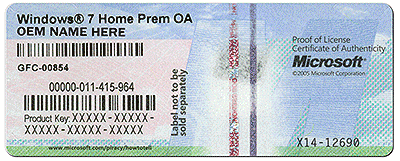
The product key will be on the COA sticker fixed beneath the laptop (or sometimes inside the battery compartment)

It looks similar to this:

coa-stickers.gif
 

My Computer

Computer type
PC/Desktop
Computer Manufacturer/Model Number
Golden Mk. I.4
OS
Windows 10 Pro x64 ; Xubuntu x64
CPU
Intel i7 860 @ 2.80 GHz O/C'ed to 4.0GHz
Motherboard
Gigabyte P55A-UD3R Rev.1. Award BIOS F13
Memory
16GB Corsair Vengance DDR3 @ 661 MHz Dual Channel (9-9-9-24)
Graphics Card(s)
EVGA NVidia GTX 560 1024MB
Sound Card
Realtek Integrated
Monitor(s) Displays
Dual Samsung SyncMaster 2494HS
Screen Resolution
1920*1080 and 1920*1080
Hard Drives
1*Samsung 840 EVO 120GB SSD;
1*OCZ Vertex 2 60GB SSD;
2*Samsung F3 SpinPoint 1TB in RAID0;
1*Samsung F1 SpinPoint 1TB;
2*Western Digital 1TB External USB 3.0
1*Western Digital 500GB External USB 3.0
1*Seagate 500GB External USB 2.0
PSU
Thermaltake ToughPower QFan 750W
Case
Thermaltake Element S VK60001W2Z
Cooling
Corsair H60 Water Cooling, 2*230mm and 2*80mm case fans
Keyboard
Logitech G110
Mouse
Logitech MX518
Bingo, thanks for that Golden. Looks like the full scan will take 5 hours or so before I will be able to try the Repair Install. Thanks again.
 

My Computer

Computer type
Laptop
Computer Manufacturer/Model Number
Toshiba Satellite L755
OS
Windows 7 Home Premium 64-bit
CPU
Pentium B940@ 2 GHZ
Motherboard
ACPI x64-based
Memory
4 GB
Hard Drives
Toshiba MK3265GSXN
Antivirus
Microsoft Security Essentials
Browser
Explorer
:thumbsup:
 

My Computer

Computer type
PC/Desktop
Computer Manufacturer/Model Number
Golden Mk. I.4
OS
Windows 10 Pro x64 ; Xubuntu x64
CPU
Intel i7 860 @ 2.80 GHz O/C'ed to 4.0GHz
Motherboard
Gigabyte P55A-UD3R Rev.1. Award BIOS F13
Memory
16GB Corsair Vengance DDR3 @ 661 MHz Dual Channel (9-9-9-24)
Graphics Card(s)
EVGA NVidia GTX 560 1024MB
Sound Card
Realtek Integrated
Monitor(s) Displays
Dual Samsung SyncMaster 2494HS
Screen Resolution
1920*1080 and 1920*1080
Hard Drives
1*Samsung 840 EVO 120GB SSD;
1*OCZ Vertex 2 60GB SSD;
2*Samsung F3 SpinPoint 1TB in RAID0;
1*Samsung F1 SpinPoint 1TB;
2*Western Digital 1TB External USB 3.0
1*Western Digital 500GB External USB 3.0
1*Seagate 500GB External USB 2.0
PSU
Thermaltake ToughPower QFan 750W
Case
Thermaltake Element S VK60001W2Z
Cooling
Corsair H60 Water Cooling, 2*230mm and 2*80mm case fans
Keyboard
Logitech G110
Mouse
Logitech MX518
I am screwed. It took over 12 hours of the Repair Install to stop at 66% at the next to last step and then tell me it failed. It has now been sitting on this screen for well over an hour: "The upgrade was not successful. Your previous version of Windows is being restored. Do not restart your computer during this time." It is not stuck, I can still move my mouse and the green bar continues to move on the bottom of the screen...any suggestions? I am now thinking it is hardware since the install took so long before failing but I haven't seen any indication of any hardware failure anywhere.
 

My Computer

Computer type
Laptop
Computer Manufacturer/Model Number
Toshiba Satellite L755
OS
Windows 7 Home Premium 64-bit
CPU
Pentium B940@ 2 GHZ
Motherboard
ACPI x64-based
Memory
4 GB
Hard Drives
Toshiba MK3265GSXN
Antivirus
Microsoft Security Essentials
Browser
Explorer
Help! This thing is still doing whatever restoring the old Windows. What will happen if I shut it down??
 

My Computer

Computer type
Laptop
Computer Manufacturer/Model Number
Toshiba Satellite L755
OS
Windows 7 Home Premium 64-bit
CPU
Pentium B940@ 2 GHZ
Motherboard
ACPI x64-based
Memory
4 GB
Hard Drives
Toshiba MK3265GSXN
Antivirus
Microsoft Security Essentials
Browser
Explorer
It finally reverted to the old Windows, stilll wicked slow, "not responding" constantly, don't know what to do next.
 

My Computer

Computer type
Laptop
Computer Manufacturer/Model Number
Toshiba Satellite L755
OS
Windows 7 Home Premium 64-bit
CPU
Pentium B940@ 2 GHZ
Motherboard
ACPI x64-based
Memory
4 GB
Hard Drives
Toshiba MK3265GSXN
Antivirus
Microsoft Security Essentials
Browser
Explorer
Upgrade? I thought you were going to do a repair install? Or a clean install..................
 

My Computer

Computer type
Laptop
Computer Manufacturer/Model Number
MSI GE72VR Apache Pro-416
OS
Windows 10x64 Build 1709
CPU
Intel i7 7700HQ Kaby Lake
Motherboard
Micro-Star Intl. MS-179B (U3C1)
Memory
16 GB DDR4 @2400
Graphics Card(s)
Nvidia Geforce GTX 1060
Screen Resolution
1920x1080 120Hz
Hard Drives
256 GB Nvme M.2 SSD

1TB HDD@7200
Cooling
Cooler Blast 4
Keyboard
Steel Series
Antivirus
Bit Defender Free
Browser
Edge
Help! This thing is still doing whatever restoring the old Windows. What will happen if I shut it down??

At this point I think the problem lays in the fact that it is only 2.0 ghz and its trying to run 64-bit windows. Sounds like it is not worth saving imo. But if you really still want to try; at this point do not shut it down!. doing so can corrupt windows system files!. Just let it revert to the previous version. And yes its probably because of the hardware as well. Sounds way out of date etc. I would also try a clean install of windows following the instructions in the link in my signature which i will also paste below:

http://www.sevenforums.com/tutorials/1649-clean-install-windows-7-a.html
 

My Computer

Computer type
PC/Desktop
Computer Manufacturer/Model Number
custom built
OS
Windows 7 ultimate 64-bit
CPU
Intel I7 2600K 3.4ghz
Motherboard
Asus Evo P8P67
Memory
Corsair 16gb ddr3 1600mhz
Graphics Card(s)
Nvidia Geforce gt 430
Sound Card
Sound Blaster Titanium x-fi pci express
Monitor(s) Displays
Dell E198WFP
Hard Drives
1 western digital 2TB drive.
PSU
Antec 1200 watt
Case
Inwin Dragon Rider
Cooling
6 case supplied cooling fans
Keyboard
logitech mk700
Mouse
logitech m705
Internet Speed
25-50mbps download; 10mbps upload(i think)
Antivirus
avg free 2014
Browser
mozilla firefox
Other Info
Also have a pretty bad speaker setup which is a klipsch promedia 5.1 surround speaker setup with huge subwoofer and lg blu ray player/writer. Also a hp officejet pro 8600 plus wireless all in one and a logitech s7500 webcam.
A 2.0 processor should be plenty to run Win7x64 without lagging. Straight from MS : If you want to run Windows 7 on your PC, here's what it takes:

1 gigahertz (GHz) or faster 32-bit (x86) or 64-bit (x64) processor

1 gigabyte (GB) RAM (32-bit) or 2 GB RAM (64-bit)

16 GB available hard disk space (32-bit) or 20 GB (64-bit)

DirectX 9 graphics device with WDDM 1.0 or higher driver

Have you checked your HDD for errors? http://www.sevenforums.com/tutorials/433-disk-check.html
 

My Computer

Computer type
Laptop
Computer Manufacturer/Model Number
MSI GE72VR Apache Pro-416
OS
Windows 10x64 Build 1709
CPU
Intel i7 7700HQ Kaby Lake
Motherboard
Micro-Star Intl. MS-179B (U3C1)
Memory
16 GB DDR4 @2400
Graphics Card(s)
Nvidia Geforce GTX 1060
Screen Resolution
1920x1080 120Hz
Hard Drives
256 GB Nvme M.2 SSD

1TB HDD@7200
Cooling
Cooler Blast 4
Keyboard
Steel Series
Antivirus
Bit Defender Free
Browser
Edge
It was a Repair Install took forever and finally failed. This machine was sold with Windows 7 64-bit, so I got to think Toshiba knew what it was doing. Ran Chkdsk, nothing, just downloaded malicious software tool from MS, trying anything now. Really at a loss.
 

My Computer

Computer type
Laptop
Computer Manufacturer/Model Number
Toshiba Satellite L755
OS
Windows 7 Home Premium 64-bit
CPU
Pentium B940@ 2 GHZ
Motherboard
ACPI x64-based
Memory
4 GB
Hard Drives
Toshiba MK3265GSXN
Antivirus
Microsoft Security Essentials
Browser
Explorer

My Computer

Computer type
Laptop
Computer Manufacturer/Model Number
MSI GE72VR Apache Pro-416
OS
Windows 10x64 Build 1709
CPU
Intel i7 7700HQ Kaby Lake
Motherboard
Micro-Star Intl. MS-179B (U3C1)
Memory
16 GB DDR4 @2400
Graphics Card(s)
Nvidia Geforce GTX 1060
Screen Resolution
1920x1080 120Hz
Hard Drives
256 GB Nvme M.2 SSD

1TB HDD@7200
Cooling
Cooler Blast 4
Keyboard
Steel Series
Antivirus
Bit Defender Free
Browser
Edge
Back
Top