All Search Bars gone in start menu/explorer

kieonsegg

New member
Local time
11:47 AM
Messages
4
Just installed i guess a customized version of w7 for netbooks. Its called EEE7.
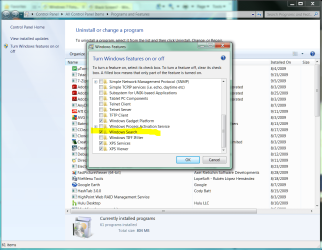
I've gone to control panel and went to turn windows features on but windows search bar does not show up.
Start menu does not have search bar.
IE does.
Windows Explorer does not.

Default start menu settings.
Any way to fix this? Or maybe the version of windows is nlited and does not have?!? Way to download?

Any ideas??
Like the search bar does nto show up but the bar that says C:>Documents>pictures etc... does who up

Thanks in advance

**EDIT** under the control panel, i do see windows search and it is ticked. i tried ticking and unticking again.
 

My Computer My Computer

OS
7
Just installed i guess a customized version of w7 for netbooks. Its called EEE7.
I've gone to control panel and went to turn windows features on but windows search bar does not show up.
Start menu does not have search bar.
IE does.
Windows Explorer does not.

Default start menu settings.
Any way to fix this? Or maybe the version of windows is nlited and does not have?!? Way to download?

Any ideas??
Like the search bar does nto show up but the bar that says C:>Documents>pictures etc... does who up

Thanks in advance

**EDIT** under the control panel, i do see windows search and it is ticked. i tried ticking and unticking again.

Can you post a screenshot of your start menu and windows explorer?
 

My Computer My Computer

Computer type
PC/Desktop
Computer Manufacturer/Model Number
Virtual Machine
OS
Windows 7 Professional 32-bit SP1
CPU
AMD A4/A6
Motherboard
Intel Corporation 440BX Desktop Reference Platform
Memory
3.00GB EDO
Graphics Card(s)
VMware SVGA 3D
Sound Card
High Definition Audio Device
Monitor(s) Displays
Generic Non-PnP Monitor on VMware SVGA 3D
Screen Resolution
1440x900
Hard Drives
1 x 60GB VMware Virtual SATA Hard Drive ATA Device
Antivirus
Kaspersky Total Security
Enable Windows Search. If it exists in your version.


Control Panel, Programs and Features
.
 

Attachments

  • Capture.PNG
    Capture.PNG
    108 KB · Views: 235
k

Just installed i guess a customized version of w7 for netbooks. Its called EEE7.
I've gone to control panel and went to turn windows features on but windows search bar does not show up.
Start menu does not have search bar.
IE does.
Windows Explorer does not.

Default start menu settings.
Any way to fix this? Or maybe the version of windows is nlited and does not have?!? Way to download?

Any ideas??
Like the search bar does nto show up but the bar that says C:>Documents>pictures etc... does who up

Thanks in advance

**EDIT** under the control panel, i do see windows search and it is ticked. i tried ticking and unticking again.

Can you post a screenshot of your start menu and windows explorer?
here grabbed this from sum1 else with the problem.
http://www.sevenforums.com/attachme...menu-explorer-search-thingy-gone-untitled.png

i think i need a program or a patch to re-install windows search
 

My Computer My Computer

OS
7
Because you are using a "lite" version, you may wish to consider an alternative search tool. Re-integrating Search may not be a simple thing. Maybe, maybe not.

See Everything - a popular alternative installed in many lite builds.

Everything Search Engine
 
thanks

Because you are using a "lite" version, you may wish to consider an alternative search tool. Re-integrating Search may not be a simple thing. Maybe, maybe not.

See Everything - a popular alternative installed in many lite builds.

Everything Search Engine

yea thanks
that program is nice but i still really wanna search in the start menu and explorer
no way to re-install the .dll or anything lol?!?
if i press the Altf3 or wutever it is to open search i get a "class unregistered error or osmething like that so it is completley gone
 

My Computer My Computer

OS
7
Because you are using a "lite" version, you may wish to consider an alternative search tool. Re-integrating Search may not be a simple thing. Maybe, maybe not.

See Everything - a popular alternative installed in many lite builds.

Everything Search Engine

yea thanks
that program is nice but i still really wanna search in the start menu and explorer
no way to re-install the .dll or anything lol?!?
if i press the Altf3 or wutever it is to open search i get a "class unregistered error or osmething like that so it is completley gone

You might also want to consider the possibility that your "EEE7" is not a legit Windows 7 and has been hacked by a third party. Where did you get EEE7?

As far as I can tell, Microsoft never did, nor do they ever intend to, release a "Lite" version of Windows 7. Why would they need to if the normal release works on Netbooks?
 

My Computer My Computer

Computer type
PC/Desktop
Computer Manufacturer/Model Number
Virtual Machine
OS
Windows 7 Professional 32-bit SP1
CPU
AMD A4/A6
Motherboard
Intel Corporation 440BX Desktop Reference Platform
Memory
3.00GB EDO
Graphics Card(s)
VMware SVGA 3D
Sound Card
High Definition Audio Device
Monitor(s) Displays
Generic Non-PnP Monitor on VMware SVGA 3D
Screen Resolution
1440x900
Hard Drives
1 x 60GB VMware Virtual SATA Hard Drive ATA Device
Antivirus
Kaspersky Total Security
yea thanks
that program is nice but i still really wanna search in the start menu and explorer
no way to re-install the .dll or anything lol?!?
if i press the Altf3 or wutever it is to open search i get a "class unregistered error or osmething like that so it is completley gone
Good luck with that. 10-7
 
Back
Top