All Simple Volumes

CtrlAltDel

New member
Member
Local time
11:46 PM
Messages
42
Location
Birmingham, Alabama, USA
Windows 7 Service Pack 1

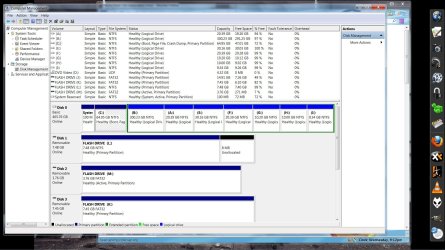
I decided I needed a new partition and have done something that I don't quite understand. The computer still boots up fine and everything seems just as it was, operation wise, but something is not like it was before.

I have a 500GB HD and originally had 3 Primary Partitions.

These were the normal C: drive which I had set to a size of about 50 GB and a B: which was larger at about 400GB for movies and music and a smaller 10GB partition for files and documents.

So, I go to create another small 10GB partition in Computer Management, I right click on the large 400GB partition and select shrink. I shrank it by 10GB and created another partition.

Somehow, and I guess all of you can tell, I am no computer genius; I managed to create the extra needed small 10 GB partition but, I changed all the volumes that were primary partitions into simple volumes in one fell swoop.

Is this a bad thing? What are the advantages/disadvantages to this?

I have no primary partitions at all, just simple volumes.
Simple Volumes.jpg
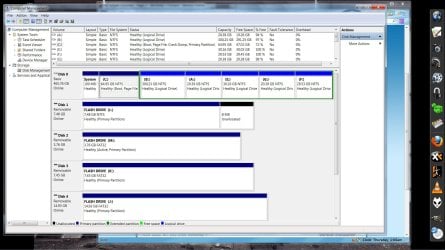
Also, all the flash drives are primary partitions. That seems odd to me but, may not be odd at all because I have no idea what I am talking about.

Is it normal for flash drives to be primary partitions?
Primary Partition.jpg
 
Last edited by a moderator:

My Computer

Computer Manufacturer/Model Number
Dell 537s
OS
Windows 7 (Home Premium) x64
CPU
Pentium(R) Dual-Core CPU E5300 @ 2.60GHz
Motherboard
Dell OU880P v.AO1
Memory
4.00 GB DDR2 (PC2-6400) @ 400MHz (DDR2 800)
Graphics Card(s)
Intel(R) G41 Express Chipset
Sound Card
Realtek High Definition Audio
Monitor(s) Displays
Dell ST2210 22'' HD
Screen Resolution
1920x1080
Hard Drives
Seagate Barracuda 500GB
Internet Speed
20Mbps
Unfortunately you have converted your disk to dynamic. You can only have 4 basic primary partitions. If you want more then need to go to "logicals" after the 3rd primary. Basically this is not a good situation and you should convert your HDD back to a "Basic" disk.
see
http://www.sevenforums.com/tutorials/26829-convert-dynamic-disk-basic-disk.html

Hold off doing anything. There is a procedure to do the conversion but I think one of your 10GB partitions may be a factory recovery partition. Is that correct?
 

My Computer

Computer type
PC/Desktop
Computer Manufacturer/Model Number
Own build
OS
Windows 7x64 Home Premium SP1
CPU
Intel i7 2600k
Motherboard
ASUS P8Z68 Deluxe
Memory
G.Skill Ripjaws (DDR3-1600) 2x4GB
Graphics Card(s)
Nvidia GeForce GTS 450; Intel HD Graphics 3000(GT2+)
Monitor(s) Displays
Dell Ultrasharp IPS panel U2311H, Samsung SyncMaster P2350
Screen Resolution
1920x1080
Hard Drives
Samsung 850 Pro SSD 256GB, Samsung SSD 840 120GB, Seagates 1TB Barracuda ST31000528AS x2
PSU
Seasonic M12II 520W
Case
Lian Li Lancool PC-K60
Cooling
Case: 1x120mm, 3x140mm CPU: Hyper 212+
Keyboard
Logitech MK520 (wireless)
Mouse
Logitech MK520
Internet Speed
6-7 Mbps
Antivirus
Norton Security Premium, Malwarebytes on 2 (MSE on 3rd PC)
Browser
FireFox
Other Info
Audio: Logitech Z523 2.1
Unfortunately you have converted your disk to dynamic. You can only have 4 basic primary partitions. If you want more then need to go to "logicals" after the 3rd primary. Basically this is not a good situation and you should convert your HDD back to a "Basic" disk.
see
http://www.sevenforums.com/tutorials/26829-convert-dynamic-disk-basic-disk.html

Hold off doing anything. There is a procedure to do the conversion but I think one of your 10GB partitions may be a factory recovery partition. Is that correct?

Thank you, mjf, and thanks for the quick reply also. I will do what you have listed above.

Just out of curiosity, what are the disadvantages to the way I have it now?
 

My Computer

Computer Manufacturer/Model Number
Dell 537s
OS
Windows 7 (Home Premium) x64
CPU
Pentium(R) Dual-Core CPU E5300 @ 2.60GHz
Motherboard
Dell OU880P v.AO1
Memory
4.00 GB DDR2 (PC2-6400) @ 400MHz (DDR2 800)
Graphics Card(s)
Intel(R) G41 Express Chipset
Sound Card
Realtek High Definition Audio
Monitor(s) Displays
Dell ST2210 22'' HD
Screen Resolution
1920x1080
Hard Drives
Seagate Barracuda 500GB
Internet Speed
20Mbps
Unfortunately you have converted your disk to dynamic. You can only have 4 basic primary partitions. If you want more then need to go to "logicals" after the 3rd primary. Basically this is not a good situation and you should convert your HDD back to a "Basic" disk.
see
http://www.sevenforums.com/tutorials/26829-convert-dynamic-disk-basic-disk.html

Hold off doing anything. There is a procedure to do the conversion but I think one of your 10GB partitions may be a factory recovery partition. Is that correct?

I'm not sure about one being a factory recovery partition. One of the 10GB's is just a partition that I had files and documents on.

The other is the one I just created and it's empty. It is the one that I created when I, evidently, messed things up.
 

My Computer

Computer Manufacturer/Model Number
Dell 537s
OS
Windows 7 (Home Premium) x64
CPU
Pentium(R) Dual-Core CPU E5300 @ 2.60GHz
Motherboard
Dell OU880P v.AO1
Memory
4.00 GB DDR2 (PC2-6400) @ 400MHz (DDR2 800)
Graphics Card(s)
Intel(R) G41 Express Chipset
Sound Card
Realtek High Definition Audio
Monitor(s) Displays
Dell ST2210 22'' HD
Screen Resolution
1920x1080
Hard Drives
Seagate Barracuda 500GB
Internet Speed
20Mbps
I consider 50 GB for your OS and installed programs partition way too small on a spinning disk. Your OS partition is very lean at the moment so I'll just give the steps to attempt to get you back to where you were before creating the last partition.
You started with 4 not 3 primaries. A, B, C plus system reserved.

(1) All partition operations have risk. You may need to do a clean install or factory restore.
Backup ALL data to an external HDD. Make sure you can do a clean install or a factory restore (ie. you have the appropriate disks).
Don't proceed with the instructions if you cannot do this.
(2) Delete I: making it unallocated. Can use Disk management.
(3) Extend the volume B: to capture back the unallocated space.
(4) Download Partition Wizard v4.2 to do the dynamic to basic disk conversion. The current
free version of PW 5.2 will not do this.
http://cid-24a0e9031e104daf.skydrive.live.com/self.aspx/.Public/partition%20wizard%204.2%20free.zip
(5) Start PW 4.2. Select the disk.
Go Disk > Convert Dynamic to Basic Disk
then click the Apply button.

Your disk should now be back to a basic 4 primary partition disk. If any of the partitions are not primary PW4.2 can convert them.
If you want more partitions in the future then B: will need to be made a logical partition.

Finally, A:, and B: are bad letters to pick since they are normally reserved for floppy drives.
It would be better to reassign the letters later on.
 
Last edited:

My Computer

Computer type
PC/Desktop
Computer Manufacturer/Model Number
Own build
OS
Windows 7x64 Home Premium SP1
CPU
Intel i7 2600k
Motherboard
ASUS P8Z68 Deluxe
Memory
G.Skill Ripjaws (DDR3-1600) 2x4GB
Graphics Card(s)
Nvidia GeForce GTS 450; Intel HD Graphics 3000(GT2+)
Monitor(s) Displays
Dell Ultrasharp IPS panel U2311H, Samsung SyncMaster P2350
Screen Resolution
1920x1080
Hard Drives
Samsung 850 Pro SSD 256GB, Samsung SSD 840 120GB, Seagates 1TB Barracuda ST31000528AS x2
PSU
Seasonic M12II 520W
Case
Lian Li Lancool PC-K60
Cooling
Case: 1x120mm, 3x140mm CPU: Hyper 212+
Keyboard
Logitech MK520 (wireless)
Mouse
Logitech MK520
Internet Speed
6-7 Mbps
Antivirus
Norton Security Premium, Malwarebytes on 2 (MSE on 3rd PC)
Browser
FireFox
Other Info
Audio: Logitech Z523 2.1
Hello.


If you convert back to a Basic disk, have a look at this tutorial at the link below to see ways to create Extended partition Logical drives if need be and be sure to post back with any further questions you may have and to keep us informed.


Partition / Extended : Logical Drives
 

My Computer

Computer Manufacturer/Model Number
* BFK Customs *
OS
W 7 64-bit Ultimate
CPU
Intel Q9550 Yorkfield
Motherboard
ASUS P5Q Pro
Memory
8GB Dominator 8500C5D
Graphics Card(s)
ATI : XFX 5870
Sound Card
Realtek HD Audio 7-1
Monitor(s) Displays
1x 47" LCD HDMI & 3x 26" LCD HDMI
Screen Resolution
1920x1080P & 1920x1200
Hard Drives
1x 80GB Intel X25-M G2 SSD : 1x 500GB & 1x 640GB WD Caviar Black(s)
PSU
Corsair 620HX
Case
Cooler Master RC-690
Cooling
Tuniq Tower 120, 2x 140mm and 3x 120mm case fans
Keyboard
Microsoft 500
Mouse
Razer Diamondback 3G
Internet Speed
14 Mb/s
Other Info
1x Koutech 3Gb/s SATA HDD Hot Swap Rack
may i ask why you have been only creating primary partitions? primary partitions are for things that need to be made bootable. it doesnt hurt to make them primary partitions, but if you had

1)your system reserve (primary)
2)your boot partition and (primary)
3) a extended patition (extended duh)

inside the extended partition you can make as many logical drives as you like, that way if you decide to add more later you dont need to back up your entire drive re-partition and create new logical drives, then restore the files to your drive.

and depending on how you have your system congifured 50 gigs is plenty of space, however i would move my program directory off the 50 gig partition onto another disc, along with your hiberfile.sys and pagefile.sys.
for starters, that is
 

My Computer

OS
Windows 7 Ultimate x86
Motherboard
Asus P5N-D
Memory
8 Gig(4 x 2 Gig)
Graphics Card(s)
2 x GeForce 9500 GT (SLI)
Monitor(s) Displays
2 x 25" VGA, 1 37" DVI-D
Hard Drives
1x 5400 RPM 100 gig
4 x 5400 RPM 250 gig RAID 0+1
1 TB USB 3.0 external hard drive
500 gig external
and depending on how you have your system congifured 50 gigs is plenty of space, however i would move my program directory off the 50 gig partition onto another disc, along with your hiberfile.sys and pagefile.sys.
for starters, that is
I would definitely not do this.
Installed programs are too closely linked to the OS (eg. via the registry). I think it's best to keep them together.
When you're running an SSD you need to keep more of an eye on OS/program partition
space.

CtrlAltDel,
I would focus on getting your disk back to a Basic disk then consider the use of logical partitions. BareFootKid has followed up with a link on how to go about this.
After all of this further advice can be given on how you can relocate your personal folders from the OS partition to another partition.
 

My Computer

Computer type
PC/Desktop
Computer Manufacturer/Model Number
Own build
OS
Windows 7x64 Home Premium SP1
CPU
Intel i7 2600k
Motherboard
ASUS P8Z68 Deluxe
Memory
G.Skill Ripjaws (DDR3-1600) 2x4GB
Graphics Card(s)
Nvidia GeForce GTS 450; Intel HD Graphics 3000(GT2+)
Monitor(s) Displays
Dell Ultrasharp IPS panel U2311H, Samsung SyncMaster P2350
Screen Resolution
1920x1080
Hard Drives
Samsung 850 Pro SSD 256GB, Samsung SSD 840 120GB, Seagates 1TB Barracuda ST31000528AS x2
PSU
Seasonic M12II 520W
Case
Lian Li Lancool PC-K60
Cooling
Case: 1x120mm, 3x140mm CPU: Hyper 212+
Keyboard
Logitech MK520 (wireless)
Mouse
Logitech MK520
Internet Speed
6-7 Mbps
Antivirus
Norton Security Premium, Malwarebytes on 2 (MSE on 3rd PC)
Browser
FireFox
Other Info
Audio: Logitech Z523 2.1
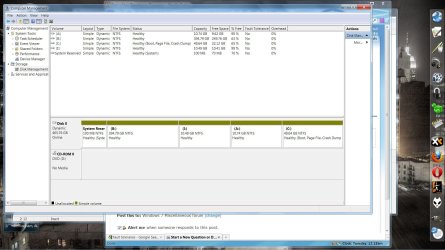
I wish to thank everyone for helping me sort this out. I took everyone's advice and proceeded slowly. Everything worked out great.

I successfully created several new extended partitions and did away with the dynamic format, I guess you would call it.

Also, I increased the size of C:drive to about 65 Gigs just to be safe.

Thanks again, and here is a .jpg of the results.
 

Attachments

  • Updated.jpg
    Updated.jpg
    243.4 KB · Views: 36

My Computer

Computer Manufacturer/Model Number
Dell 537s
OS
Windows 7 (Home Premium) x64
CPU
Pentium(R) Dual-Core CPU E5300 @ 2.60GHz
Motherboard
Dell OU880P v.AO1
Memory
4.00 GB DDR2 (PC2-6400) @ 400MHz (DDR2 800)
Graphics Card(s)
Intel(R) G41 Express Chipset
Sound Card
Realtek High Definition Audio
Monitor(s) Displays
Dell ST2210 22'' HD
Screen Resolution
1920x1080
Hard Drives
Seagate Barracuda 500GB
Internet Speed
20Mbps
im glad you got your drive back to normal, but if you dont mind my asking, why put soo many logical drives in your extended part?
i mean, its a perfectly fine way to do it, im just interested if there was some particular reasoning to it
 

My Computer

OS
Windows 7 Ultimate x86
Motherboard
Asus P5N-D
Memory
8 Gig(4 x 2 Gig)
Graphics Card(s)
2 x GeForce 9500 GT (SLI)
Monitor(s) Displays
2 x 25" VGA, 1 37" DVI-D
Hard Drives
1x 5400 RPM 100 gig
4 x 5400 RPM 250 gig RAID 0+1
1 TB USB 3.0 external hard drive
500 gig external
im glad you got your drive back to normal, but if you dont mind my asking, why put soo many logical drives in your extended part?
i mean, its a perfectly fine way to do it, im just interested if there was some particular reasoning to it


No particular reason. I was just tinkering around with it and seeing what could be done. I think I am going to do away with about 3 of them.
 

My Computer

Computer Manufacturer/Model Number
Dell 537s
OS
Windows 7 (Home Premium) x64
CPU
Pentium(R) Dual-Core CPU E5300 @ 2.60GHz
Motherboard
Dell OU880P v.AO1
Memory
4.00 GB DDR2 (PC2-6400) @ 400MHz (DDR2 800)
Graphics Card(s)
Intel(R) G41 Express Chipset
Sound Card
Realtek High Definition Audio
Monitor(s) Displays
Dell ST2210 22'' HD
Screen Resolution
1920x1080
Hard Drives
Seagate Barracuda 500GB
Internet Speed
20Mbps
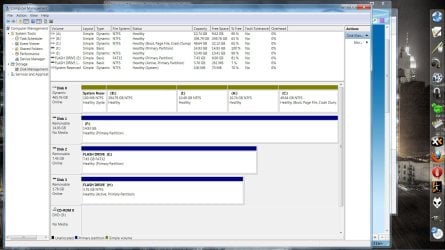
Here it is with 2 of the 7 eliminated.
 

Attachments

  • Clipboard01.jpg
    Clipboard01.jpg
    222.2 KB · Views: 12

My Computer

Computer Manufacturer/Model Number
Dell 537s
OS
Windows 7 (Home Premium) x64
CPU
Pentium(R) Dual-Core CPU E5300 @ 2.60GHz
Motherboard
Dell OU880P v.AO1
Memory
4.00 GB DDR2 (PC2-6400) @ 400MHz (DDR2 800)
Graphics Card(s)
Intel(R) G41 Express Chipset
Sound Card
Realtek High Definition Audio
Monitor(s) Displays
Dell ST2210 22'' HD
Screen Resolution
1920x1080
Hard Drives
Seagate Barracuda 500GB
Internet Speed
20Mbps
You did a good job. Glad it worked out so well.
 

My Computer

Computer type
PC/Desktop
Computer Manufacturer/Model Number
Own build
OS
Windows 7x64 Home Premium SP1
CPU
Intel i7 2600k
Motherboard
ASUS P8Z68 Deluxe
Memory
G.Skill Ripjaws (DDR3-1600) 2x4GB
Graphics Card(s)
Nvidia GeForce GTS 450; Intel HD Graphics 3000(GT2+)
Monitor(s) Displays
Dell Ultrasharp IPS panel U2311H, Samsung SyncMaster P2350
Screen Resolution
1920x1080
Hard Drives
Samsung 850 Pro SSD 256GB, Samsung SSD 840 120GB, Seagates 1TB Barracuda ST31000528AS x2
PSU
Seasonic M12II 520W
Case
Lian Li Lancool PC-K60
Cooling
Case: 1x120mm, 3x140mm CPU: Hyper 212+
Keyboard
Logitech MK520 (wireless)
Mouse
Logitech MK520
Internet Speed
6-7 Mbps
Antivirus
Norton Security Premium, Malwarebytes on 2 (MSE on 3rd PC)
Browser
FireFox
Other Info
Audio: Logitech Z523 2.1
You did a good job. Glad it worked out so well.

Couldn't have done it without you and the help of the other contributors in the thread.

You know I was pretty lost when I came in and didn't even know what I had done; that's bad.

Thanks.
 

My Computer

Computer Manufacturer/Model Number
Dell 537s
OS
Windows 7 (Home Premium) x64
CPU
Pentium(R) Dual-Core CPU E5300 @ 2.60GHz
Motherboard
Dell OU880P v.AO1
Memory
4.00 GB DDR2 (PC2-6400) @ 400MHz (DDR2 800)
Graphics Card(s)
Intel(R) G41 Express Chipset
Sound Card
Realtek High Definition Audio
Monitor(s) Displays
Dell ST2210 22'' HD
Screen Resolution
1920x1080
Hard Drives
Seagate Barracuda 500GB
Internet Speed
20Mbps
Hello again.


Good to see you got it sorted out, well done!

One suggestion if I may, change the A / B drives to something else, it's best not to use those letters, they were originally reserved for FDD and may cause confusion installing progs/app though probably not.
 

My Computer

Computer Manufacturer/Model Number
* BFK Customs *
OS
W 7 64-bit Ultimate
CPU
Intel Q9550 Yorkfield
Motherboard
ASUS P5Q Pro
Memory
8GB Dominator 8500C5D
Graphics Card(s)
ATI : XFX 5870
Sound Card
Realtek HD Audio 7-1
Monitor(s) Displays
1x 47" LCD HDMI & 3x 26" LCD HDMI
Screen Resolution
1920x1080P & 1920x1200
Hard Drives
1x 80GB Intel X25-M G2 SSD : 1x 500GB & 1x 640GB WD Caviar Black(s)
PSU
Corsair 620HX
Case
Cooler Master RC-690
Cooling
Tuniq Tower 120, 2x 140mm and 3x 120mm case fans
Keyboard
Microsoft 500
Mouse
Razer Diamondback 3G
Internet Speed
14 Mb/s
Other Info
1x Koutech 3Gb/s SATA HDD Hot Swap Rack
Back
Top