Solved all soud stopped working

aztezs

New member
Local time
11:24 AM
Messages
6
All my sound have stopped working. both the normal speakers and my USB headset.

the speakers just stopped working even though my computer says there is nothing wrong. hovever my USB headset gets a code 43 whenever i plug it in. also all the harware is atleast 6 months old and it all worked fine up untill erlier this week.
 

My Computer

OS
windows 7 ultimate x64
CPU
intel Q6600
Motherboard
Gigabyte GA.EP35-DS3
Graphics Card(s)
Nvidia Geforce 9800 GTX
Sound Card
asus xonar D2
Monitor(s) Displays
asus VB191T
Screen Resolution
1280x1024
Hard Drives
Samsung SP2504C ATA
Samsung SP2504C ATA
ST3160021A ATA
WDC WD5000AACS-00ZUB0 ATA
Case
antec
Keyboard
Roccat Valo
Mouse
logitech mx518
hi :) have you run the troubleshooter for sound in windows 7?
Try using the Playing Audio troubleshooter to fix the problem. It checks for common problems with your volume settings, your sound card or driver, and your speakers or headphones.

Open the Playing Audio troubleshooter by clicking the Start button , and then clicking Control Panel. In the search box, type troubleshooter, and then click Troubleshooting. Under Hardware and Sound, click Troubleshoot audio playback.* If you're prompted for an administrator password or confirmation, type the password or provide confirmation.

Tips for fixing common sound problems >>> Tips for fixing common sound problems
 

My Computer

Computer Manufacturer/Model Number
packard bell IXTREME M5722
OS
Operating System : Windows 7 Home Premium Edition 6.01.7600 SP1 (x64)
CPU
Processor : Intel Core 2 Quad Q8300 @ 2500 MHz
Motherboard
Mainboard : Packard Bell (Acer EG43M )
Memory
Physical Memory :8GB Corsair4x 2GB 800MHz C5 DDR2
Graphics Card(s)
Video Card : XFX 6700 AMD
Monitor(s) Displays
Maestro 234DL - BenQ V2220 - BenQ VW2420H
Screen Resolution
Current Display :1920x1080p pixels at 60 Hz in HD LED
Hard Drives
Hard Disks : WDC (1000 GB)
Drive C: (Hard Disk) : 428 GB available on 491 GB
Drive D: (Hard Disk) : 426 GB available on 492 GB
SAMSUNG spinpoint HD103SJ 1000.2 GB
(X 2) KINGSTON SSD NOW V 30GB
PSU
XFX ProSeries 550W PSU
Case
PACKARD BELL IXTREME
Cooling
System Blower Current: 150mA Air Flow16CFM ;Akasa 90mm rear
Keyboard
Gigabyte Aivia K8100
Mouse
TRUST-Wireless Laser Mouse - Carbon edition MI-7770C
Internet Speed
TP-LINK > TL-WN951N / AV500 Gigabit Powerline Adapters
Browser
chrome dev
Other Info
EXTRA COOLING>(FAN CONTROLLER) PC Bay Cooler 3 x 40mm fans; Akasa AK-HD-BL Blue hard drive cooler 2 x 40 mm fan 4500 rpm 29.7 dBA
Bios> American Megatrends Inc.
Version : P01-A1
Date : 08/31/2009
Have already tried that. It doesn't find any problem
 

My Computer

OS
windows 7 ultimate x64
CPU
intel Q6600
Motherboard
Gigabyte GA.EP35-DS3
Graphics Card(s)
Nvidia Geforce 9800 GTX
Sound Card
asus xonar D2
Monitor(s) Displays
asus VB191T
Screen Resolution
1280x1024
Hard Drives
Samsung SP2504C ATA
Samsung SP2504C ATA
ST3160021A ATA
WDC WD5000AACS-00ZUB0 ATA
Case
antec
Keyboard
Roccat Valo
Mouse
logitech mx518
ok right.
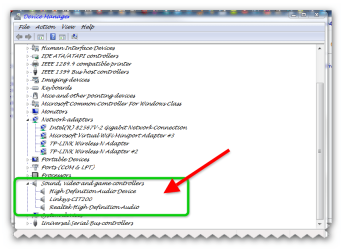
if you go into device manager and have a look for any red crosses / exclamation marks if there right click to go into properties and update the drivers

  • run in administrator if not already
  • type device manager in start menu search box
  • click on device manager in the results pane
  • at the top tabs left click on view
  • click show hidden devices
  • now check for any notifications
  • update drivers if needed
 

Attachments

  • brys snap ?01 ?April ?2011 13h18m14s.png
    brys snap ?01 ?April ?2011 13h18m14s.png
    40.5 KB · Views: 49

My Computer

Computer Manufacturer/Model Number
packard bell IXTREME M5722
OS
Operating System : Windows 7 Home Premium Edition 6.01.7600 SP1 (x64)
CPU
Processor : Intel Core 2 Quad Q8300 @ 2500 MHz
Motherboard
Mainboard : Packard Bell (Acer EG43M )
Memory
Physical Memory :8GB Corsair4x 2GB 800MHz C5 DDR2
Graphics Card(s)
Video Card : XFX 6700 AMD
Monitor(s) Displays
Maestro 234DL - BenQ V2220 - BenQ VW2420H
Screen Resolution
Current Display :1920x1080p pixels at 60 Hz in HD LED
Hard Drives
Hard Disks : WDC (1000 GB)
Drive C: (Hard Disk) : 428 GB available on 491 GB
Drive D: (Hard Disk) : 426 GB available on 492 GB
SAMSUNG spinpoint HD103SJ 1000.2 GB
(X 2) KINGSTON SSD NOW V 30GB
PSU
XFX ProSeries 550W PSU
Case
PACKARD BELL IXTREME
Cooling
System Blower Current: 150mA Air Flow16CFM ;Akasa 90mm rear
Keyboard
Gigabyte Aivia K8100
Mouse
TRUST-Wireless Laser Mouse - Carbon edition MI-7770C
Internet Speed
TP-LINK > TL-WN951N / AV500 Gigabit Powerline Adapters
Browser
chrome dev
Other Info
EXTRA COOLING>(FAN CONTROLLER) PC Bay Cooler 3 x 40mm fans; Akasa AK-HD-BL Blue hard drive cooler 2 x 40 mm fan 4500 rpm 29.7 dBA
Bios> American Megatrends Inc.
Version : P01-A1
Date : 08/31/2009
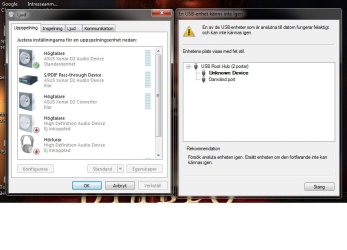
it says i have the latest drivers installed and there is neither anything wrong whit it. only warning i get is for my usb headset whit the code 43. the headset shows up under usb devices as "unknown Device"
 

My Computer

OS
windows 7 ultimate x64
CPU
intel Q6600
Motherboard
Gigabyte GA.EP35-DS3
Graphics Card(s)
Nvidia Geforce 9800 GTX
Sound Card
asus xonar D2
Monitor(s) Displays
asus VB191T
Screen Resolution
1280x1024
Hard Drives
Samsung SP2504C ATA
Samsung SP2504C ATA
ST3160021A ATA
WDC WD5000AACS-00ZUB0 ATA
Case
antec
Keyboard
Roccat Valo
Mouse
logitech mx518
it says i have the latest drivers installed and there is neither anything wrong whit it. only warning i get is for my usb headset whit the code 43. the headset shows up under usb devices as "unknown Device"

ok un- install this driver for the usb driver re-boot (un-plug usb while the pc is re-booting) when pc booted up and the desktop is shown plug the usb back in ( plug it back in using a different port.)
 

My Computer

Computer Manufacturer/Model Number
packard bell IXTREME M5722
OS
Operating System : Windows 7 Home Premium Edition 6.01.7600 SP1 (x64)
CPU
Processor : Intel Core 2 Quad Q8300 @ 2500 MHz
Motherboard
Mainboard : Packard Bell (Acer EG43M )
Memory
Physical Memory :8GB Corsair4x 2GB 800MHz C5 DDR2
Graphics Card(s)
Video Card : XFX 6700 AMD
Monitor(s) Displays
Maestro 234DL - BenQ V2220 - BenQ VW2420H
Screen Resolution
Current Display :1920x1080p pixels at 60 Hz in HD LED
Hard Drives
Hard Disks : WDC (1000 GB)
Drive C: (Hard Disk) : 428 GB available on 491 GB
Drive D: (Hard Disk) : 426 GB available on 492 GB
SAMSUNG spinpoint HD103SJ 1000.2 GB
(X 2) KINGSTON SSD NOW V 30GB
PSU
XFX ProSeries 550W PSU
Case
PACKARD BELL IXTREME
Cooling
System Blower Current: 150mA Air Flow16CFM ;Akasa 90mm rear
Keyboard
Gigabyte Aivia K8100
Mouse
TRUST-Wireless Laser Mouse - Carbon edition MI-7770C
Internet Speed
TP-LINK > TL-WN951N / AV500 Gigabit Powerline Adapters
Browser
chrome dev
Other Info
EXTRA COOLING>(FAN CONTROLLER) PC Bay Cooler 3 x 40mm fans; Akasa AK-HD-BL Blue hard drive cooler 2 x 40 mm fan 4500 rpm 29.7 dBA
Bios> American Megatrends Inc.
Version : P01-A1
Date : 08/31/2009
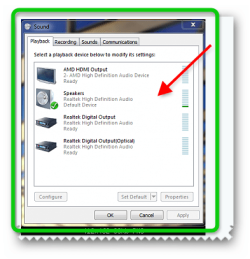
can you post the sound settings like i have in the snapshot please?
 

Attachments

  • brys snap ?01 ?April ?2011 13h32m00s.png
    brys snap ?01 ?April ?2011 13h32m00s.png
    31.3 KB · Views: 13

My Computer

Computer Manufacturer/Model Number
packard bell IXTREME M5722
OS
Operating System : Windows 7 Home Premium Edition 6.01.7600 SP1 (x64)
CPU
Processor : Intel Core 2 Quad Q8300 @ 2500 MHz
Motherboard
Mainboard : Packard Bell (Acer EG43M )
Memory
Physical Memory :8GB Corsair4x 2GB 800MHz C5 DDR2
Graphics Card(s)
Video Card : XFX 6700 AMD
Monitor(s) Displays
Maestro 234DL - BenQ V2220 - BenQ VW2420H
Screen Resolution
Current Display :1920x1080p pixels at 60 Hz in HD LED
Hard Drives
Hard Disks : WDC (1000 GB)
Drive C: (Hard Disk) : 428 GB available on 491 GB
Drive D: (Hard Disk) : 426 GB available on 492 GB
SAMSUNG spinpoint HD103SJ 1000.2 GB
(X 2) KINGSTON SSD NOW V 30GB
PSU
XFX ProSeries 550W PSU
Case
PACKARD BELL IXTREME
Cooling
System Blower Current: 150mA Air Flow16CFM ;Akasa 90mm rear
Keyboard
Gigabyte Aivia K8100
Mouse
TRUST-Wireless Laser Mouse - Carbon edition MI-7770C
Internet Speed
TP-LINK > TL-WN951N / AV500 Gigabit Powerline Adapters
Browser
chrome dev
Other Info
EXTRA COOLING>(FAN CONTROLLER) PC Bay Cooler 3 x 40mm fans; Akasa AK-HD-BL Blue hard drive cooler 2 x 40 mm fan 4500 rpm 29.7 dBA
Bios> American Megatrends Inc.
Version : P01-A1
Date : 08/31/2009
A good test also would be to connect the headset to another computer, to see if it gives the same error. If yes : probably defective.
 

My Computer

Computer Manufacturer/Model Number
packard bell IXTREME M5722
OS
Operating System : Windows 7 Home Premium Edition 6.01.7600 SP1 (x64)
CPU
Processor : Intel Core 2 Quad Q8300 @ 2500 MHz
Motherboard
Mainboard : Packard Bell (Acer EG43M )
Memory
Physical Memory :8GB Corsair4x 2GB 800MHz C5 DDR2
Graphics Card(s)
Video Card : XFX 6700 AMD
Monitor(s) Displays
Maestro 234DL - BenQ V2220 - BenQ VW2420H
Screen Resolution
Current Display :1920x1080p pixels at 60 Hz in HD LED
Hard Drives
Hard Disks : WDC (1000 GB)
Drive C: (Hard Disk) : 428 GB available on 491 GB
Drive D: (Hard Disk) : 426 GB available on 492 GB
SAMSUNG spinpoint HD103SJ 1000.2 GB
(X 2) KINGSTON SSD NOW V 30GB
PSU
XFX ProSeries 550W PSU
Case
PACKARD BELL IXTREME
Cooling
System Blower Current: 150mA Air Flow16CFM ;Akasa 90mm rear
Keyboard
Gigabyte Aivia K8100
Mouse
TRUST-Wireless Laser Mouse - Carbon edition MI-7770C
Internet Speed
TP-LINK > TL-WN951N / AV500 Gigabit Powerline Adapters
Browser
chrome dev
Other Info
EXTRA COOLING>(FAN CONTROLLER) PC Bay Cooler 3 x 40mm fans; Akasa AK-HD-BL Blue hard drive cooler 2 x 40 mm fan 4500 rpm 29.7 dBA
Bios> American Megatrends Inc.
Version : P01-A1
Date : 08/31/2009
i uninstalled the drivers and rebooted as you said. when i replugged the headset it started installing the drivers but then it said it couldn't recognice the usb device.

I am booting another computer up to try my headset in it
 

Attachments

  • usbsound.jpg
    usbsound.jpg
    55 KB · Views: 22

My Computer

OS
windows 7 ultimate x64
CPU
intel Q6600
Motherboard
Gigabyte GA.EP35-DS3
Graphics Card(s)
Nvidia Geforce 9800 GTX
Sound Card
asus xonar D2
Monitor(s) Displays
asus VB191T
Screen Resolution
1280x1024
Hard Drives
Samsung SP2504C ATA
Samsung SP2504C ATA
ST3160021A ATA
WDC WD5000AACS-00ZUB0 ATA
Case
antec
Keyboard
Roccat Valo
Mouse
logitech mx518
good idea to test the headset it may be faulty are the speakers working with sound?
 

My Computer

Computer Manufacturer/Model Number
packard bell IXTREME M5722
OS
Operating System : Windows 7 Home Premium Edition 6.01.7600 SP1 (x64)
CPU
Processor : Intel Core 2 Quad Q8300 @ 2500 MHz
Motherboard
Mainboard : Packard Bell (Acer EG43M )
Memory
Physical Memory :8GB Corsair4x 2GB 800MHz C5 DDR2
Graphics Card(s)
Video Card : XFX 6700 AMD
Monitor(s) Displays
Maestro 234DL - BenQ V2220 - BenQ VW2420H
Screen Resolution
Current Display :1920x1080p pixels at 60 Hz in HD LED
Hard Drives
Hard Disks : WDC (1000 GB)
Drive C: (Hard Disk) : 428 GB available on 491 GB
Drive D: (Hard Disk) : 426 GB available on 492 GB
SAMSUNG spinpoint HD103SJ 1000.2 GB
(X 2) KINGSTON SSD NOW V 30GB
PSU
XFX ProSeries 550W PSU
Case
PACKARD BELL IXTREME
Cooling
System Blower Current: 150mA Air Flow16CFM ;Akasa 90mm rear
Keyboard
Gigabyte Aivia K8100
Mouse
TRUST-Wireless Laser Mouse - Carbon edition MI-7770C
Internet Speed
TP-LINK > TL-WN951N / AV500 Gigabit Powerline Adapters
Browser
chrome dev
Other Info
EXTRA COOLING>(FAN CONTROLLER) PC Bay Cooler 3 x 40mm fans; Akasa AK-HD-BL Blue hard drive cooler 2 x 40 mm fan 4500 rpm 29.7 dBA
Bios> American Megatrends Inc.
Version : P01-A1
Date : 08/31/2009
good idea to test the headset it may be faulty are the speakers working with sound?

no they'r not. all sound is gone. the speakers wen't first. and then a couple of days later i accidentaly unplugged my headset and then it also stopped working
 

My Computer

OS
windows 7 ultimate x64
CPU
intel Q6600
Motherboard
Gigabyte GA.EP35-DS3
Graphics Card(s)
Nvidia Geforce 9800 GTX
Sound Card
asus xonar D2
Monitor(s) Displays
asus VB191T
Screen Resolution
1280x1024
Hard Drives
Samsung SP2504C ATA
Samsung SP2504C ATA
ST3160021A ATA
WDC WD5000AACS-00ZUB0 ATA
Case
antec
Keyboard
Roccat Valo
Mouse
logitech mx518
good idea to test the speakers on another pc if you can. you could system restore to a point before the speakers stopped working that is a good option here are some tests for you to do below

Perform a SFC Scan (System File Check)

1. Click Start, click All Programs, click Accessories, right-click Command Prompt, and then click Run as administrator. If you are prompted for an administrator password or for a confirmation, type the password, or click Allow

2. Type the following command, sfc /scannow and then press ENTER:

(A message will appear stating that 'The system scan will begin'. Be patient because the scan may take some time)

3. If any files require a replace SFC will replace them. You may be asked to insert your Windows 7 DVD for this process to continue

4. If everything is okay you should, after the scan, see the following message "Windows resource protection did not find any integrity violations"

5. After the scan has completed, close the command prompt window, restart the computer. (TIP repeat scan 3 times)

How to use the System File Checker tool to troubleshoot missing or corrupted system files on Windows Vista or on Windows 7 >>> How to use the System File Checker tool to troubleshoot missing or corrupted system files on Windows Vista or on Windows 7

How to Check / Repair the Windows System Files from a Command Prompt at Boot >>> http://www.sevenforums.com/tutorials/139810-sfc-scannow-run-command-prompt-boot.html
 

My Computer

Computer Manufacturer/Model Number
packard bell IXTREME M5722
OS
Operating System : Windows 7 Home Premium Edition 6.01.7600 SP1 (x64)
CPU
Processor : Intel Core 2 Quad Q8300 @ 2500 MHz
Motherboard
Mainboard : Packard Bell (Acer EG43M )
Memory
Physical Memory :8GB Corsair4x 2GB 800MHz C5 DDR2
Graphics Card(s)
Video Card : XFX 6700 AMD
Monitor(s) Displays
Maestro 234DL - BenQ V2220 - BenQ VW2420H
Screen Resolution
Current Display :1920x1080p pixels at 60 Hz in HD LED
Hard Drives
Hard Disks : WDC (1000 GB)
Drive C: (Hard Disk) : 428 GB available on 491 GB
Drive D: (Hard Disk) : 426 GB available on 492 GB
SAMSUNG spinpoint HD103SJ 1000.2 GB
(X 2) KINGSTON SSD NOW V 30GB
PSU
XFX ProSeries 550W PSU
Case
PACKARD BELL IXTREME
Cooling
System Blower Current: 150mA Air Flow16CFM ;Akasa 90mm rear
Keyboard
Gigabyte Aivia K8100
Mouse
TRUST-Wireless Laser Mouse - Carbon edition MI-7770C
Internet Speed
TP-LINK > TL-WN951N / AV500 Gigabit Powerline Adapters
Browser
chrome dev
Other Info
EXTRA COOLING>(FAN CONTROLLER) PC Bay Cooler 3 x 40mm fans; Akasa AK-HD-BL Blue hard drive cooler 2 x 40 mm fan 4500 rpm 29.7 dBA
Bios> American Megatrends Inc.
Version : P01-A1
Date : 08/31/2009
it's a bit embarresing but i just realised that i had plugged in my old speakers wich is lying just behind the computer. they have the same kind of cabel so it's impossible to se any difference on em if you don't start at the speaker end following the cabel to the end. that's what i call a nooby mistake xD well thanks for helping me. i guess my headset are defective since it didn't work in the other computer either:( thanks anyways, you have been realy helpfull whit everything
 

My Computer

OS
windows 7 ultimate x64
CPU
intel Q6600
Motherboard
Gigabyte GA.EP35-DS3
Graphics Card(s)
Nvidia Geforce 9800 GTX
Sound Card
asus xonar D2
Monitor(s) Displays
asus VB191T
Screen Resolution
1280x1024
Hard Drives
Samsung SP2504C ATA
Samsung SP2504C ATA
ST3160021A ATA
WDC WD5000AACS-00ZUB0 ATA
Case
antec
Keyboard
Roccat Valo
Mouse
logitech mx518
not a problem i will have the thread marked solved for you but i hope you have picked up some helpful repair checks for use if needed have a great day :)
 

My Computer

Computer Manufacturer/Model Number
packard bell IXTREME M5722
OS
Operating System : Windows 7 Home Premium Edition 6.01.7600 SP1 (x64)
CPU
Processor : Intel Core 2 Quad Q8300 @ 2500 MHz
Motherboard
Mainboard : Packard Bell (Acer EG43M )
Memory
Physical Memory :8GB Corsair4x 2GB 800MHz C5 DDR2
Graphics Card(s)
Video Card : XFX 6700 AMD
Monitor(s) Displays
Maestro 234DL - BenQ V2220 - BenQ VW2420H
Screen Resolution
Current Display :1920x1080p pixels at 60 Hz in HD LED
Hard Drives
Hard Disks : WDC (1000 GB)
Drive C: (Hard Disk) : 428 GB available on 491 GB
Drive D: (Hard Disk) : 426 GB available on 492 GB
SAMSUNG spinpoint HD103SJ 1000.2 GB
(X 2) KINGSTON SSD NOW V 30GB
PSU
XFX ProSeries 550W PSU
Case
PACKARD BELL IXTREME
Cooling
System Blower Current: 150mA Air Flow16CFM ;Akasa 90mm rear
Keyboard
Gigabyte Aivia K8100
Mouse
TRUST-Wireless Laser Mouse - Carbon edition MI-7770C
Internet Speed
TP-LINK > TL-WN951N / AV500 Gigabit Powerline Adapters
Browser
chrome dev
Other Info
EXTRA COOLING>(FAN CONTROLLER) PC Bay Cooler 3 x 40mm fans; Akasa AK-HD-BL Blue hard drive cooler 2 x 40 mm fan 4500 rpm 29.7 dBA
Bios> American Megatrends Inc.
Version : P01-A1
Date : 08/31/2009
what if you try to run sfc and the computer says windows Resource protection could not start the repair service?
 

My Computer

OS
windows 7 ultimate 64 bit
CPU
intel I5
Motherboard
evga p55v
Memory
4 g corsair
Sound Card
on board
Hard Drives
1.5 TB WD
300g WD
Back
Top