

- Local time
- 4:19 PM
- Messages
- 488
I have a set of usb speakers and a logitech Headset.
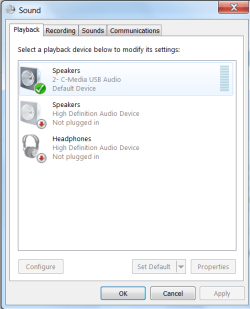
Both work fine. When I can finally by chance get one or the other playing. See pic. Nothing seems to be easy to switch between the two. Why does the panel not acknowledge both are plugged in? Its a big drama to try to switch from speakers to headphones & vica versa.
Is there a 3rd party gadget that'll make life easy here?
Both work fine. When I can finally by chance get one or the other playing. See pic. Nothing seems to be easy to switch between the two. Why does the panel not acknowledge both are plugged in? Its a big drama to try to switch from speakers to headphones & vica versa.
Is there a 3rd party gadget that'll make life easy here?
Attachments
Last edited:
My Computer
At a glance
Microsoft Windows 7 HomePremium 64-bit 7601 M...Intel(R) Core(TM)2 Duo CPU E4500 @ 2.20GHz8GbNVIDIA GeForce GT 710
- Computer type
- PC/Desktop
- Computer Manufacturer/Model Number
- Generic - custom build
- OS
- Microsoft Windows 7 HomePremium 64-bit 7601 Multiprocessor Free Service Pack 1
- CPU
- Intel(R) Core(TM)2 Duo CPU E4500 @ 2.20GHz
- Motherboard
- Gigabyte Technology Co., Ltd. EP35-DS3P
- Memory
- 8Gb
- Graphics Card(s)
- NVIDIA GeForce GT 710
- Sound Card
- (1) USB Audio Device (2) USB Audio Device (3) NVIDIA Hig
- Monitor(s) Displays
- older 21" thinkvision brand?
- Screen Resolution
- 1680 x 1050
- Hard Drives
- WDC WD5000AAKS-22A7B0 ATA Device
ST3500418AS ATA Device
ST3320813AS ATA Device
- PSU
- ANTEC NEO ECO 520W
- Case
- generic tower
- Cooling
- couple of 4" fans
- Keyboard
- logitech k220
- Mouse
- logitech 305
- Antivirus
- malwarebytes premium
- Browser
- FireFox + opera


