All usb mouse not working

btr999

New member
Local time
5:50 AM
Messages
9
Hi guys, sorry but this is really urgent. My PC running windows 7 64bit is unable to detect any mouse.

Here is the problem, recently i updated my nvdia graphic card drivers through DriverMax and together I suppose another intel driver which I can't really remember. Ever since then my mouse started having problem. It was fine the first few times I could simply restart my pc, but today it is completely down. I bought new mouse and it prompted Device drivers cannot be installed blah blah. I tried all ports nothing works. My keyboard/bluetooth dongle and all others devices are working fine except mouse. No mouse can be installed.

I have backed up my old drivers before updating using DriverMax but I can't figure out a way to restore it because no mouse is working and I can't choose anything using keyboard.

By the way, my motherboard is msi TP67B+


Please help.
 

My Computer

Computer type
PC/Desktop
OS
Windows 7 64bit
You should be able to select most things using arrow keys/tab/enter

Press win key to open start menu
Arrows to select control panel > enter
Arrows to mouse > enter
Select hardware tab then you have access to mouse drivers section


Alternatively hold win key and tap pause key to enter system properties then tap tab to select left list and enter on device manager
 

My Computer

Computer type
PC/Desktop
Computer Manufacturer/Model Number
Pauly Special
OS
Win7 Ultimate X64
CPU
Intel i5 3570K
Motherboard
Gigabyte Z77X-DS3H
Memory
8GB DDR3 1600
Graphics Card(s)
Onboard
Sound Card
Onboard
Screen Resolution
1280x1024
Hard Drives
Samsung 840 Evo SSD (OS)
1TB Spinner (Data)
PSU
800W Arctic
Case
Cooler Master
Cooling
3x120mm Fans
Keyboard
MS Wireless
Mouse
MS Wireless
Internet Speed
20M
You should be able to select most things using arrow keys/tab/enter

Press win key to open start menu
Arrows to select control panel > enter
Arrows to mouse > enter
Select hardware tab then you have access to mouse drivers section

I did. but it won't install the driver, the error message "Device driver software was not successfully installed" shows all the time for all ports I tried. I have manually installed mouse drivers but it's still not working.
 

My Computer

Computer type
PC/Desktop
OS
Windows 7 64bit
btr999, I would not use programs such as drivermax. These programs do help with drivers but you can get them yourself. That is just my opinion. My advice would to check a few things.

:ar:try a system restore prior to the driver installation from drivermax.
:ar: check your bios settings, allow for legacy usb controllers.
:ar: download CCleaner and run scan for issues in registry

   Tip
Backup your registry when promted


I recommend the CCleaner because of a possible conflict which is usually why usb mice have problems
 

My Computer

Computer type
PC/Desktop
Computer Manufacturer/Model Number
Dude Build
OS
Windows 10 Pro X64
CPU
Intel(R) Core(TM) i5-3570K CPU OC@ 4.5GHZ Turbo
Motherboard
MSI Z77A-G45 Gaming
Memory
8.00 GB DDR3 1600Mhz
Graphics Card(s)
MSI Gaming X GTX 1070
Sound Card
Realtek High Definition
Monitor(s) Displays
Dell S23O9W, HP L1710
Screen Resolution
DELL-1920 x 1080 HP-1280 x1024
Hard Drives
Crucial m4 256 SSD, WD 7200RPM 500GB WD 1TB
PSU
Seasonic X650 GOLD
Case
Zalman Z12
Cooling
Antec Kuhler 920
Keyboard
Logitech
Mouse
MSI DS100 Interceptor
Internet Speed
50 down and 5 up
Antivirus
MSE
Browser
Chrome, IE 11
Other Info
Logitech X-620 Speakers
btr999, I would not use programs such as drivermax. These programs do help with drivers but you can get them yourself. That is just my opinion. My advice would to check a few things.

:ar:try a system restore prior to the driver installation from drivermax.
:ar: check your bios settings, allow for legacy usb controllers.
:ar: download CCleaner and run scan for issues in registry

   Tip
Backup your registry when promted


I recommend the CCleaner because of a possible conflict which is usually why usb mice have problems

I would have uninstalled it if I knew it earlier.

This is what I have tried but no luck:-
1. CCleaner
2. check bios setting - legacy usb controllers is allowed
3. roll back all drivers - usb & all related items
4. installed drivers from CD
5. System restore - won't let me choose from older restore point, currently trying to restore one by one. will update once done

I have uninstalled my keyboard and replug it back and everything works perfect. So it is just the mice my pc is incapable to handle :(
 

My Computer

Computer type
PC/Desktop
OS
Windows 7 64bit
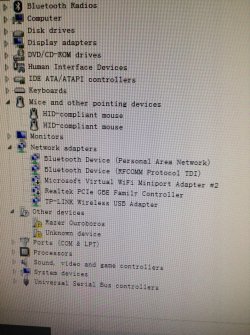
Can you go to control panel, device manager expand Mice and other pointing devices and post a screenshot

:ar:Post a SS

If it shows no :warn: then I recommend a repair
 

My Computer

Computer type
PC/Desktop
Computer Manufacturer/Model Number
Dude Build
OS
Windows 10 Pro X64
CPU
Intel(R) Core(TM) i5-3570K CPU OC@ 4.5GHZ Turbo
Motherboard
MSI Z77A-G45 Gaming
Memory
8.00 GB DDR3 1600Mhz
Graphics Card(s)
MSI Gaming X GTX 1070
Sound Card
Realtek High Definition
Monitor(s) Displays
Dell S23O9W, HP L1710
Screen Resolution
DELL-1920 x 1080 HP-1280 x1024
Hard Drives
Crucial m4 256 SSD, WD 7200RPM 500GB WD 1TB
PSU
Seasonic X650 GOLD
Case
Zalman Z12
Cooling
Antec Kuhler 920
Keyboard
Logitech
Mouse
MSI DS100 Interceptor
Internet Speed
50 down and 5 up
Antivirus
MSE
Browser
Chrome, IE 11
Other Info
Logitech X-620 Speakers
Can you go to control panel, device manager expand Mice and other pointing devices and post a screenshot

:ar:Post a SS

If it shows no :warn: then I recommend a repair

I have done a system restore to roll back before drivemax updating. Mouse has light indicator (which was completely off when OS started) for a while until the system tried to install the driver and it was the same error then light went off again. No luck.

I have captured a photo of my device manager, "razer ouroboros" is the mouse I try to install now, the unknown device i guess is the one failed before.
IMG_0047.jpg


p/s the mouse works fine in repair mode....
 

My Computer

Computer type
PC/Desktop
OS
Windows 7 64bit

My Computer

Computer type
PC/Desktop
Computer Manufacturer/Model Number
Dude Build
OS
Windows 10 Pro X64
CPU
Intel(R) Core(TM) i5-3570K CPU OC@ 4.5GHZ Turbo
Motherboard
MSI Z77A-G45 Gaming
Memory
8.00 GB DDR3 1600Mhz
Graphics Card(s)
MSI Gaming X GTX 1070
Sound Card
Realtek High Definition
Monitor(s) Displays
Dell S23O9W, HP L1710
Screen Resolution
DELL-1920 x 1080 HP-1280 x1024
Hard Drives
Crucial m4 256 SSD, WD 7200RPM 500GB WD 1TB
PSU
Seasonic X650 GOLD
Case
Zalman Z12
Cooling
Antec Kuhler 920
Keyboard
Logitech
Mouse
MSI DS100 Interceptor
Internet Speed
50 down and 5 up
Antivirus
MSE
Browser
Chrome, IE 11
Other Info
Logitech X-620 Speakers
Okay, try the Razer site for their driver

Razer

Use this method Driver install

This may help too

Unknown Device
Razer is using some sort of stupid software called synapse to update the drivers and the drivers are not available to download as standalone. Anyways, I am able to connect apple magic mouse to my pc, trying to fix all this mess now by restoring from drivemax backup. Hope it would work and i will uninstall this dumb software after that.

Thanks for the help dude.
 

My Computer

Computer type
PC/Desktop
OS
Windows 7 64bit
Okay, try the Razer site for their driver

Razer

Use this method Driver install

This may help too

Unknown Device
Razer is using some sort of stupid software called synapse to update the drivers and the drivers are not available to download as standalone. Anyways, I am able to connect apple magic mouse to my pc, trying to fix all this mess now by restoring from drivemax backup. Hope it would work and i will uninstall this dumb software after that.

Thanks for the help dude.

You're welcome. i have never used razer, I use a logitech G500. Good luck!!
 

My Computer

Computer type
PC/Desktop
Computer Manufacturer/Model Number
Dude Build
OS
Windows 10 Pro X64
CPU
Intel(R) Core(TM) i5-3570K CPU OC@ 4.5GHZ Turbo
Motherboard
MSI Z77A-G45 Gaming
Memory
8.00 GB DDR3 1600Mhz
Graphics Card(s)
MSI Gaming X GTX 1070
Sound Card
Realtek High Definition
Monitor(s) Displays
Dell S23O9W, HP L1710
Screen Resolution
DELL-1920 x 1080 HP-1280 x1024
Hard Drives
Crucial m4 256 SSD, WD 7200RPM 500GB WD 1TB
PSU
Seasonic X650 GOLD
Case
Zalman Z12
Cooling
Antec Kuhler 920
Keyboard
Logitech
Mouse
MSI DS100 Interceptor
Internet Speed
50 down and 5 up
Antivirus
MSE
Browser
Chrome, IE 11
Other Info
Logitech X-620 Speakers
Back
Top