Solved Allocating memory

dani02

New member
Helo everybody.I have just shrank a volume and now i have : System(C) and Data(E). How can i move 100gb of memory from C(System) to E(Data)? I hope my questions is pretty clear;)
 

My Computer

Computer type
PC/Desktop
Computer Manufacturer/Model Number
Asus X54C
OS
Windows 7 Ultimate x64
CPU
Intel Pentium Dual Core B960 2.2.Ghz
Motherboard
Asus K54C
Memory
4 GB DDR3
Graphics Card(s)
Intel HD Graphics 3000
Screen Resolution
1366 x 768
Hard Drives
1 Hard Drive 500GB
Mouse
Canyon
Browser
Google Chrome

My Computer

Computer type
PC/Desktop
Computer Manufacturer/Model Number
Golden Mk. I.4
OS
Windows 10 Pro x64 ; Xubuntu x64
CPU
Intel i7 860 @ 2.80 GHz O/C'ed to 4.0GHz
Motherboard
Gigabyte P55A-UD3R Rev.1. Award BIOS F13
Memory
16GB Corsair Vengance DDR3 @ 661 MHz Dual Channel (9-9-9-24)
Graphics Card(s)
EVGA NVidia GTX 560 1024MB
Sound Card
Realtek Integrated
Monitor(s) Displays
Dual Samsung SyncMaster 2494HS
Screen Resolution
1920*1080 and 1920*1080
Hard Drives
1*Samsung 840 EVO 120GB SSD;
1*OCZ Vertex 2 60GB SSD;
2*Samsung F3 SpinPoint 1TB in RAID0;
1*Samsung F1 SpinPoint 1TB;
2*Western Digital 1TB External USB 3.0
1*Western Digital 500GB External USB 3.0
1*Seagate 500GB External USB 2.0
PSU
Thermaltake ToughPower QFan 750W
Case
Thermaltake Element S VK60001W2Z
Cooling
Corsair H60 Water Cooling, 2*230mm and 2*80mm case fans
Keyboard
Logitech G110
Mouse
Logitech MX518
there you go
disk mngment.jpg
 

My Computer

Computer type
PC/Desktop
Computer Manufacturer/Model Number
Asus X54C
OS
Windows 7 Ultimate x64
CPU
Intel Pentium Dual Core B960 2.2.Ghz
Motherboard
Asus K54C
Memory
4 GB DDR3
Graphics Card(s)
Intel HD Graphics 3000
Screen Resolution
1366 x 768
Hard Drives
1 Hard Drive 500GB
Mouse
Canyon
Browser
Google Chrome
OK.

You need to "shrink" C: to create 100MB of unallocated space that will sit between C: and E:.

Then you create a 3rd partition called F:, and then you can "merge" F: and E: together to create the new larger E:.

The best tool for this is Partition Wizard. Use the this tutorial to guide you (specifically look at Option 3):

http://www.sevenforums.com/tutorials/93322-partition-wizard-use-bootable-cd.html

Regards,
Golden
 

My Computer

Computer type
PC/Desktop
Computer Manufacturer/Model Number
Golden Mk. I.4
OS
Windows 10 Pro x64 ; Xubuntu x64
CPU
Intel i7 860 @ 2.80 GHz O/C'ed to 4.0GHz
Motherboard
Gigabyte P55A-UD3R Rev.1. Award BIOS F13
Memory
16GB Corsair Vengance DDR3 @ 661 MHz Dual Channel (9-9-9-24)
Graphics Card(s)
EVGA NVidia GTX 560 1024MB
Sound Card
Realtek Integrated
Monitor(s) Displays
Dual Samsung SyncMaster 2494HS
Screen Resolution
1920*1080 and 1920*1080
Hard Drives
1*Samsung 840 EVO 120GB SSD;
1*OCZ Vertex 2 60GB SSD;
2*Samsung F3 SpinPoint 1TB in RAID0;
1*Samsung F1 SpinPoint 1TB;
2*Western Digital 1TB External USB 3.0
1*Western Digital 500GB External USB 3.0
1*Seagate 500GB External USB 2.0
PSU
Thermaltake ToughPower QFan 750W
Case
Thermaltake Element S VK60001W2Z
Cooling
Corsair H60 Water Cooling, 2*230mm and 2*80mm case fans
Keyboard
Logitech G110
Mouse
Logitech MX518
you said 100MB...can i shrink 100GB? because i want to get 100GB more in E(Data).thanks for everything..have a nice day:)
 

My Computer

Computer type
PC/Desktop
Computer Manufacturer/Model Number
Asus X54C
OS
Windows 7 Ultimate x64
CPU
Intel Pentium Dual Core B960 2.2.Ghz
Motherboard
Asus K54C
Memory
4 GB DDR3
Graphics Card(s)
Intel HD Graphics 3000
Screen Resolution
1366 x 768
Hard Drives
1 Hard Drive 500GB
Mouse
Canyon
Browser
Google Chrome
Sorry, yes you can. Just check how much space is currently being used on C: first - if you have more than 100GB free space on C:, then you can shrink by that amount.

Regards,
Golden
 

My Computer

Computer type
PC/Desktop
Computer Manufacturer/Model Number
Golden Mk. I.4
OS
Windows 10 Pro x64 ; Xubuntu x64
CPU
Intel i7 860 @ 2.80 GHz O/C'ed to 4.0GHz
Motherboard
Gigabyte P55A-UD3R Rev.1. Award BIOS F13
Memory
16GB Corsair Vengance DDR3 @ 661 MHz Dual Channel (9-9-9-24)
Graphics Card(s)
EVGA NVidia GTX 560 1024MB
Sound Card
Realtek Integrated
Monitor(s) Displays
Dual Samsung SyncMaster 2494HS
Screen Resolution
1920*1080 and 1920*1080
Hard Drives
1*Samsung 840 EVO 120GB SSD;
1*OCZ Vertex 2 60GB SSD;
2*Samsung F3 SpinPoint 1TB in RAID0;
1*Samsung F1 SpinPoint 1TB;
2*Western Digital 1TB External USB 3.0
1*Western Digital 500GB External USB 3.0
1*Seagate 500GB External USB 2.0
PSU
Thermaltake ToughPower QFan 750W
Case
Thermaltake Element S VK60001W2Z
Cooling
Corsair H60 Water Cooling, 2*230mm and 2*80mm case fans
Keyboard
Logitech G110
Mouse
Logitech MX518
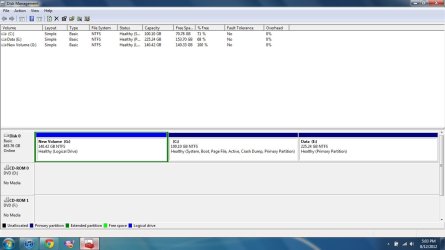
i made a new partition with 140gb space(G).can you explain me the procedure of merging E(Data) with G pls?
Here it is:Untitled.jpg
 
Last edited:

My Computer

Computer type
PC/Desktop
Computer Manufacturer/Model Number
Asus X54C
OS
Windows 7 Ultimate x64
CPU
Intel Pentium Dual Core B960 2.2.Ghz
Motherboard
Asus K54C
Memory
4 GB DDR3
Graphics Card(s)
Intel HD Graphics 3000
Screen Resolution
1366 x 768
Hard Drives
1 Hard Drive 500GB
Mouse
Canyon
Browser
Google Chrome
Did you use Partition Wizard to do that? The new partition should sit between C: and E:. How did you create it in front of C:?

Regards,
Golden
 

My Computer

Computer type
PC/Desktop
Computer Manufacturer/Model Number
Golden Mk. I.4
OS
Windows 10 Pro x64 ; Xubuntu x64
CPU
Intel i7 860 @ 2.80 GHz O/C'ed to 4.0GHz
Motherboard
Gigabyte P55A-UD3R Rev.1. Award BIOS F13
Memory
16GB Corsair Vengance DDR3 @ 661 MHz Dual Channel (9-9-9-24)
Graphics Card(s)
EVGA NVidia GTX 560 1024MB
Sound Card
Realtek Integrated
Monitor(s) Displays
Dual Samsung SyncMaster 2494HS
Screen Resolution
1920*1080 and 1920*1080
Hard Drives
1*Samsung 840 EVO 120GB SSD;
1*OCZ Vertex 2 60GB SSD;
2*Samsung F3 SpinPoint 1TB in RAID0;
1*Samsung F1 SpinPoint 1TB;
2*Western Digital 1TB External USB 3.0
1*Western Digital 500GB External USB 3.0
1*Seagate 500GB External USB 2.0
PSU
Thermaltake ToughPower QFan 750W
Case
Thermaltake Element S VK60001W2Z
Cooling
Corsair H60 Water Cooling, 2*230mm and 2*80mm case fans
Keyboard
Logitech G110
Mouse
Logitech MX518
yes...i created it from C...i don't know why it is in front of C..maybe thats why i can't extend the C partition as it says in some tutorials..
EDIT:ok it was my fault. I made the 100GB partition wrong. Now its between C and E ;) thx for everything !
 
Last edited:

My Computer

Computer type
PC/Desktop
Computer Manufacturer/Model Number
Asus X54C
OS
Windows 7 Ultimate x64
CPU
Intel Pentium Dual Core B960 2.2.Ghz
Motherboard
Asus K54C
Memory
4 GB DDR3
Graphics Card(s)
Intel HD Graphics 3000
Screen Resolution
1366 x 768
Hard Drives
1 Hard Drive 500GB
Mouse
Canyon
Browser
Google Chrome
No worries. In order to merge partitions, they have to be adjacent to one another. Did you manage the merge?

Regards,
Golden
 

My Computer

Computer type
PC/Desktop
Computer Manufacturer/Model Number
Golden Mk. I.4
OS
Windows 10 Pro x64 ; Xubuntu x64
CPU
Intel i7 860 @ 2.80 GHz O/C'ed to 4.0GHz
Motherboard
Gigabyte P55A-UD3R Rev.1. Award BIOS F13
Memory
16GB Corsair Vengance DDR3 @ 661 MHz Dual Channel (9-9-9-24)
Graphics Card(s)
EVGA NVidia GTX 560 1024MB
Sound Card
Realtek Integrated
Monitor(s) Displays
Dual Samsung SyncMaster 2494HS
Screen Resolution
1920*1080 and 1920*1080
Hard Drives
1*Samsung 840 EVO 120GB SSD;
1*OCZ Vertex 2 60GB SSD;
2*Samsung F3 SpinPoint 1TB in RAID0;
1*Samsung F1 SpinPoint 1TB;
2*Western Digital 1TB External USB 3.0
1*Western Digital 500GB External USB 3.0
1*Seagate 500GB External USB 2.0
PSU
Thermaltake ToughPower QFan 750W
Case
Thermaltake Element S VK60001W2Z
Cooling
Corsair H60 Water Cooling, 2*230mm and 2*80mm case fans
Keyboard
Logitech G110
Mouse
Logitech MX518
yes , everything is fine now;)
 

My Computer

Computer type
PC/Desktop
Computer Manufacturer/Model Number
Asus X54C
OS
Windows 7 Ultimate x64
CPU
Intel Pentium Dual Core B960 2.2.Ghz
Motherboard
Asus K54C
Memory
4 GB DDR3
Graphics Card(s)
Intel HD Graphics 3000
Screen Resolution
1366 x 768
Hard Drives
1 Hard Drive 500GB
Mouse
Canyon
Browser
Google Chrome
Back
Top