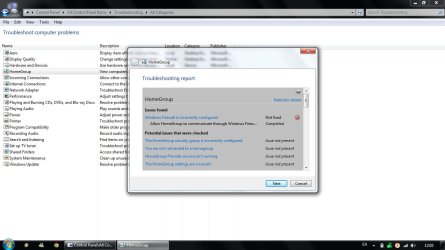
Allow Homegroup to communicate through Windows Firewall(Not Fixed)

Umut

Jenkins
Local time
2:34 AM
Messages
17
Location
Turkey
First of all hello and thank you to people reading and trying to solve my problem :)

As the title says i'm having some communication issues between my computers. And i decided to write after searching for all advises through this site and others from google.

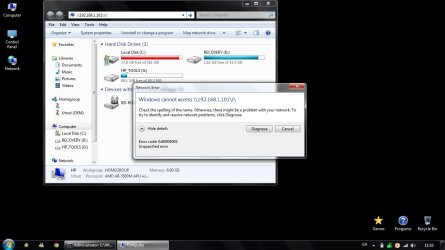
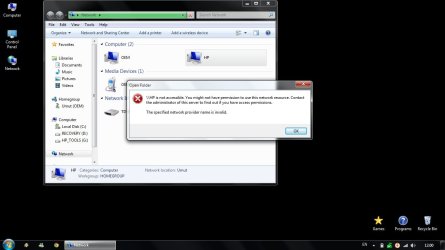
I'm using a w7 ultimate on my desktop and w7 home premium on my hp laptop. Some can say its so easy to connect them to eachother but i found out its not. I made a homegroup, allowed everything from advanced sharing and my desktop saw my laptop immediately but now the problem started. As i can do anything from desktop ultimate side i can't join from my laptop to my desktop. It can see ultimate but when i try to connect it says ''\\OEM not accessible... The specified network provider name is invalid''

Before you ask i shall say the thing i have done. My laptop is using MSE and my desktop KIS2013 as anti-virus prog. Both allowed for networking and homegroup connections(in and out). Both ip's are like 192.168.1.100-101.

I want to fix this cause we can't play games with my friends. As i tested in the games like ''Heroes of Might and Magic 3'' it shows the game on tcp/ip but when i click it gives connection error. When we try to play counter-strike 1.6 it doesn't show on LAN games but when we write this command(connect 192.168.1.101) it works.

At last when i open Homegroup troubleshooting(from the laptop with home premium) it says that ''windows firewall is preventing homegroup from communicating''. But it can not fix the issue and says the problem is ''windows firewall is incorrectly configured''.

I'm also curious about how can i connect/share files to laptop without any problems if if firewall is the problem. I hope any of you can solve my problem cause it's been a long time i'm searching every ideas and about to mess my computers.
 

My Computer My Computer

Computer type
PC/Desktop
Computer Manufacturer/Model Number
Custom
OS
Windows 10 Home 64bit
CPU
AMD FX-6300 3.8GHz
Motherboard
MSI 990FXA GD65
Memory
GSKILL 8GB (2x4GB) RipjawsX DDR3 2133MHz CL11
Graphics Card(s)
MSI GTX1070 Gaming X 8GB
Sound Card
IDT High Definition
Monitor(s) Displays
DVI & HDMI
Screen Resolution
1920x1080 32bit 60Hz
Hard Drives
CORSAIR FORCE GS SSD 128GB
WESTERN DIGITAL HDD 1TB
PSU
COOLER MASTER GX(BRONZE) 750W
Case
COOLER MASTER MIDI ATX
Cooling
COOLER MASTER
Keyboard
A4 TECH
Mouse
A4 TECH X7
Internet Speed
8MBPS
Antivirus
WINDOWS DEFENDER & MALWAREBYTES ANTI-MALWARE
Browser
CHROME(PREFERRED)

My Computer My Computer

Computer Manufacturer/Model Number
Lenovo Desktop/Samsung Laptop
OS
Win7 & Win8 64bit
CPU
Intel i5
Internet Speed
Charter-20 Mbps
Antivirus
Avast
Browser
FF, IE9 and Chrome
I opened a TCP port with the same number in both computers and allowed everything but still my desktop and laptop can see eachother in network but laptop can not connect. I personally don't think its about ports or they wouldn't be seeing eachother also. Both can see eactother, desktop can connect to laptop but when laptop tries to connect it still says ''\\OEM not accessible... The specified network provider name is invalid''.

Another information i just noticed can be useful is; when i double-click on my own C:/ folder in Network window it again says ''\\OEM not accessible... The specified network provider name is invalid''. So i started to think there is something wrong with my laptop i guess.
 

My Computer My Computer

Computer type
PC/Desktop
Computer Manufacturer/Model Number
Custom
OS
Windows 10 Home 64bit
CPU
AMD FX-6300 3.8GHz
Motherboard
MSI 990FXA GD65
Memory
GSKILL 8GB (2x4GB) RipjawsX DDR3 2133MHz CL11
Graphics Card(s)
MSI GTX1070 Gaming X 8GB
Sound Card
IDT High Definition
Monitor(s) Displays
DVI & HDMI
Screen Resolution
1920x1080 32bit 60Hz
Hard Drives
CORSAIR FORCE GS SSD 128GB
WESTERN DIGITAL HDD 1TB
PSU
COOLER MASTER GX(BRONZE) 750W
Case
COOLER MASTER MIDI ATX
Cooling
COOLER MASTER
Keyboard
A4 TECH
Mouse
A4 TECH X7
Internet Speed
8MBPS
Antivirus
WINDOWS DEFENDER & MALWAREBYTES ANTI-MALWARE
Browser
CHROME(PREFERRED)

My Computer My Computer

Computer Manufacturer/Model Number
Lenovo Desktop/Samsung Laptop
OS
Win7 & Win8 64bit
CPU
Intel i5
Internet Speed
Charter-20 Mbps
Antivirus
Avast
Browser
FF, IE9 and Chrome
Everything is the same at both computers with same account name&passwords. My porblem starts with homegroup situation. I created the homegroup with my desktop which has ultimate and joined from my laptop by typing the password that windows assigned. Windows accepted i joined to homegroup without any porblems BUT when i click on the homegroup at the right section of any folder window it says: `No other homegroup computers are currently available`. If i open the homegroup trouble shooter it says that `windows is preventing Homegroup from communicating` but can not fix the problem. Last information it can`t be cause of kaspersky cause i deleted and tried like that still the same `not accesible` warning. Btw i now installed MSE instead of Kaspersky to my desktop too.
 

My Computer My Computer

Computer type
PC/Desktop
Computer Manufacturer/Model Number
Custom
OS
Windows 10 Home 64bit
CPU
AMD FX-6300 3.8GHz
Motherboard
MSI 990FXA GD65
Memory
GSKILL 8GB (2x4GB) RipjawsX DDR3 2133MHz CL11
Graphics Card(s)
MSI GTX1070 Gaming X 8GB
Sound Card
IDT High Definition
Monitor(s) Displays
DVI & HDMI
Screen Resolution
1920x1080 32bit 60Hz
Hard Drives
CORSAIR FORCE GS SSD 128GB
WESTERN DIGITAL HDD 1TB
PSU
COOLER MASTER GX(BRONZE) 750W
Case
COOLER MASTER MIDI ATX
Cooling
COOLER MASTER
Keyboard
A4 TECH
Mouse
A4 TECH X7
Internet Speed
8MBPS
Antivirus
WINDOWS DEFENDER & MALWAREBYTES ANTI-MALWARE
Browser
CHROME(PREFERRED)
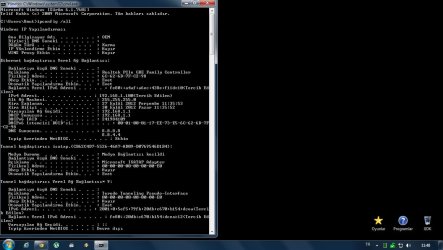
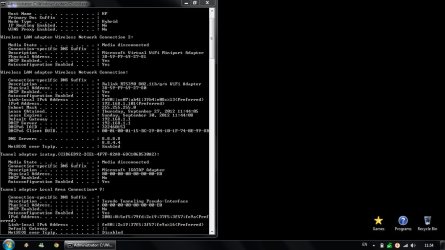
Can you please post the ipconfig /all output of both computers?

What happens if you temporarily disable the Windows Firewall?
Can you try accessing the computer by typing the IPAddress? Click on the Start button then type \\IPAddress\Shared Drive or Shared Folder (example \\192.168.1.10\TestFolder)

Also, make sure that from the troublesome computer verify that all your network services are Started from Control Panel=> Admin Tools=> Services:
• COM+ Event System (for WZC issues)
• Computer Browser
• DHCP Client
• DNS Client
• Network Connections
• Network Location Awareness
• Remote Procedure Call (RPC)
• Server
• TCP/IP Netbios helper
• Workstation
 
Last edited:

My Computer My Computer

Computer Manufacturer/Model Number
Lenovo Desktop/Samsung Laptop
OS
Win7 & Win8 64bit
CPU
Intel i5
Internet Speed
Charter-20 Mbps
Antivirus
Avast
Browser
FF, IE9 and Chrome
As i said i deleted kaspersky in that case computer had no anti-virus program, no firewall, no windows defender nothing but still it's not accesible...

Computer Browser, Network Connections startup type is manual on both but others are all automatic. Shall i change them to automatic too ?

At the bottom all the screenshots maybe they can help to figure out whats going on.

And thank you for spending your time to help me.

Edit: The desktop cmd language is in turkish but i think you can figure out what it says by compairing with other picture :)
 

Attachments

  • desktop(ultimate).jpg
    desktop(ultimate).jpg
    94.5 KB · Views: 28
  • laptop(home premium)1.jpg
    laptop(home premium)1.jpg
    96.4 KB · Views: 12
  • laptop(home premium)2.jpg
    laptop(home premium)2.jpg
    72.8 KB · Views: 18
  • network1.jpg
    network1.jpg
    64.9 KB · Views: 22
  • network2.jpg
    network2.jpg
    85.7 KB · Views: 21

My Computer My Computer

Computer type
PC/Desktop
Computer Manufacturer/Model Number
Custom
OS
Windows 10 Home 64bit
CPU
AMD FX-6300 3.8GHz
Motherboard
MSI 990FXA GD65
Memory
GSKILL 8GB (2x4GB) RipjawsX DDR3 2133MHz CL11
Graphics Card(s)
MSI GTX1070 Gaming X 8GB
Sound Card
IDT High Definition
Monitor(s) Displays
DVI & HDMI
Screen Resolution
1920x1080 32bit 60Hz
Hard Drives
CORSAIR FORCE GS SSD 128GB
WESTERN DIGITAL HDD 1TB
PSU
COOLER MASTER GX(BRONZE) 750W
Case
COOLER MASTER MIDI ATX
Cooling
COOLER MASTER
Keyboard
A4 TECH
Mouse
A4 TECH X7
Internet Speed
8MBPS
Antivirus
WINDOWS DEFENDER & MALWAREBYTES ANTI-MALWARE
Browser
CHROME(PREFERRED)
Alright....let's see if changing the DNS of both computers to......obtain a DNS server address automatically helps. Here's the entire guide. Please restart both computers and see if you're able to access both.
 

My Computer My Computer

Computer Manufacturer/Model Number
Lenovo Desktop/Samsung Laptop
OS
Win7 & Win8 64bit
CPU
Intel i5
Internet Speed
Charter-20 Mbps
Antivirus
Avast
Browser
FF, IE9 and Chrome
They already have automatic DNS that windows assigned. Do you want me to change both specific?
 

My Computer My Computer

Computer type
PC/Desktop
Computer Manufacturer/Model Number
Custom
OS
Windows 10 Home 64bit
CPU
AMD FX-6300 3.8GHz
Motherboard
MSI 990FXA GD65
Memory
GSKILL 8GB (2x4GB) RipjawsX DDR3 2133MHz CL11
Graphics Card(s)
MSI GTX1070 Gaming X 8GB
Sound Card
IDT High Definition
Monitor(s) Displays
DVI & HDMI
Screen Resolution
1920x1080 32bit 60Hz
Hard Drives
CORSAIR FORCE GS SSD 128GB
WESTERN DIGITAL HDD 1TB
PSU
COOLER MASTER GX(BRONZE) 750W
Case
COOLER MASTER MIDI ATX
Cooling
COOLER MASTER
Keyboard
A4 TECH
Mouse
A4 TECH X7
Internet Speed
8MBPS
Antivirus
WINDOWS DEFENDER & MALWAREBYTES ANTI-MALWARE
Browser
CHROME(PREFERRED)
Those are Google Public DNS's. Is this what you have setup in your router setting? By default you should be using your ISP's DNS(s). Please check your router's DNS setting...
Others would choose to add a secondary Public DNS only if they are having issues to some websites, but the Primary DNS should be your ISP's.
They already have automatic DNS that windows assigned. Do you want me to change both specific?
 

My Computer My Computer

Computer Manufacturer/Model Number
Lenovo Desktop/Samsung Laptop
OS
Win7 & Win8 64bit
CPU
Intel i5
Internet Speed
Charter-20 Mbps
Antivirus
Avast
Browser
FF, IE9 and Chrome
Dns setup is like that can you describe me how to change the google public DNS ?
 

Attachments

  • Yeni Bit E?lem Resmi.jpg
    Yeni Bit E?lem Resmi.jpg
    104.2 KB · Views: 15

My Computer My Computer

Computer type
PC/Desktop
Computer Manufacturer/Model Number
Custom
OS
Windows 10 Home 64bit
CPU
AMD FX-6300 3.8GHz
Motherboard
MSI 990FXA GD65
Memory
GSKILL 8GB (2x4GB) RipjawsX DDR3 2133MHz CL11
Graphics Card(s)
MSI GTX1070 Gaming X 8GB
Sound Card
IDT High Definition
Monitor(s) Displays
DVI & HDMI
Screen Resolution
1920x1080 32bit 60Hz
Hard Drives
CORSAIR FORCE GS SSD 128GB
WESTERN DIGITAL HDD 1TB
PSU
COOLER MASTER GX(BRONZE) 750W
Case
COOLER MASTER MIDI ATX
Cooling
COOLER MASTER
Keyboard
A4 TECH
Mouse
A4 TECH X7
Internet Speed
8MBPS
Antivirus
WINDOWS DEFENDER & MALWAREBYTES ANTI-MALWARE
Browser
CHROME(PREFERRED)
The WLAN settings from your computer is correct Umut, but I need to you to check your router settings, the DNS'es have been modified in your router which needs to be corrected, perhaps this will help us resolve your issue. Do you have access to your router?
 

My Computer My Computer

Computer Manufacturer/Model Number
Lenovo Desktop/Samsung Laptop
OS
Win7 & Win8 64bit
CPU
Intel i5
Internet Speed
Charter-20 Mbps
Antivirus
Avast
Browser
FF, IE9 and Chrome
I apologize for responding late but cause of my job this happens...

Yes i can access my router. What shall i do ?
 

My Computer My Computer

Computer type
PC/Desktop
Computer Manufacturer/Model Number
Custom
OS
Windows 10 Home 64bit
CPU
AMD FX-6300 3.8GHz
Motherboard
MSI 990FXA GD65
Memory
GSKILL 8GB (2x4GB) RipjawsX DDR3 2133MHz CL11
Graphics Card(s)
MSI GTX1070 Gaming X 8GB
Sound Card
IDT High Definition
Monitor(s) Displays
DVI & HDMI
Screen Resolution
1920x1080 32bit 60Hz
Hard Drives
CORSAIR FORCE GS SSD 128GB
WESTERN DIGITAL HDD 1TB
PSU
COOLER MASTER GX(BRONZE) 750W
Case
COOLER MASTER MIDI ATX
Cooling
COOLER MASTER
Keyboard
A4 TECH
Mouse
A4 TECH X7
Internet Speed
8MBPS
Antivirus
WINDOWS DEFENDER & MALWAREBYTES ANTI-MALWARE
Browser
CHROME(PREFERRED)
Umut - navigate in your router settings and find the page where the WAN, LAN IPs and DNS'es information, see what you can find out about the DNS assigned. By default the router should using your ISP DNS'es. If you don't know what they are you may contact your ISP.
I apologize for responding late but cause of my job this happens...

Yes i can access my router. What shall i do ?
 

My Computer My Computer

Computer Manufacturer/Model Number
Lenovo Desktop/Samsung Laptop
OS
Win7 & Win8 64bit
CPU
Intel i5
Internet Speed
Charter-20 Mbps
Antivirus
Avast
Browser
FF, IE9 and Chrome
Back
Top