Allow multiple instances of explorer

scott9

New member
Local time
5:34 PM
Messages
4
Hi

When I open explorer (the filesystem application not the webbrowser), and then try to open another instance of the same directory, the old instance of the program comes to the foreground but no new instance of the program is started.

I use multiple workspaces with dexpot, so this means that if I have a folder open on one workspace, I cant open it anywhere else.

Can this behaviour be turned off?
 

My Computer My Computer

At a glance

windows 7 pro 32bit
Computer Manufacturer/Model Number
Thinkpad T61
OS
windows 7 pro 32bit
hi scott9, and welcome to sevenforums,

i have no idea what dexpot is, but a handy tip is that you can open a new instance of a program by middle-clicking (with scroll wheel) the taskbar icon.

also, can you not right-click a folder in explorer and select 'open in new window'?
 

My Computer My Computer

At a glance

ultimate 64 sp1i5 2500K [email protected]8 gigs GSkill Ripjaws 1600amd hd6950
Computer Manufacturer/Model Number
mickey megabyte 1234
OS
ultimate 64 sp1
CPU
i5 2500K [email protected]
Motherboard
MSI P67A-GD53
Memory
8 gigs GSkill Ripjaws 1600
Graphics Card(s)
amd hd6950
Sound Card
creative x-fi gamer
Monitor(s) Displays
samsung 24"
Screen Resolution
1920x1080
Hard Drives
ocz vertex 2e 60 gig, samsung f3 1tb, buffalo 2tb ext
PSU
antec 550
Case
antec three hundred
Cooling
i'm a cooling fan
Keyboard
saitek eclipse ii
Mouse
logitech g3
Internet Speed
about 4 Mbps
Other Info
i love win7
Mickey's methods should work, but if you haven't changed the directory in the 1st instance, clicking on the same shortcut will not open another window, but will bring the 1st window to focus. If you've changed the directory, another instance should open to the default directory.

James
 

My Computer My Computer

At a glance

Win7U 64 RTMQ95508GB GskillASUS|EAH4850/HTDI/1GD3/A
OS
Win7U 64 RTM
CPU
Q9550
Motherboard
GA-EP45-UD3R
Memory
8GB Gskill
Graphics Card(s)
ASUS|EAH4850/HTDI/1GD3/A
Sound Card
xfi Plat
Monitor(s) Displays
Dell 2405fpw
Screen Resolution
1920x1200
Hard Drives
Seagate & WD sata Drives
PSU
Antec
Case
Antec
Keyboard
MS Natural Ergonomic 4000
Mouse
Logitech MX610 USB Cordless
Thanks for the tips, but I was hoping for a way to actually turn that behaviour off. I dont mind editing the registry or something like that if that is what it takes.

Dexpot is a program that creates several independent workspaces that one can switch between. These workspaces all have independent opened programs and independent taskbars. So if I open "my computer" on workspace 1, and then switch to workspace 2, it is now impossible to open "my computer", and the icon is not showing up on the taskbar.
 

My Computer My Computer

At a glance

windows 7 pro 32bit
Computer Manufacturer/Model Number
Thinkpad T61
OS
windows 7 pro 32bit
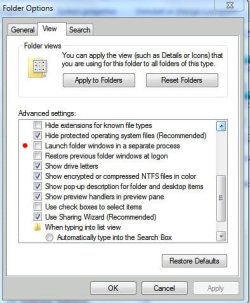
I've not had experience with what you want to do, but have you tried this setting?

Folder Options_Separate Process.JPG
 

My Computer My Computer

At a glance

Win7U 64 RTMQ95508GB GskillASUS|EAH4850/HTDI/1GD3/A
OS
Win7U 64 RTM
CPU
Q9550
Motherboard
GA-EP45-UD3R
Memory
8GB Gskill
Graphics Card(s)
ASUS|EAH4850/HTDI/1GD3/A
Sound Card
xfi Plat
Monitor(s) Displays
Dell 2405fpw
Screen Resolution
1920x1200
Hard Drives
Seagate & WD sata Drives
PSU
Antec
Case
Antec
Keyboard
MS Natural Ergonomic 4000
Mouse
Logitech MX610 USB Cordless
Ok just tried it. It doesnt seem to help with this problem.
 

My Computer My Computer

At a glance

windows 7 pro 32bit
Computer Manufacturer/Model Number
Thinkpad T61
OS
windows 7 pro 32bit

My Computer My Computer

At a glance

Win7U 64 RTMQ95508GB GskillASUS|EAH4850/HTDI/1GD3/A
OS
Win7U 64 RTM
CPU
Q9550
Motherboard
GA-EP45-UD3R
Memory
8GB Gskill
Graphics Card(s)
ASUS|EAH4850/HTDI/1GD3/A
Sound Card
xfi Plat
Monitor(s) Displays
Dell 2405fpw
Screen Resolution
1920x1200
Hard Drives
Seagate & WD sata Drives
PSU
Antec
Case
Antec
Keyboard
MS Natural Ergonomic 4000
Mouse
Logitech MX610 USB Cordless
Sure, Ill try posting there.
 

My Computer My Computer

At a glance

windows 7 pro 32bit
Computer Manufacturer/Model Number
Thinkpad T61
OS
windows 7 pro 32bit
Just another thought...have you thought about creating shortcuts to different folders on each desktop? Selectively choosing your different path for each one to allow easy navigation to the folder you want? I'm thinking that once you have a folder open on a given desktop, you may be able to move to the same folder as is open on another desktop. Maybe a viable workaround...

James
 

My Computer My Computer

At a glance

Win7U 64 RTMQ95508GB GskillASUS|EAH4850/HTDI/1GD3/A
OS
Win7U 64 RTM
CPU
Q9550
Motherboard
GA-EP45-UD3R
Memory
8GB Gskill
Graphics Card(s)
ASUS|EAH4850/HTDI/1GD3/A
Sound Card
xfi Plat
Monitor(s) Displays
Dell 2405fpw
Screen Resolution
1920x1200
Hard Drives
Seagate & WD sata Drives
PSU
Antec
Case
Antec
Keyboard
MS Natural Ergonomic 4000
Mouse
Logitech MX610 USB Cordless
Back
Top