
You are using an out of date browser. It may not display this or other websites correctly.
You should upgrade or use an alternative browser.
You should upgrade or use an alternative browser.
Allow non administrator to calibrate touch screen
- Thread starter Mondo1287
- Start date
Cant y ou go into its properties and change the permissions and allow a specific user full control? Dont have a touch screen so dont know options with it.
My Computer
- Computer type
- PC/Desktop
- Computer Manufacturer/Model Number
- Custom
- OS
- Windows 7 64bit
- CPU
- Intel I7 4770k @4.5
- Motherboard
- Asus z87-pro
- Memory
- 16GB corsair Vengence
- Graphics Card(s)
- EVGA GTX 980 TI SC acx2.0
- Sound Card
- XFI fatality gamer
- Monitor(s) Displays
- Samsung
- Screen Resolution
- 1920 x 1080
- Hard Drives
- OCZ ssd Baracuda 1tb x2
- PSU
- Corsair 1200 watt
- Case
- NZXT Noctis 450
- Cooling
- Kraken X61
- Keyboard
- Logitech G510
- Mouse
- Razer naga
- Internet Speed
- 100 down 25 up
- Other Info
- Nzxt Hue +

zigzag3143
New member
- Local time
- 12:18 AM
- Messages
- 27,140
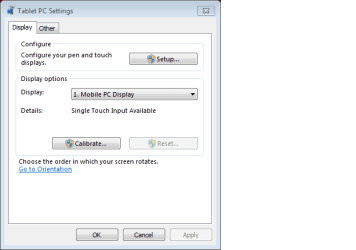
I need to allow non administrators to calibrate the touch screen. As you can see, the calibrate button causes the UAC login to appear. Does anyone know a way around this?
Mondo
One way to do it would be to create a group touchscreen users. give them std user plus mark the cpanel/folder to give them access. they stay std users and can mess with the touch screen
Ken J
My Computer
- Computer Manufacturer/Model Number
- HP Pavillion dv-7 1005 Tx
- OS
- Win 8 Release candidate 8400
- Memory
- 4 gigs
- Graphics Card(s)
- Nvidia 9600M
- Sound Card
- HD built-in
- Monitor(s) Displays
- 17" Wxga
- Screen Resolution
- 1440x900
- Cooling
- none
- Internet Speed
- 45Mb down 5Mb up