alt tab with windows areo -ANNOYING how to get to classic mode??

bras4real

New member
Local time
5:05 PM
Messages
5
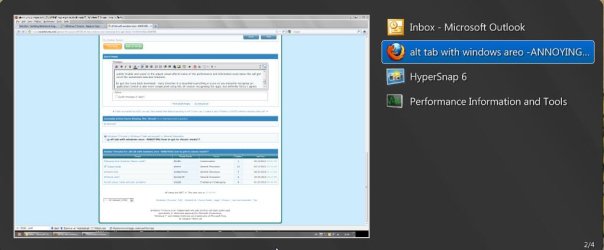
Is there a way to get the control alt tab function back as how it worked with windows classic theme and like in XP?? with aero now you see all programs and applications as a little thumbnail instead of an icon, it is harder to see what you are selecting with icons it is easier identify what you want to select

more annoying even if you cycle through open ap;plications and windows in the alt tab menu and stay a few seconds long on a certain application it starts appearing automatically. Before this would happen only if you let go the alt key then it would select the specific application, now if you just select it while having tab pressed it will appear automatically :devil:

anybody know any patched or configuration instructions on how to get back the classic alt tab function ???(and not of course by using classic theme)

many thanks in advance for yr feedback!
 

My Computer My Computer

At a glance

windows 7 64 bit
OS
windows 7 64 bit
You might try the Windows button & Tab, rather than Alt & Tab. The 3D version is easier to see I think. It is certainly a fancy feature.

Sorry to be so little help. Best Wishes,
Rªnce
 

My Computer My Computer

At a glance

Windows 7 Pro 32bit / Windows 7 ProfessionalIntel Core i7-620M Duel Core 2.66GHz / Intel ...4.0 GB / 8.0 GB1.0 GB NVIDIA Quadro FX 2800M / Intel HD Grap...
Computer type
PC/Desktop
Computer Manufacturer/Model Number
Dell Precision M6500 / Dell Insprion 3847
OS
Windows 7 Pro 32bit / Windows 7 Professional
CPU
Intel Core i7-620M Duel Core 2.66GHz / Intel Core i5-4460
Memory
4.0 GB / 8.0 GB
Graphics Card(s)
1.0 GB NVIDIA Quadro FX 2800M / Intel HD Graphics
Screen Resolution
1440x900 / 1920x1080
I use Alt+Esc to cycle through open windows. Not an answer to your question I know but a good way to do this.
 

My Computer My Computer

At a glance

Windows 10 Pro X64Intel Quad Core i7-4770 @ 3.4Ghz16.0GB PC3-12800 DDR3 SDRAM 1600 MHzIntel Integrated HD Graphics
Computer type
PC/Desktop
Computer Manufacturer/Model Number
Lenovo IdeaCenter 450
OS
Windows 10 Pro X64
CPU
Intel Quad Core i7-4770 @ 3.4Ghz
Memory
16.0GB PC3-12800 DDR3 SDRAM 1600 MHz
Graphics Card(s)
Intel Integrated HD Graphics
Sound Card
Realtek HD Audio
Monitor(s) Displays
HP 22" LCD
Screen Resolution
1680 x 1050
Hard Drives
250GB Samsung EVO SATA-3 SSD
2TB Seagate ST2000DM001 SATA-2
1.5TB Seagate ST3150041AS SATA
Keyboard
Dell USB
Mouse
Lenovo USB
Internet Speed
Cable via Road Runner 3MB Upload, 30MB Download
Antivirus
Windows Defender, MBAM Pro, MBAE
Browser
Seamonkey
Other Info
UEFI/GPT
PLDS DVD-RW DH16AERSH
thanks for the replies, I find the al escape method inconvenient, depending on what programs and applications are open, it doesn t cycle consistently, sometimes it skips an application. actually right now I have outlook open, word open and firefox and it jumps erratically from left to right....

but I found a way!

untick 'enable aero peek' in the adjust visual effects menu of the performance and information tools menu this will get rid of the automated selection feauture.

to get the icons back download: Vista Switcher it is beautiful everything in icons so you instantly recognise an application (which is also more complicated using the 3d version recognising the apps, but defentily fancy I agree)
 

Attachments

  • Snap1.jpg
    Snap1.jpg
    40.3 KB · Views: 53

My Computer My Computer

At a glance

windows 7 64 bit
OS
windows 7 64 bit
Back
Top