Solved Always having blue screen errors

Louie999

New member
Local time
7:46 PM
Messages
5
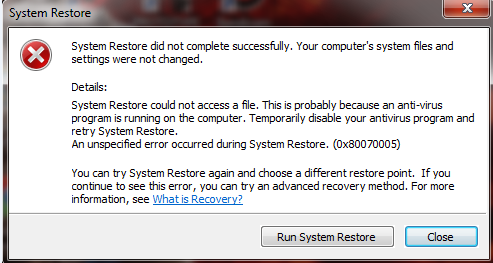
From time to time,whether im playing games or using facebook then suddenly i will get a blue screen error or stop error i tried the System Restore but i get this error
wG5CK6d.png

I turned off my Anti-Virus but the System Restore is still not successfull and also whats that 0x80070005 error? or is there another way to prevent those blue screen errors from happening? Help please,the constant blue screen errors are getting annoying. :mad:
 

My Computer

Computer type
PC/Desktop
OS
Windows 7 x32
CPU
AMD Athlon(tm) 64 X2 Dual Core Processor 4800+ 2.50 GHz
Memory
2GB
Antivirus
Avira Free Antivirus
Browser
Opera

My Computer

Computer type
PC/Desktop
Computer Manufacturer/Model Number
Self Built
OS
Win 10 Pro x64
CPU
Intel I5-2500K @3.3GHz
Motherboard
Asrock P67 Extreme4
Memory
16GB G.Skill Ripjaws X (4x4GB)
Graphics Card(s)
EVGA GeForce 750 Ti SC 2GB
Sound Card
ASUS Xonar DG 5.1 Channels 24-bit 96KHz PCI Interface Sound
Monitor(s) Displays
auria eq2367
Screen Resolution
1920 x 1080
Hard Drives
250GB Samsung 850 EVO SSD
1TB WD Blue
1TB Hitachi
PSU
SeaSonic X 650W 80 Plus Gold
Case
Corsair Obsidian 750D
Cooling
Corsair H60, Three 140mm case fans
Keyboard
Logitech Wireless Keyboard K520
Mouse
Logitech Wireless Mouse M310
Internet Speed
Wave Broadband ~ 100 dn 5 up
Antivirus
Windows Defender, Malwarebytes Premium
Browser
Edge, IE11, Chrome
Other Info
Laptop specs: HP g7-1365dx /
CPU: AMD A6-3420M APU with Radeon(tm) HD Graphics /
RAM: Crucial 8Gb (2x4Gb) /
SSD: Crucial M4-CT128M4SSD2 ATA Device/ FW 000F /
GFX: AMD Radeon HD 6520G /
OS: Windows 10 Pro x64
Ok so i followed the steps there,so here it is
 

My Computer

Computer type
PC/Desktop
OS
Windows 7 x32
CPU
AMD Athlon(tm) 64 X2 Dual Core Processor 4800+ 2.50 GHz
Memory
2GB
Antivirus
Avira Free Antivirus
Browser
Opera
You don't have any dumps from this year, you also don't have SP1 installed and a few of the reports are missing from the upload.

Please perform the following:

1. Download and save this tool to your desktop:
http://go.microsoft.com/fwlink/?linkid=52012

2. Run the tool, and then click Copy - ignore any errors if they appear

3. Use CTRL+V to paste the unedited results of the tool here in your next reply.
 

My Computer

Computer type
PC/Desktop
Computer Manufacturer/Model Number
Self Built
OS
Win 10 Pro x64
CPU
Intel I5-2500K @3.3GHz
Motherboard
Asrock P67 Extreme4
Memory
16GB G.Skill Ripjaws X (4x4GB)
Graphics Card(s)
EVGA GeForce 750 Ti SC 2GB
Sound Card
ASUS Xonar DG 5.1 Channels 24-bit 96KHz PCI Interface Sound
Monitor(s) Displays
auria eq2367
Screen Resolution
1920 x 1080
Hard Drives
250GB Samsung 850 EVO SSD
1TB WD Blue
1TB Hitachi
PSU
SeaSonic X 650W 80 Plus Gold
Case
Corsair Obsidian 750D
Cooling
Corsair H60, Three 140mm case fans
Keyboard
Logitech Wireless Keyboard K520
Mouse
Logitech Wireless Mouse M310
Internet Speed
Wave Broadband ~ 100 dn 5 up
Antivirus
Windows Defender, Malwarebytes Premium
Browser
Edge, IE11, Chrome
Other Info
Laptop specs: HP g7-1365dx /
CPU: AMD A6-3420M APU with Radeon(tm) HD Graphics /
RAM: Crucial 8Gb (2x4Gb) /
SSD: Crucial M4-CT128M4SSD2 ATA Device/ FW 000F /
GFX: AMD Radeon HD 6520G /
OS: Windows 10 Pro x64
Here it is:
Code:
Diagnostic Report (1.9.0027.0):
-----------------------------------------
Windows Validation Data-->

Validation Code: 0
Cached Online Validation Code: N/A, hr = 0xc004f012
Windows Product Key: *****-*****-X92GV-V7DCV-P4K27
Windows Product Key Hash: aU2z1/fnhnLHmhBm699qYZT2E6s=
Windows Product ID: 00426-OEM-8992662-00400
Windows Product ID Type: 2
Windows License Type: OEM SLP
Windows OS version: 6.1.7600.2.00010100.0.0.001
ID: {0F63544F-B702-4EC3-A651-B69DA1B8C598}(1)
Is Admin: Yes
TestCab: 0x0
LegitcheckControl ActiveX: N/A, hr = 0x80070002
Signed By: N/A, hr = 0x80070002
Product Name: Windows 7 Ultimate
Architecture: 0x00000000
Build lab: 7600.win7_rtm.090713-1255
TTS Error: 
Validation Diagnostic: 
Resolution Status: N/A

Vista WgaER Data-->
ThreatID(s): N/A, hr = 0x80070002
Version: N/A, hr = 0x80070002

Windows XP Notifications Data-->
Cached Result: N/A, hr = 0x80070002
File Exists: No
Version: N/A, hr = 0x80070002
WgaTray.exe Signed By: N/A, hr = 0x80070002
WgaLogon.dll Signed By: N/A, hr = 0x80070002

OGA Notifications Data-->
Cached Result: N/A, hr = 0x80070002
Version: N/A, hr = 0x80070002
OGAExec.exe Signed By: N/A, hr = 0x80070002
OGAAddin.dll Signed By: N/A, hr = 0x80070002

OGA Data-->
Office Status: 100 Genuine
Microsoft Office Enterprise 2007 - 100 Genuine
OGA Version: N/A, 0x80070002
Signed By: N/A, hr = 0x80070002
Office Diagnostics: 025D1FF3-364-80041010_025D1FF3-229-80041010_025D1FF3-230-1_025D1FF3-517-80040154_025D1FF3-237-80040154_025D1FF3-238-2_025D1FF3-244-80070002_025D1FF3-258-3_E2AD56EA-765-d003_E2AD56EA-766-0_E2AD56EA-134-80004005_E2AD56EA-765-b01a_E2AD56EA-766-0_E2AD56EA-148-80004005_16E0B333-89-80004005_B4D0AA8B-1029-80004005

Browser Data-->
Proxy settings: N/A
User Agent: Mozilla/4.0 (compatible; MSIE 8.0; Win32)
Default Browser: C:\Program Files\Opera\launcher.exe
Download signed ActiveX controls: Prompt
Download unsigned ActiveX controls: Disabled
Run ActiveX controls and plug-ins: Allowed
Initialize and script ActiveX controls not marked as safe: Disabled
Allow scripting of Internet Explorer Webbrowser control: Disabled
Active scripting: Allowed
Script ActiveX controls marked as safe for scripting: Allowed

File Scan Data-->
File Mismatch: C:\Windows\system32\wat\watadminsvc.exe[Hr = 0x80070003]
File Mismatch: C:\Windows\system32\wat\npwatweb.dll[Hr = 0x80070003]
File Mismatch: C:\Windows\system32\wat\watux.exe[Hr = 0x80070003]
File Mismatch: C:\Windows\system32\wat\watweb.dll[Hr = 0x80070003]

Other data-->
Office Details: <GenuineResults><MachineData><UGUID>{0F63544F-B702-4EC3-A651-B69DA1B8C598}</UGUID><Version>1.9.0027.0</Version><OS>6.1.7600.2.00010100.0.0.001</OS><Architecture>x32</Architecture><PKey>*****-*****-*****-*****-P4K27</PKey><PID>00426-OEM-8992662-00400</PID><PIDType>2</PIDType><SID>S-1-5-21-3104763761-3363793854-4267546442</SID><SYSTEM><Manufacturer>SAMSUNG ELECTRONICS CO.,LTD</Manufacturer><Model>DeskTop System</Model></SYSTEM><BIOS><Manufacturer>SAMSUNG ELECTRONICS CO.,LTD</Manufacturer><Version>0JLN.1291.20070912.AJH</Version><SMBIOSVersion major="2" minor="4"/><Date>20070912000000.000000+000</Date></BIOS><HWID>E9B83607018400F8</HWID><UserLCID>0409</UserLCID><SystemLCID>0409</SystemLCID><TimeZone>Pacific Standard Time(GMT-08:00)</TimeZone><iJoin>0</iJoin><SBID><stat>3</stat><msppid></msppid><name></name><model></model></SBID><OEM><OEMID>DELL  </OEMID><OEMTableID>QA09   </OEMTableID></OEM><GANotification/></MachineData><Software><Office><Result>100</Result><Products><Product GUID="{90120000-0030-0000-0000-0000000FF1CE}"><LegitResult>100</LegitResult><Name>Microsoft Office Enterprise 2007</Name><Ver>12</Ver><Val>7480B9502DF0D86</Val><Hash>oYWOW5ayFE3pZ+jvTpuXYsY64JE=</Hash><Pid>89388-707-8722531-65245</Pid><PidType>14</PidType></Product></Products><Applications><App Id="15" Version="12" Result="100"/><App Id="16" Version="12" Result="100"/><App Id="18" Version="12" Result="100"/><App Id="19" Version="12" Result="100"/><App Id="1A" Version="12" Result="100"/><App Id="1B" Version="12" Result="100"/><App Id="44" Version="12" Result="100"/><App Id="A1" Version="12" Result="100"/><App Id="BA" Version="12" Result="100"/></Applications></Office></Software></GenuineResults>  

Spsys.log Content: 0x80070002

Licensing Data-->
Software licensing service version: 6.1.7600.16385

Name: Windows(R) 7, Ultimate edition
Description: Windows Operating System - Windows(R) 7, OEM_SLP channel
Activation ID: 7cfd4696-69a9-4af7-af36-ff3d12b6b6c8
Application ID: 55c92734-d682-4d71-983e-d6ec3f16059f
Extended PID: 00426-00178-926-600400-02-1033-7600.0000-1762014
Installation ID: 006860973833356443847334259562106000916645520841073361
Processor Certificate URL: [url=http://go.microsoft.com/fwlink/?LinkID=88338]SpcService Web Service[/url]
Machine Certificate URL: [url=http://go.microsoft.com/fwlink/?LinkID=88339]RacService Web Service[/url]
Use License URL: [url=http://go.microsoft.com/fwlink/?LinkID=88341]UseLicenseService Web Service[/url]
Product Key Certificate URL: [url=http://go.microsoft.com/fwlink/?LinkID=88340]PkcService Web Service[/url]
Partial Product Key: P4K27
License Status: Licensed
Remaining Windows rearm count: 3
Trusted time: 2/28/2015 2:42:49 PM

Windows Activation Technologies-->
HrOffline: 0x00000000
HrOnline: N/A
HealthStatus: 0x0000000000000000
Event Time Stamp: N/A
ActiveX: Not Registered - 0x80040154
Admin Service: Not Registered - 0x80040154
HealthStatus Bitmask Output:


HWID Data-->
HWID Hash Current: MAAAAAEAAwABAAEAAAACAAAAAQABAAEAJJRqbTggCt6q0Egkbu9a4xAHIRtkPcj0

OEM Activation 1.0 Data-->
N/A

OEM Activation 2.0 Data-->
BIOS valid for OA 2.0: yes
Windows marker version: 0x20001
OEMID and OEMTableID Consistent: yes
BIOS Information: 
  ACPI Table Name	OEMID Value	OEMTableID Value
  APIC			PTLTD 			 APIC  
  FACP			SEC   		MAGIC   
  HPET			PTLTD 		HPETTBL 
  BOOT			PTLTD 		$SBFTBL$
  MCFG			PTLTD 		  MCFG  
  SSDT			PTLTD 		POWERNOW
  SLIC			DELL  		QA09

 

My Computer

Computer type
PC/Desktop
OS
Windows 7 x32
CPU
AMD Athlon(tm) 64 X2 Dual Core Processor 4800+ 2.50 GHz
Memory
2GB
Antivirus
Avira Free Antivirus
Browser
Opera
Alright, let's see what this says,

To suggest the right steps, we need to see some more files. Upload your MSINFO32.nfo file.

  1. Click on the start button
  2. Type "msinfo32" (without quotes) in the search bar of the start menu, click the resulting link. It will open the System Information window.
  3. File>Save. In the "File Name" filed, put "MSINFO32" (without Quote), give the save location to desktop, and click the "save" button.
  4. Give the time for processing, it will save a .nfo file on your desktop.
  5. Zip it, and upload it following the instruction.
 

My Computer

Computer type
PC/Desktop
Computer Manufacturer/Model Number
Self Built
OS
Win 10 Pro x64
CPU
Intel I5-2500K @3.3GHz
Motherboard
Asrock P67 Extreme4
Memory
16GB G.Skill Ripjaws X (4x4GB)
Graphics Card(s)
EVGA GeForce 750 Ti SC 2GB
Sound Card
ASUS Xonar DG 5.1 Channels 24-bit 96KHz PCI Interface Sound
Monitor(s) Displays
auria eq2367
Screen Resolution
1920 x 1080
Hard Drives
250GB Samsung 850 EVO SSD
1TB WD Blue
1TB Hitachi
PSU
SeaSonic X 650W 80 Plus Gold
Case
Corsair Obsidian 750D
Cooling
Corsair H60, Three 140mm case fans
Keyboard
Logitech Wireless Keyboard K520
Mouse
Logitech Wireless Mouse M310
Internet Speed
Wave Broadband ~ 100 dn 5 up
Antivirus
Windows Defender, Malwarebytes Premium
Browser
Edge, IE11, Chrome
Other Info
Laptop specs: HP g7-1365dx /
CPU: AMD A6-3420M APU with Radeon(tm) HD Graphics /
RAM: Crucial 8Gb (2x4Gb) /
SSD: Crucial M4-CT128M4SSD2 ATA Device/ FW 000F /
GFX: AMD Radeon HD 6520G /
OS: Windows 10 Pro x64

My Computer

Computer type
PC/Desktop
OS
Windows 7 x32
CPU
AMD Athlon(tm) 64 X2 Dual Core Processor 4800+ 2.50 GHz
Memory
2GB
Antivirus
Avira Free Antivirus
Browser
Opera
You have a Dell OEM install on a Samsung computer with a BIOS date way before Win 7 was released, you have a counterfeit install.

Counterfeit installations such as yours contained heavily modified code that causes the installation to behave it unexpected ways. Analysing BSOD's and determining their causes on these sorts of installations is very unreliable. For this reason, many analysts won't attempt it.

My recommendation is to install a genuine Windows 7. This will minimise the problems you are experiencing, and make subsequent diagnosis of BSOD's far more reliable. Once you are running a genuine Windows 7 installation, and are still experiencing BSOD's, we will be happy to help you solve them :)
 

My Computer

Computer type
PC/Desktop
Computer Manufacturer/Model Number
Self Built
OS
Win 10 Pro x64
CPU
Intel I5-2500K @3.3GHz
Motherboard
Asrock P67 Extreme4
Memory
16GB G.Skill Ripjaws X (4x4GB)
Graphics Card(s)
EVGA GeForce 750 Ti SC 2GB
Sound Card
ASUS Xonar DG 5.1 Channels 24-bit 96KHz PCI Interface Sound
Monitor(s) Displays
auria eq2367
Screen Resolution
1920 x 1080
Hard Drives
250GB Samsung 850 EVO SSD
1TB WD Blue
1TB Hitachi
PSU
SeaSonic X 650W 80 Plus Gold
Case
Corsair Obsidian 750D
Cooling
Corsair H60, Three 140mm case fans
Keyboard
Logitech Wireless Keyboard K520
Mouse
Logitech Wireless Mouse M310
Internet Speed
Wave Broadband ~ 100 dn 5 up
Antivirus
Windows Defender, Malwarebytes Premium
Browser
Edge, IE11, Chrome
Other Info
Laptop specs: HP g7-1365dx /
CPU: AMD A6-3420M APU with Radeon(tm) HD Graphics /
RAM: Crucial 8Gb (2x4Gb) /
SSD: Crucial M4-CT128M4SSD2 ATA Device/ FW 000F /
GFX: AMD Radeon HD 6520G /
OS: Windows 10 Pro x64
You have a Dell OEM install on a Samsung computer with a BIOS date way before Win 7 was released, you have a counterfeit install.

Counterfeit installations such as yours contained heavily modified code that causes the installation to behave it unexpected ways. Analysing BSOD's and determining their causes on these sorts of installations is very unreliable. For this reason, many analysts won't attempt it.

My recommendation is to install a genuine Windows 7. This will minimise the problems you are experiencing, and make subsequent diagnosis of BSOD's far more reliable. Once you are running a genuine Windows 7 installation, and are still experiencing BSOD's, we will be happy to help you solve them :)
Wtf,when i got my new CPU i thought my Windows 7 is genuine,well thanks for pointing that out i'll try to get a genuine Windows 7. :)
 

My Computer

Computer type
PC/Desktop
OS
Windows 7 x32
CPU
AMD Athlon(tm) 64 X2 Dual Core Processor 4800+ 2.50 GHz
Memory
2GB
Antivirus
Avira Free Antivirus
Browser
Opera
Back
Top