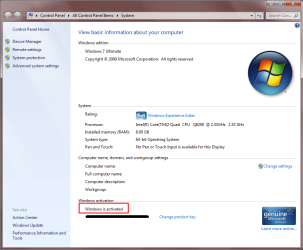
Am I activated or not activated?

zippster

New member
Local time
4:51 AM
Messages
4
I have a retail upgrade copy of Win7. I did a clean install on a new hard drive using custom install. I unchecked Automatically activate windows and entered my product key. It would not let me continue because it said my product key was only valid for an upgrade. So I left the product key blank and it continued with the install. After the install successfully completed I tried to manually activate with my product key. Again it said the product key was not valid. So now I try the Registry workaround. Downloaded the .reg file, executed it and did the slmgr -rearm. This time when I tried to activate I got a message saying there was a rearm violation (or something like that) and when I tried again it said I needed to reinstall Win7. So now I do a reinstall except this time I do an upgrade instead of custom since now I have a copy of windows installed. When it gets to the activation screen this time I left Automatically update checked entered my key and it accepted it. So I figure all my problems are solved until I go to check the activation screen and it says will Automatically update in 2 days and shows a different key from the one I entered. So Am I activated or not activated and if not what's going on?
 

My Computer

OS
xp
To check if you are activated, right click on computer and go to properties.

It will tell you in the bottom section.
 

Attachments

  • activation.png
    activation.png
    45.7 KB · Views: 214

My Computer

Computer Manufacturer/Model Number
Custom Hack job
OS
Windows 7 Ultimate 64 bit
CPU
Intel(R) Core(TM)2 Quad CPU Q8200 @ 2.33GHz
Motherboard
GigaByte EP45-UD3
Memory
8 GB Kingston
Graphics Card(s)
Nvidia GeForce 9600GT
Sound Card
Soundblaster Audigy
Monitor(s) Displays
AOC x2 22"
Hard Drives
2 x Samsung 500GB (RAID)
2 x Samsung 2TB
1 x WD Green 2TB
1 x Seagate 1TB
1 x Samsung 500GB
PSU
Thermaltake QFan 750W
Case
CM Scout Gaming
Cooling
Coolermaster V10
Keyboard
Microsoft Wireless Keyboard 1000
Mouse
Microsoft Wireless Optical 2000
Internet Speed
320
Other Info
Winfast PVR2000CP
LG DVD-RAM DVD/RW/DL Super Multi
Linksys WMP300Nx2 Wireless Adapter
you have to activate your copy of windows which it will automatically do in 2 days, or click the activate now link
yes you will see a different key to the one you entered so to answer your question no you are not activated at this particular time
 

My Computer

Computer type
PC/Desktop
Computer Manufacturer/Model Number
self build
OS
win 7 ultimate32bit, Win8.1pro wmc 32bit
CPU
amd phenom x4 9600
Motherboard
asus m2n32-sli deluxe
Memory
corsair twinxs 2x2gb
Graphics Card(s)
2x nvidia 1gb 8500gt
Sound Card
onboard
Monitor(s) Displays
23" PB Viseo 233d
Screen Resolution
1920x1080
Hard Drives
maxtor sata 500gb
maxtor sata 320gb
fujitsu sata200gb
PSU
oryxx tornado 750w
Case
thermaltake xaser lll
Cooling
artic freezer64 pro + 7 case fans
I just reread your post.
Did you use the UPGRADE version of Windows? It's a bit cheaper than the regular one and has upgrade written on the box (pic below of a home upgrade box). In Vista you couldn't do fresh installs with this release, only upgrades. i.e. install XP first and then upgrade.

I read a post yesterday where GregRocker posted on this forum that if you install again and choose 'repair' you are able to install over the top and the upgrade key will work. I haven't tested this though.

The post is here to get the info straight from the horses mouth (sorry Greg ;) ).
http://www.sevenforums.com/installa...nt-offer-boot-disk-required-2.html#post452781
 

Attachments

  • offer_detail_student.jpg
    offer_detail_student.jpg
    4.8 KB · Views: 791

My Computer

Computer Manufacturer/Model Number
Custom Hack job
OS
Windows 7 Ultimate 64 bit
CPU
Intel(R) Core(TM)2 Quad CPU Q8200 @ 2.33GHz
Motherboard
GigaByte EP45-UD3
Memory
8 GB Kingston
Graphics Card(s)
Nvidia GeForce 9600GT
Sound Card
Soundblaster Audigy
Monitor(s) Displays
AOC x2 22"
Hard Drives
2 x Samsung 500GB (RAID)
2 x Samsung 2TB
1 x WD Green 2TB
1 x Seagate 1TB
1 x Samsung 500GB
PSU
Thermaltake QFan 750W
Case
CM Scout Gaming
Cooling
Coolermaster V10
Keyboard
Microsoft Wireless Keyboard 1000
Mouse
Microsoft Wireless Optical 2000
Internet Speed
320
Other Info
Winfast PVR2000CP
LG DVD-RAM DVD/RW/DL Super Multi
Linksys WMP300Nx2 Wireless Adapter
I have a retail upgrade copy of Win7. I did a clean install on a new hard drive using custom install. I unchecked Automatically activate windows and entered my product key. It would not let me continue because it said my product key was only valid for an upgrade. So I left the product key blank and it continued with the install. After the install successfully completed I tried to manually activate with my product key. Again it said the product key was not valid. So now I try the Registry workaround. Downloaded the .reg file, executed it and did the slmgr -rearm. This time when I tried to activate I got a message saying there was a rearm violation (or something like that) and when I tried again it said I needed to reinstall Win7. So now I do a reinstall except this time I do an upgrade instead of custom since now I have a copy of windows installed. When it gets to the activation screen this time I left Automatically update checked entered my key and it accepted it. So I figure all my problems are solved until I go to check the activation screen and it says will Automatically update in 2 days and shows a different key from the one I entered. So Am I activated or not activated and if not what's going on?

Dont guess, and lets get this done. If you are in the US call this number 888 725 1047. Activate by touch tone phone. If that does not work a person will speak to you. Then you will be good to go.
 

My Computer

Computer type
PC/Desktop
Computer Manufacturer/Model Number
Dell XPS 420
OS
Windows 10, Home Clean Install
CPU
Intel Core2 processsor Q8200(2.33Ghz 1333FSB) Quad Core Tech
Motherboard
Dell
Memory
6 gb
Graphics Card(s)
ATI Radeon 256MB HD3650
Sound Card
Intergrated 7.1 Channel Audio
Monitor(s) Displays
Dell SP2009W 20"
Hard Drives
640 GB Serial ATA Hard drive
Cooling
Fan
Keyboard
Dell USB Keyboard
Mouse
Dell Premium Optical USB
Internet Speed
DSL 2.85
Yes, It is the upgrade version. I tried activating again this time leaving the key that was generated instead of my product key and it worked. I'm happy but confused. I don't recall reading anywhere not to change the generated key to the product key when activating.
 

My Computer

OS
xp
Actually I believe that you accidentally came across the one of the methods for "upgrading" while doing a clean install that I've seen several times. You install it first with no key, then upgrade in place using your key.

If the activation completes then, run windows media player and let it do the genuine advantage thing (ugh), if that takes then you should be good on that machine.
 

My Computer

Computer Manufacturer/Model Number
Scratch built
OS
Windows 7 x64 Ultimate
CPU
i7 960
Motherboard
Asus P6X58D
Memory
12 Gig Corsair Dominator
Graphics Card(s)
Nvidia 480
Sound Card
Maudio Delta 44 + breakout box
Monitor(s) Displays
Dell UltraSharp U2410 24in and Samsung 21 dual monitors
Screen Resolution
1920x1200 and 1280x1024
Hard Drives
Primary: Intel X-25M G2 160G SSD
Secondary: Segate baracuda 1.0 TB
HDs in AHCI mode.
PSU
Corasair TX850
Case
Cooler Master HAF
Cooling
Corsair H50
Keyboard
Logitech G15 + N52 game pad
Mouse
Logitech MX518
Internet Speed
15kbs down 4.5kbps up
Other Info
WEI 7.6
CPU & RAM 7.6
Graphics 7.9
Hard disk 7.7
When you did the repair install, the installer saw an OS already there and allowed you to insert the upgrade version key.

Then it only needed activation at the Computer>Properties link. It should be activated on your inserted key.
 
Back
Top