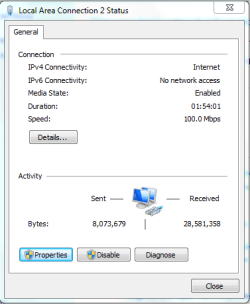
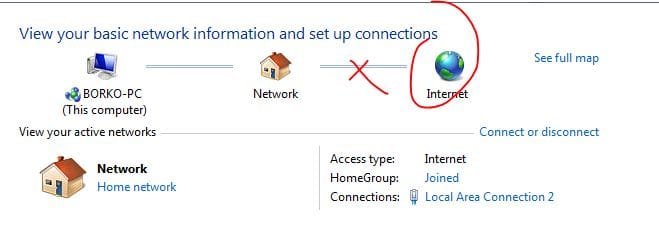
Amazing Network Problem.

Download the Chipset / LAN / SATA Raid driver for your motherboard, Vista 32 or 64 bit depending on which Win 7 you have installed.

GIGABYTE - Support&Download - Motherboard - Driver - GA-M61VME-S2 (rev. 1.0)
Run the .exe. Let it extract. Then manually install only the network part through the device manager, under network adapters, by pointing to the .inf in the ethernet folder.

If that doesn't help, I'd check your router is not denying internet access (as opposed to intranet, which seems to be working since you see other pc.) Turn on the logs if you gotta. Basically, ensure there's no filter against your machine by either direct exclusion or that it only allows registered machines by mac address to access the net.

Try disabling the dns client service and rebooting. Absolutely make sure that there is no Bonjour service present in services or program files or any mdnsresponder.exe in task manager. If there is let us know so we can help ya fix it. Use Malwarebytes to scan your system.

Can you successfully ping ip addresses, like Google's? Try from command prompt:

ping 74.125.127.100
 

My Computer

Computer Manufacturer/Model Number
self built
OS
7600.20510 x86
CPU
P4 550 3.4 GHz HT running at 3.5 GHz
Motherboard
MSI PM8M3-V (MS-7211 v1.x) Micro-ATX mainboard
Memory
OCZ 2 GB(2x1GB) DDR400mHz running @ 414 mHz
Graphics Card(s)
HIS Radeon HD 3850 IceQ 3 Turbo HDMI Dual DL-DVI AGP
Sound Card
MOTU Traveler firewire studio interface 192 kHz 24 bit
Monitor(s) Displays
22" widescreen Acer X223W LCD, 17" Compaq P75 CRT
Screen Resolution
1680x1050 and 1280x1024
Hard Drives
SATA I x2 WD, 400 GB and 120 GB, SATA 2 WD Caviar Black 1 TB
PSU
350W generic
Case
Cybertronpc, it glows blue
Cooling
stock cpu fan, Ice-Q 3 gpu and system, many case fans
Keyboard
Logitch Classical Keyboard 200
Mouse
Logitech Mediaplay cordless
Internet Speed
1792/448 kbits/sec
Other Info
SATA II PCI fake RAID adapter, 1 GB Readyboost, original ATI Remote Wonder (even works with WMC perfectly), Logitech Rumblepad 2 game controller x2
these are the settings i use..

And umm, i set up a connection, it asked me for my ISP name and password, and when i tried to connect it gave me that error..

292pclw.png


I dont know whats going on.. If i cant fix it within 30 minutes, i am going back to XP guys.. I love windows 7 so much, but i cant live without internet so i have to go back ;(
 

My Computer

Computer Manufacturer/Model Number
Custom Made By Me
OS
XP
CPU
AMD Athlon x2 64 3800+
Motherboard
Gigabyte / GA-M61VME-S2
Memory
Kingston 4 GB / DDR2
Uhhh if you are setting the DNS server to the router, then no you will not beable to connect to the internet via domain names unless the router is also running an DNS server or forwarder (not likely). Instead use OpenDNS's for your DNS settings.

OpenDNS's IPs:
208.67.222.222
208.67.220.220

Another thing to try for now is to turn off Windows Firewall.
 

My Computer

Computer type
PC/Desktop
Computer Manufacturer/Model Number
Alienware Aurora ALX R4
OS
Windows 10 Pro (x64)
CPU
Intel Core i7-3930K (3.2GHz - 4.5GHz)
Motherboard
Alienware Aurora-R4 x79
Memory
4x Samsung 4GB PC3-12800 DDR3 (16GB 1600MHz)
Graphics Card(s)
Nvidia Geforce GTX 690
Sound Card
SteelSeries Siberia Elite
Monitor(s) Displays
Dell UltraSharp U3011
Screen Resolution
2560x1600
Hard Drives
Samsung 850 Pro 256 GB, Seagate 1TB Desktop Hybrid HDD, 2x Western Digital 4TB Green HDD
PSU
875W Some Dell PSU <.<
Case
Alienware Aurora ALX
Cooling
Custom Liquid Cooling (EK CPU & GPU blocks) dual EK 480RAD
Keyboard
Logitech G710+ Mechanical
Mouse
Logitech G700s
Internet Speed
Verizon Fios (50 mbps average)
Other Info
Server: Intel NUC D54250WYK: i5-4250U, 16GB, 256 GB mSATA, Windows Server 2012 R2
Last edited:

My Computer

Computer Manufacturer/Model Number
DELL XPS 700
OS
Windows 7 Ultimate x64, Windows Vista Ultimate x64 and Windows 2003 Datacenter Server x64 Edition
CPU
Intel Core 2 Quad CPU Q6600 @ 2.40GHz (4 CPUs)
Motherboard
nForce 590 SLI Intel Edition
Memory
8.00 GB DDR2 RAM @ 800MHz
Graphics Card(s)
nVidia GeForce 260 GTX 896MB DDR3 and AGEIA PhysX Card
Sound Card
Creative SB X-Fi Xtreme Music
Monitor(s) Displays
DELL ST2410
Screen Resolution
1920 x 1080
Hard Drives
4 x 250 GB SATA HDDs
PSU
Dell Dimension 1100 Watt Power Supply
Case
DELL Custom
Keyboard
Microsoft Razer Reclusa
Mouse
Microsoft USB IntelliMouse Explorer 3.0
HI there
I've posted on this a number of times

Some NIC's (and Wireless as well) just DO NOT WORK with W7 whatever the Device manager says about the device is working.
Some work with X-86 and not X-64.

(I had the same problem with VISTA X-64 BTW). A typical Network card that doesn't work is the onboard VIA VELOCITY FAMILY gigabyte ethernet card. W7 has updates but it still doesn't work.

If you are in this situation I'd advise spending around 5 USD / 3 GBP / EUR to get a USB===>LAN adapter - these work fine and avoid a lot of this frustration).

Routers in general aren't normally a problem if they are reasonably new (i.e not more than 3 - 4 years old).

Your symptoms (the IPV4 address) are typical of a NIC that just won't work with W7 I'm afraid.

Believe me I've done all the other tricks / registry hacks / switching off Firewalls / disabling IPV6 etc etc.

Funny thing is that the card works fine in XP and XP-64 bit edition. It also works in W7 X-86 and vista x-86.

XP 64 doesn't actually use 64 bit working for the NIC card (uses WOW) so I suspect that the firmware in the NIC card is not capable of the 64 bit working in the case of W7 / Vista (both X-64 bit versions).

As older stock gets used up I suspect this problem will disappear.

Cheers
jimbo
 

My Computer

Computer type
PC/Desktop
Computer Manufacturer/Model Number
Custom built, several laptops HP/ASUS
OS
Linux CENTOS 7 / various Windows OS'es and servers
CPU
Intel i7 Intel i5
Memory
8GB, 16GB
Graphics Card(s)
On Motherboard
Sound Card
Realtek HD audio
Monitor(s) Displays
Apple Cinema display, Samsung LCD
Screen Resolution
1920 X 1080
Hard Drives
4 X 1TB SATA
Mouse
Toshiba wireless laser
Internet Speed
> 20MB up
Uhhh if you are setting the DNS server to the router, then no you will not beable to connect to the internet via domain names unless the router is also running an DNS server or forwarder (not likely). Instead use OpenDNS's for your DNS settings.

OpenDNS's IPs:
208.67.222.222
208.67.220.220

Another thing to try for now is to turn off Windows Firewall.
almost all soho routers run dns forwarders.


not being assigned an ip address has nothing to do with a software firewall running
 

My Computer

Computer Manufacturer/Model Number
Black_Box (homebuilt)
OS
windows 7 RTM x64
CPU
Phenom II 965 Quad Core 3.4Ghz
Motherboard
Asus M4A79T Deluxe
Memory
Mushkin Blackline 8GB (4x2gb)
Graphics Card(s)
XFX Radeon 5970 Black Edition
Sound Card
onboard
Monitor(s) Displays
Dell 2408WPF-main Dell E248WFP-secondary
Screen Resolution
1920x1200-main 1920x1200-secondary
Hard Drives
OCZ Vertex Limited Edition 100GB (OS)
x1 WD Black Edition 500GB drive (Storage)
PSU
XFX 850w Black Edition (Modular)
Case
Mountian Mods H2go
Cooling
CoolITSystems ECO A.L.C.
Keyboard
Logitech MX 5500 wireless keyboard
Mouse
Razor Copperhead
Internet Speed
16Mb down/2Mb up Wowway Cable Internet
So, after you installed Windows 7, you didn't configure your wireless network? Normally when you install 7, if Windows can activate the wifi card it will notify you of a wireless network while you are installing the operating system. You will select the network, enter your security credentials, and then be able to connect to the internet.

Did you do any of this?
 

My Computer

Computer Manufacturer/Model Number
Dell XPS 15 L502x
OS
Windows 7 Ultimate x64 SP1
CPU
Core i7-2670QM
Memory
8GB DDR3 PC3-10600
Graphics Card(s)
Intel HD Graphics 3000 + GeForce GT 540M
Screen Resolution
1920x1080
Hard Drives
1TB 5400RPM Seagate
Can you take a screenshot of ipconfig /all after you setup the static ip address?

Jimbo, that would definitely be a good explanation but I'm slightly hesitant to lean towards that being that problem because the OP said he could "see" another pc on the lan. My guess is if the driver will not work in 7, it would impossible to "see" anything. And NVidia would probably have made a driver by now that does work, right? hrrmmm
 

My Computer

Computer Manufacturer/Model Number
self built
OS
7600.20510 x86
CPU
P4 550 3.4 GHz HT running at 3.5 GHz
Motherboard
MSI PM8M3-V (MS-7211 v1.x) Micro-ATX mainboard
Memory
OCZ 2 GB(2x1GB) DDR400mHz running @ 414 mHz
Graphics Card(s)
HIS Radeon HD 3850 IceQ 3 Turbo HDMI Dual DL-DVI AGP
Sound Card
MOTU Traveler firewire studio interface 192 kHz 24 bit
Monitor(s) Displays
22" widescreen Acer X223W LCD, 17" Compaq P75 CRT
Screen Resolution
1680x1050 and 1280x1024
Hard Drives
SATA I x2 WD, 400 GB and 120 GB, SATA 2 WD Caviar Black 1 TB
PSU
350W generic
Case
Cybertronpc, it glows blue
Cooling
stock cpu fan, Ice-Q 3 gpu and system, many case fans
Keyboard
Logitch Classical Keyboard 200
Mouse
Logitech Mediaplay cordless
Internet Speed
1792/448 kbits/sec
Other Info
SATA II PCI fake RAID adapter, 1 GB Readyboost, original ATI Remote Wonder (even works with WMC perfectly), Logitech Rumblepad 2 game controller x2
these are the settings i use..

And umm, i set up a connection, it asked me for my ISP name and password, and when i tried to connect it gave me that error..

292pclw.png


I dont know whats going on.. If i cant fix it within 30 minutes, i am going back to XP guys.. I love windows 7 so much, but i cant live without internet so i have to go back ;(
You may better configure your internet connection (direct; instead of PPOE) in accordance with a guide as provided by your local ISP...
 

My Computer

Computer Manufacturer/Model Number
DELL XPS 700
OS
Windows 7 Ultimate x64, Windows Vista Ultimate x64 and Windows 2003 Datacenter Server x64 Edition
CPU
Intel Core 2 Quad CPU Q6600 @ 2.40GHz (4 CPUs)
Motherboard
nForce 590 SLI Intel Edition
Memory
8.00 GB DDR2 RAM @ 800MHz
Graphics Card(s)
nVidia GeForce 260 GTX 896MB DDR3 and AGEIA PhysX Card
Sound Card
Creative SB X-Fi Xtreme Music
Monitor(s) Displays
DELL ST2410
Screen Resolution
1920 x 1080
Hard Drives
4 x 250 GB SATA HDDs
PSU
Dell Dimension 1100 Watt Power Supply
Case
DELL Custom
Keyboard
Microsoft Razer Reclusa
Mouse
Microsoft USB IntelliMouse Explorer 3.0
guys,i have similar problem here...it is very strange...
i had WIN OS ,SP2...and i upgrade it to WIN 7 PROFESIONAL EDITION...and,my problem is: when i restart my PC i dont have internet access...
sometimes,when i restart 2,3 times in a row then i get my internet connection...and,when i got it,there is yellow triangle on Netwok icon but i can use internet...
i tried to restart router and there is a still same problem...
this is my sytem confing DxDiag.rar View attachment DxDiag.txt

Capture1.PNG

Capture2.PNG

Capture3.JPG
 

My Computer

Computer Manufacturer/Model Number
System manufacturer
OS
Windows 7 Ultimate 32-bit
CPU
AMD Sempron(tm) Processor 3200+, ~1.8GHz
Motherboard
ADUSTek M2N68-AM SE2
Memory
1536MB RAM
Graphics Card(s)
NVIDIA GeForce 7300 GT
Sound Card
Speakers (Realtek High Definition Audio)
Monitor(s) Displays
SAMSUNG Sync Master 753s
Hard Drives
1. Maxtor 6 Y080M0 SCSI Disk Device (80 GB, 7200 RPM, SATA)
2. WDC WD32 00AAKS-22B3A SCSI Disk Device (298 GB)
PSU
Rex Power 500W
Back
Top