Solved Amazon cookies issue in IE9

Carnivore

New member
Member
Local time
1:42 AM
Messages
28
I keep gettiing:

Please Enable Cookies to Continue
To continue shopping at Amazon.com, please enable cookies in your Web browser. Learn more about cookies and how to enable them. Once you have enabled cookies in your browser, please click on the button below to return to the previous page.

I've tried lowering security settings, overriding cookie handling to allow everything, cleared cache, cookies and everything else, and even reset Internet Explorer entirely. I also tried with no Antivirus running.

Is this a known issue? It just started happening for me.

Oh, and yes Firefox works, but I want to get to the bottom of it so I can have the option of using IE9 if I want. Plus I have items saved in my cart that FF can't see.
 

My Computer My Computer

Computer type
PC/Desktop
Computer Manufacturer/Model Number
System Builder
OS
Windows 7 Professional x64 (Retail)
CPU
AMD Phenom II X3 720
Motherboard
Asus M3A78-EM
Memory
8GB Patriot 800MHz DDR2 4-4-4-12
Graphics Card(s)
ATI 3200 (onboard)
Sound Card
Realtek onboard & M-Audio Delta 66
Monitor(s) Displays
Dell 2209WA
Hard Drives
Sandisk 2240GB SSD
Several non-raid SATA drives for storage
PSU
Antec 400W
Case
Antec
Cooling
Arctic Cooling
Keyboard
Logitech Illuminated
Mouse
Microsoft Comgort Mouse 6000
Internet Speed
Verizon FiOS 50/25
Hello Carnivore,

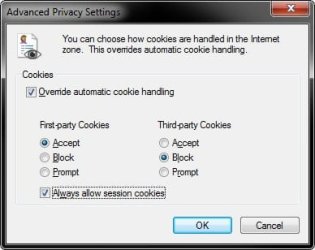
Do you have your cookie settings in IE9 set like below to allow cookies? After you are finished shopping at Amazon, you can set it to block cookies again if you like. :)

cookies.jpg

Hope this helps,
Shawn
 

My Computer My Computer

Computer type
PC/Desktop
Computer Manufacturer/Model Number
Self built custom
OS
64-bit Windows 11 Pro for Workstations
CPU
Intel i7-8700K OC'd to 5 GHz
Motherboard
ASUS ROG Maximus XI Formula Z390
Memory
64 GB (4x16GB) G.SKILL TridentZ RGB DDR4 3600 MHz
Graphics Card(s)
ASUS ROG-STRIX-GTX1080TI-O11G-GAMING
Sound Card
Integrated
Monitor(s) Displays
2 x Samsung Odyssey G7 27"
Screen Resolution
2560x1440
Hard Drives
1TB Samsung 990 PRO M.2,
4TB Samsung 990 PRO PRO M.2,
TerraMaster F8 SSD Plus NAS
PSU
Seasonic Prime Titanium 850W
Case
Thermaltake Core P3
Cooling
Corsair Hydro H115i
Keyboard
Logitech wireless K800
Mouse
Logitech MX Master 4
Internet Speed
2 Gb/s Download and 100 Mb/s Upload
Antivirus
Malwarebyte Anti-Malware Premium
Browser
Google Chrome
Other Info
Logitech Z625 speaker system,
Logitech BRIO 4K Pro webcam,
HP Color LaserJet Pro MFP M477fdn,
APC SMART-UPS RT 1000 XL - SURT1000XLI,
Galaxy S23 Plus phone
Yes I do, actually. I also tried setting it to allow third-party cookies as well but I'm still getting the error.
 

My Computer My Computer

Computer type
PC/Desktop
Computer Manufacturer/Model Number
System Builder
OS
Windows 7 Professional x64 (Retail)
CPU
AMD Phenom II X3 720
Motherboard
Asus M3A78-EM
Memory
8GB Patriot 800MHz DDR2 4-4-4-12
Graphics Card(s)
ATI 3200 (onboard)
Sound Card
Realtek onboard & M-Audio Delta 66
Monitor(s) Displays
Dell 2209WA
Hard Drives
Sandisk 2240GB SSD
Several non-raid SATA drives for storage
PSU
Antec 400W
Case
Antec
Cooling
Arctic Cooling
Keyboard
Logitech Illuminated
Mouse
Microsoft Comgort Mouse 6000
Internet Speed
Verizon FiOS 50/25

My Computer My Computer

Computer type
PC/Desktop
Computer Manufacturer/Model Number
Self built custom
OS
64-bit Windows 11 Pro for Workstations
CPU
Intel i7-8700K OC'd to 5 GHz
Motherboard
ASUS ROG Maximus XI Formula Z390
Memory
64 GB (4x16GB) G.SKILL TridentZ RGB DDR4 3600 MHz
Graphics Card(s)
ASUS ROG-STRIX-GTX1080TI-O11G-GAMING
Sound Card
Integrated
Monitor(s) Displays
2 x Samsung Odyssey G7 27"
Screen Resolution
2560x1440
Hard Drives
1TB Samsung 990 PRO M.2,
4TB Samsung 990 PRO PRO M.2,
TerraMaster F8 SSD Plus NAS
PSU
Seasonic Prime Titanium 850W
Case
Thermaltake Core P3
Cooling
Corsair Hydro H115i
Keyboard
Logitech wireless K800
Mouse
Logitech MX Master 4
Internet Speed
2 Gb/s Download and 100 Mb/s Upload
Antivirus
Malwarebyte Anti-Malware Premium
Browser
Google Chrome
Other Info
Logitech Z625 speaker system,
Logitech BRIO 4K Pro webcam,
HP Color LaserJet Pro MFP M477fdn,
APC SMART-UPS RT 1000 XL - SURT1000XLI,
Galaxy S23 Plus phone
Yes I did both of those things. In fact I just went back and reset IE9 again, making sure to check the box to Delete Personal Settings. Same issue.

I went back to settings to override cookies but it didn't help.

Restored advanced settings. Added Amazon to permitted sites in the Privacy tab. Lowered Internet zone security to lowest level. The problem persists.

sfc /scannow came up clean.

---

UPDATE:
I uninstalled IE9 following the instructions on this site, but got the the same problem even with IE8.

Then I reinstalled IE9 but the problem persists.
 
Last edited:

My Computer My Computer

Computer type
PC/Desktop
Computer Manufacturer/Model Number
System Builder
OS
Windows 7 Professional x64 (Retail)
CPU
AMD Phenom II X3 720
Motherboard
Asus M3A78-EM
Memory
8GB Patriot 800MHz DDR2 4-4-4-12
Graphics Card(s)
ATI 3200 (onboard)
Sound Card
Realtek onboard & M-Audio Delta 66
Monitor(s) Displays
Dell 2209WA
Hard Drives
Sandisk 2240GB SSD
Several non-raid SATA drives for storage
PSU
Antec 400W
Case
Antec
Cooling
Arctic Cooling
Keyboard
Logitech Illuminated
Mouse
Microsoft Comgort Mouse 6000
Internet Speed
Verizon FiOS 50/25
Found the problem. https://amazon.com found its way into my Restricted Sites list. I have no idea how it got added but I'm surprised that the Reset and reinstalls apparently didn't clear the list.
 

My Computer My Computer

Computer type
PC/Desktop
Computer Manufacturer/Model Number
System Builder
OS
Windows 7 Professional x64 (Retail)
CPU
AMD Phenom II X3 720
Motherboard
Asus M3A78-EM
Memory
8GB Patriot 800MHz DDR2 4-4-4-12
Graphics Card(s)
ATI 3200 (onboard)
Sound Card
Realtek onboard & M-Audio Delta 66
Monitor(s) Displays
Dell 2209WA
Hard Drives
Sandisk 2240GB SSD
Several non-raid SATA drives for storage
PSU
Antec 400W
Case
Antec
Cooling
Arctic Cooling
Keyboard
Logitech Illuminated
Mouse
Microsoft Comgort Mouse 6000
Internet Speed
Verizon FiOS 50/25
That is strange. I would have thought that resetting IE9 completely would have as well.
 

My Computer My Computer

Computer type
PC/Desktop
Computer Manufacturer/Model Number
Self built custom
OS
64-bit Windows 11 Pro for Workstations
CPU
Intel i7-8700K OC'd to 5 GHz
Motherboard
ASUS ROG Maximus XI Formula Z390
Memory
64 GB (4x16GB) G.SKILL TridentZ RGB DDR4 3600 MHz
Graphics Card(s)
ASUS ROG-STRIX-GTX1080TI-O11G-GAMING
Sound Card
Integrated
Monitor(s) Displays
2 x Samsung Odyssey G7 27"
Screen Resolution
2560x1440
Hard Drives
1TB Samsung 990 PRO M.2,
4TB Samsung 990 PRO PRO M.2,
TerraMaster F8 SSD Plus NAS
PSU
Seasonic Prime Titanium 850W
Case
Thermaltake Core P3
Cooling
Corsair Hydro H115i
Keyboard
Logitech wireless K800
Mouse
Logitech MX Master 4
Internet Speed
2 Gb/s Download and 100 Mb/s Upload
Antivirus
Malwarebyte Anti-Malware Premium
Browser
Google Chrome
Other Info
Logitech Z625 speaker system,
Logitech BRIO 4K Pro webcam,
HP Color LaserJet Pro MFP M477fdn,
APC SMART-UPS RT 1000 XL - SURT1000XLI,
Galaxy S23 Plus phone
Back
Top