

Does the AMD CCC that is installed depend on the graphics chipset (i.e. different interface for different chipsets)?
When I install an AMD graphics card, the display always appears underscanned by about 10%.
On my main desktop, I can open CCC and adjust the overscan and underscan.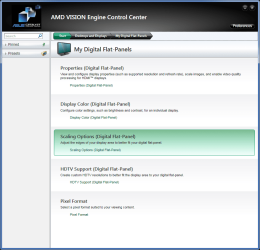 I've been trying an old HDD in another box.
I'm using the onboard graphics chip set (using the HDMI output).
The display appears to be underscanned by ~10%.
The CCC on this machine looks completely different and it has no adjustments for overscan and underscan.
Everything is presets, so nothing can be adjusted (apart from 3D settings).
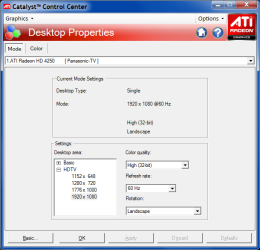 The irony is that despite all of the complaints about drivers in Linux Distros, Linux Mint 16 "just worked" (i.e. proper resolution and scan width).
Does anyone know how I can fix the underscan issue?
Can I just download a different version of CCC and install it?
When I install an AMD graphics card, the display always appears underscanned by about 10%.
On my main desktop, I can open CCC and adjust the overscan and underscan.
I'm using the onboard graphics chip set (using the HDMI output).
The display appears to be underscanned by ~10%.
The CCC on this machine looks completely different and it has no adjustments for overscan and underscan.
Everything is presets, so nothing can be adjusted (apart from 3D settings).
Does anyone know how I can fix the underscan issue?
Can I just download a different version of CCC and install it?
My Computer
- Computer type
- PC/Desktop
- Computer Manufacturer/Model Number
- n/a
- OS
- W7 Ultimate SP1, LM19.2 MATE, W10 Home 1703, W10 Pro 1703 VM, #All 64 bit
- CPU
- AMD Phenom II x6 1100T, 3.3 GHz
- Motherboard
- ASUS M4A88T-M/USB3 (AM3)
- Memory
- 12GB DDR3 1333 G-Skill (4GB x 2), G-Skill (2GB x 2)
- Graphics Card(s)
- NVIDIA GeForce GTX 660
- Sound Card
- Realtek?
- Monitor(s) Displays
- Samsung S23B350
- Screen Resolution
- 1920x1080
- Hard Drives
- WD Green 2TB (SATA), WD Green 3TB (SATA), WD Blue 4TB (SATA), WD Blue 6TB (SATA)
- PSU
- Cooler Master
- Case
- Antec GX300 Tower
- Cooling
- 3x Antec TRICOOL 120mm Fans
- Mouse
- Wired Optical
- Internet Speed
- DSL
- Antivirus
- Avast
- Browser
- Pale Moon (64 bit)
- Other Info
- 2018-12-27 Upgraded HDDs
2015-12-10 Upgraded case, graphics card, storage
2015-08-15 Upgraded motherboard & RAM
2015-07-15 Upgraded LM17.1 to LM17.2


