Amd FX 8350 Driver Update

Xp4me

New member
Member
Local time
6:03 AM
Messages
65
I'm sure many people have asked this question before, but nothing comes up when using the search feature on this site.

Is there a AMD FX 8350 driver update available?

One would think that you should be able to just get it from the amd support page for your particular processor, but no.

Microsoft has one, well kind of, if you don't mind taking a chance of dealing with the possible problem it may cause and then having to install a hotfix to repair that problem. An update is available for computers that have an AMD FX, AMD Opteron 4200, AMD Opteron 6200, or AMD Bulldozer series processor installed and that are running Windows 7 or Windows Server 2008 R2Is there or is there not a AMD FX 8350 driver to replace the Microsoft 2006 driver???

Thanks all,
Bruce
 

My Computer

Computer type
PC/Desktop
Computer Manufacturer/Model Number
Custom build
OS
XP 32 Bit & Win 7 64 Bit
CPU
FX 8350 AMD 8 - Core
Motherboard
Gigabyte 990FXA-UD5
Memory
Mushkin Silverline 8GB x2 16GB
Graphics Card(s)
MSI Twin Frozr Geforce GTX 660
Hard Drives
SSD Samsung SSD 840 EVO
HDD Seagate Barracuda ST3000DM001 3TB
Antivirus
Bitdefender Internet Security
Browser
Firefox
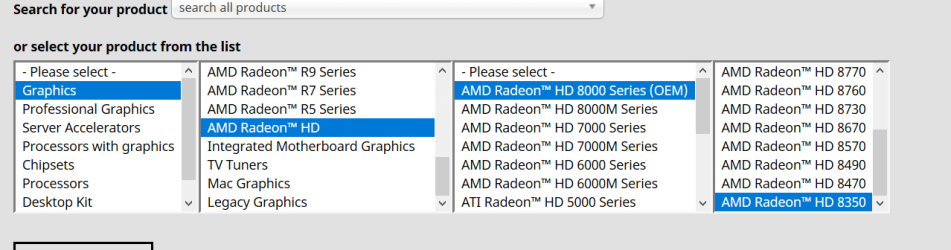
here you go Bruce,graph.PNG
 

My Computer

Computer type
PC/Desktop
Computer Manufacturer/Model Number
medionl/Aspire 6930G/acer x55a
OS
W7 home premium 32bit/W7HP 64bit/w10 tp insider ring
CPU
E5300 dual core
Motherboard
medion MS7366
Memory
3gb
Graphics Card(s)
Nvidia Geforce 7100 Nforce 630i
Monitor(s) Displays
avixc
Internet Speed
n (isp resticted to 72)
Antivirus
mse/pands
Browser
palemoon
Other Info
Belkin Fd7050 n USB using Railink RT2870 drivers, more upto date
The AMD FX CPUs had hybrid cores where each core had its own integer unit but two cores shared a floating point unit. This complicated Windows assigning cores to programs. I think that is what the update you referred to was about. There have no updates since then.

That's wrong. The OP asked about an AMD FX-8350 processor not a AMD HD 8350 graphics card.

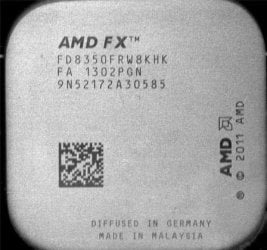
Below is a photo I took of the AMD FX-8350 I have in one of my computers.

FX8350#2.jpg
 

My Computers

System One System Two

  • Computer type
    PC/Desktop
    Computer Manufacturer/Model Number
    Custom build
    OS
    Windows 7 Home Premium 64-bits
    CPU
    AMD FX-8350
    Motherboard
    Gigabyte GA-990FXA-UD3 (AM3+)
    Memory
    GSKILL Ripjaw-X PC3 12800 8GB (2x4GB)
    Graphics Card(s)
    ASUS ROG STRIX GTX 1060 6GB
    Sound Card
    Integrated
    Monitor(s) Displays
    Asus VE228H (21.5-in)
    Screen Resolution
    1920x1080 60Hz
    Hard Drives
    SAMSUNG 870 EVO 2.5 Inch SATA SSD (1TB)
    SAMSUNG 870 EVO 2.5 Inch SATA SSD (1TB)
    SAMSUNG 870 EVO 2.5 Inch SATA SSD (1TB)
    PSU
    Corsair RM750x (750 watts)
    Case
    Corsair Carbide Series 200R
    Cooling
    Corsair Hydro Series H60 (CWCH60)
    Keyboard
    Logitech Elite
    Mouse
    Logitech M510 Wireless Mouse
    Internet Speed
    Comcast Gigabit Extra (1200Mbps down / 35Mbps up)
    Antivirus
    Malwarebytes
    Browser
    Firefox, Edge, Chrome
    Other Info
    ASUS DRW-24B1ST DVD-RW (24X) optical drive
    Seagate Expansion Desk (5TB) external SATA/USB HDD
    Comcast XB8 Internet Gateway
  • Computer type
    PC/Desktop
    System Manufacturer/Model Number
    Custom
    OS
    Windows 7 Pro (64-bit)
    CPU
    AMD Phenom II 960T X4
    Motherboard
    ASUS M4N82 Deluxe
    Memory
    Corsair XMS2 DDR2-800 8GB (4x2GB)
    Graphics Card(s)
    ASUS ENGTX560 DCII OC/2DI/1GD5 1GB
    Monitor(s) Displays
    Samsung 930B 19-inch LCD
    Screen Resolution
    1280x1024
    Hard Drives
    Samsung SSD 870 EVO 1000 GB (Windows 10)
    Seagate ST1000DM003 1000 GB (Windows 7)
    PSU
    Antec TruePower (new) TP-650
    Case
    Antec Three Hundred
    Cooling
    AMD stock cooler from FX8350
    Mouse
    Logitech M100
    Internet Speed
    Xfinity Gigabit Extra 1200/35 Mbps
The AMD FX CPUs had hybrid cores where each core had its own integer unit but two cores shared a floating point unit. This complicated Windows assigning cores to programs. I think that is what the update you referred to was about. There have no updates since then.

That's wrong. The OP asked about an AMD FX-8350 processor not a AMD HD 8350 graphics card.

Below is a photo I took of the AMD FX-8350 I have in one of my computers.

View attachment 420862

Thank you very much. Unfortunately, I don't like messing with Microsoft updates. I was just curious because the Performance Index program in widows 7 is giving my processor a score of 7.7 out of the best 7.9.
 

My Computer

Computer type
PC/Desktop
Computer Manufacturer/Model Number
Custom build
OS
XP 32 Bit & Win 7 64 Bit
CPU
FX 8350 AMD 8 - Core
Motherboard
Gigabyte 990FXA-UD5
Memory
Mushkin Silverline 8GB x2 16GB
Graphics Card(s)
MSI Twin Frozr Geforce GTX 660
Hard Drives
SSD Samsung SSD 840 EVO
HDD Seagate Barracuda ST3000DM001 3TB
Antivirus
Bitdefender Internet Security
Browser
Firefox
Thank you very much. Unfortunately, I don't like messing with Microsoft updates. I was just curious because the Performance Index program in widows 7 is giving my processor a score of 7.7 out of the best 7.9.
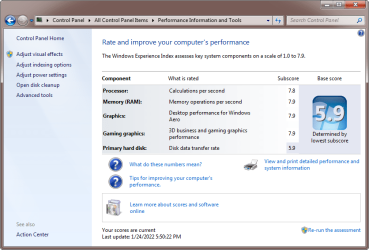
That's strange. My computer with an AMD FX-8350 got a CPU score of 7.8. I have a Gigabyte 990FXA-UD3 motherboard. I wonder if that makes a difference.
Windows 7 Performance.png
 

My Computers

System One System Two

  • Computer type
    PC/Desktop
    Computer Manufacturer/Model Number
    Custom build
    OS
    Windows 7 Home Premium 64-bits
    CPU
    AMD FX-8350
    Motherboard
    Gigabyte GA-990FXA-UD3 (AM3+)
    Memory
    GSKILL Ripjaw-X PC3 12800 8GB (2x4GB)
    Graphics Card(s)
    ASUS ROG STRIX GTX 1060 6GB
    Sound Card
    Integrated
    Monitor(s) Displays
    Asus VE228H (21.5-in)
    Screen Resolution
    1920x1080 60Hz
    Hard Drives
    SAMSUNG 870 EVO 2.5 Inch SATA SSD (1TB)
    SAMSUNG 870 EVO 2.5 Inch SATA SSD (1TB)
    SAMSUNG 870 EVO 2.5 Inch SATA SSD (1TB)
    PSU
    Corsair RM750x (750 watts)
    Case
    Corsair Carbide Series 200R
    Cooling
    Corsair Hydro Series H60 (CWCH60)
    Keyboard
    Logitech Elite
    Mouse
    Logitech M510 Wireless Mouse
    Internet Speed
    Comcast Gigabit Extra (1200Mbps down / 35Mbps up)
    Antivirus
    Malwarebytes
    Browser
    Firefox, Edge, Chrome
    Other Info
    ASUS DRW-24B1ST DVD-RW (24X) optical drive
    Seagate Expansion Desk (5TB) external SATA/USB HDD
    Comcast XB8 Internet Gateway
  • Computer type
    PC/Desktop
    System Manufacturer/Model Number
    Custom
    OS
    Windows 7 Pro (64-bit)
    CPU
    AMD Phenom II 960T X4
    Motherboard
    ASUS M4N82 Deluxe
    Memory
    Corsair XMS2 DDR2-800 8GB (4x2GB)
    Graphics Card(s)
    ASUS ENGTX560 DCII OC/2DI/1GD5 1GB
    Monitor(s) Displays
    Samsung 930B 19-inch LCD
    Screen Resolution
    1280x1024
    Hard Drives
    Samsung SSD 870 EVO 1000 GB (Windows 10)
    Seagate ST1000DM003 1000 GB (Windows 7)
    PSU
    Antec TruePower (new) TP-650
    Case
    Antec Three Hundred
    Cooling
    AMD stock cooler from FX8350
    Mouse
    Logitech M100
    Internet Speed
    Xfinity Gigabit Extra 1200/35 Mbps
Last edited:

My Computers

System One System Two

  • Computer type
    PC/Desktop
    Computer Manufacturer/Model Number
    Custom build
    OS
    Windows 7 x64 Ultimate
    CPU
    AMD FX 8350
    Motherboard
    ASUS Crosshair V Formula-Z
    Memory
    Corsair Dominator Platinum 32 GB @2133 Mhz
    Graphics Card(s)
    Sapphire 290 Tri-X 4GB
    Sound Card
    On board sound
    Monitor(s) Displays
    BenQ XL2410T
    Screen Resolution
    1920 x 1080
    Hard Drives
    C: Samsung SSD 860 EVO 500 GB
    D: Western Digital Caviar Black 500 GB
    E: SAMSUNG HD103UJ 1000 GB
    F: Western Digital Caviar Green 1000 GB
    PSU
    EVGA Supersonic 750 W GS
    Case
    Bitfenix Ghost (plastic shit)
    Cooling
    Zalman CNPS9700 LED (very old cooler)
    Keyboard
    Corsair K55 RGB Pro
    Mouse
    Corsair Ironclaw RGB
    Internet Speed
    Telia 100/100
    Antivirus
    Avast free version
    Browser
    Firefox
  • Computer type
    PC/Desktop
maybe try installing the KB2818604 amd microcode update for Win7 and run those benchmark tests again to see if that will make a difference or not

I always install this W7 update for any AMD based system

Thank you very much. Unfortunately, I don't like messing with Microsoft updates. I was just curious because the Performance Index program in widows 7 is giving my processor a score of 7.7 out of the best 7.9.

that MS hotfix is obsolete (and already moot & pointless) and may be included in recent kernel security updates for Win7 as it only updates the Ntoskrnl.exe & Powrprof.dll files
 

My Computer

Computer type
PC/Desktop
Computer Manufacturer/Model Number
Dell Inspiron 620
OS
Windows 7 SP1 Home Premium 64bit [x64]
CPU
Intel(R) Core(TM) i5-2310 CPU @ 2.90GHz
Memory
6 GB
Graphics Card(s)
Intel HD Graphics 2000
Sound Card
Conexant CX20641 HD Audio
Hard Drives
Western Digital 1TB (1024GB) WD10EALX-759BA1
Internet Speed
Spectrum Cable Internet up to 100Mbps
That's strange. My computer with an AMD FX-8350 got a CPU score of 7.8. I have a Gigabyte 990FXA-UD3 motherboard. I wonder if that makes a difference.
View attachment 420870
Yeah, my CPU and Memory use to always be at 7.8, but now it's down to 7.7 for some reason.
Performance Index.png

By the way, are you using a PCIe 3.0 card with your MB?

- - - Updated - - -

maybe try installing the KB2818604 amd microcode update for Win7 and run those benchmark tests again to see if that will make a difference or not

I always install this W7 update for any AMD based system


that MS hotfix is obsolete (and already moot & pointless) and may be included in recent kernel security updates for Win7 as it only updates the Ntoskrnl.exe & Powrprof.dll files

Unfortunately, that update is not for the FX models, it goes from E to G, skips over F. A microcode update is available for Windows 7-based and Windows 8-based computers that use AMD processors
 

My Computer

Computer type
PC/Desktop
Computer Manufacturer/Model Number
Custom build
OS
XP 32 Bit & Win 7 64 Bit
CPU
FX 8350 AMD 8 - Core
Motherboard
Gigabyte 990FXA-UD5
Memory
Mushkin Silverline 8GB x2 16GB
Graphics Card(s)
MSI Twin Frozr Geforce GTX 660
Hard Drives
SSD Samsung SSD 840 EVO
HDD Seagate Barracuda ST3000DM001 3TB
Antivirus
Bitdefender Internet Security
Browser
Firefox
maybe try installing the KB2818604 amd microcode update for Win7 and run those benchmark tests again to see if that will make a difference or not

I always install this W7 update for any AMD based system


that MS hotfix is obsolete (and already moot & pointless) and may be included in recent kernel security updates for Win7 as it only updates the Ntoskrnl.exe & Powrprof.dll files
That update is already installed on my computer. It came with simplix Набор обновлений UpdatePack7R2 для Windows 7 SP1 и Server 2008 R2 SP1 — simplix.info


If you dont trust russian sites use erpser4 link. If you dont understand russan language use Google Translate Web - iTools

Yeah, my CPU and Memory use to always be at 7.8, but now it's down to 7.7 for some reason.
View attachment 420873

By the way, are you using a PCIe 3.0 card with your MB?

- - - Updated - - -


Unfortunately, that update is not for the FX models, it goes from E to G, skips over F.

You are right. Its only for CPUs with built-in graphics
 
Last edited:

My Computers

System One System Two

  • Computer type
    PC/Desktop
    Computer Manufacturer/Model Number
    Custom build
    OS
    Windows 7 x64 Ultimate
    CPU
    AMD FX 8350
    Motherboard
    ASUS Crosshair V Formula-Z
    Memory
    Corsair Dominator Platinum 32 GB @2133 Mhz
    Graphics Card(s)
    Sapphire 290 Tri-X 4GB
    Sound Card
    On board sound
    Monitor(s) Displays
    BenQ XL2410T
    Screen Resolution
    1920 x 1080
    Hard Drives
    C: Samsung SSD 860 EVO 500 GB
    D: Western Digital Caviar Black 500 GB
    E: SAMSUNG HD103UJ 1000 GB
    F: Western Digital Caviar Green 1000 GB
    PSU
    EVGA Supersonic 750 W GS
    Case
    Bitfenix Ghost (plastic shit)
    Cooling
    Zalman CNPS9700 LED (very old cooler)
    Keyboard
    Corsair K55 RGB Pro
    Mouse
    Corsair Ironclaw RGB
    Internet Speed
    Telia 100/100
    Antivirus
    Avast free version
    Browser
    Firefox
  • Computer type
    PC/Desktop
Yeah, my CPU and Memory use to always be at 7.8, but now it's down to 7.7 for some reason.
By the way, are you using a PCIe 3.0 card with your MB?
Old GPU: ASUS GTX560 1GB (PCIe 2.0)
New GPU: ASUS GTX1060 6GB (PCIe 3.0)

I revitalize the new GPU will take a performance hit because the motherboard slot is only PCIe 2.0. However, I am using it because:
1. I wasn't using the GTX1060 card *
2. The GTX1060 card is faster than the GTX560 one
3. Having 6GB instead of only 1GB GPU RAM will make a difference in some games

* The computer that had this card now has a GTX3060-Ti 8GB.
 

My Computers

System One System Two

  • Computer type
    PC/Desktop
    Computer Manufacturer/Model Number
    Custom build
    OS
    Windows 7 Home Premium 64-bits
    CPU
    AMD FX-8350
    Motherboard
    Gigabyte GA-990FXA-UD3 (AM3+)
    Memory
    GSKILL Ripjaw-X PC3 12800 8GB (2x4GB)
    Graphics Card(s)
    ASUS ROG STRIX GTX 1060 6GB
    Sound Card
    Integrated
    Monitor(s) Displays
    Asus VE228H (21.5-in)
    Screen Resolution
    1920x1080 60Hz
    Hard Drives
    SAMSUNG 870 EVO 2.5 Inch SATA SSD (1TB)
    SAMSUNG 870 EVO 2.5 Inch SATA SSD (1TB)
    SAMSUNG 870 EVO 2.5 Inch SATA SSD (1TB)
    PSU
    Corsair RM750x (750 watts)
    Case
    Corsair Carbide Series 200R
    Cooling
    Corsair Hydro Series H60 (CWCH60)
    Keyboard
    Logitech Elite
    Mouse
    Logitech M510 Wireless Mouse
    Internet Speed
    Comcast Gigabit Extra (1200Mbps down / 35Mbps up)
    Antivirus
    Malwarebytes
    Browser
    Firefox, Edge, Chrome
    Other Info
    ASUS DRW-24B1ST DVD-RW (24X) optical drive
    Seagate Expansion Desk (5TB) external SATA/USB HDD
    Comcast XB8 Internet Gateway
  • Computer type
    PC/Desktop
    System Manufacturer/Model Number
    Custom
    OS
    Windows 7 Pro (64-bit)
    CPU
    AMD Phenom II 960T X4
    Motherboard
    ASUS M4N82 Deluxe
    Memory
    Corsair XMS2 DDR2-800 8GB (4x2GB)
    Graphics Card(s)
    ASUS ENGTX560 DCII OC/2DI/1GD5 1GB
    Monitor(s) Displays
    Samsung 930B 19-inch LCD
    Screen Resolution
    1280x1024
    Hard Drives
    Samsung SSD 870 EVO 1000 GB (Windows 10)
    Seagate ST1000DM003 1000 GB (Windows 7)
    PSU
    Antec TruePower (new) TP-650
    Case
    Antec Three Hundred
    Cooling
    AMD stock cooler from FX8350
    Mouse
    Logitech M100
    Internet Speed
    Xfinity Gigabit Extra 1200/35 Mbps
Old GPU: ASUS GTX560 1GB (PCIe 2.0)
New GPU: ASUS GTX1060 6GB (PCIe 3.0)

I revitalize the new GPU will take a performance hit because the motherboard slot is only PCIe 2.0. However, I am using it because:
1. I wasn't using the GTX1060 card *
2. The GTX1060 card is faster than the GTX560 one
3. Having 6GB instead of only 1GB GPU RAM will make a difference in some games

* The computer that had this card now has a GTX3060-Ti 8GB.

Is not big difference with GTX 1080 in this video. PCIE 2.0 vs PCIE 3.0 tested in 8 games at 1080p (GTX 1080 Ti) - YouTube but with GTX 3060 I have no idea
 

My Computers

System One System Two

  • Computer type
    PC/Desktop
    Computer Manufacturer/Model Number
    Custom build
    OS
    Windows 7 x64 Ultimate
    CPU
    AMD FX 8350
    Motherboard
    ASUS Crosshair V Formula-Z
    Memory
    Corsair Dominator Platinum 32 GB @2133 Mhz
    Graphics Card(s)
    Sapphire 290 Tri-X 4GB
    Sound Card
    On board sound
    Monitor(s) Displays
    BenQ XL2410T
    Screen Resolution
    1920 x 1080
    Hard Drives
    C: Samsung SSD 860 EVO 500 GB
    D: Western Digital Caviar Black 500 GB
    E: SAMSUNG HD103UJ 1000 GB
    F: Western Digital Caviar Green 1000 GB
    PSU
    EVGA Supersonic 750 W GS
    Case
    Bitfenix Ghost (plastic shit)
    Cooling
    Zalman CNPS9700 LED (very old cooler)
    Keyboard
    Corsair K55 RGB Pro
    Mouse
    Corsair Ironclaw RGB
    Internet Speed
    Telia 100/100
    Antivirus
    Avast free version
    Browser
    Firefox
  • Computer type
    PC/Desktop
Old GPU: ASUS GTX560 1GB (PCIe 2.0)
New GPU: ASUS GTX1060 6GB (PCIe 3.0)

I revitalize the new GPU will take a performance hit because the motherboard slot is only PCIe 2.0. However, I am using it because:
1. I wasn't using the GTX1060 card *
2. The GTX1060 card is faster than the GTX560 one
3. Having 6GB instead of only 1GB GPU RAM will make a difference in some games

* The computer that had this card now has a GTX3060-Ti 8GB.

Okay, I have the same MB as you, the only difference is mine is a UD5 and your is UD3. I have 2 questions, one related to CPU settings in our MB's and the other about using a 3.0 card.

(1st) I have my bios set to the original optimized defaults. In regards to CPU setting in the bios, for (Core C6 State) the descriptions says: "This feature will reduce power consumed by CPU" and it is Enabled. I don't care about how much power it uses if my CPU will run better. Is that disabled on your MB too?

(2nd) I knew about the whole slight downgrade in speed when using a 3.0 card in a 2.0 MB, but I wasn't worried about it when I just bought a new PCIe x16 3.0 card. However, I didn't think that I would be getting yellow flags for PCI Device and Universal Serial Bus Host in Device Management. No matter what I do I can't get drivers to install for them. Do you have the same two errors in your Device Manager?

- - - Updated - - -

maybe try installing the KB2818604 amd microcode update for Win7 and run those benchmark tests again to see if that will make a difference or not

I always install this W7 update for any AMD based system


that MS hotfix is obsolete (and already moot & pointless) and may be included in recent kernel security updates for Win7 as it only updates the Ntoskrnl.exe & Powrprof.dll files

This is a good example of why you should not just install every widows update that Microsoft throws at you. Microsoft never mentioned that the update could slow down your AMD processor. Disable Meltdown Fix on AMD CPUs After Installing KB4056892
 

My Computer

Computer type
PC/Desktop
Computer Manufacturer/Model Number
Custom build
OS
XP 32 Bit & Win 7 64 Bit
CPU
FX 8350 AMD 8 - Core
Motherboard
Gigabyte 990FXA-UD5
Memory
Mushkin Silverline 8GB x2 16GB
Graphics Card(s)
MSI Twin Frozr Geforce GTX 660
Hard Drives
SSD Samsung SSD 840 EVO
HDD Seagate Barracuda ST3000DM001 3TB
Antivirus
Bitdefender Internet Security
Browser
Firefox
Back
Top