
AMD High Definition Audio Device not plugged in

ACMDogfight1997

New member
Member
VIP
Local time
7:14 AM
Messages
106
Location
Fairland, Indiana
So my laptop is a little structurally broken and I do not know how to fix it.

Right now I'm experiencing an audio issue where most of the sounds go through the speakers instead of the headset that use and find that there's an internal hardware issue.
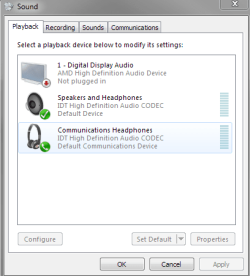
WHY.PNG

I need to know how take care of this problem and I want it now!!!

Headset: Turtle Beach Ear Force X12
Laptop: HP Envy Dv7-7223cl w/ Windows 7
 

My Computer My Computer

Computer type
Laptop
Computer Manufacturer/Model Number
HP Envy Dv7-7223cl
OS
Windows 10 Pro 64-Bit
CPU
AMD A8-4500M APU
Motherboard
I dunno, System Information won't tell me :P
Memory
8 GB
Graphics Card(s)
AMD Radeon HD Graphics 1.90 GHz
Sound Card
AMD High Definition Audio Device
Monitor(s) Displays
AMD Radeon HD 7640G
Screen Resolution
1600x900
Hard Drives
Hitachi HTS547575A9E384 ATA Device
PSU
HP/Compaq R33030 Charger
Case
Swiss Gear 17"
Cooling
HP CoolSense
Keyboard
Standard PS/2 Keyboard
Mouse
Microsoft Basic Optical Mouse v2.0
Internet Speed
135.0 Mbps
Antivirus
Microsoft Security Essentials
Browser
Internet Explorer 11, Google Chrome, Mozilla Firefox
Other Info
My spiritual successor to the Toshiba Satellite L645D-S2025 (my first laptop which died of mismanagement primarily involving food :( )
The AMD High Definition is for HDMI audio ONLY, has nothing to do with regular PC audio or headset.

What is shown for the Sound in the Device Manager? Barring a Windows corruption the headphone jack may have developed a problem.
 

My Computer My Computer

Computer type
PC/Desktop
Computer Manufacturer/Model Number
My Own Build
OS
Windows 10 64 bit
CPU
Intel i7 6700K
Motherboard
ASUS ROG Maximus VIII Hero
Memory
16GB Corsair Dominator
Graphics Card(s)
Intel CPU Graphics
Sound Card
RealTek
Monitor(s) Displays
27" Dell S2719dgf
Screen Resolution
2560X1440
Hard Drives
1 TB Samsung 850 EVO SSD for Win 10 Pro
500GB Samsung 850 EVO SSD for Win 10 Insider
2 TB drive for backup
PSU
EVGA Supernova 750G2
Case
BeQuiet Silent Base 600
Cooling
Deepcool Captain 120EX
Keyboard
Microsoft Wireless 2000
Mouse
Microsoft wireless
Internet Speed
100 MB/sec (Cable)
Antivirus
Microsoft Defender and Malwarebytes
Browser
Edge/Firefox
Other Info
Cakewalk (Sonar) by BandLab and Studio One 4.1 Pro recording studio software. MOTU 896Mk3 Hybrid recording interface, Frontier Tranzport wireless control unit, Behringer X-Touch Control Surface.
Five USB connected optical drives for CD Audio production using Nero BurningROM
Well I think now know what the problem is: Uplay!

I just got my laptop back from the repair shop just today. It had a corner which was broken and my laptop's motherboard exterior shell had to be replaced. Before I took it in, I was having problems with the audio where for some reason all sounds except Uplay and teamspeak could go through the headset.

I recently looked online and found that other people had issues with speakers when the played Uplay games. I only have one Uplay game which was H.A.W.X. 2 that I bought from steam. I uninstalled and reinstalled Uplay to fix the launch issue and I think around that time is when I noticed the issue.

At first, I thought the broken corner was responsible because the playback device menu said that the AMD High Definition Audio Device was unplugged, so I assumed an internal cord to something was unplugged. When I went to the repair shop to pick my laptop up, the manager said that everything is plugged in correctly. To prove that the headphone jack was working, a worker plugged a pair of speakers in and the sound came out of them.

When I brought it back home and got on it for the first time, the sound was still fine. However, when I opened Uplay while listening to spotify, the sound immediately switched to the speakers which made me mad. Now that I know what the problem is, does anyone have a clue on how to fix this?

The playback devices menu won't let me set communications headphones as the default device so that answer is out of the solution.
 

My Computer My Computer

Computer type
Laptop
Computer Manufacturer/Model Number
HP Envy Dv7-7223cl
OS
Windows 10 Pro 64-Bit
CPU
AMD A8-4500M APU
Motherboard
I dunno, System Information won't tell me :P
Memory
8 GB
Graphics Card(s)
AMD Radeon HD Graphics 1.90 GHz
Sound Card
AMD High Definition Audio Device
Monitor(s) Displays
AMD Radeon HD 7640G
Screen Resolution
1600x900
Hard Drives
Hitachi HTS547575A9E384 ATA Device
PSU
HP/Compaq R33030 Charger
Case
Swiss Gear 17"
Cooling
HP CoolSense
Keyboard
Standard PS/2 Keyboard
Mouse
Microsoft Basic Optical Mouse v2.0
Internet Speed
135.0 Mbps
Antivirus
Microsoft Security Essentials
Browser
Internet Explorer 11, Google Chrome, Mozilla Firefox
Other Info
My spiritual successor to the Toshiba Satellite L645D-S2025 (my first laptop which died of mismanagement primarily involving food :( )
Well I think now know what the problem is: Uplay!

I just got my laptop back from the repair shop just today. It had a corner which was broken and my laptop's motherboard exterior shell had to be replaced. Before I took it in, I was having problems with the audio where for some reason all sounds except Uplay and teamspeak could go through the headset.

I recently looked online and found that other people had issues with speakers when the played Uplay games. I only have one Uplay game which was H.A.W.X. 2 that I bought from steam. I uninstalled and reinstalled Uplay to fix the launch issue and I think around that time is when I noticed the issue.

At first, I thought the broken corner was responsible because the playback device menu said that the AMD High Definition Audio Device was unplugged, so I assumed an internal cord to something was unplugged. When I went to the repair shop to pick my laptop up, the manager said that everything is plugged in correctly. To prove that the headphone jack was working, a worker plugged a pair of speakers in and the sound came out of them.

When I brought it back home and got on it for the first time, the sound was still fine. However, when I opened Uplay while listening to spotify, the sound immediately switched to the speakers which made me mad. Now that I know what the problem is, does anyone have a clue on how to fix this?

The playback devices menu won't let me set communications headphones as the default device so that answer is out of the solution.

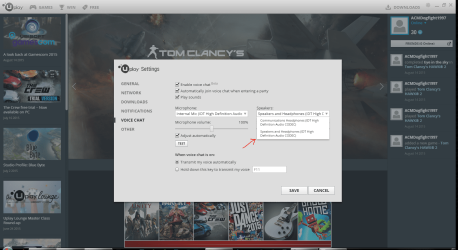
Well never mind, I found a fix:

Uplay fix.PNG

Select the option pointed by the arrow in the voice chat settings.
 

My Computer My Computer

Computer type
Laptop
Computer Manufacturer/Model Number
HP Envy Dv7-7223cl
OS
Windows 10 Pro 64-Bit
CPU
AMD A8-4500M APU
Motherboard
I dunno, System Information won't tell me :P
Memory
8 GB
Graphics Card(s)
AMD Radeon HD Graphics 1.90 GHz
Sound Card
AMD High Definition Audio Device
Monitor(s) Displays
AMD Radeon HD 7640G
Screen Resolution
1600x900
Hard Drives
Hitachi HTS547575A9E384 ATA Device
PSU
HP/Compaq R33030 Charger
Case
Swiss Gear 17"
Cooling
HP CoolSense
Keyboard
Standard PS/2 Keyboard
Mouse
Microsoft Basic Optical Mouse v2.0
Internet Speed
135.0 Mbps
Antivirus
Microsoft Security Essentials
Browser
Internet Explorer 11, Google Chrome, Mozilla Firefox
Other Info
My spiritual successor to the Toshiba Satellite L645D-S2025 (my first laptop which died of mismanagement primarily involving food :( )
Here's another tip: If that doesn't work, set speakers and headphones as default device and default communications device.

Plan B.PNG
 

My Computer My Computer

Computer type
Laptop
Computer Manufacturer/Model Number
HP Envy Dv7-7223cl
OS
Windows 10 Pro 64-Bit
CPU
AMD A8-4500M APU
Motherboard
I dunno, System Information won't tell me :P
Memory
8 GB
Graphics Card(s)
AMD Radeon HD Graphics 1.90 GHz
Sound Card
AMD High Definition Audio Device
Monitor(s) Displays
AMD Radeon HD 7640G
Screen Resolution
1600x900
Hard Drives
Hitachi HTS547575A9E384 ATA Device
PSU
HP/Compaq R33030 Charger
Case
Swiss Gear 17"
Cooling
HP CoolSense
Keyboard
Standard PS/2 Keyboard
Mouse
Microsoft Basic Optical Mouse v2.0
Internet Speed
135.0 Mbps
Antivirus
Microsoft Security Essentials
Browser
Internet Explorer 11, Google Chrome, Mozilla Firefox
Other Info
My spiritual successor to the Toshiba Satellite L645D-S2025 (my first laptop which died of mismanagement primarily involving food :( )
Back
Top