hi guys my audio seams to be having problems
randomly my speakers are saying they not working, im getting sound through my screen but i cant get my surround sound to work.
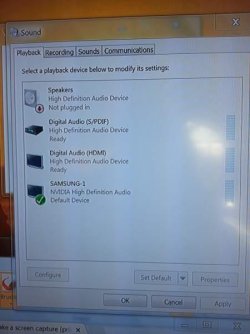
Your Playback Devices screenshot shows interesting things, but not something that would produce surround sound. You don't have the correct device checked as "default" for that to occur.
It looks like you have your Samsung display (which obviously has speakers in it) selected as the default. So that's where digital audio is being sent... to your monitor, not to your surround sound system through a different connection.
Your "speakers" device says "nothing plugged in", so I assume you don't have computer speakers on your desk.
You show "digital audio (HDMI)" available (presumably there's a cable connected, going to an HDMI input on your surround sound system), but it's not checked as the default. So if this is how you thought you were going to be delivering digital multi-channel audio to your surround system, then you must check this one and push the SET DEFAULT button. Then you'll get multi-channel digital audio delivered via that HDMI output path to your sound system.
Or, if you intended to use "digital audio (S/PDIF)" which I assume is a coax connector with coax cable going to your sound system, then you need to check that one as the default. Again, once this is checked as the default then this is the output path your digital audio will be sent out through, to your surround sound system.
But with your Samsung monitor currently checked as the default Playback Device, that's why you're not getting digital sound delivered to your external surround sound system.
Also, when you do correctly check either the S/PDIF or HDMI device as your default playback device, don't forget to also look at the "supported formats" tab (shown when you push the Properties button), as well as be sure to pick the multi-channel speaker configuration (when you push the Configure button, where you can also "test" each channel solo to be sure you get sound from each speaker). You want to designate a multi-channel speaker setup (Configure), and support for all multi-channel audio formats (Properties).
If you want to use HDMI to deliver audio to your surround sound system, and also use the same HDMI path to deliver video to your Samsung display, you need to have two HDMI cables. One goes from PC sound card HDMI output to the AVR's HDMI input (where the digital audio will be handled), and then a second going from the AVR's HDMI output to relay video on to your Samsung display.