Solved AMD Overdrive Usage

feetand nches

New member
Power User
VIP
Local time
5:13 PM
Messages
555
Hey guys, as usual I did way to much googling and still not sure about this program "AMD's Overdrive"
OverDrive? Technology | AMD

All I want to do for now is Monitor the system Temps, and curious about fan speeds etc., No Overclocking. I know there are many System Monitoring tools out there but thought that a Brand Specific tool might be the best. I've read that some of these tools don't report AMD very well. So, am open to other tools also, but want to know if this tool is any good for some simple outputs. It looks quite nice as far as the GUI is concerned, and that is a big plus for me. Any advice would be very welcome.

I have this Processor, and it seems to be supported, at least for some functions. This is probably were I'm lacking the most important Info: What will it actually Monitor on my Motherboard.

AMD Athlon(tm) II Dual-Core M300

I also considered using the "TOSHIBA PC Health Monitor" but will have to install it because this was a Vanilla install to avoid all that junk. Here is what shouldiremoveit says:
TOSHIBA PC Health Monitor - Should I Remove It?

Thanks, Nasty7
 

My Computer

Computer type
Laptop
Computer Manufacturer/Model Number
HP Pavilion dv7-6c23cl
OS
Windows 7 Home Premium 64bit
CPU
AMD A8-3520M
Motherboard
Hewlett-Packard 180B (Socket FS1)
Memory
6.00GB DDR3 @ 674MHz (9-9-9-24)
Graphics Card(s)
512MB ATI AMD Radeon HD 6620G
Sound Card
IDT High Definition Audio CODEC
Monitor(s) Displays
Generic PnP Monitor
Screen Resolution
(1600x900@60Hz)
Hard Drives
Samsung 850 EVO 250GB SSD
Mouse
Logitec M525
Internet Speed
30-75Mbps
Antivirus
Avast Free, Unfortunately
Browser
Google Chrome, Firefox, IE
Hello Nasty mate I have had a few Toshibas now and in general most of their software is plain bloat and I personally clean install the machines - not that I am suggesting you do and then just install specific Toshiba drivers and software ie Blu tooth etc That AMD software myself in view that your machine is reasonably old now I don't think it would be of much use to you if it would be even supported.

Now you can use these to see fan speeds (laptops usually have only one anyway) and component temps etc if that is all you want to do.
SpeedFan - Access temperature sensor in your computer
Speccy - Free Download - Piriform
https://www.hwinfo.com/download.php < make sure you get the right bit version

Just as a by the by this might help you get the machine running a bit faster and more efficient - if you don't mind losing a bit of the "bling" like transparency.
http://www.sevenforums.com/tutorials/11728-optimize-windows-7-a.html
 

My Computer

Computer type
PC/Desktop
Computer Manufacturer/Model Number
Own build (new) Desk1 / Asus ROG Win 7 / Desk2 1st build
OS
Desk1 7 Home Prem / Desk2 10 Pro / Main lap Asus ROG 10 Pro 2 laptop Toshiba 7 Pro Asus P2520 7 & 10
CPU
Desk1 i5 3750K / Laptop i7 GTX 860M / Desk2 i5 2500
Motherboard
Desk1 Asus P877-V / Desk2 Gigabyte H67 UD3H / Laptop ?
Memory
Desk1 8GB (1866) / Desk2 16GB (1333) / Laptop 8Gb DDR3
Graphics Card(s)
Desk 1& 2NVidia GTX 650 & Laptops on board Intel
Sound Card
Desk 1 & 2 -XONAR DG Realtek High Def audio Laptop
Monitor(s) Displays
Desk 1 Benq HD 2450 / Desk2 Philips 24" / Laptop 17.5"
Screen Resolution
1920x1080 D1 & D2 & Laptop 1
Hard Drives
Desk1 Samsung 120GB 830 SSD
Asus ROG 256GB 850 Pro SSD
Desk2 Samsung 840 256 SSD
Toshiba 120GB EVO
PSU
Desk 1 Corsair HX 1050/ Laptop ? / Desk 2 Corsair HX 650
Case
Desk 1 Cooler HAF XM ? Toshiba laptop / Desk2 Coolermaster
Cooling
Fans on all Desk1 -2 Desk2 - all Coolermasters 5 Laptop ?
Keyboard
Desk 1 MS Sidewinder X6 Desk 2 MS Sidewinder X 4
Mouse
Desk 1&2 - Gigabyte MS 900 gamer - laptop - Logitec wireless
Internet Speed
ADSL2+
Other Info
One other Desktop (tester) and spare Toshba laptop both with SSD's
Running Kaspersky 2016 ISS on all machines config'd identically
Logitec audio stereo systems on each machine (x3)
Canon MG5250MFC
Router/modem TP-Link running WPA2SK
1. Hello Nasty mate I have had a few Toshibas now and in general most of their software is plain bloat and I personally clean install the machines

2. That AMD software myself in view that your machine is reasonably old now I don't think it would be of much use to you if it would be even supported.

3. Now you can use these to see fan speeds (laptops usually have only one anyway) and component temps etc if that is all you want to do.

4. Just as a by the by this might help you get the machine running a bit faster and more efficient - if you don't mind losing a bit of the "bling" like transparency.

1. I already did a clean install, so all good there, that's why I was asking about the Toshiba Health Monitor, because that was on the pc originally. I got an 850 EVO SSD so wanted to start clean.

2. Gotcha

3. I'll try one of those, they were on my long list of stuff to try. Been using Speccy for a while, but not for a quick looks at temps.

4. I definitely look at this also.


Thanks very much ICIT2LOL, glad you have some Tosh's also!
 

My Computer

Computer type
Laptop
Computer Manufacturer/Model Number
HP Pavilion dv7-6c23cl
OS
Windows 7 Home Premium 64bit
CPU
AMD A8-3520M
Motherboard
Hewlett-Packard 180B (Socket FS1)
Memory
6.00GB DDR3 @ 674MHz (9-9-9-24)
Graphics Card(s)
512MB ATI AMD Radeon HD 6620G
Sound Card
IDT High Definition Audio CODEC
Monitor(s) Displays
Generic PnP Monitor
Screen Resolution
(1600x900@60Hz)
Hard Drives
Samsung 850 EVO 250GB SSD
Mouse
Logitec M525
Internet Speed
30-75Mbps
Antivirus
Avast Free, Unfortunately
Browser
Google Chrome, Firefox, IE
Yes mate the health monitor I don't ever use it is dead baggage as far as I am concerned there are better ways of looking after the machine than that like the tutorial I linked and CCleaner CCleaner - Free Download - Piriform if you don't use that already.
I also use these add scans in addition to keep things tidy of malware and adware that my main AV misses
SUPERAntiSpyware | Remove Malware | Remove Spyware - AntiMalware, AntiSpyware, AntiAdware!
Malwarebytes | Malwarebytes Anti-Malware Premium

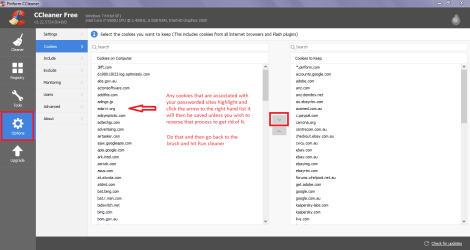
I use these on an ad hoc basis say two three times a week the thing to remember with CCleaner (nearly all of us use this cleaner) is when you run the Analyse and it finishes you need to got to Options > Cookies > save to the right hand list any cookies that are connected to your passworded sites or else it will mean you need to login again each time you go there ie your bank you do that by clicking on them and they highlight and then use the little arrow to send them to the right hand list see pic

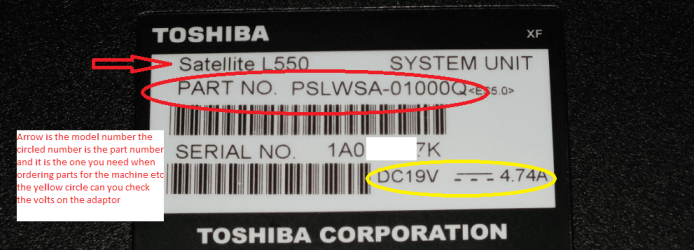
Edit Yes been very happy with the Toshibas but have gone over to Asus for the last two laptops only because they are easier to work on ie adding RAM hard drives etc oh and if you need drivers for the Toshies a tip use the PART NO on the back of your machine because it will pinpoint the exact ones you need as it refers to where the machine was made and for where ;)see pic
 

Attachments

  • CC COOKIES.PNG
    CC COOKIES.PNG
    83.1 KB · Views: 3
  • PART NO.PNG
    PART NO.PNG
    558.3 KB · Views: 0

My Computer

Computer type
PC/Desktop
Computer Manufacturer/Model Number
Own build (new) Desk1 / Asus ROG Win 7 / Desk2 1st build
OS
Desk1 7 Home Prem / Desk2 10 Pro / Main lap Asus ROG 10 Pro 2 laptop Toshiba 7 Pro Asus P2520 7 & 10
CPU
Desk1 i5 3750K / Laptop i7 GTX 860M / Desk2 i5 2500
Motherboard
Desk1 Asus P877-V / Desk2 Gigabyte H67 UD3H / Laptop ?
Memory
Desk1 8GB (1866) / Desk2 16GB (1333) / Laptop 8Gb DDR3
Graphics Card(s)
Desk 1& 2NVidia GTX 650 & Laptops on board Intel
Sound Card
Desk 1 & 2 -XONAR DG Realtek High Def audio Laptop
Monitor(s) Displays
Desk 1 Benq HD 2450 / Desk2 Philips 24" / Laptop 17.5"
Screen Resolution
1920x1080 D1 & D2 & Laptop 1
Hard Drives
Desk1 Samsung 120GB 830 SSD
Asus ROG 256GB 850 Pro SSD
Desk2 Samsung 840 256 SSD
Toshiba 120GB EVO
PSU
Desk 1 Corsair HX 1050/ Laptop ? / Desk 2 Corsair HX 650
Case
Desk 1 Cooler HAF XM ? Toshiba laptop / Desk2 Coolermaster
Cooling
Fans on all Desk1 -2 Desk2 - all Coolermasters 5 Laptop ?
Keyboard
Desk 1 MS Sidewinder X6 Desk 2 MS Sidewinder X 4
Mouse
Desk 1&2 - Gigabyte MS 900 gamer - laptop - Logitec wireless
Internet Speed
ADSL2+
Other Info
One other Desktop (tester) and spare Toshba laptop both with SSD's
Running Kaspersky 2016 ISS on all machines config'd identically
Logitec audio stereo systems on each machine (x3)
Canon MG5250MFC
Router/modem TP-Link running WPA2SK
Thanks again ICIT2LOL, I still got a lot to learn! I have used most of that stuff a few times but must admit don't use it regularly, and have Avast, MBAM and MBAE Free versions installed. Wish I could get Paid Versions but health issues won't allow. I'm just careful on the web, or use my linux install, and have some backups. I do love Windows7 though, maybe more than Linux.

Nasty7
 

My Computer

Computer type
Laptop
Computer Manufacturer/Model Number
HP Pavilion dv7-6c23cl
OS
Windows 7 Home Premium 64bit
CPU
AMD A8-3520M
Motherboard
Hewlett-Packard 180B (Socket FS1)
Memory
6.00GB DDR3 @ 674MHz (9-9-9-24)
Graphics Card(s)
512MB ATI AMD Radeon HD 6620G
Sound Card
IDT High Definition Audio CODEC
Monitor(s) Displays
Generic PnP Monitor
Screen Resolution
(1600x900@60Hz)
Hard Drives
Samsung 850 EVO 250GB SSD
Mouse
Logitec M525
Internet Speed
30-75Mbps
Antivirus
Avast Free, Unfortunately
Browser
Google Chrome, Firefox, IE
@ICIT2LOL, I provided the WRONG Link earlier...O-boy my ADD is really kicking in! Just for curiosity's sake here it is, says it will work with the AMD Athlon cpu's. I'll need to try a few of these monitors. Right now using the W7 inbuilt one for CPU freq/%, and memory, it's one of the "Desktop Gadgets"
AMD System Monitor

Here is a good youtube video about it, looks pretty good.
https://www.youtube.com/watch?v=eUX2n6Bcl2U
 
Last edited:

My Computer

Computer type
Laptop
Computer Manufacturer/Model Number
HP Pavilion dv7-6c23cl
OS
Windows 7 Home Premium 64bit
CPU
AMD A8-3520M
Motherboard
Hewlett-Packard 180B (Socket FS1)
Memory
6.00GB DDR3 @ 674MHz (9-9-9-24)
Graphics Card(s)
512MB ATI AMD Radeon HD 6620G
Sound Card
IDT High Definition Audio CODEC
Monitor(s) Displays
Generic PnP Monitor
Screen Resolution
(1600x900@60Hz)
Hard Drives
Samsung 850 EVO 250GB SSD
Mouse
Logitec M525
Internet Speed
30-75Mbps
Antivirus
Avast Free, Unfortunately
Browser
Google Chrome, Firefox, IE
@ICIT2LOL, Should I go with the Installer or the Portable of HWiNFO?

And, to get what I really think will make me happy, how is the HWiNFOMonitor? I really want something that is easy to read like this little GUI Widget. I'm guessing the Widget won't work with Portable?

Thanks, Nasty
 

My Computer

Computer type
Laptop
Computer Manufacturer/Model Number
HP Pavilion dv7-6c23cl
OS
Windows 7 Home Premium 64bit
CPU
AMD A8-3520M
Motherboard
Hewlett-Packard 180B (Socket FS1)
Memory
6.00GB DDR3 @ 674MHz (9-9-9-24)
Graphics Card(s)
512MB ATI AMD Radeon HD 6620G
Sound Card
IDT High Definition Audio CODEC
Monitor(s) Displays
Generic PnP Monitor
Screen Resolution
(1600x900@60Hz)
Hard Drives
Samsung 850 EVO 250GB SSD
Mouse
Logitec M525
Internet Speed
30-75Mbps
Antivirus
Avast Free, Unfortunately
Browser
Google Chrome, Firefox, IE
Back
Top