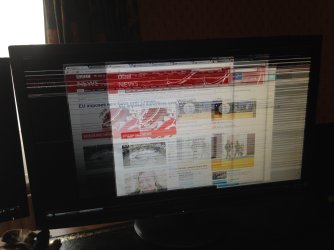
AMD RHD7800 Artifacts

lsaw2

New member
Local time
8:02 PM
Messages
25
AMD RHD7800 Artifacts (slow gpu process?)

Hi Seven Forums.

I bought a new computer and experienced BSODs instantly, as per the great advice from arc in the BSOD section here (http://www.sevenforums.com/bsod-hel...win7-install-bsod-issues-ntoskrnl-win32k.html) I diagnosed a faulty RAM stick and a motherboard error. Two and a half months later and the board has finally been RMA'ed and returned.

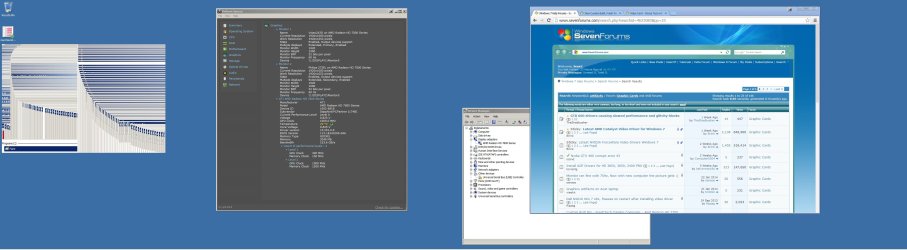
I am now experiencing visual artifacts on both monitors, more severely on the primary monitor. When I drag a window across the corresponding section of the secondary monitor it draws a trail of the window but then disappears, on the primary monitor it just stays there.


I include a screenshot of what I mean, which includes my speccy graphics overview tab. Temps seem fine, previously as part of troubleshooting the BSODs before I RMA'ed the board I ran furmark and found no problems. My CCC is the newest version 13.12


What tests other than furmark can I run? Could this be anything other than a fault with the graphics card?
 

Attachments
  • artifacts.jpg
    artifacts.jpg
    296.1 KB · Views: 10
Last edited:

My Computer

Computer type
PC/Desktop
Computer Manufacturer/Model Number
Custom Build
OS
Microsoft Windows 7 Home Premium 64-bit 7601 Multiprocessor Free Service Pack 1
CPU
Intel(R) Core(TM) i5-3470 CPU @ 3.20GHz
Motherboard
ASUSTeK COMPUTER INC. P8Z77-V LX2
Memory
8.00 GB
Graphics Card(s)
(1) BB Capture Driver (2) AMD Radeon HD 7800 Series
Sound Card
(1) AMD High Definition Audio Device (2) High Definition A
Screen Resolution
(1) 1920 x 1080 x 32 bits (4294967296 colors) @ 60 Hz (2)
Hard Drives
KINGSTON SV300S37A120G ATA Device
PSU
650 watt bronze rated
Case
basic
Cooling
nothing special?
Keyboard
budget logitech
Mouse
logitech g500
Internet Speed
50mb fiber
Antivirus
MSE
Browser
FF/Chrome JUST NOT IE LOLZ

My Computer

Computer type
Laptop
Computer Manufacturer/Model Number
Packard Bell
OS
Windows 7 Home Premium 64Bit
CPU
AMD A6-3420M 1.5GHZ OC - 2.0GHZ
Memory
4GB DDR3 1600MHZ
Graphics Card(s)
AMD RADEON 6520G+AMD RADEON HD7470M 1GB DDR3
Screen Resolution
1366x768
Hard Drives
500GB SATA
Internet Speed
18Mb Unlimited
Antivirus
AVAST!
Browser
MOZILLA FIREFOX
I have just done that and will see if problems persist.
 

My Computer

Computer type
PC/Desktop
Computer Manufacturer/Model Number
Custom Build
OS
Microsoft Windows 7 Home Premium 64-bit 7601 Multiprocessor Free Service Pack 1
CPU
Intel(R) Core(TM) i5-3470 CPU @ 3.20GHz
Motherboard
ASUSTeK COMPUTER INC. P8Z77-V LX2
Memory
8.00 GB
Graphics Card(s)
(1) BB Capture Driver (2) AMD Radeon HD 7800 Series
Sound Card
(1) AMD High Definition Audio Device (2) High Definition A
Screen Resolution
(1) 1920 x 1080 x 32 bits (4294967296 colors) @ 60 Hz (2)
Hard Drives
KINGSTON SV300S37A120G ATA Device
PSU
650 watt bronze rated
Case
basic
Cooling
nothing special?
Keyboard
budget logitech
Mouse
logitech g500
Internet Speed
50mb fiber
Antivirus
MSE
Browser
FF/Chrome JUST NOT IE LOLZ
what is your monitor refresh rate ?

Also that isn't really an artifact that is just a slow GPU process

Artifacts happen when you are actually watching video or doing games with it

Artifacts could be green dots dead looking Pixels and flashes of weird shapes like rectangles triangles that glitch and appear randomly while trying to watch or play a game i think you have a graphics acceleration problem or even a Aero issue ,I doubt it's the gpu honestly

Also i was reading info on this could be the wrong GPU driver in use as well
 

My Computer

Computer type
PC/Desktop
Computer Manufacturer/Model Number
CoreI7-6700K MrFingerIII Special Builds
OS
Windows 10 Home Premium 64bit sp1
CPU
Intel I7-6700K @ 4.6 Ghz 1.344 volts everyday OC
Motherboard
Asrock Fatality K6 Z170 Socket 1151
Memory
32GB G-Skill TridentZ 3200mhz 16-18-18-38 DDR4
Graphics Card(s)
Sli Gigabyte Windforce GTX 980 G1
Sound Card
AC97 Creative Rage Tactic 3D Headphones Bluetooth
Monitor(s) Displays
27" Asus ROG Swift PG278Q G-Sync 48" Vizio Smart HD TV
Screen Resolution
2560x1440p 27"- 48" Currently Gaming at 2560x1440p Res 2K
Hard Drives
250GB Samsung Evo840SSD Seagate baracuda 500 GB WD Mybook 500Gb 1TB Seagate Barracuda
PSU
HX1050w Corsair Silver 80plus certified crosfire/sli
Case
Enthod Pro Full Tower
Cooling
Corsair H110i GT 280 mm High Performance WaterBlock
Keyboard
Logitech wireless keyboard
Mouse
Logitech wireless mouse
Internet Speed
Cox Cable 100+ mb
Antivirus
WebRoot Spysweeper with Antivirus
Browser
IE-10, Chrome, Opera
Other Info
My Other Rig is a AMD FX8320E @4.6Ghz 16GB Ballistic Sport Ram
Mobo Asrock Fatality 990FX 120GB OCZ SSD 1TB Seagate Barracuda Corsair H75 Cooling PSU Corsair CX750
GPU GTX Gigabyte 970G1
what is your monitor refresh rate ?

Also that isn't really an artifact that is just a slow GPU process

Artifacts happen when you are actually watching video or doing games with it

Artifacts could be green dots dead looking Pixels and flashes of weird shapes like rectangles triangles that glitch and appear randomly while trying to watch or play a game i think you have a graphics acceleration problem or even a Aero issue ,I doubt it's the gpu honestly

Also i was reading info on this could be the wrong GPU driver in use as well


ah ok I am a newb so just used the word I thought was right.


I think they are both running at 60hz, but they could both run at 75 I think...

I use win 7 classic view so I think aero is off?

I'm running 13.350.1005.0 driver version.

I have very little experience with gpus so i'm kind of sitting here a bit lost. I don't seem to get issues when playing BF4 but just when moving stuff across the desktop it glitches like the screenshot provided, similarly right click context menus disappear whilst I hover my mouse over the options and sometimes stay there after clicking.

Thanks for the responses guys.
 

My Computer

Computer type
PC/Desktop
Computer Manufacturer/Model Number
Custom Build
OS
Microsoft Windows 7 Home Premium 64-bit 7601 Multiprocessor Free Service Pack 1
CPU
Intel(R) Core(TM) i5-3470 CPU @ 3.20GHz
Motherboard
ASUSTeK COMPUTER INC. P8Z77-V LX2
Memory
8.00 GB
Graphics Card(s)
(1) BB Capture Driver (2) AMD Radeon HD 7800 Series
Sound Card
(1) AMD High Definition Audio Device (2) High Definition A
Screen Resolution
(1) 1920 x 1080 x 32 bits (4294967296 colors) @ 60 Hz (2)
Hard Drives
KINGSTON SV300S37A120G ATA Device
PSU
650 watt bronze rated
Case
basic
Cooling
nothing special?
Keyboard
budget logitech
Mouse
logitech g500
Internet Speed
50mb fiber
Antivirus
MSE
Browser
FF/Chrome JUST NOT IE LOLZ
what is your monitor refresh rate ?

Also that isn't really an artifact that is just a slow GPU process

Artifacts happen when you are actually watching video or doing games with it

Artifacts could be green dots dead looking Pixels and flashes of weird shapes like rectangles triangles that glitch and appear randomly while trying to watch or play a game i think you have a graphics acceleration problem or even a Aero issue ,I doubt it's the gpu honestly

Also i was reading info on this could be the wrong GPU driver in use as well


ah ok I am a newb so just used the word I thought was right.


I think they are both running at 60hz, but they could both run at 75 I think...

I use win 7 classic view so I think aero is off?

I'm running 13.350.1005.0 driver version.

I have very little experience with gpus so i'm kind of sitting here a bit lost. I don't seem to get issues when playing BF4 but just when moving stuff across the desktop it glitches like the screenshot provided, similarly right click context menus disappear whilst I hover my mouse over the options and sometimes stay there after clicking.

Thanks for the responses guys.
It sounds like the GPU 2d rendering is muffed meaning it is having acceleration problems have you monitored the GPU when just using the desk top or browsing web pages

Also have you tried to connect the monitor to another port /That port could be giving off a bad signal too
and double check the refresh rate it should be at 60 75,hz will default to 60 unless a 120 mhz monitor
 

My Computer

Computer type
PC/Desktop
Computer Manufacturer/Model Number
CoreI7-6700K MrFingerIII Special Builds
OS
Windows 10 Home Premium 64bit sp1
CPU
Intel I7-6700K @ 4.6 Ghz 1.344 volts everyday OC
Motherboard
Asrock Fatality K6 Z170 Socket 1151
Memory
32GB G-Skill TridentZ 3200mhz 16-18-18-38 DDR4
Graphics Card(s)
Sli Gigabyte Windforce GTX 980 G1
Sound Card
AC97 Creative Rage Tactic 3D Headphones Bluetooth
Monitor(s) Displays
27" Asus ROG Swift PG278Q G-Sync 48" Vizio Smart HD TV
Screen Resolution
2560x1440p 27"- 48" Currently Gaming at 2560x1440p Res 2K
Hard Drives
250GB Samsung Evo840SSD Seagate baracuda 500 GB WD Mybook 500Gb 1TB Seagate Barracuda
PSU
HX1050w Corsair Silver 80plus certified crosfire/sli
Case
Enthod Pro Full Tower
Cooling
Corsair H110i GT 280 mm High Performance WaterBlock
Keyboard
Logitech wireless keyboard
Mouse
Logitech wireless mouse
Internet Speed
Cox Cable 100+ mb
Antivirus
WebRoot Spysweeper with Antivirus
Browser
IE-10, Chrome, Opera
Other Info
My Other Rig is a AMD FX8320E @4.6Ghz 16GB Ballistic Sport Ram
Mobo Asrock Fatality 990FX 120GB OCZ SSD 1TB Seagate Barracuda Corsair H75 Cooling PSU Corsair CX750
GPU GTX Gigabyte 970G1
what's best to use to monitor the GPU? what should I be looking at?


the refresh rates are both down as 60hz.

i've seen in similar threads stuff about turning up or down the 2d stuff, but I don't know exactly what that entails.

Thanks again for your replies.
 

My Computer

Computer type
PC/Desktop
Computer Manufacturer/Model Number
Custom Build
OS
Microsoft Windows 7 Home Premium 64-bit 7601 Multiprocessor Free Service Pack 1
CPU
Intel(R) Core(TM) i5-3470 CPU @ 3.20GHz
Motherboard
ASUSTeK COMPUTER INC. P8Z77-V LX2
Memory
8.00 GB
Graphics Card(s)
(1) BB Capture Driver (2) AMD Radeon HD 7800 Series
Sound Card
(1) AMD High Definition Audio Device (2) High Definition A
Screen Resolution
(1) 1920 x 1080 x 32 bits (4294967296 colors) @ 60 Hz (2)
Hard Drives
KINGSTON SV300S37A120G ATA Device
PSU
650 watt bronze rated
Case
basic
Cooling
nothing special?
Keyboard
budget logitech
Mouse
logitech g500
Internet Speed
50mb fiber
Antivirus
MSE
Browser
FF/Chrome JUST NOT IE LOLZ
Open your CCC The AMD Catalyst Control Center on the Bottom right hand side by the clock

You want to hit the tab Overdrive after that you should see Temps and Fan speeds and also GPU clock speed

There is also a box you can check to activate Overclocking if you wish

You can use that program to monitor the clock speed after opening this up you can open up a browser like Firefox that uses flash to see if you GPU moves above 300mhz standard activity when rendering flash is 300-500mhz like 2% to 5% activity if you don't see any activity then you need to see if upclocking the core a little will help it out
 

My Computer

Computer type
PC/Desktop
Computer Manufacturer/Model Number
CoreI7-6700K MrFingerIII Special Builds
OS
Windows 10 Home Premium 64bit sp1
CPU
Intel I7-6700K @ 4.6 Ghz 1.344 volts everyday OC
Motherboard
Asrock Fatality K6 Z170 Socket 1151
Memory
32GB G-Skill TridentZ 3200mhz 16-18-18-38 DDR4
Graphics Card(s)
Sli Gigabyte Windforce GTX 980 G1
Sound Card
AC97 Creative Rage Tactic 3D Headphones Bluetooth
Monitor(s) Displays
27" Asus ROG Swift PG278Q G-Sync 48" Vizio Smart HD TV
Screen Resolution
2560x1440p 27"- 48" Currently Gaming at 2560x1440p Res 2K
Hard Drives
250GB Samsung Evo840SSD Seagate baracuda 500 GB WD Mybook 500Gb 1TB Seagate Barracuda
PSU
HX1050w Corsair Silver 80plus certified crosfire/sli
Case
Enthod Pro Full Tower
Cooling
Corsair H110i GT 280 mm High Performance WaterBlock
Keyboard
Logitech wireless keyboard
Mouse
Logitech wireless mouse
Internet Speed
Cox Cable 100+ mb
Antivirus
WebRoot Spysweeper with Antivirus
Browser
IE-10, Chrome, Opera
Other Info
My Other Rig is a AMD FX8320E @4.6Ghz 16GB Ballistic Sport Ram
Mobo Asrock Fatality 990FX 120GB OCZ SSD 1TB Seagate Barracuda Corsair H75 Cooling PSU Corsair CX750
GPU GTX Gigabyte 970G1

My Computer

Computer type
PC/Desktop
Computer Manufacturer/Model Number
CoreI7-6700K MrFingerIII Special Builds
OS
Windows 10 Home Premium 64bit sp1
CPU
Intel I7-6700K @ 4.6 Ghz 1.344 volts everyday OC
Motherboard
Asrock Fatality K6 Z170 Socket 1151
Memory
32GB G-Skill TridentZ 3200mhz 16-18-18-38 DDR4
Graphics Card(s)
Sli Gigabyte Windforce GTX 980 G1
Sound Card
AC97 Creative Rage Tactic 3D Headphones Bluetooth
Monitor(s) Displays
27" Asus ROG Swift PG278Q G-Sync 48" Vizio Smart HD TV
Screen Resolution
2560x1440p 27"- 48" Currently Gaming at 2560x1440p Res 2K
Hard Drives
250GB Samsung Evo840SSD Seagate baracuda 500 GB WD Mybook 500Gb 1TB Seagate Barracuda
PSU
HX1050w Corsair Silver 80plus certified crosfire/sli
Case
Enthod Pro Full Tower
Cooling
Corsair H110i GT 280 mm High Performance WaterBlock
Keyboard
Logitech wireless keyboard
Mouse
Logitech wireless mouse
Internet Speed
Cox Cable 100+ mb
Antivirus
WebRoot Spysweeper with Antivirus
Browser
IE-10, Chrome, Opera
Other Info
My Other Rig is a AMD FX8320E @4.6Ghz 16GB Ballistic Sport Ram
Mobo Asrock Fatality 990FX 120GB OCZ SSD 1TB Seagate Barracuda Corsair H75 Cooling PSU Corsair CX750
GPU GTX Gigabyte 970G1
ah marvelous thank you, I hadn't realised there was anything in that tab as you have to accept the terms before it shows you it because of the OC'ing.


watching a video on youtube in firefox, is giving between 2 and 26% activity, gpu clock 450mhz.


I'll download the gpu clock tool but will have no idea what the settings should be let alone what to change them to!
 

My Computer

Computer type
PC/Desktop
Computer Manufacturer/Model Number
Custom Build
OS
Microsoft Windows 7 Home Premium 64-bit 7601 Multiprocessor Free Service Pack 1
CPU
Intel(R) Core(TM) i5-3470 CPU @ 3.20GHz
Motherboard
ASUSTeK COMPUTER INC. P8Z77-V LX2
Memory
8.00 GB
Graphics Card(s)
(1) BB Capture Driver (2) AMD Radeon HD 7800 Series
Sound Card
(1) AMD High Definition Audio Device (2) High Definition A
Screen Resolution
(1) 1920 x 1080 x 32 bits (4294967296 colors) @ 60 Hz (2)
Hard Drives
KINGSTON SV300S37A120G ATA Device
PSU
650 watt bronze rated
Case
basic
Cooling
nothing special?
Keyboard
budget logitech
Mouse
logitech g500
Internet Speed
50mb fiber
Antivirus
MSE
Browser
FF/Chrome JUST NOT IE LOLZ
That seems to be with in range

You said you turned off Aero that could have something to do with it i might need to research that
 

My Computer

Computer type
PC/Desktop
Computer Manufacturer/Model Number
CoreI7-6700K MrFingerIII Special Builds
OS
Windows 10 Home Premium 64bit sp1
CPU
Intel I7-6700K @ 4.6 Ghz 1.344 volts everyday OC
Motherboard
Asrock Fatality K6 Z170 Socket 1151
Memory
32GB G-Skill TridentZ 3200mhz 16-18-18-38 DDR4
Graphics Card(s)
Sli Gigabyte Windforce GTX 980 G1
Sound Card
AC97 Creative Rage Tactic 3D Headphones Bluetooth
Monitor(s) Displays
27" Asus ROG Swift PG278Q G-Sync 48" Vizio Smart HD TV
Screen Resolution
2560x1440p 27"- 48" Currently Gaming at 2560x1440p Res 2K
Hard Drives
250GB Samsung Evo840SSD Seagate baracuda 500 GB WD Mybook 500Gb 1TB Seagate Barracuda
PSU
HX1050w Corsair Silver 80plus certified crosfire/sli
Case
Enthod Pro Full Tower
Cooling
Corsair H110i GT 280 mm High Performance WaterBlock
Keyboard
Logitech wireless keyboard
Mouse
Logitech wireless mouse
Internet Speed
Cox Cable 100+ mb
Antivirus
WebRoot Spysweeper with Antivirus
Browser
IE-10, Chrome, Opera
Other Info
My Other Rig is a AMD FX8320E @4.6Ghz 16GB Ballistic Sport Ram
Mobo Asrock Fatality 990FX 120GB OCZ SSD 1TB Seagate Barracuda Corsair H75 Cooling PSU Corsair CX750
GPU GTX Gigabyte 970G1

My Computer

Computer type
PC/Desktop
Computer Manufacturer/Model Number
CoreI7-6700K MrFingerIII Special Builds
OS
Windows 10 Home Premium 64bit sp1
CPU
Intel I7-6700K @ 4.6 Ghz 1.344 volts everyday OC
Motherboard
Asrock Fatality K6 Z170 Socket 1151
Memory
32GB G-Skill TridentZ 3200mhz 16-18-18-38 DDR4
Graphics Card(s)
Sli Gigabyte Windforce GTX 980 G1
Sound Card
AC97 Creative Rage Tactic 3D Headphones Bluetooth
Monitor(s) Displays
27" Asus ROG Swift PG278Q G-Sync 48" Vizio Smart HD TV
Screen Resolution
2560x1440p 27"- 48" Currently Gaming at 2560x1440p Res 2K
Hard Drives
250GB Samsung Evo840SSD Seagate baracuda 500 GB WD Mybook 500Gb 1TB Seagate Barracuda
PSU
HX1050w Corsair Silver 80plus certified crosfire/sli
Case
Enthod Pro Full Tower
Cooling
Corsair H110i GT 280 mm High Performance WaterBlock
Keyboard
Logitech wireless keyboard
Mouse
Logitech wireless mouse
Internet Speed
Cox Cable 100+ mb
Antivirus
WebRoot Spysweeper with Antivirus
Browser
IE-10, Chrome, Opera
Other Info
My Other Rig is a AMD FX8320E @4.6Ghz 16GB Ballistic Sport Ram
Mobo Asrock Fatality 990FX 120GB OCZ SSD 1TB Seagate Barracuda Corsair H75 Cooling PSU Corsair CX750
GPU GTX Gigabyte 970G1
oh noes does that mean it's no more windows classic theme for me?

how will I cope ha.

I will change that now and see how that affects things, thanks so much for your quick responses and helpfulness.
 

My Computer

Computer type
PC/Desktop
Computer Manufacturer/Model Number
Custom Build
OS
Microsoft Windows 7 Home Premium 64-bit 7601 Multiprocessor Free Service Pack 1
CPU
Intel(R) Core(TM) i5-3470 CPU @ 3.20GHz
Motherboard
ASUSTeK COMPUTER INC. P8Z77-V LX2
Memory
8.00 GB
Graphics Card(s)
(1) BB Capture Driver (2) AMD Radeon HD 7800 Series
Sound Card
(1) AMD High Definition Audio Device (2) High Definition A
Screen Resolution
(1) 1920 x 1080 x 32 bits (4294967296 colors) @ 60 Hz (2)
Hard Drives
KINGSTON SV300S37A120G ATA Device
PSU
650 watt bronze rated
Case
basic
Cooling
nothing special?
Keyboard
budget logitech
Mouse
logitech g500
Internet Speed
50mb fiber
Antivirus
MSE
Browser
FF/Chrome JUST NOT IE LOLZ
oh noes does that mean it's no more windows classic theme for me?

how will I cope ha.

I will change that now and see how that affects things, thanks so much for your quick responses and helpfulness.


No problem the article states that UI is graphics intensive and turning off AERO will make your CPU work harder while you see no difference in video or gaming but the UI is being worked
 

My Computer

Computer type
PC/Desktop
Computer Manufacturer/Model Number
CoreI7-6700K MrFingerIII Special Builds
OS
Windows 10 Home Premium 64bit sp1
CPU
Intel I7-6700K @ 4.6 Ghz 1.344 volts everyday OC
Motherboard
Asrock Fatality K6 Z170 Socket 1151
Memory
32GB G-Skill TridentZ 3200mhz 16-18-18-38 DDR4
Graphics Card(s)
Sli Gigabyte Windforce GTX 980 G1
Sound Card
AC97 Creative Rage Tactic 3D Headphones Bluetooth
Monitor(s) Displays
27" Asus ROG Swift PG278Q G-Sync 48" Vizio Smart HD TV
Screen Resolution
2560x1440p 27"- 48" Currently Gaming at 2560x1440p Res 2K
Hard Drives
250GB Samsung Evo840SSD Seagate baracuda 500 GB WD Mybook 500Gb 1TB Seagate Barracuda
PSU
HX1050w Corsair Silver 80plus certified crosfire/sli
Case
Enthod Pro Full Tower
Cooling
Corsair H110i GT 280 mm High Performance WaterBlock
Keyboard
Logitech wireless keyboard
Mouse
Logitech wireless mouse
Internet Speed
Cox Cable 100+ mb
Antivirus
WebRoot Spysweeper with Antivirus
Browser
IE-10, Chrome, Opera
Other Info
My Other Rig is a AMD FX8320E @4.6Ghz 16GB Ballistic Sport Ram
Mobo Asrock Fatality 990FX 120GB OCZ SSD 1TB Seagate Barracuda Corsair H75 Cooling PSU Corsair CX750
GPU GTX Gigabyte 970G1
Thanks again I'll mark this as solved and come back if I have any more issues.
 

My Computer

Computer type
PC/Desktop
Computer Manufacturer/Model Number
Custom Build
OS
Microsoft Windows 7 Home Premium 64-bit 7601 Multiprocessor Free Service Pack 1
CPU
Intel(R) Core(TM) i5-3470 CPU @ 3.20GHz
Motherboard
ASUSTeK COMPUTER INC. P8Z77-V LX2
Memory
8.00 GB
Graphics Card(s)
(1) BB Capture Driver (2) AMD Radeon HD 7800 Series
Sound Card
(1) AMD High Definition Audio Device (2) High Definition A
Screen Resolution
(1) 1920 x 1080 x 32 bits (4294967296 colors) @ 60 Hz (2)
Hard Drives
KINGSTON SV300S37A120G ATA Device
PSU
650 watt bronze rated
Case
basic
Cooling
nothing special?
Keyboard
budget logitech
Mouse
logitech g500
Internet Speed
50mb fiber
Antivirus
MSE
Browser
FF/Chrome JUST NOT IE LOLZ
No problem and good luck
 

My Computer

Computer type
PC/Desktop
Computer Manufacturer/Model Number
CoreI7-6700K MrFingerIII Special Builds
OS
Windows 10 Home Premium 64bit sp1
CPU
Intel I7-6700K @ 4.6 Ghz 1.344 volts everyday OC
Motherboard
Asrock Fatality K6 Z170 Socket 1151
Memory
32GB G-Skill TridentZ 3200mhz 16-18-18-38 DDR4
Graphics Card(s)
Sli Gigabyte Windforce GTX 980 G1
Sound Card
AC97 Creative Rage Tactic 3D Headphones Bluetooth
Monitor(s) Displays
27" Asus ROG Swift PG278Q G-Sync 48" Vizio Smart HD TV
Screen Resolution
2560x1440p 27"- 48" Currently Gaming at 2560x1440p Res 2K
Hard Drives
250GB Samsung Evo840SSD Seagate baracuda 500 GB WD Mybook 500Gb 1TB Seagate Barracuda
PSU
HX1050w Corsair Silver 80plus certified crosfire/sli
Case
Enthod Pro Full Tower
Cooling
Corsair H110i GT 280 mm High Performance WaterBlock
Keyboard
Logitech wireless keyboard
Mouse
Logitech wireless mouse
Internet Speed
Cox Cable 100+ mb
Antivirus
WebRoot Spysweeper with Antivirus
Browser
IE-10, Chrome, Opera
Other Info
My Other Rig is a AMD FX8320E @4.6Ghz 16GB Ballistic Sport Ram
Mobo Asrock Fatality 990FX 120GB OCZ SSD 1TB Seagate Barracuda Corsair H75 Cooling PSU Corsair CX750
GPU GTX Gigabyte 970G1
More similar issues

Hi Seven forums.

Further to my last incorrectly titled post, i'm still having weird issues on my monitors.

Essentially similar to my previous ones just with slightly different symptoms.


Constantly whilst using the computer I get squares all over the screen. In general any kind of interaction away from the window i'm using or just clicking anywhere causes them to go. Once they appear like they are doing whilst i type they flicker alot and jump about the screen. if I were to print screen then you'd see none of them just the normal output, hence I have taken a picture with my phone which i've attached. it seems like it's morphing sections that should be on monitor 1 and pebble dashing monitor 2 with them. It seems to be mostly when i'm moving between two applications windows.

As per earlier in the thread everything is up to date and i'm using nividias 14.2 beta drivers or w/e the most up to date beta is.

I'm at a loss as to what to do, one part of me thinks well meh it clears up pretty quickly unlike the large areas of problems I was having before. However it's really annoying and it'd be nice to get a handle on why it's happening.


edit it seems like the more you move the mouse about and between the two monitors the worse it gets then when you take focus in a new window by clicking it resolves the graphical glitch.
 

Attachments

  • photo.jpg
    photo.jpg
    634.1 KB · Views: 1
Last edited:

My Computer

Computer type
PC/Desktop
Computer Manufacturer/Model Number
Custom Build
OS
Microsoft Windows 7 Home Premium 64-bit 7601 Multiprocessor Free Service Pack 1
CPU
Intel(R) Core(TM) i5-3470 CPU @ 3.20GHz
Motherboard
ASUSTeK COMPUTER INC. P8Z77-V LX2
Memory
8.00 GB
Graphics Card(s)
(1) BB Capture Driver (2) AMD Radeon HD 7800 Series
Sound Card
(1) AMD High Definition Audio Device (2) High Definition A
Screen Resolution
(1) 1920 x 1080 x 32 bits (4294967296 colors) @ 60 Hz (2)
Hard Drives
KINGSTON SV300S37A120G ATA Device
PSU
650 watt bronze rated
Case
basic
Cooling
nothing special?
Keyboard
budget logitech
Mouse
logitech g500
Internet Speed
50mb fiber
Antivirus
MSE
Browser
FF/Chrome JUST NOT IE LOLZ
more problems, marv

Furthermore now the secondary monitor just went batshit. The whole picture starting shifting and flickering and overlaying itself multiple times but only on the secondary monitor, the main one seemed fine. Nothing I could do seemed to effect the problem, just as suddenly as it started it stopped and was fine then a few minutes later just back to the small squares of monitor 1 flickering and being overlayed on monitor 2. I just had a few programs open and was watching a video on youtube.

Any help greatly appreciated.
 

Attachments

  • IMG_0428.jpg
    IMG_0428.jpg
    459.6 KB · Views: 0
Last edited:

My Computer

Computer type
PC/Desktop
Computer Manufacturer/Model Number
Custom Build
OS
Microsoft Windows 7 Home Premium 64-bit 7601 Multiprocessor Free Service Pack 1
CPU
Intel(R) Core(TM) i5-3470 CPU @ 3.20GHz
Motherboard
ASUSTeK COMPUTER INC. P8Z77-V LX2
Memory
8.00 GB
Graphics Card(s)
(1) BB Capture Driver (2) AMD Radeon HD 7800 Series
Sound Card
(1) AMD High Definition Audio Device (2) High Definition A
Screen Resolution
(1) 1920 x 1080 x 32 bits (4294967296 colors) @ 60 Hz (2)
Hard Drives
KINGSTON SV300S37A120G ATA Device
PSU
650 watt bronze rated
Case
basic
Cooling
nothing special?
Keyboard
budget logitech
Mouse
logitech g500
Internet Speed
50mb fiber
Antivirus
MSE
Browser
FF/Chrome JUST NOT IE LOLZ
How do you have it set up again ?
Also have you tried monitor calibration

When the Picture shows like that it could also be the cables you are using have you tried to reposition the cables while this is going on

Sometimes that will cause distortion
 

My Computer

Computer type
PC/Desktop
Computer Manufacturer/Model Number
CoreI7-6700K MrFingerIII Special Builds
OS
Windows 10 Home Premium 64bit sp1
CPU
Intel I7-6700K @ 4.6 Ghz 1.344 volts everyday OC
Motherboard
Asrock Fatality K6 Z170 Socket 1151
Memory
32GB G-Skill TridentZ 3200mhz 16-18-18-38 DDR4
Graphics Card(s)
Sli Gigabyte Windforce GTX 980 G1
Sound Card
AC97 Creative Rage Tactic 3D Headphones Bluetooth
Monitor(s) Displays
27" Asus ROG Swift PG278Q G-Sync 48" Vizio Smart HD TV
Screen Resolution
2560x1440p 27"- 48" Currently Gaming at 2560x1440p Res 2K
Hard Drives
250GB Samsung Evo840SSD Seagate baracuda 500 GB WD Mybook 500Gb 1TB Seagate Barracuda
PSU
HX1050w Corsair Silver 80plus certified crosfire/sli
Case
Enthod Pro Full Tower
Cooling
Corsair H110i GT 280 mm High Performance WaterBlock
Keyboard
Logitech wireless keyboard
Mouse
Logitech wireless mouse
Internet Speed
Cox Cable 100+ mb
Antivirus
WebRoot Spysweeper with Antivirus
Browser
IE-10, Chrome, Opera
Other Info
My Other Rig is a AMD FX8320E @4.6Ghz 16GB Ballistic Sport Ram
Mobo Asrock Fatality 990FX 120GB OCZ SSD 1TB Seagate Barracuda Corsair H75 Cooling PSU Corsair CX750
GPU GTX Gigabyte 970G1
hi good morning :)

yes as you can see by the headtorch the first thing I do is check the cables etc, that had no effect. The problem just stopped of it's own accord.

The main monitor is dvi out via a vga adapter, and the secondary (the one with the major issues) is dvi to dvi.

I will try a combo with no adapter today as I am clutching at straws as to what the problem could be.
 

My Computer

Computer type
PC/Desktop
Computer Manufacturer/Model Number
Custom Build
OS
Microsoft Windows 7 Home Premium 64-bit 7601 Multiprocessor Free Service Pack 1
CPU
Intel(R) Core(TM) i5-3470 CPU @ 3.20GHz
Motherboard
ASUSTeK COMPUTER INC. P8Z77-V LX2
Memory
8.00 GB
Graphics Card(s)
(1) BB Capture Driver (2) AMD Radeon HD 7800 Series
Sound Card
(1) AMD High Definition Audio Device (2) High Definition A
Screen Resolution
(1) 1920 x 1080 x 32 bits (4294967296 colors) @ 60 Hz (2)
Hard Drives
KINGSTON SV300S37A120G ATA Device
PSU
650 watt bronze rated
Case
basic
Cooling
nothing special?
Keyboard
budget logitech
Mouse
logitech g500
Internet Speed
50mb fiber
Antivirus
MSE
Browser
FF/Chrome JUST NOT IE LOLZ
Back
Top