Solved Amd sapphire 7770 high activity while idle

bala2289

New member
Member
VIP
Local time
1:59 PM
Messages
101
Location
india
Hi All,

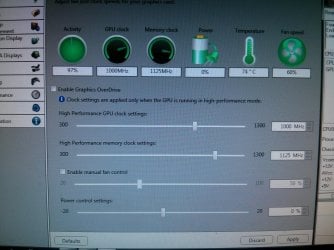
My graphic card is having activity 97% even while its in idle. Had CCC 13.4 tried re installing, didnt help.
Currently installed 13.8 beta still same issue.

Card was overclocked before but had set everything to default settings. Should be a software issue is guess :confused:

Thanks in advance..
 

Attachments

  • IMG_20130820_122607.jpg
    IMG_20130820_122607.jpg
    992.8 KB · Views: 11
Last edited:

My Computer My Computer

Computer type
PC/Desktop
Computer Manufacturer/Model Number
Intel
OS
windows 7 ultimate x32
CPU
core i3 530 @ 3.63 ghz
Motherboard
Intel dh55pj
Memory
4 gb ddr3 1333mhz
Graphics Card(s)
Sapphire radeon 7770 1gb Ghz Edition
Monitor(s) Displays
lg 19"
Screen Resolution
1368*768
Hard Drives
Seagate 500gb @ 7200 rpm
PSU
Zebronics 450 w
Case
Zebronics
Cooling
Cooler master Tx3 Evo cpu and cooler master 120mm Inlet fan
Mouse
Lenovo razer 1600 dpi laser
Internet Speed
8 Mbps dsl
Antivirus
Avast Free
Browser
Chrome

My Computer My Computer

Computer type
PC/Desktop
Computer Manufacturer/Model Number
Home Built
OS
Win 7 Pro x64, Win 10 Pro x64, Linux Light x86
CPU
Core i7 3770K
Motherboard
Gigabyte GA-Z77P-D3
Memory
Crucial Ballistix Sport 8GB
Graphics Card(s)
ASUS GeForce GTX 650 Ti
Sound Card
On board
Monitor(s) Displays
ASUS 22 W/S
Screen Resolution
1920 x 1080
Hard Drives
Intel 320 Series SSD, WD Caviar Black 1TB
PSU
Corsair CX 750w
Case
Black Night
Cooling
120mm fans front/back, Coolermaster Hyper 212 Evo
Keyboard
Razer Blackwidow Expert 2013 Mechanical Keyboard
Mouse
Logitech G300 Gaming Mouse
Internet Speed
20mb Unlimited
Antivirus
ZA Antivirus + Firewall
Browser
Cyberfox
Other Info
Powered USB Hub, External Drives 3 x 1TB, Phone Dock.
^^^ Same. I bet money it's the new malware everyone's been seeing that mines bitcoins on Gpu's. Horrible thing but easy to repair. If MWB can't fix it, PM me I have an exe file that someone created that is very versatile and can remove most cases of this Malware; pretty confident you got it.
 

My Computer My Computer

Computer type
PC/Desktop
Computer Manufacturer/Model Number
Custom
OS
Windows 7 Ultimate x64
CPU
AMD Phenom II X4 965 3.4Ghz (Stock spd until Winter)
Motherboard
890FX Asus
Memory
Kingston 8GB DDR 3 1333
Graphics Card(s)
EVGA GeForce GTX 660 Ti Superclocked 2GB GDDR5 6Ghz
Hard Drives
2 Western Digital Red 3TB
Antivirus
MWB
Browser
FF/Chrome
Hi,

Thanks to Stephanie and Das:party::party::party:. I thought Avast:confused: would be enough to protect my system. Check the Malware bytes log.

Memory Processes Detected: 2
C:\Program Files\Java\sidebar.exe (Trojan.BitCoinMiner) -> 2816 -> Delete on reboot.
C:\ProgramData\IBUpdaterService\ibsvc.exe (PUP.InstallBrain) -> 1964 -> Delete on reboot.

Memory Modules Detected: 0
(No malicious items detected)

Registry Keys Detected: 26
HKCR\AppID\{C26644C4-2A12-4CA6-8F2E-0EDE6CF018F3} (PUP.Optional.Delta.A) -> Quarantined and deleted successfully.
HKCR\AppID\{CA5CAA63-B27C-4963-9BEC-CB16A36D56F8} (PUP.Optional.MySearchDial.A) -> Quarantined and deleted successfully.
HKCR\CLSID\{261DD098-8A3E-43D4-87AA-63324FA897D8} (PUP.Optional.Delta) -> Quarantined and deleted successfully.
HKCR\TypeLib\{39CB8175-E224-4446-8746-00566302DF8D} (PUP.Optional.Delta) -> Quarantined and deleted successfully.
HKCR\esrv.deltaESrvc.1 (PUP.Optional.Delta) -> Quarantined and deleted successfully.
HKCR\esrv.deltaESrvc (PUP.Optional.Delta) -> Quarantined and deleted successfully.
HKCR\CLSID\{D40753C7-8A59-4C1F-BE88-C300F4624D5B} (PUP.Optional.MySearchDial.A) -> Quarantined and deleted successfully.
HKCR\TypeLib\{C292AD0A-C11F-479B-B8DB-743E72D283B0} (PUP.Optional.MySearchDial.A) -> Quarantined and deleted successfully.
HKCR\esrv.mysearchdialESrvc.1 (PUP.Optional.MySearchDial.A) -> Quarantined and deleted successfully.
HKCR\esrv.mysearchdialESrvc (PUP.Optional.MySearchDial.A) -> Quarantined and deleted successfully.
HKCR\CLSID\{DF84E609-C3A4-49CB-A160-61767DAF8899} (PUP.Optional.WebCake.A) -> Quarantined and deleted successfully.
HKCR\Typelib\{4599D05A-D545-4069-BB42-5895B4EAE05B} (PUP.Optional.Delta.A) -> Quarantined and deleted successfully.
HKCR\Interface\{1231839B-064E-4788-B865-465A1B5266FD} (PUP.Optional.Delta.A) -> Quarantined and deleted successfully.
HKCU\SOFTWARE\Microsoft\Windows\CurrentVersion\Ext\Stats\{C1AF5FA5-852C-4C90-812E-A7F75E011D87} (PUP.Optional.Delta.A) -> Quarantined and deleted successfully.
HKLM\SOFTWARE\Microsoft\Windows\CurrentVersion\Explorer\Browser Helper Objects\{C1AF5FA5-852C-4C90-812E-A7F75E011D87} (PUP.Optional.Delta.A) -> Quarantined and deleted successfully.
HKCU\SOFTWARE\Microsoft\Windows\CurrentVersion\Ext\Stats\{EF5625A3-37AB-4BDB-9875-2A3D91CD0DFD} (PUP.Optional.MySearchDial.A) -> Quarantined and deleted successfully.
HKLM\SOFTWARE\Microsoft\Windows\CurrentVersion\Explorer\Browser Helper Objects\{EF5625A3-37AB-4BDB-9875-2A3D91CD0DFD} (PUP.Optional.MySearchDial.A) -> Quarantined and deleted successfully.
HKLM\SOFTWARE\Microsoft\Internet Explorer\Low Rights\ElevationPolicy\{219046AE-358F-4CF1-B1FD-2B4DE83642A8} (PUP.Optional.MySearchDial.A) -> Quarantined and deleted successfully.
HKLM\SOFTWARE\Microsoft\Internet Explorer\Low Rights\ElevationPolicy\{348C2DF3-1191-4C3E-92A6-B3A89A9D9C85} (PUP.Optional.Delta.A) -> Quarantined and deleted successfully.
HKLM\SOFTWARE\Microsoft\Windows\CurrentVersion\Uninstall\{845D66F9-A5B9-A0AF-466D-DB802E6066E5} (PUP.Optional.Tarma.A) -> Quarantined and deleted successfully.
HKLM\SYSTEM\CurrentControlSet\Services\IBUpdaterService (PUP.InstallBrain) -> Quarantined and deleted successfully.
HKLM\SOFTWARE\Microsoft\Windows\CurrentVersion\Uninstall\Updater Service (PUP.InstallBrain) -> Quarantined and deleted successfully.
HKCU\SOFTWARE\DataMngr_Toolbar (PUP.Optional.DataMngr) -> Quarantined and deleted successfully.
HKCU\SOFTWARE\DELTA\DELTA (PUP.Optional.Delta) -> Quarantined and deleted successfully.
HKCU\Software\DataMngr (PUP.Optional.DataMngr) -> Quarantined and deleted successfully.
HKLM\SOFTWARE\InstallCore\mysearchdial (PUP.Optional.MySearchDial.A) -> Quarantined and deleted successfully.

Registry Values Detected: 5
HKLM\SOFTWARE\Microsoft\Internet Explorer\Toolbar\{82E1477C-B154-48D3-9891-33D83C26BCD3} (PUP.Optional.Delta.A) -> Data: -> Quarantined and deleted successfully.
HKLM\SOFTWARE\Microsoft\Internet Explorer\Toolbar|{82E1477C-B154-48D3-9891-33D83C26BCD3} (PUP.Optional.Delta.A) -> Data: Delta Toolbar -> Quarantined and deleted successfully.
HKLM\SOFTWARE\Microsoft\Internet Explorer\Toolbar\{3004627E-F8E9-4E8B-909D-316753CBA923} (PUP.Optional.MySearchDial.A) -> Data: -> Quarantined and deleted successfully.
HKLM\SOFTWARE\Microsoft\Internet Explorer\Toolbar|{3004627E-F8E9-4E8B-909D-316753CBA923} (PUP.Optional.MySearchDial.A) -> Data: mysearchdial Toolbar -> Quarantined and deleted successfully.
HKCU\SOFTWARE\Delta\Delta|tlbrSrchUrl (PUP.Optional.Delta) -> Data: -> Quarantined and deleted successfully.

Registry Data Items Detected: 2
HKCU\SOFTWARE\Microsoft\Internet Explorer\Main|Start Page (PUP.Optional.MySearchDial.A) -> Bad: (Mysearchdial Search) Good: (Google) -> Quarantined and repaired successfully.
HKCU\SOFTWARE\Microsoft\Windows\CurrentVersion\Explorer\Advanced|Start_ShowMyComputer (PUM.Hijack.StartMenu) -> Bad: (0) Good: (1) -> Quarantined and repaired successfully.

Folders Detected: 8
C:\ProgramData\IBUpdaterService (PUP.InstallBrain) -> Delete on reboot.
C:\Users\\AppData\Roaming\Babylon (PUP.Optional.Babylon.A) -> Quarantined and deleted successfully.
C:\Users\\AppData\Roaming\Delta (PUP.Optional.Delta) -> Quarantined and deleted successfully.
C:\ProgramData\Tarma Installer (PUP.Optional.Tarma.A) -> Quarantined and deleted successfully.
C:\ProgramData\Tarma Installer\{361E80BE-388B-4270-BF54-A10C2B756504} (PUP.Optional.Tarma.A) -> Quarantined and deleted successfully.
C:\ProgramData\Tarma Installer\{361E80BE-388B-4270-BF54-A10C2B756504}\Cache (PUP.Optional.Tarma.A) -> Quarantined and deleted successfully.
C:\Users\\AppData\Roaming\mysearchdial (PUP.Optional.MySearchDial.A) -> Quarantined and deleted successfully.
C:\Users\\AppData\Roaming\mysearchdial\icons_2.2.4.731 (PUP.Optional.MySearchDial.A) -> Quarantined and deleted successfully.

Files Detected: 14
C:\Program Files\Java\sidebar.exe (Trojan.BitCoinMiner) -> Delete on reboot.
C:\ProgramData\InstallMate\{25F72E33-523F-4055-A2BE-1A1DFE140CC5}\Setup.exe (PUP.Optional.Tarma.A) -> Quarantined and deleted successfully.
C:\ProgramData\InstallMate\{25F72E33-523F-4055-A2BE-1A1DFE140CC5}\TsuDll.dll (PUP.Optional.Tarma.A) -> Quarantined and deleted successfully.
C:\ProgramData\Tarma Installer\{361E80BE-388B-4270-BF54-A10C2B756504}\Setup.exe (PUP.Optional.Tarma.A) -> Quarantined and deleted successfully.
C:\ProgramData\IBUpdaterService\ibsvc.exe (PUP.InstallBrain) -> Delete on reboot.
C:\ProgramData\IBUpdaterService\repository.xml (PUP.InstallBrain) -> Quarantined and deleted successfully.
C:\Users\balakarthi\AppData\Roaming\Babylon\log_file.txt (PUP.Optional.Babylon.A) -> Quarantined and deleted successfully.
C:\Users\\AppData\Roaming\Delta\sqlite3.dll (PUP.Optional.Delta) -> Quarantined and deleted successfully.
C:\ProgramData\Tarma Installer\{361E80BE-388B-4270-BF54-A10C2B756504}\Setup.dat (PUP.Optional.Tarma.A) -> Quarantined and deleted successfully.
C:\ProgramData\Tarma Installer\{361E80BE-388B-4270-BF54-A10C2B756504}\Setup.ico (PUP.Optional.Tarma.A) -> Quarantined and deleted successfully.
C:\ProgramData\Tarma Installer\{361E80BE-388B-4270-BF54-A10C2B756504}\_Setup.dll (PUP.Optional.Tarma.A) -> Quarantined and deleted successfully.
C:\ProgramData\Tarma Installer\{361E80BE-388B-4270-BF54-A10C2B756504}\_Setupx.dll (PUP.Optional.Tarma.A) -> Quarantined and deleted successfully.
C:\Users\\AppData\Roaming\mysearchdial\icons_2.2.4.731\magnifying.ico (PUP.Optional.MySearchDial.A) -> Quarantined and deleted successfully.
C:\Users\\AppData\Roaming\mysearchdial\icons_2.2.4.731\star2.ico (PUP.Optional.MySearchDial.A) -> Quarantined and deleted successfully.

Thanks again. Will recommend MB along with Avast from now on.

 

My Computer My Computer

Computer type
PC/Desktop
Computer Manufacturer/Model Number
Intel
OS
windows 7 ultimate x32
CPU
core i3 530 @ 3.63 ghz
Motherboard
Intel dh55pj
Memory
4 gb ddr3 1333mhz
Graphics Card(s)
Sapphire radeon 7770 1gb Ghz Edition
Monitor(s) Displays
lg 19"
Screen Resolution
1368*768
Hard Drives
Seagate 500gb @ 7200 rpm
PSU
Zebronics 450 w
Case
Zebronics
Cooling
Cooler master Tx3 Evo cpu and cooler master 120mm Inlet fan
Mouse
Lenovo razer 1600 dpi laser
Internet Speed
8 Mbps dsl
Antivirus
Avast Free
Browser
Chrome
Hi bala, did running the Malwarebytes helped?
 

My Computer My Computer

Computer type
PC/Desktop
Computer Manufacturer/Model Number
Custom Bulid/Self made
OS
Windows 11 x64
CPU
i5 2500K @ 3.3 GHz
Motherboard
ASUS P8 Z77 V pro
Memory
16 GB DDR 3 @ 1600Mhz
Graphics Card(s)
MSI 1050TI 4GB OC version
Sound Card
On Board (Realtek HD audio)
Monitor(s) Displays
Samsung 22" LCD
Screen Resolution
1920*1080
Hard Drives
Seagate 1 TB, WD 1TB, Seagate 2 TB ( I use a lot of space)
PSU
coolermaster 750 W
Case
Coolermaster HAF912
Cooling
Coolermaster hyper 212 EVO
Keyboard
Samsung
Mouse
Dell Wireless
Internet Speed
Wireless 50 Mbps
Antivirus
AVG 2016 Internet Security
Browser
Google Chrome

My Computer My Computer

Computer type
PC/Desktop
Computer Manufacturer/Model Number
Intel
OS
windows 7 ultimate x32
CPU
core i3 530 @ 3.63 ghz
Motherboard
Intel dh55pj
Memory
4 gb ddr3 1333mhz
Graphics Card(s)
Sapphire radeon 7770 1gb Ghz Edition
Monitor(s) Displays
lg 19"
Screen Resolution
1368*768
Hard Drives
Seagate 500gb @ 7200 rpm
PSU
Zebronics 450 w
Case
Zebronics
Cooling
Cooler master Tx3 Evo cpu and cooler master 120mm Inlet fan
Mouse
Lenovo razer 1600 dpi laser
Internet Speed
8 Mbps dsl
Antivirus
Avast Free
Browser
Chrome
Perfect, congrats!
 

My Computer My Computer

Computer type
PC/Desktop
Computer Manufacturer/Model Number
Custom Bulid/Self made
OS
Windows 11 x64
CPU
i5 2500K @ 3.3 GHz
Motherboard
ASUS P8 Z77 V pro
Memory
16 GB DDR 3 @ 1600Mhz
Graphics Card(s)
MSI 1050TI 4GB OC version
Sound Card
On Board (Realtek HD audio)
Monitor(s) Displays
Samsung 22" LCD
Screen Resolution
1920*1080
Hard Drives
Seagate 1 TB, WD 1TB, Seagate 2 TB ( I use a lot of space)
PSU
coolermaster 750 W
Case
Coolermaster HAF912
Cooling
Coolermaster hyper 212 EVO
Keyboard
Samsung
Mouse
Dell Wireless
Internet Speed
Wireless 50 Mbps
Antivirus
AVG 2016 Internet Security
Browser
Google Chrome
I was a paying Avast! customer myself and fired them after the subscription ended, twice things got by it.

Scan with malwarebytes' at least weekly if you use ANY free a/v is what I recommend, I may have to switch to that myself.

Or just pay for malwarebyte's product and let it be your real time monitoring solution. 8)
 

My Computer My Computer

Computer type
PC/Desktop
Computer Manufacturer/Model Number
Self Built Custom
OS
Windows 7 Ultimate Retail Box (64-bit installed) + Service Pack 1
CPU
AMD FX-8350 CPU v1.15 (or 1.0F) BIOS was required!
Motherboard
MSI 890FXA-GD70
Memory
8G CAS-7 G-Skill DDR3 @1333 (2 fours) [mobo nonOC max rec'd]
Graphics Card(s)
Radeon HD 7950 [3 gigs of GDDR5] MSI Twin Frozr model
Sound Card
Realtek High Definition Audio (onboard mobo, ALC-889 chip)
Monitor(s) Displays
2 WS LED Monitors: One LG One Viewsonic
Screen Resolution
1920 by 1080
Hard Drives
SSD for OS: Samsung 840 Pro
SSD for VM and utilities: Adata SX900
7200 RPM SATA HDs for the rest: Hitachi and Seagate
PSU
Corsair TX850 - 850W max, in service since August 2010.
Case
Thermaltake Armor A90
Cooling
Thermaltake Spin Q CPU Cooler, in service since August 2010
Keyboard
Logitech G11
Mouse
Logitech M310 Wireless
Internet Speed
100 Megabit broadband supposedly upgraded from 50 (Cable)
Antivirus
Bitdefender Internet Security 2014 suite
Browser
Pale Moon 64-bit main, also IceDragon, Opera, and Maxthon.
Other Info
CompTIA A+ certified (220-800 series) in July 2013.
Try running Malwarebytes Chameleon next, and see how much more malware you can slay at once.

To run: Start > All Programs > Malwarebytes' Anti-Malware > Tools > Malwarebytes Chameleon

Follow the directions.

   Note
This tool will attempt to launch Malwarebytes in an attempt to update the definitions, especially if malware has taken over and prevented any other AV/AS tool from working. Even if it fails, it will then try to slay the malicious processes before trying to run Malwarebytes in Quick Scan mode.
:warn: Chameleon may not work if Malwarebytes itself needs an update, or if you're running the Windows 8.1 release preview.
 

My Computer My Computer

Computer type
PC/Desktop
Computer Manufacturer/Model Number
Custom
OS
Microsoft Windows 7 Home Premium 64-bit Service Pack 1
CPU
AMD A10-6800K APU with Radeon(tm)™ HD Graphics 4100
Motherboard
ASRock FM2A85X Extreme4-M
Memory
(2) G.Skill F3-12800CL10-8GBXL
Graphics Card(s)
ASUS R7 250 Series (0x6610)
Sound Card
Realtek High Definition Audio
Monitor(s) Displays
Acer X213H LCD monitor, 21"
Screen Resolution
1920 x 1080 x 32 bits @ 60 Hz
Hard Drives
WD Black, 1.0TB, WDC WD1002FAEX-00Z3A0
PSU
Rosewill Quark-650
Case
Raidmax Comet SECC Steel ATX Mid Tower Computer Case
Cooling
1 x 80mm + 2 x 120mm + Stock cooler
Mouse
Gear Head Wireless Optical 5-button mouse
Internet Speed
FTTx 6000 / 1000
Antivirus
Avast! Free Antivirus 2015.10.0.2208
Browser
Google Chrome Version 40.0.2214.115
Other Info
*AMD Dual-Graphics
*Uses OpenDNS
*Uses Folding@Home
*HP 16x Super-Multi DVD Writer
*Superspeed 74-in-1 Card Reader
*Maximum overclock has not been determined.
Hello All,

I am running a different Video Card but still an AMD. (doubt that the video HW has anything to do with issue) My Card-->XFX Radeon HD 7970 GHz Edition 3GB FX-797G-TDFC


I had the exact problem and the replies on this topic helped me key into the problem and eradicate it.


I had never heard of bitcoin mining botnets or anything of the sort and was very disturbed that Malwarebytes did not have even the slightest clue that my system was boarded and my GPU was being baked by a foreign program.


Neither my MS Defender nor Malwarebytes' Anti-Malware full scan even with chameleon found anything that could have been causing the issue with my runaway GPU processes and associate heat and loud fan noise.
It found some stuff and I removed it all, but it was just adware stuff and nothing that helped when it was removed. Several post scans revealed they were gone and found nothing new.


After further browsing of the Internet for possible help I came across some folks that identified the iehighutil.exe as being a part of the \"0Access\" or \"ZeroAccess\" bitcoin mining botnet and found that file in my system startup and its associated file location in c:\temporary.


Another Virus found spreading quickly. This virus installs malwares on your system silently and exploits your GPU leading to a messed up one. Unfortunately, Antivirus Software’s don't detect this one. These viruses probably pass down to your computer via Torrents and some other sources.

How to check if I have the Virus?
Check your task manager for processes with these names -
ieutil.exe
iehighutil.exe

How to remove the virus?
1. If you've the virus you'll have a folder named Temporary in your System Drive. For eg:- C:\Temporary. You'll see the virus there. So delete that folder.
2. Block the programs - ieutil.exe and iehighutil.exe with an Antivirus Program.
3. Run msconfig and delete iehighutil.exe from startup programs.
4. Run regedit search and find(Ctrl +F) iehighutil and delete the whole folder.


Even after deleting the files and the folder and removing any reference to it in my registry and several reboots, I was still plagued with this menace of what sure seemed like a GPU hijack for bitcoin mining. I was almost ready to wipe and reload My OS and in preparation I logged in with a secondary Admin account to back up my docs and profile. That is when I noticed that the GPU was calm and unaffected.

So I backed up the suspect user profile then deleted it completely and then logged into the old account and widows rebuild my profile and that killed whatever was present on my system.

It must have had some nasty files running (that were undetected by MB and MS defender Mind you) somewhere in my app data or elsewhere in my User Profile.

I am so happy to be rid of this menace and to have a calm, cool and noise free PC again.

I wish I could have used a smaller hammer than wiping out the user profile, but I was glad I got rid of the menace and did not have to reload the OS and all my APPS and non-steam games again.

Not so fast.. See the next post to see the ongoing saga..

Thanks for the advice and steering me in the right direction all.

Take Care,
Del
 
Last edited:

My Computer My Computer

Computer type
PC/Desktop
Computer Manufacturer/Model Number
Custom Built with ADM /ATI ()
OS
Windows 7 Ultimate X64 & Windows 8 X64
CPU
AMD FX-8150 8-Core
Motherboard
ASUS Crosshair Formula-Z Motherboard
Memory
16GB DDR3-2133 PC317000 G.Skills F3-1700CL9Q-16GBZH
Graphics Card(s)
XFX Radeon HD 7970 GHz Edition 3GB FX-797G-TDFC
Hard Drives
OCZ Technology 128GB Vertex 4 Series SATA 6.0 VTX4-25SAT3-128G

Several other internal Seagate 7200 RPM SATA Drives.
Antivirus
Windows Defender & Malewarebytes
Browser
IE and Chrome
Hello All,


The GPU pegged to 100% again.


I was premature in my assessment that all was well. In Fact it is possible the deleting my user profile may not have been required in the remediation process.


I found that AMD released a new Beta Driver (amd_catalyst_13.10_beta.exe) so I thought perhaps that would not hurt to download that new driver and begin to prepare for a new OS install after a drive wipe.


I downloaded the driver saved it and also installed it.


During the install (with the GPU screaming) I got an error message about timeserver.exe crashed.


That was very suspicious so I began to research that.
Found this site:: http://forums.malwarebytes.org/index.php?showtopic=128536

Hi everybody,

A few days ago my PC began running very slow. To try and find a solution I began to run my trusted group of virus scanner and male ware scanners, Malwarebytes Anti-Malware of course included. However my attempts of finding the solution seem to bring zero results. After poking around in the task manager is seem to find a process called TimeServer.exe that was eating a lot of CPU power. In my shock I hastily ended the process, a bit drastic but it seems to stop harassing my CPU and everything seems to be calming down.
So now that I found my evil doer my job was to identify it, however here I also found some problems in identifying the culprit. In my search I found two things http://processchecke...Server.exe.html saying it might be a bitcoin miner and the 2nd item was http://forums.malwar...howtopic=125666

I knew I needed help getting rid of it even if I found the monster.

I followed the "I'm infected - What do i do now?" and read some posts and the guide lines. After i did the preparations for the files in my post, I did some more digging and found the culprit located in C:\ProgramData\Microsoft\Windows\Time also I highlighted some interesting things I already found in the DDS.txt below. My apologies if I did something wrong but i try to give a much information to help you, help me . Also English is my second language so sorry for any spelling and grammar mistakes.

Any advice would be a great help in getting rid of this monster. Also my thanks and appreciation for any help in advance.

I followed the guided instructions very carefully, mindful that this was a very exact remedy for a specific problem.


I ran the RogueKillerX64.exe and found a rogue script and deleted it::


Rogue ST Task 4458 wscript.exe c:\users\%USERNAME%\APPDATA\LOCAL\TEMP\Launchie.vbs //B


I then ran the combofix.exe scan first


Found the same results as listed on the website, so I ran the script file with combofix.exe
It killed the bad folder and all of its contents.


Followed up with the remaining steps suggested on the site.


I am pretty sure that I have it killed off this time. But I will monitor it closely and post in a few days if it stays clear.

Although the Malwarebytes application did not catch this custom rogue code in a scan the website and its members and expert assistance is very top notch as are the members of this great sevenforums board.

Take Care,
Del (Carefully optimistic)
 
Last edited:

My Computer My Computer

Computer type
PC/Desktop
Computer Manufacturer/Model Number
Custom Built with ADM /ATI ()
OS
Windows 7 Ultimate X64 & Windows 8 X64
CPU
AMD FX-8150 8-Core
Motherboard
ASUS Crosshair Formula-Z Motherboard
Memory
16GB DDR3-2133 PC317000 G.Skills F3-1700CL9Q-16GBZH
Graphics Card(s)
XFX Radeon HD 7970 GHz Edition 3GB FX-797G-TDFC
Hard Drives
OCZ Technology 128GB Vertex 4 Series SATA 6.0 VTX4-25SAT3-128G

Several other internal Seagate 7200 RPM SATA Drives.
Antivirus
Windows Defender & Malewarebytes
Browser
IE and Chrome
Still All Clear..

I am Happy to have the unwelcome Hijack of my Gaming Computer In the past. :-)

Take Care,
Del
 

My Computer My Computer

Computer type
PC/Desktop
Computer Manufacturer/Model Number
Custom Built with ADM /ATI ()
OS
Windows 7 Ultimate X64 & Windows 8 X64
CPU
AMD FX-8150 8-Core
Motherboard
ASUS Crosshair Formula-Z Motherboard
Memory
16GB DDR3-2133 PC317000 G.Skills F3-1700CL9Q-16GBZH
Graphics Card(s)
XFX Radeon HD 7970 GHz Edition 3GB FX-797G-TDFC
Hard Drives
OCZ Technology 128GB Vertex 4 Series SATA 6.0 VTX4-25SAT3-128G

Several other internal Seagate 7200 RPM SATA Drives.
Antivirus
Windows Defender & Malewarebytes
Browser
IE and Chrome
Back
Top