AMD Turion problem

Naftaline

New member
Local time
4:16 PM
Messages
4
Good day!
I've got an Acer Aspire 6530G and I've got a little ,,weird" problem with my processor.

Let's forget about the overheating(which is nearly unbearable - the laptop switches off when playing some games, okay, I can handle this - I am not very fond of games,and it has got problems with Flash and Skype videos.)

BUT:
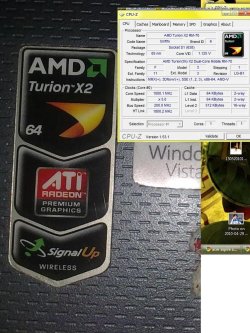
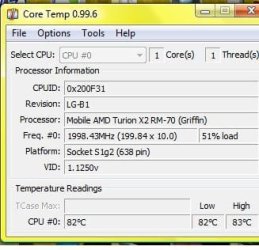
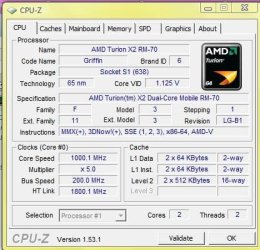
My laptop has got a sticker on it that says that I've got AMD Turion X2 (64), which has got two cores. My laptop also says so, but it's talking only about one core - which goes to 2000 mhz. Look at these screens and compare the stickers and those softwares...
turion.jpg
tuut.jpg
core.jpg

(...but the fact is that 2000 mhz is being used only when nothing's running, normally I've got the CPU around 1000 mhz...)

And now, please, could you tell me, what do I exactly have?:D
 

My Computer

OS
Windows Vista
Last edited by a moderator:

My Computer

Computer type
PC/Desktop
Computer Manufacturer/Model Number
Dwarf Dwf/11/2012 r09/2013
OS
Windows 8.1 Pro RTM x64
CPU
Intel Core-i5-3570K 4-core @ 3.4GHz (Ivy Bridge) (OC 4.4GHz)
Motherboard
ASRock Z77 Extreme4-M
Memory
4 x 4GB DDR3-1600 Corsair Vengeance CMZ8GX3M2A1600C9B (16GB)
Graphics Card(s)
MSI GeForce GTX770 Gaming OC 2GB
Sound Card
Realtek High Definition on board solution (ALC 898)
Monitor(s) Displays
ViewSonic VA1912w Widescreen (VGA)
Screen Resolution
1440x900
Hard Drives
OCZ Agility 3 SSD 120GB SATA III x2 (RAID 0)
Samsung HD501LJ 500GB SATA II x2
Hitachi HDS721010CLA332 1TB SATA II
Iomega 1.5TB Ext USB 2.0
WD 2.0TB Ext USB 3.0
PSU
XFX Pro Series 850W Semi-Modular
Case
Gigabyte IF233
Cooling
1 x 120mm Front Inlet 1 x 120mm Rear Exhaust
Keyboard
Microsoft Comfort Curve Keyboard 3000 (USB)
Mouse
Microsoft Comfort Mouse 3000 for Business (USB)
Internet Speed
NetGear DG834Gv3 ADSL Modem/Router (Ethernet) ~4.0 Mb/s (O2)
Antivirus
Avast! 8.0.1497
Browser
IE 11
Other Info
Optical Drive: HL-DT-ST BD-RE BH10LS30 SATA Bluray
Lexmark S305 Printer/Scanner/Copier (USB)
WEI Score: 8.1/8.1/8.5/8.5/8.25
Asus Eee PC 1011PX Netbook (Windows 7 x86 Starter)
It also looks like you might need to blow some compressed air into your laptop vents to clean out some dust or something. Your temps shouldn't run that high. I had a serious over heating problem which would crash my laptop all the time and prevent me from even booting. I finally got a can of air and had some serious dust bunnies come out of the heat sink fins that took putting the straw into the holes to get it out. I have also taken a small shop vac and sucked some serious pet hair from the heat fins which has dropped my temp down into the 50's and only spikes to mid 70's while playing large games.

Cleaning would be my first attempt to solve this. might seem strange but a small over heating can cause tons of issues and even kill a battery if it stays hot like your core temp is showing.

Also if your laptop is like mine the heatsink above my video card burned out the pad and I had to put artic silver in its place to keep my video from overheating. Once I cleaned and fixed the heat transfer paste to something better then factory all my issues went away.

This is something to think about and a good cleaning can only help and its a cheap fix.
 

My Computer

Computer Manufacturer/Model Number
Alienware M17x R3
OS
Windows 7 Ultimate x64
CPU
Intel Core i7 2670QM 2.2GHz 3.3GHz Turbo Mode
Memory
12GB Dual Channel DDR3 at 1333MHz
Graphics Card(s)
2GB GDDR5 AMD Radeon 6990M
Sound Card
Audio Powered by Klipsch
Monitor(s) Displays
17.3-inch WideFHD 1920 x 1080 60Hz WLED
Screen Resolution
1920x1080
Hard Drives
120GB SSD slot 1
1TB HDD slot 2
Case
alienware laptop case
Cooling
Dual heatsink and fans
Keyboard
Alienware multi color keyboard
Mouse
logitech G300 gaming mouse
Other Info
Intel® Centrino Advanced-N 6230 2x2 agn+ Bluetooth

finally got it!!!
Oh..Thanks for your advice. :) I tried to do so - but you know what? There was nearly NO DUST at all!...just like a little bit of it, but definitely not enough to cause so much overheating.
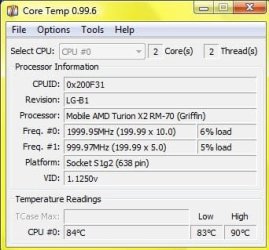
 

My Computer

OS
Windows Vista
Have you checked msconfig? Select Boot tab, click on Advanced options... and ensure that Number of processors is unchecked.

http://www.sevenforums.com/tutorials/66504-processors-limit-number-used-windows-7-a.html

Wow!! Maybe it's better. But..
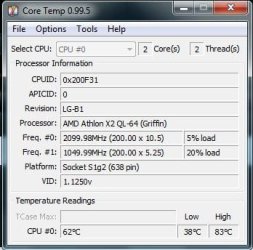
So I've done it as you said...and here are the results. Now it says I've got a double-core, but it's still measuring only one core in Bez názvu.jpg,
but it says coretemp.jpg this too.
performance.jpg

But THANKS a lot!:) You've really made my day. Now I finally see that my money was spent really on something that's on the sticker:D
But the question now is the performance...it hasn't improved very much...
 
Last edited by a moderator:

My Computer

OS
Windows Vista
CPU-Z currently only shows information for the first core of any processor (Core #0). This may, or may not, be rectified in subsequent releases.

As regards performance, this has a great deal to do with the power settings. As this is a laptop, the settings are probably set to give the maximum battery life. To find out what setting your system is currently set to, and to change them, see the following Tutorial: http://www.sevenforums.com/tutorials/774-power-plan-select.html You may also like to refer to the Related Tutorials listed at the end of this one.
 

My Computer

Computer type
PC/Desktop
Computer Manufacturer/Model Number
Dwarf Dwf/11/2012 r09/2013
OS
Windows 8.1 Pro RTM x64
CPU
Intel Core-i5-3570K 4-core @ 3.4GHz (Ivy Bridge) (OC 4.4GHz)
Motherboard
ASRock Z77 Extreme4-M
Memory
4 x 4GB DDR3-1600 Corsair Vengeance CMZ8GX3M2A1600C9B (16GB)
Graphics Card(s)
MSI GeForce GTX770 Gaming OC 2GB
Sound Card
Realtek High Definition on board solution (ALC 898)
Monitor(s) Displays
ViewSonic VA1912w Widescreen (VGA)
Screen Resolution
1440x900
Hard Drives
OCZ Agility 3 SSD 120GB SATA III x2 (RAID 0)
Samsung HD501LJ 500GB SATA II x2
Hitachi HDS721010CLA332 1TB SATA II
Iomega 1.5TB Ext USB 2.0
WD 2.0TB Ext USB 3.0
PSU
XFX Pro Series 850W Semi-Modular
Case
Gigabyte IF233
Cooling
1 x 120mm Front Inlet 1 x 120mm Rear Exhaust
Keyboard
Microsoft Comfort Curve Keyboard 3000 (USB)
Mouse
Microsoft Comfort Mouse 3000 for Business (USB)
Internet Speed
NetGear DG834Gv3 ADSL Modem/Router (Ethernet) ~4.0 Mb/s (O2)
Antivirus
Avast! 8.0.1497
Browser
IE 11
Other Info
Optical Drive: HL-DT-ST BD-RE BH10LS30 SATA Bluray
Lexmark S305 Printer/Scanner/Copier (USB)
WEI Score: 8.1/8.1/8.5/8.5/8.25
Asus Eee PC 1011PX Netbook (Windows 7 x86 Starter)
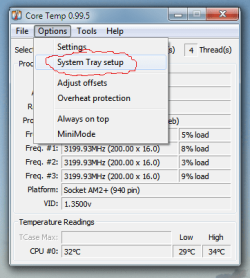
For CoreTemp, the setting to see all or one core is here:
 

Attachments

  • CoreTemp2.png
    CoreTemp2.png
    16.4 KB · Views: 2

My Computer

Computer Manufacturer/Model Number
Rig 1
OS
Windows 7 Ultimate x64
CPU
AMD Phenom II X4 940 Black Edition @ 3.4GHz (AM2+)
Motherboard
Gigabyte GA-MA790X-UD4P (AM2+)
Memory
Corsair CM2X4096-8500C5 (4 X 2GB)
Graphics Card(s)
XFX Radeon HD 5770 / Diamond Radeon HD 5770 CrossFireX
Sound Card
Asus Xonar DS (PCI)
Monitor(s) Displays
Samsung SyncMaster 932bw+ (3)
Screen Resolution
4320x900
Hard Drives
OCZ Vertex 2 80 GB - Windows 7 System --
WD Caviar Black 1TB - Music, Movies, Vids, Pics --
WD Caviar Black 640GB - User Profiles & Games --
WD My Book 320GB external
PSU
Corsair CMPSU-750TX
Case
Cooler Master HAF 932
Cooling
Corsair Hydro Series H50
Keyboard
Logitech Desktop Wave
Mouse
Logitech LX8 Laser
Internet Speed
20 down / 2 up
Other Info
LG GGC-H20L Blu-Ray / HDDVD combo --
Hauppauge HVR-1250 --
Silverstone MFP-51 --
Logitech Webcam C600
my system can read one core faster then another also so I don't think this is an issue.
 

Attachments

  • Capture.JPG
    Capture.JPG
    31.5 KB · Views: 4

My Computer

Computer Manufacturer/Model Number
Alienware M17x R3
OS
Windows 7 Ultimate x64
CPU
Intel Core i7 2670QM 2.2GHz 3.3GHz Turbo Mode
Memory
12GB Dual Channel DDR3 at 1333MHz
Graphics Card(s)
2GB GDDR5 AMD Radeon 6990M
Sound Card
Audio Powered by Klipsch
Monitor(s) Displays
17.3-inch WideFHD 1920 x 1080 60Hz WLED
Screen Resolution
1920x1080
Hard Drives
120GB SSD slot 1
1TB HDD slot 2
Case
alienware laptop case
Cooling
Dual heatsink and fans
Keyboard
Alienware multi color keyboard
Mouse
logitech G300 gaming mouse
Other Info
Intel® Centrino Advanced-N 6230 2x2 agn+ Bluetooth

finally got it!!!
my system can read one core faster then another also so I don't think this is an issue.

yeah..same does mine but the problem was that it didnt even know it has a second core:)
 

My Computer

OS
Windows Vista
Back
Top