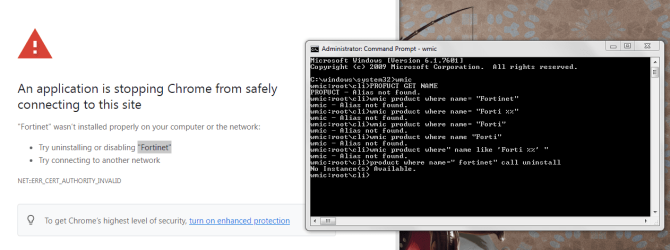
An application is stopping Chrome from safely connecting to this site

squirtmph

New member
Member
VIP
Local time
3:41 AM
Messages
235
Location
PDX
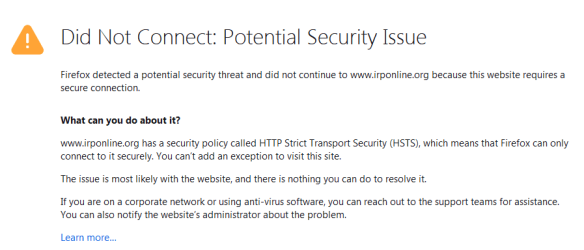
[h=1]An application is stopping Chrome/Firefox from safely connecting to this site as "Fortinet"[/h]These is what I have done:
[FONT=&quot]I use WMIC to uninstall things all the time.[/FONT]
[FONT=&quot]One piece of advice though, run this[/FONT]
[FONT=&quot]wmic product where" name like 'Forti %%' "[/FONT]

with out any success ! Please help!!!!
 

Attachments
  • 01.Fortinet.PNG
    01.Fortinet.PNG
    51.5 KB · Views: 2
  • 02.Fortinet.PNG
    02.Fortinet.PNG
    11.6 KB · Views: 0

My Computer My Computer

At a glance

Windows 10 Pro Version 22H2 64-bit EditionIntel(R) Core(TM) i7-10875H CPU @ 2.30GHz 2.3...2.0 GB (31.8 GB usable)
Computer type
Laptop
Computer Manufacturer/Model Number
Azure Blade 15.6
OS
Windows 10 Pro Version 22H2 64-bit Edition
CPU
Intel(R) Core(TM) i7-10875H CPU @ 2.30GHz 2.30 GHz
Memory
2.0 GB (31.8 GB usable)
Monitor(s) Displays
4K UHD OLED TOUCH
Screen Resolution
3840 x 2160
Hard Drives
1 TB
Mouse
Logitech MX Master 3S
Antivirus
Windows Security
Browser
Google Chrome
Other Info
______________________________________________


______________________________________________
hi
did you actually
install/delete fortinet
completely remove norton360 beforehand (using thier uninstaller)
my gut instinct is that theres a firewall or vpn conflict - check the logs
 

My Computer My Computer

At a glance

W7 home premium 32bit/W7HP 64bit/w10 tp insid...E5300 dual core3gbNvidia Geforce 7100 Nforce 630i
Computer type
PC/Desktop
Computer Manufacturer/Model Number
medionl/Aspire 6930G/acer x55a
OS
W7 home premium 32bit/W7HP 64bit/w10 tp insider ring
CPU
E5300 dual core
Motherboard
medion MS7366
Memory
3gb
Graphics Card(s)
Nvidia Geforce 7100 Nforce 630i
Monitor(s) Displays
avixc
Internet Speed
n (isp resticted to 72)
Antivirus
mse/pands
Browser
palemoon
Other Info
Belkin Fd7050 n USB using Railink RT2870 drivers, more upto date
norton360

Hello thanks for your feed back

Q - [FONT=&quot]norton360

I dont have Norton Installed

Q- [/FONT]
[FONT=&quot]firewall or vpn conflict - check the logs

What should I need to look for?
Also I dont have "VPN" as well
"Firewall" I have done any type of changes as well
"Logs" How could I creat a log for a review purposes!


Thanks again![/FONT]
 

My Computer My Computer

At a glance

Windows 10 Pro Version 22H2 64-bit EditionIntel(R) Core(TM) i7-10875H CPU @ 2.30GHz 2.3...2.0 GB (31.8 GB usable)
Computer type
Laptop
Computer Manufacturer/Model Number
Azure Blade 15.6
OS
Windows 10 Pro Version 22H2 64-bit Edition
CPU
Intel(R) Core(TM) i7-10875H CPU @ 2.30GHz 2.30 GHz
Memory
2.0 GB (31.8 GB usable)
Monitor(s) Displays
4K UHD OLED TOUCH
Screen Resolution
3840 x 2160
Hard Drives
1 TB
Mouse
Logitech MX Master 3S
Antivirus
Windows Security
Browser
Google Chrome
Other Info
______________________________________________


______________________________________________
Hi
according to your system specs you did have 360 installed
Fortinet/Norton both come with a Firewall as standard options-- check your installed programs via control panel ( did you enable them)
also check Device Manager if you had them enabled at anytime, VPN's, they will show there
To view the logs you will need to open the GUI for the AV's


MORE IMPORTANTLY did you install Fortinet or not
 

My Computer My Computer

At a glance

W7 home premium 32bit/W7HP 64bit/w10 tp insid...E5300 dual core3gbNvidia Geforce 7100 Nforce 630i
Computer type
PC/Desktop
Computer Manufacturer/Model Number
medionl/Aspire 6930G/acer x55a
OS
W7 home premium 32bit/W7HP 64bit/w10 tp insider ring
CPU
E5300 dual core
Motherboard
medion MS7366
Memory
3gb
Graphics Card(s)
Nvidia Geforce 7100 Nforce 630i
Monitor(s) Displays
avixc
Internet Speed
n (isp resticted to 72)
Antivirus
mse/pands
Browser
palemoon
Other Info
Belkin Fd7050 n USB using Railink RT2870 drivers, more upto date
I'm on my Vista system right now using Firefox 52.9 and Norton 360 (note that I'm not using any of the many Norton programs for controlling internet connections or security). For information, I can readily access fortinet.com and irponline.org. I don't know what the latter website has to do with fortinet. In the security section of Firefox, I have everything checkmarked except for using a master password and I have no exceptions in any of the options there. I'd make sure you have the latest version of Firefox installed (it should install automatically). I don't use Chrome as a browser but I do use Opera, which is a Chrome browser. It too, can readily access fortinet.
 

My Computer My Computer

At a glance

Windows 7 Pro SP1 64 bit8 GB
Computer type
Laptop
Computer Manufacturer/Model Number
Dell M6500 Precision Work Station
OS
Windows 7 Pro SP1 64 bit
Memory
8 GB
Screen Resolution
1920x
Internet Speed
30 Mbps
Antivirus
Norton Security
Browser
IE 11
Back
Top