Solved An attempt was made to load a program with an incorrect format.

Garciamk4

New member
Member
Local time
5:10 PM
Messages
87
After performing Syprep and moving the HD to a different machine I've been experiencing this Problem, It does appear to be at Random recently its been popping up on startup.

I'm not sure what program is causing this, I wish i can narrow it down any Ideas?


Windows 7 64bit
i7 2600 16gb ram GTX 970

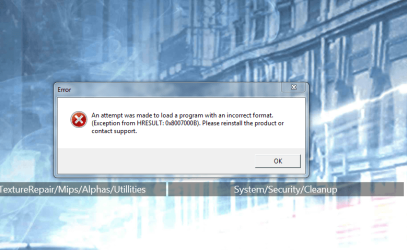
Error Message (An attempt was made to load a program with an incorrect format.)
 

My Computer My Computer

At a glance

Windows 7 Ultimate x64Intel i7 2600 3.4ghz16GB[ASUS] Nvidia GTX970 4GB (Mini Direct)
Computer type
PC/Desktop
Computer Manufacturer/Model Number
Dell Optiplex 990
OS
Windows 7 Ultimate x64
CPU
Intel i7 2600 3.4ghz
Motherboard
Dell OVNP2H
Memory
16GB
Graphics Card(s)
[ASUS] Nvidia GTX970 4GB (Mini Direct)
Sound Card
Intergraded
Monitor(s) Displays
3 Monitors 1# ViewSonic 23'" 2# ViewSonic 23'" 3# DELL 23"
Screen Resolution
1920X1080P X 3
Hard Drives
3 Internal Satas's (Two 7200RPM 1TB (WD) (1 Sata Velocirapto 10,000RPM 500GB)
1 External Mybook 4TB USB. 1External Passport 2TB.
PSU
650W
Internet Speed
50up 50down Fios
Hi Garciamk4,

Have you looked in the Startup to see what is running?

Start > type msconfig in the search box and press Enter, then click the Startup tab.

I hope this helps!
 

My Computer My Computer

At a glance

Win 7 HP SP1 64-bit Vista HB SP2 32-bit Linux...Intel(R) Pentium(R) CPU P6200 @ 2.13GHz4.00 GBIntel(R) Graphics Media Accelerator HD
Computer type
Laptop
Computer Manufacturer/Model Number
Fujitsu LIFEBOOK
OS
Win 7 HP SP1 64-bit Vista HB SP2 32-bit Linux Mint 18.3
CPU
Intel(R) Pentium(R) CPU P6200 @ 2.13GHz
Motherboard
FUJITSU FJNBB06
Memory
4.00 GB
Graphics Card(s)
Intel(R) Graphics Media Accelerator HD
Sound Card
[1] Realtek High Definition Audio [2] Intel(R) Display Audio
Screen Resolution
1366 x 768 x 32 bits (4294967296 colors) @ 59 Hz
Hard Drives
TOSHIBA MK5076GSX
Antivirus
AVG FREE
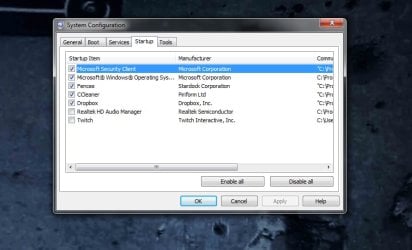
Yes these are the programs currently running on startup I currently disabled the Audio Drivers to see if that was causing the issue witch is why its currently unchecked......oko.jpg
 

My Computer My Computer

At a glance

Windows 7 Ultimate x64Intel i7 2600 3.4ghz16GB[ASUS] Nvidia GTX970 4GB (Mini Direct)
Computer type
PC/Desktop
Computer Manufacturer/Model Number
Dell Optiplex 990
OS
Windows 7 Ultimate x64
CPU
Intel i7 2600 3.4ghz
Motherboard
Dell OVNP2H
Memory
16GB
Graphics Card(s)
[ASUS] Nvidia GTX970 4GB (Mini Direct)
Sound Card
Intergraded
Monitor(s) Displays
3 Monitors 1# ViewSonic 23'" 2# ViewSonic 23'" 3# DELL 23"
Screen Resolution
1920X1080P X 3
Hard Drives
3 Internal Satas's (Two 7200RPM 1TB (WD) (1 Sata Velocirapto 10,000RPM 500GB)
1 External Mybook 4TB USB. 1External Passport 2TB.
PSU
650W
Internet Speed
50up 50down Fios
Hi Garciamk4,

Are you sure the CCleaner version is 64-bit, the same as your OS?
I have CCleaner but I don't have it in the Startup, I don't see a need for it there.

I hope this helps!
 

My Computer My Computer

At a glance

Win 7 HP SP1 64-bit Vista HB SP2 32-bit Linux...Intel(R) Pentium(R) CPU P6200 @ 2.13GHz4.00 GBIntel(R) Graphics Media Accelerator HD
Computer type
Laptop
Computer Manufacturer/Model Number
Fujitsu LIFEBOOK
OS
Win 7 HP SP1 64-bit Vista HB SP2 32-bit Linux Mint 18.3
CPU
Intel(R) Pentium(R) CPU P6200 @ 2.13GHz
Motherboard
FUJITSU FJNBB06
Memory
4.00 GB
Graphics Card(s)
Intel(R) Graphics Media Accelerator HD
Sound Card
[1] Realtek High Definition Audio [2] Intel(R) Display Audio
Screen Resolution
1366 x 768 x 32 bits (4294967296 colors) @ 59 Hz
Hard Drives
TOSHIBA MK5076GSX
Antivirus
AVG FREE
Hi Garciamk4,

Thats a very unusual setup, generally
the OS shows in the Boot tab and ALL the MS services should show here.
Are you dual booting??

Its possible that this is causing the error.

this error message also appears when C++/Netframework programs cannot intepret the the bitness correctly,
ie 32 or 64, you could uninstall/reinstall them see if this helps.


Roy
 

My Computer My Computer

At a glance

W7 home premium 32bit/W7HP 64bit/w10 tp insid...E5300 dual core3gbNvidia Geforce 7100 Nforce 630i
Computer type
PC/Desktop
Computer Manufacturer/Model Number
medionl/Aspire 6930G/acer x55a
OS
W7 home premium 32bit/W7HP 64bit/w10 tp insider ring
CPU
E5300 dual core
Motherboard
medion MS7366
Memory
3gb
Graphics Card(s)
Nvidia Geforce 7100 Nforce 630i
Monitor(s) Displays
avixc
Internet Speed
n (isp resticted to 72)
Antivirus
mse/pands
Browser
palemoon
Other Info
Belkin Fd7050 n USB using Railink RT2870 drivers, more upto date
Hey Everyone

I've checked and CCLeaner is definitely 64bit version, This os was actually running on an older setup Intel Core 2 quad Q9650 never had that message pop up until recently when i've decided to run a Sysprep.exe to strip the OS from the drivers installed on the last motherboard so that I Can switch everything over the newer setup.

Everything was Successful everything seems to be in order, with the exception of the above error. Funny thing is it doesn't happen to pop up on every startup, for Example yesterday it popped up on startup but today it didn't, at times it will pop up during the day at random.

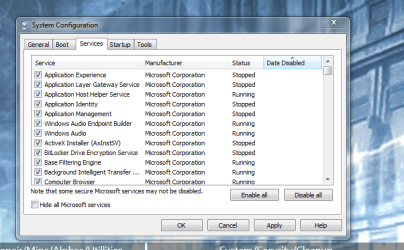
The Screenshot above only shows the Startup programs as I got rid of some, below I will post the service section.


1Untitled.png
 

Attachments

  • Untitled.jpg
    Untitled.jpg
    631 KB · Views: 4
Last edited:

My Computer My Computer

At a glance

Windows 7 Ultimate x64Intel i7 2600 3.4ghz16GB[ASUS] Nvidia GTX970 4GB (Mini Direct)
Computer type
PC/Desktop
Computer Manufacturer/Model Number
Dell Optiplex 990
OS
Windows 7 Ultimate x64
CPU
Intel i7 2600 3.4ghz
Motherboard
Dell OVNP2H
Memory
16GB
Graphics Card(s)
[ASUS] Nvidia GTX970 4GB (Mini Direct)
Sound Card
Intergraded
Monitor(s) Displays
3 Monitors 1# ViewSonic 23'" 2# ViewSonic 23'" 3# DELL 23"
Screen Resolution
1920X1080P X 3
Hard Drives
3 Internal Satas's (Two 7200RPM 1TB (WD) (1 Sata Velocirapto 10,000RPM 500GB)
1 External Mybook 4TB USB. 1External Passport 2TB.
PSU
650W
Internet Speed
50up 50down Fios
Hi Garciamk4,

Thats a very unusual setup, generally
the OS shows in the Boot tab and ALL the MS services should show here.Roy

Shot in section [#3] only shows programs as I got rid of some unwanted ones, I've re-posted on section [#6] to show the services


Are you dual booting?? Roy

Negative (not booting in dual boot)


this error message also appears when C++/Netframework programs cannot intepret the the bitness correctly,
ie 32 or 64, you could uninstall/reinstall them see if this helps.
Roy

Yes I've tried, When trying to install via the Installer it would not allow it, as it instructs me to do this via Programs and Features, which I've also done by Un-checking the Net framework section followed by a Reboot then Re-enabling the Net-framework via programs and features to no avail.

I've also installed the latest version which did go through successfully but still unfortunately am getting the error.

I've Also created workaround Script to see if (not to get rid of the issue but instead see if it will help get rid of the message as I Saw somewhere it was recommended via Microsoft support forums)to no avail the message still pops up @ random. :-(
 

My Computer My Computer

At a glance

Windows 7 Ultimate x64Intel i7 2600 3.4ghz16GB[ASUS] Nvidia GTX970 4GB (Mini Direct)
Computer type
PC/Desktop
Computer Manufacturer/Model Number
Dell Optiplex 990
OS
Windows 7 Ultimate x64
CPU
Intel i7 2600 3.4ghz
Motherboard
Dell OVNP2H
Memory
16GB
Graphics Card(s)
[ASUS] Nvidia GTX970 4GB (Mini Direct)
Sound Card
Intergraded
Monitor(s) Displays
3 Monitors 1# ViewSonic 23'" 2# ViewSonic 23'" 3# DELL 23"
Screen Resolution
1920X1080P X 3
Hard Drives
3 Internal Satas's (Two 7200RPM 1TB (WD) (1 Sata Velocirapto 10,000RPM 500GB)
1 External Mybook 4TB USB. 1External Passport 2TB.
PSU
650W
Internet Speed
50up 50down Fios
Any Advice Guys

So today listening to Youtube browsing through Facebook the Message Appeared once again, Computers' been running for about an 1hr so its got to be some program trying to start in the backround? I'd really like to narrow down the faulty program that's causing this any Ideas?

1234.png
 

My Computer My Computer

At a glance

Windows 7 Ultimate x64Intel i7 2600 3.4ghz16GB[ASUS] Nvidia GTX970 4GB (Mini Direct)
Computer type
PC/Desktop
Computer Manufacturer/Model Number
Dell Optiplex 990
OS
Windows 7 Ultimate x64
CPU
Intel i7 2600 3.4ghz
Motherboard
Dell OVNP2H
Memory
16GB
Graphics Card(s)
[ASUS] Nvidia GTX970 4GB (Mini Direct)
Sound Card
Intergraded
Monitor(s) Displays
3 Monitors 1# ViewSonic 23'" 2# ViewSonic 23'" 3# DELL 23"
Screen Resolution
1920X1080P X 3
Hard Drives
3 Internal Satas's (Two 7200RPM 1TB (WD) (1 Sata Velocirapto 10,000RPM 500GB)
1 External Mybook 4TB USB. 1External Passport 2TB.
PSU
650W
Internet Speed
50up 50down Fios
So today listening to Youtube browsing through Facebook the Message Appeared once again, Computers' been running for about an 1hr so its got to be some program trying to start in the backround? I'd really like to narrow down the faulty program that's causing this any Ideas?

View attachment 403797


System Explorer will help you zero in on the culprit causing this issue. Give it a look! Hope it helps. "FYI" Run the Security Check after the install, You will find it very useful.
 
Last edited:

My Computer My Computer

At a glance

Windows 10 Pro 64 bitAMD FX 9590 8 Core Black EditionCorsair Vengeance 16GB DDR3AMD Radeon (TM) R9 380 Gaming Series
Computer type
PC/Desktop
Computer Manufacturer/Model Number
Custom Built By Me.
OS
Windows 10 Pro 64 bit
CPU
AMD FX 9590 8 Core Black Edition
Motherboard
MSI 990FXA GAMING (MS-7893)
Memory
Corsair Vengeance 16GB DDR3
Graphics Card(s)
AMD Radeon (TM) R9 380 Gaming Series
Sound Card
AMD High Definition
Monitor(s) Displays
Samsung 32" 60Hz 4ms Curved PLS LED
Screen Resolution
1920 X 1080
Hard Drives
C: 223 GB SSD = E: 465 GB HDD = F: 931 GB HDD = G: 149 GB HDD = H: 931 GB HDD
PSU
EVGA Supernova NEX750B 750W ATX EPS12V 80PLUS Bronze
Case
Cool Master
Cooling
Noctua NH-D15 Premium Cooler with 2x NF-A15 PWM 140mm Fan
Internet Speed
Fiber Optic: Download 332.7 Mbps / Upload 331.5 Mbps
Antivirus
Windows Defender
Browser
Slimjet (64bit)
System Explorer will help you zero in on the culprit causing this issue. Give it a look! Hope it helps. "FYI" Run the Security Check after the install, You will find it very useful.


Thank You Lance will give system Explorer a try.
 

My Computer My Computer

At a glance

Windows 7 Ultimate x64Intel i7 2600 3.4ghz16GB[ASUS] Nvidia GTX970 4GB (Mini Direct)
Computer type
PC/Desktop
Computer Manufacturer/Model Number
Dell Optiplex 990
OS
Windows 7 Ultimate x64
CPU
Intel i7 2600 3.4ghz
Motherboard
Dell OVNP2H
Memory
16GB
Graphics Card(s)
[ASUS] Nvidia GTX970 4GB (Mini Direct)
Sound Card
Intergraded
Monitor(s) Displays
3 Monitors 1# ViewSonic 23'" 2# ViewSonic 23'" 3# DELL 23"
Screen Resolution
1920X1080P X 3
Hard Drives
3 Internal Satas's (Two 7200RPM 1TB (WD) (1 Sata Velocirapto 10,000RPM 500GB)
1 External Mybook 4TB USB. 1External Passport 2TB.
PSU
650W
Internet Speed
50up 50down Fios
One less thing to worry about, Security Check came out clean, will be monitoring system Explorer for now and report back. Thanks again Lance.
 

My Computer My Computer

At a glance

Windows 7 Ultimate x64Intel i7 2600 3.4ghz16GB[ASUS] Nvidia GTX970 4GB (Mini Direct)
Computer type
PC/Desktop
Computer Manufacturer/Model Number
Dell Optiplex 990
OS
Windows 7 Ultimate x64
CPU
Intel i7 2600 3.4ghz
Motherboard
Dell OVNP2H
Memory
16GB
Graphics Card(s)
[ASUS] Nvidia GTX970 4GB (Mini Direct)
Sound Card
Intergraded
Monitor(s) Displays
3 Monitors 1# ViewSonic 23'" 2# ViewSonic 23'" 3# DELL 23"
Screen Resolution
1920X1080P X 3
Hard Drives
3 Internal Satas's (Two 7200RPM 1TB (WD) (1 Sata Velocirapto 10,000RPM 500GB)
1 External Mybook 4TB USB. 1External Passport 2TB.
PSU
650W
Internet Speed
50up 50down Fios
One less thing to worry about, Security Check came out clean, will be monitoring system Explorer for now and report back. Thanks again Lance.

You're most welcome. I hope you solve your issue. "FYI" Keep an eye on Tasks in the left pan. If it pops up again it may give you a clue.
 

My Computer My Computer

At a glance

Windows 10 Pro 64 bitAMD FX 9590 8 Core Black EditionCorsair Vengeance 16GB DDR3AMD Radeon (TM) R9 380 Gaming Series
Computer type
PC/Desktop
Computer Manufacturer/Model Number
Custom Built By Me.
OS
Windows 10 Pro 64 bit
CPU
AMD FX 9590 8 Core Black Edition
Motherboard
MSI 990FXA GAMING (MS-7893)
Memory
Corsair Vengeance 16GB DDR3
Graphics Card(s)
AMD Radeon (TM) R9 380 Gaming Series
Sound Card
AMD High Definition
Monitor(s) Displays
Samsung 32" 60Hz 4ms Curved PLS LED
Screen Resolution
1920 X 1080
Hard Drives
C: 223 GB SSD = E: 465 GB HDD = F: 931 GB HDD = G: 149 GB HDD = H: 931 GB HDD
PSU
EVGA Supernova NEX750B 750W ATX EPS12V 80PLUS Bronze
Case
Cool Master
Cooling
Noctua NH-D15 Premium Cooler with 2x NF-A15 PWM 140mm Fan
Internet Speed
Fiber Optic: Download 332.7 Mbps / Upload 331.5 Mbps
Antivirus
Windows Defender
Browser
Slimjet (64bit)
Update

Ok Guys I FINALLY! Found whats causing the error Using the Bulls-eye feature on Process Explorer following this tutorial http://www.winhelponline.com/blog/determine-program-process-owns-error-message-window/

At first it refused to highlight the error after dragging the Bulls-eye onto the error Message pop-up window, so I Ran Process Explorer on an Elevated Command Prompt and Viola it worked. Turned out to be My Fences program from Stardock Corp. Located in c:\program files (x86)\Stardock\Fences\SdDisplay.exe. :geek::geek::geek:

Its funny how the problem was right there in front of me this entire time just staring at me unbelievable.

Many thanks to all of you for helping me out with this one :cool:
 

My Computer My Computer

At a glance

Windows 7 Ultimate x64Intel i7 2600 3.4ghz16GB[ASUS] Nvidia GTX970 4GB (Mini Direct)
Computer type
PC/Desktop
Computer Manufacturer/Model Number
Dell Optiplex 990
OS
Windows 7 Ultimate x64
CPU
Intel i7 2600 3.4ghz
Motherboard
Dell OVNP2H
Memory
16GB
Graphics Card(s)
[ASUS] Nvidia GTX970 4GB (Mini Direct)
Sound Card
Intergraded
Monitor(s) Displays
3 Monitors 1# ViewSonic 23'" 2# ViewSonic 23'" 3# DELL 23"
Screen Resolution
1920X1080P X 3
Hard Drives
3 Internal Satas's (Two 7200RPM 1TB (WD) (1 Sata Velocirapto 10,000RPM 500GB)
1 External Mybook 4TB USB. 1External Passport 2TB.
PSU
650W
Internet Speed
50up 50down Fios
Back
Top