
An error has occurred while installing XLiveRedist.msi

MrZoola

New member
Local time
11:42 PM
Messages
8
Hello,
I write this post because I have an issue while trying to install the update "Games for Windows Live 3.2".
No problem installing previous versions and no problem running Games (offline) or other apps, but I cannot play my games online because they ask me to install the 3.2 update.

The problem seems to be linked with the installation of XLiveredist.msi.
Things I already tried so far:
- Remove all and install from scratch
- Clean the registery
- Execute as Admin
- Uninstall completely with Windows Install Cleaner (and even Total Uninstall 5)
- Start the installation from a game
- Start the installation from Xbox site
- Start the installation manually (after having downloaded the file on my system)
- Start the installation manually via Windows Update
- Start the installation automatically via Windows Update
- Check the log of installation ==>
Microsoft Games for Windows - LIVE Redistributable -- Error 1402. Could not open key: UNKNOWN\Components\A49B6681220C2EA49826913B104EE03B\4F4F5C009F267D040800DAA8C90D6C96. System error 5. Verify that you have sufficient access to that key, or contact your support personnel.
- Use Fix-it! (see How do I reset Windows Update components?)
- Use Reset.cmd file (see Windows Update dans Windows Seven : Code erreur 80070005)
- Contact Microsoft Live Support (http://www.microsoft.com/games/en-US...ctsupport.aspx) fo Belgium, where they told me it isn't the right service to contact because they only focus on Xbox...
- Create messages on forums: GFW 3.2 ==> An error occured while installing XLiveRedist.msi and
An error has occurred while installing XLiveRedist.msi

... So, I hope one can help me, because I really don't have a clue on how to update this Games for Windows Live to 3.2...

I'm running Windows 7 64.
 

My Computer My Computer

OS
Windows 7
CPU
i7 860
Memory
4 Go
Graphics Card(s)
NVIDIA GeForce GTX 260 (SLI ==> x2)
You shouldn't do that!This script is correct only for older systems :2000 and XP not for Vista & Win7.Oryginal permissions in Vista/Win7 are completely different much more subtle,doing this it is really permissions violation in the system!People which offer such kind of solution for Vista & Windows 7 are fools :mad:!If anybody have really problem with permissions then you should use Process Monitor to diagnose problem with permissions and change permissions only in these places which really need it,not for whole system.Opposite link to yours:
windows update error 80070005

Back to your problem.I doubt it is going on about permissions only any started process block installation.

METHOD I

1.Uninstall 3p security software and retry installation on clean boot How to Troubleshoot a Problem by Performing a Clean Startup in Windows 7 or Vista

METHOD II

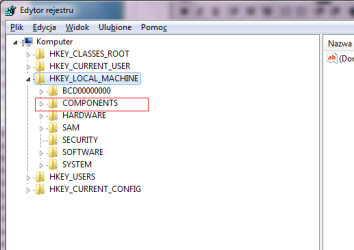
Open registry and remove this key HKLM\Components\A49B6681220C2EA49826913B104EE03B\4F4F5C009F267D040800DAA8C90D6C96

As far as I remember Win7 never defaultly load COMPONENTS hive to registry automatically,so you have to do it manually if you don't have already loaded COMPONENTS.png

Article how to load hive Load a hive into the registry: Core Services

Registry files (hives) are stored in C:\Windows\System32\Config
Another method to load COMPONENTS hive is just open Windows Update>>Search for new updates and next open regedit

METHOD III

Analyze & Disabling disturbing process:

Download Process Hacker https://www.ohloh.net/p/processhacker/download?package=Process+Hacker

run it,go to Hacker>>Show details for all processes

and next again go to Hacker>>Save :choose *.txt or *.log extension and PH log attache to post
 
Last edited by a moderator:

My Computer My Computer

Computer Manufacturer/Model Number
Custom made
OS
Windows 7 Professional x64 PL
CPU
AMD Athlon 4450e
Motherboard
Giga-Byte GA-MA69G-S3H
Memory
GoodRam DDR2 2x2048MB (FSB 800MHz)
Graphics Card(s)
nVidia GeForce 9600GT (G94-300) 1024 MB
Monitor(s) Displays
SAMSUNG SyncMaster HS2P301688
Hard Drives
Seagate ST3750330AS 750GB
PSU
Corsair 550W
Cooling
AeroCool ExtremeEngine 3T
Hello Flavius,

First of all thank you for your reply and thank you for your advices, I'm not a "technical" expert, and indeed, I could do wrong actions whithout even being aware of...but you know...after several days of trying to find a solution + reaching Microsoft directly (where or I receive no answer at all, or I receive always the answer "This issue is not under the responsibility of this service, you should contact service XXX")

==>

METHOD I

If I understand correctly, you propose me to uninstall my security sofware, then in my case it would be Norton 360.
I would prefer check other otpions for the moment, because I had no issue at all installing other updates for GFWL (and any other apps).

METHOD II

I only found this key under:

HKEY_LOCAL_MACHINE\SOFTWARE\Microsoft\Windows\CurrentVersion\Installer\UserData\S-1-5-18\Components\A49B6681220C2EA49826913B104EE03B\4F4F5C009F267D040800DAA8C90D6C96


It cannot be removed...

METHOD III

See attachment
 
Last edited:

My Computer My Computer

OS
Windows 7
CPU
i7 860
Memory
4 Go
Graphics Card(s)
NVIDIA GeForce GTX 260 (SLI ==> x2)
METHOD II

I only found this key under:

HKEY_LOCAL_MACHINE\SOFTWARE\Microsoft\Windows\CurrentVersion\Installer\UserData\S-1-5-18\Components\A49B6681220C2EA49826913B104EE03B\4F4F5C009F267D040800DAA8C90D6C96


It cannot be removed...
Be careful with this key.Although defaultly Win 7 never have this key neverless it may belong to Windows Live or your game so for the moment don't remove it.Check only permissions for Administrators group.If Administrators group don't have full control and are not owners of this key,takeownership of it and give Administrators full control.
useful link Take Ownership of file - Vista Forums

METHOD III

See attachment
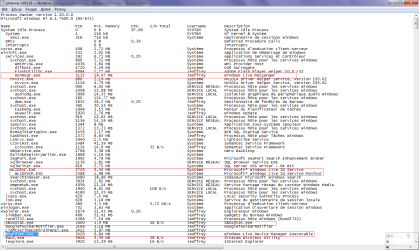
See image below image:
Xstat.png

Before installation open again Process Hacker,go to Hacker>>Show details for all processes and if you see already these processes which I circled red lines then disable them (as you can see many processes are truly subprocesses hanged under others).Generally you have to dispose processes belongs to Windows Live or Xstat,disable Process Hacker (you don't need longer track processes) and next try installation again.
 

My Computer My Computer

Computer Manufacturer/Model Number
Custom made
OS
Windows 7 Professional x64 PL
CPU
AMD Athlon 4450e
Motherboard
Giga-Byte GA-MA69G-S3H
Memory
GoodRam DDR2 2x2048MB (FSB 800MHz)
Graphics Card(s)
nVidia GeForce 9600GT (G94-300) 1024 MB
Monitor(s) Displays
SAMSUNG SyncMaster HS2P301688
Hard Drives
Seagate ST3750330AS 750GB
PSU
Corsair 550W
Cooling
AeroCool ExtremeEngine 3T
Hello Flavius,

Unfortunately it seems I cannot provide full control on this key. I receive an error message telling me "Access denied" when trying to apply the full control.

In between, I have had a call from a Microsoft employee who's also checking on his side what could be the solution to this problem.

In case I receive a solution, I'll post it here (might be useful for smdy other in the future...).
 

My Computer My Computer

OS
Windows 7
CPU
i7 860
Memory
4 Go
Graphics Card(s)
NVIDIA GeForce GTX 260 (SLI ==> x2)
Hello,

I've been asked by Microsoft to try to change the User variables, but this didn't solve my problem. :cry:

We also tried method 2 under this link: http://computerquestionhelp.com/articles/windows7/msi-installer-package-crash-on-windows7.html

After analysis&tests (clean startup, etc...) it is supposed not to be linked to my hardware, nor software...

I'm still wandering why the registery key cannot be modified (change authorization on it) nor deleted.

Here is the message I recently got on another forum for the variables (it seems to have solved a similar problem for another user):

Hi MrZoola,
As I see from your post, there is a problem with temp file variables.
You may follow the steps mentioned below:

Go to My Computer -> Properties -> Advanced -> Environment variables -> User variables
After this you may changed the user setting to match the one in the system settings and check if you come across the same problem.
You may also visit the link mentioned below to find a customer who came across the same problem:
http://social.technet.microsoft.com/Forums/en/w7itproappcompat/thread/37e50204-7b2e-425b-a0e5-36569a9ae17c

http://computerquestionhelp.com/articles/windows7/msi-installer-package-crash-on-windows7.html
 

My Computer My Computer

OS
Windows 7
CPU
i7 860
Memory
4 Go
Graphics Card(s)
NVIDIA GeForce GTX 260 (SLI ==> x2)
Hello,

I've been asked by Microsoft to try to change the User variables, but this didn't solve my problem. :cry:

We also tried method 2 under this link: Windows 7 Displays error when installing .MSI installation files. How you can prevent installations from crashing on Windows 7! | Computer Question Help

After analysis&tests (clean startup, etc...) it is supposed not to be linked to my hardware, nor software...

I'm still wandering why the registery key cannot be modified (change authorization on it) nor deleted.

I understand you can't modify this key although you are already owner and you have full control to this key :huh:,it may happen,not always work according to the theory.

Try again method 2 from this link in safe mode,if you tried already and it fail too,modify this key remotelly

1.Boot Windows 7 DVD or if you don't have Win 7 DVD use special recovery disk instead Download Windows 7 System Recovery Discs — The NeoSmart Files

2.Choose language>>repair computer>>WinRE>>command prompt

and type

regedit

(it will open regedit from Win7 DVD level)

3.In the registry tree click on HKEY_LOCALE_MACHINE hive
4.Next in regedit go to File>>Load Hive

//now this option should be active)

it will open explorer and navigate to C:\Windows\System32\config folder

//This folder store registry files from your system on hdd

choose SOFTWARE file

next it will ask how to name this hive,type the name what you want i.e REM_SOFTWARE

and apply.
5.Open HKLM hive in your registry and now you should have HKLM\REM_SOFTWARE hive available

Because you wanted modify key in your system:

HKLM\Software\Microsoft\SQMClient\Windows\DisabledSessionsHKLM\Software\Microsoft\SQMClient\Windows\DisabledSessions

from WIn 7 DVD this key will be visible under


HKLM\REM_Software\Microsoft\SQMClient\Windows\DisabledSessionsHKLM\Software\Microsoft\SQMClient\Windows\DisabledSessions

Another example how to edit registry remotely although these threads relate to complete different problem,neverless it may help you understand idea

read it from post 17 Can't Delete Registry Key - Page 2 - Vista Forums
 

My Computer My Computer

Computer Manufacturer/Model Number
Custom made
OS
Windows 7 Professional x64 PL
CPU
AMD Athlon 4450e
Motherboard
Giga-Byte GA-MA69G-S3H
Memory
GoodRam DDR2 2x2048MB (FSB 800MHz)
Graphics Card(s)
nVidia GeForce 9600GT (G94-300) 1024 MB
Monitor(s) Displays
SAMSUNG SyncMaster HS2P301688
Hard Drives
Seagate ST3750330AS 750GB
PSU
Corsair 550W
Cooling
AeroCool ExtremeEngine 3T
Hello Flavius,

Sorry I think there is a misunderstanding: the key I'm still wandering why I cannot delete/change it is HKEY_LOCAL_MACHINE\SOFTWARE\Microsoft\Windows\CurrentVersion\Installer\UserData\S-1-5-18\Components\A49B6681220C2EA49826913B104EE03B\4F4F5C009F267D040800DAA8C90D6C96

I did change the disabledsessions key with the Microsoft expert (connected to my computer remotely) and this didn't solve the issue.

Rgds,
 

My Computer My Computer

OS
Windows 7
CPU
i7 860
Memory
4 Go
Graphics Card(s)
NVIDIA GeForce GTX 260 (SLI ==> x2)

My Computer My Computer

OS
Windows 7
CPU
i7 860
Memory
4 Go
Graphics Card(s)
NVIDIA GeForce GTX 260 (SLI ==> x2)
Back
Top