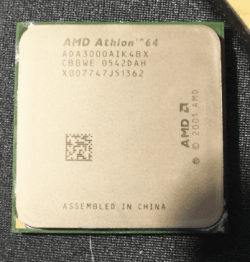
Can anyone ID this AMD CPU have been everywhere and keep coming up with results that just don't quite match what I look for.
I know it is a ?"Venice" but thats about it.
Plus I have Gigabyte GA-K8FN9 Ultra board that I am rejuvenating with some SATA gear but I cannot find out what max speed CPU the board will support - Gigabyte site is just so slow and pedantic about screeds of numbers. Googling just comes up with forums that don't rally answer my simple query.
However I do have the manual and this snip is in it does this mean that I can fit a 3Ghz or higher in this board? I will add the snips of the current CPU (LEBBE) and the one I had given to me by a friend - no name ID - I just want to know which is the best to fit.
Thanks in anticipation
Attachments
CaptureAMD64.PNG
43.8 KB
· Views: 59
CaptureAMD.PNG
57.9 KB
· Views: 3
My Computer
At a glance
Desk1 7 Home Prem / Desk2 10 Pro / Main lap A...Desk1 i5 3750K / Laptop i7 GTX 860M / Desk2 i...Desk1 8GB (1866) / Desk2 16GB (1333) / Laptop...Desk 1& 2NVidia GTX 650 & Laptops on board Intel
Computer type
PC/Desktop
Computer Manufacturer/Model Number
Own build (new) Desk1 / Asus ROG Win 7 / Desk2 1st build
OS
Desk1 7 Home Prem / Desk2 10 Pro / Main lap Asus ROG 10 Pro 2 laptop Toshiba 7 Pro Asus P2520 7 & 10
One other Desktop (tester) and spare Toshba laptop both with SSD's
Running Kaspersky 2016 ISS on all machines config'd identically
Logitec audio stereo systems on each machine (x3)
Canon MG5250MFC
Router/modem TP-Link running WPA2SK
Microsoft Security Essentials and Malwarebytes Premium
Browser
Pale Moon
Other Info
All fans PWM; speeds at idle: CPU circa 500 rpm; intake circa 600 rpm; exhaust circa 600 rpm; CPU temps 27 idle and 47 C load in a warm room (27 C/81 F) when running Intel Extreme Tuning Utility stress test.
Yeah sorry I did get the NF the wrong way round and yeah I got the ADA ref as well but didn't mean anything to me all I wanted to know was the speed of this CPU as 3000+ rated and 2000 real was / could be anything sorry I just didn't know.
I have the machine fired up at the moment with the other CPU in place and it boots from a cloned 7 drive but I only get as far as windows 7 (have a dual boot on this drive) as it was just a spare drive that I was testing this machine up with.
So I get no further than System Recovery Options - five options that get me nowhere might have to try another spare drive and see what happens. It's only a recycled machine but as it had SATA I thought it would be worth a try to use as a tester.
My Computer
At a glance
Desk1 7 Home Prem / Desk2 10 Pro / Main lap A...Desk1 i5 3750K / Laptop i7 GTX 860M / Desk2 i...Desk1 8GB (1866) / Desk2 16GB (1333) / Laptop...Desk 1& 2NVidia GTX 650 & Laptops on board Intel
Computer type
PC/Desktop
Computer Manufacturer/Model Number
Own build (new) Desk1 / Asus ROG Win 7 / Desk2 1st build
OS
Desk1 7 Home Prem / Desk2 10 Pro / Main lap Asus ROG 10 Pro 2 laptop Toshiba 7 Pro Asus P2520 7 & 10
One other Desktop (tester) and spare Toshba laptop both with SSD's
Running Kaspersky 2016 ISS on all machines config'd identically
Logitec audio stereo systems on each machine (x3)
Canon MG5250MFC
Router/modem TP-Link running WPA2SK
Ok Corazon I know you're right just that it looked like the machine had been well looked after and a shame to junk it. Plus like I said it would have made a nice tester or even a freebie for my mates young fellow as they don't have much disposable income, and it only cost me $10 from the wreckers / recycle centre and the RAM and stuff I have got from other recycled machines oh well you win some you lose some:huh:
My Computer
At a glance
Desk1 7 Home Prem / Desk2 10 Pro / Main lap A...Desk1 i5 3750K / Laptop i7 GTX 860M / Desk2 i...Desk1 8GB (1866) / Desk2 16GB (1333) / Laptop...Desk 1& 2NVidia GTX 650 & Laptops on board Intel
Computer type
PC/Desktop
Computer Manufacturer/Model Number
Own build (new) Desk1 / Asus ROG Win 7 / Desk2 1st build
OS
Desk1 7 Home Prem / Desk2 10 Pro / Main lap Asus ROG 10 Pro 2 laptop Toshiba 7 Pro Asus P2520 7 & 10
One other Desktop (tester) and spare Toshba laptop both with SSD's
Running Kaspersky 2016 ISS on all machines config'd identically
Logitec audio stereo systems on each machine (x3)
Canon MG5250MFC
Router/modem TP-Link running WPA2SK
I didn't do a fresh install Corazon I being a bit simple thought I could just put one of my cloned drives in just to see that the machine actually works - which it does and reasonably quickly.
I just keep getting back to that normal start up lets me sign in and then it goes to that screen with those five options system repair memory diag etc. Finally after running a system repair it ends up with an error message similar to one that you get with an email fault - I think it was something like error 0x80070005:Access denied.
Hey look it's not worth the hassle of trying to fix it just looked like a nice machine to start with and although I have a fresh OEM 7 here I was keeping that for my next build.
My Computer
At a glance
Desk1 7 Home Prem / Desk2 10 Pro / Main lap A...Desk1 i5 3750K / Laptop i7 GTX 860M / Desk2 i...Desk1 8GB (1866) / Desk2 16GB (1333) / Laptop...Desk 1& 2NVidia GTX 650 & Laptops on board Intel
Computer type
PC/Desktop
Computer Manufacturer/Model Number
Own build (new) Desk1 / Asus ROG Win 7 / Desk2 1st build
OS
Desk1 7 Home Prem / Desk2 10 Pro / Main lap Asus ROG 10 Pro 2 laptop Toshiba 7 Pro Asus P2520 7 & 10
One other Desktop (tester) and spare Toshba laptop both with SSD's
Running Kaspersky 2016 ISS on all machines config'd identically
Logitec audio stereo systems on each machine (x3)
Canon MG5250MFC
Router/modem TP-Link running WPA2SK
OK, but there's nothing to fix - you just can't boot a Windows drive from another computer and expect it to work (although sometimes it does). Windows needs to be installed fresh on THIS computer.
My Computer
At a glance
Windows 7 Professional SP1 32-bitIntel Core 2 Duo E6600 2.4GHz4GB DDR2-667 (4x1GB in dual-channel config)nVidia GeForce 9800 GT
Computer type
PC/Desktop
Computer Manufacturer/Model Number
Custom-built
OS
Windows 7 Professional SP1 32-bit
CPU
Intel Core 2 Duo E6600 2.4GHz
Motherboard
Asus PL5D2
Memory
4GB DDR2-667 (4x1GB in dual-channel config)
Graphics Card(s)
nVidia GeForce 9800 GT
Sound Card
Creative X-Fi XtremeMusic
Monitor(s) Displays
Acer P236H
Screen Resolution
1920x1200 (DVI)
Hard Drives
OCZ SSD Vertex Plus 60GB SATA (Firmware 3.55), 64MB cache
Hitachi HD321KJ SATA, 320GB, 7200rpm, 16MB cache
Ok mate just that it does boot then goes as I have explained but no further then those five options and to create a repair disk - which it will not do because of that error. Have tried the sytem image function but come up with that error when I get to create a repair disk - parameters are wrong -(0x80070057)
I have tried booting with an older rescue disk and the older OEM on even an empty (but initialised) drive but nothing happens.
Now I have like I said a spare OEM here if I put that on this computer I suppose the same will happen if I try and put that drive into my build when I do it?
Just out of curiosity this machine is a 2005 build and tells me it is running 64bit and the clone and the spare OEM are 64bit. Now I am no expert as you will have gathered by now but even to me I ma wondering would a 64bit system been around in those days plus if I am right would not the SATA be a 1.5Gbs and not be able to use the 3Gbs drive I have in it. I ask because I saw on Scott Muellers video that sometimes one has to "jumper" the drive to be able to utilise a 3Gbs drive on a 1.5Gbs supported board.
Maybe I should drag out the manual again and find out what the support is for drives?
My Computer
At a glance
Desk1 7 Home Prem / Desk2 10 Pro / Main lap A...Desk1 i5 3750K / Laptop i7 GTX 860M / Desk2 i...Desk1 8GB (1866) / Desk2 16GB (1333) / Laptop...Desk 1& 2NVidia GTX 650 & Laptops on board Intel
Computer type
PC/Desktop
Computer Manufacturer/Model Number
Own build (new) Desk1 / Asus ROG Win 7 / Desk2 1st build
OS
Desk1 7 Home Prem / Desk2 10 Pro / Main lap Asus ROG 10 Pro 2 laptop Toshiba 7 Pro Asus P2520 7 & 10
One other Desktop (tester) and spare Toshba laptop both with SSD's
Running Kaspersky 2016 ISS on all machines config'd identically
Logitec audio stereo systems on each machine (x3)
Canon MG5250MFC
Router/modem TP-Link running WPA2SK
Ah well I think the mobo or something has had it I am going to try once more after removing the battery to reset the BIOS. Even with empty drive I couldn't get the OEM to start up and have tried yet a fresh clone too but no good. Pity cos it has SATA instead of those awful IDE cables.
Shame also because I stuck an old HP drive into an old Optiplex and it worked perfectly and gave the owner some more speed as the old CPU was a 1.1Ghz and the new 1.7Ghz. Still you win some you lose some
My Computer
At a glance
Desk1 7 Home Prem / Desk2 10 Pro / Main lap A...Desk1 i5 3750K / Laptop i7 GTX 860M / Desk2 i...Desk1 8GB (1866) / Desk2 16GB (1333) / Laptop...Desk 1& 2NVidia GTX 650 & Laptops on board Intel
Computer type
PC/Desktop
Computer Manufacturer/Model Number
Own build (new) Desk1 / Asus ROG Win 7 / Desk2 1st build
OS
Desk1 7 Home Prem / Desk2 10 Pro / Main lap Asus ROG 10 Pro 2 laptop Toshiba 7 Pro Asus P2520 7 & 10
One other Desktop (tester) and spare Toshba laptop both with SSD's
Running Kaspersky 2016 ISS on all machines config'd identically
Logitec audio stereo systems on each machine (x3)
Canon MG5250MFC
Router/modem TP-Link running WPA2SK
Pity, but hey, you tried! Your suspicions about the SATA interface speed and the 64-bit question were pretty good ones. It's possible that while the CPU is 64-bit capable, the motherboard isn't entirely up to it. But 64-bit capability in general has been around since about 2004 from what I've heard.
I assume the mobo still has an IDE interface you can use instead of SATA? Might not be such a bad option after all.
My Computer
At a glance
Windows 7 Professional SP1 32-bitIntel Core 2 Duo E6600 2.4GHz4GB DDR2-667 (4x1GB in dual-channel config)nVidia GeForce 9800 GT
Computer type
PC/Desktop
Computer Manufacturer/Model Number
Custom-built
OS
Windows 7 Professional SP1 32-bit
CPU
Intel Core 2 Duo E6600 2.4GHz
Motherboard
Asus PL5D2
Memory
4GB DDR2-667 (4x1GB in dual-channel config)
Graphics Card(s)
nVidia GeForce 9800 GT
Sound Card
Creative X-Fi XtremeMusic
Monitor(s) Displays
Acer P236H
Screen Resolution
1920x1200 (DVI)
Hard Drives
OCZ SSD Vertex Plus 60GB SATA (Firmware 3.55), 64MB cache
Hitachi HD321KJ SATA, 320GB, 7200rpm, 16MB cache
Hum Corazon now you have got me thinking I reckon you may be right re the board not up to 64bit although the post / BIOS starts up saying it's a 64bit system. Now I think this machine must have been running 64bit as it did have a gaming type setup with a DVI GPU nd te like. Plus i the BIOS it does give one the OC options.
The SATA question was due to me watching Scott Mueller's build video as he described and showed how a 3Gbs had to be jumpered to 1.5Gbs on some systems before they are recognised. However that doesn't explain why the things boots to Windows has me enter my pw then goes to all that option stuff.
My Computer
At a glance
Desk1 7 Home Prem / Desk2 10 Pro / Main lap A...Desk1 i5 3750K / Laptop i7 GTX 860M / Desk2 i...Desk1 8GB (1866) / Desk2 16GB (1333) / Laptop...Desk 1& 2NVidia GTX 650 & Laptops on board Intel
Computer type
PC/Desktop
Computer Manufacturer/Model Number
Own build (new) Desk1 / Asus ROG Win 7 / Desk2 1st build
OS
Desk1 7 Home Prem / Desk2 10 Pro / Main lap Asus ROG 10 Pro 2 laptop Toshiba 7 Pro Asus P2520 7 & 10
One other Desktop (tester) and spare Toshba laptop both with SSD's
Running Kaspersky 2016 ISS on all machines config'd identically
Logitec audio stereo systems on each machine (x3)
Canon MG5250MFC
Router/modem TP-Link running WPA2SK