hi all found this from addictivetips you have to Register some details before you download but that's easy and it is a good program. please share your views if you try it.(zipfile at the foot of page)
DOWNLOAD >>>MaaS360® Boot Analyzer Tool | MaaS360 See. Know. Go
DOWNLOAD >>>MaaS360® Boot Analyzer Tool | MaaS360 See. Know. Go
How long does it take your computers to boot when users start them? Is your IT group getting calls? The problem could be the new software or corporate image, but how can you be sure?
The MaaS360 Boot Analyzer can maintain a history of up to 100 previous boot times, match boot time delays with changes to the computer, perform automated tests for benchmarking, and set thresholds and notify you if the times suddenly increase.
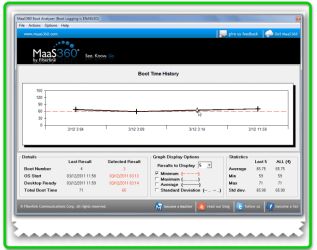
Want to know how much time it takes to boot your system after installing some security patch or a hefty anti-virus suite? You need an efficient system boot analyzer which can silently measure the boot time and can maintain boot time record to help you identify applications which make your system take forever to boot. MaaS 360 Boot Analyzer is a newly developed system boot analyzing utility which not only measures the boot time but also lets you monitor, analyze, and maintain record up to 100 system boot times with date stamps. It plots boot time on line graph, so you can visually analyze the lowest and highest boot time, pinpoint date when your system boot time was relatively longer or smaller then other boots, and check out maximum, minimum and average boot time of your system since first run of MasS 360 Boot Analyzer.
For the first time, click Test Now from Actions menu. It will ask you to specify number of boots for which you want to analyze the boot time. Here, you can enter numbers from 1 – 10. Once done, click OK to reboot the system for defined number of time(s) in order to populate graph with all the boot times. It will show you the time taken from booting the OS to preparing the desktop (with all startup applications and services fully loaded).
In bottom lane, you will see boot time details, such as, current boot number, OS Start and Desktop Ready time, and underneath these details, total boot time in seconds is shown. In the main window, all the boot times are plotted on the graph. Analyze Up To 100 System Boot Times With MaaS360 Boot Analyzer
Attachments
Last edited:
My Computer
At a glance
Operating System : Windows 7 Home Premium Edi...Processor : Intel Core 2 Quad Q8300 @ 2500 MHzPhysical Memory :8GB Corsair4x 2GB 800MHz C5 ...Video Card : XFX 6700 AMD
- Computer Manufacturer/Model Number
- packard bell IXTREME M5722
- OS
- Operating System : Windows 7 Home Premium Edition 6.01.7600 SP1 (x64)
- CPU
- Processor : Intel Core 2 Quad Q8300 @ 2500 MHz
- Motherboard
- Mainboard : Packard Bell (Acer EG43M )
- Memory
- Physical Memory :8GB Corsair4x 2GB 800MHz C5 DDR2
- Graphics Card(s)
- Video Card : XFX 6700 AMD
- Monitor(s) Displays
- Maestro 234DL - BenQ V2220 - BenQ VW2420H
- Screen Resolution
- Current Display :1920x1080p pixels at 60 Hz in HD LED
- Hard Drives
- Hard Disks : WDC (1000 GB)
Drive C: (Hard Disk) : 428 GB available on 491 GB
Drive D: (Hard Disk) : 426 GB available on 492 GB
SAMSUNG spinpoint HD103SJ 1000.2 GB
(X 2) KINGSTON SSD NOW V 30GB
- PSU
- XFX ProSeries 550W PSU
- Case
- PACKARD BELL IXTREME
- Cooling
- System Blower Current: 150mA Air Flow16CFM ;Akasa 90mm rear
- Keyboard
- Gigabyte Aivia K8100
- Mouse
- TRUST-Wireless Laser Mouse - Carbon edition MI-7770C
- Internet Speed
- TP-LINK > TL-WN951N / AV500 Gigabit Powerline Adapters
- Browser
- chrome dev
- Other Info
- EXTRA COOLING>(FAN CONTROLLER) PC Bay Cooler 3 x 40mm fans; Akasa AK-HD-BL Blue hard drive cooler 2 x 40 mm fan 4500 rpm 29.7 dBA
Bios> American Megatrends Inc.
Version : P01-A1
Date : 08/31/2009