
Anapod Explorer (iTunes replacement)

jawzforlife

New member
Local time
6:31 PM
Messages
47
Location
Minnesota
On my XP computer I didn't use itunes with my iPod. I used a program called Anapod Explorer.

Unlike iTunes, Anapod works more like windows explorer, and you can drag and drop songs right onto the iPod.

Anapod (version 9.0.6) installed fine and found my iPod fine. But when I go to start the program I get a error pop up that says:
 

Attachments
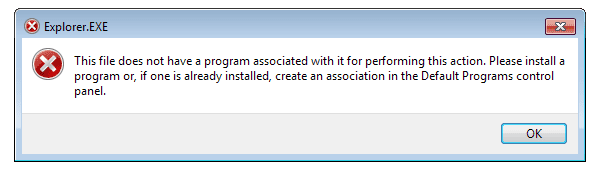
  • explorer error.PNG
    explorer error.PNG
    4.3 KB · Views: 119

My Computer

OS
Windows 7 Home Premium x64
CPU
Intel i7 860 2.8GHz
Motherboard
MSI (P-55-GD65)
Memory
G.SKILL Ripjaws DDR3 1600, 8gb
Graphics Card(s)
GIGABYTE (GV-R455D3-512I)
Monitor(s) Displays
DELL 20.1" LCD
Screen Resolution
1680 x 1050
Hard Drives
WD 500gb 7200rpm
PSU
OCZ 700watt (OCZ700SXS)
Case
XCLIO (Godspeed Two Advanced)
Cooling
COOLMASTER (Hyper 212+)
Keyboard
microsoft comfort 5000
Mouse
microsoft comfort 5000
Internet Speed
DSL
Other Info
LAPTOP:
HP Pavilion dv4-2164us
Windows 7 Home Premium 64-bit
Intel i3-330m
4gb ram /

NETBOOK:
HP Mini 110-3130nr
This isn't exactly a solution, but I used to use Anapod Explorer, and recently ditched it for Media Monkey.
 

My Computer

OS
Windows 7 Ultimate x64 SP1
CPU
Intel Core i7-2600
Motherboard
Gigabyte GA-P67A-UD3P-B3
Memory
12 GB Patriot Extreme DDR3-1333
Graphics Card(s)
Nvidia GTX 470
Monitor(s) Displays
Dell UltraSharp 2209WA
Hard Drives
OCZ Agility3 240 GB, WD5001AALS, WD7501AALS
PSU
OCZ ModStream 700W
Case
CoolerMaster HAF 912 Advanced
Cooling
CoolerMaster Hyper 212 Plus
how does media monkey work?

I don't want to "sync", I want to be able to choose what songs I want to send to my ipod.

I don't want it to take over and rename artist, title, albums, ect. I have stuff named the way I want it, and I don't want it changed.
 

My Computer

OS
Windows 7 Home Premium x64
CPU
Intel i7 860 2.8GHz
Motherboard
MSI (P-55-GD65)
Memory
G.SKILL Ripjaws DDR3 1600, 8gb
Graphics Card(s)
GIGABYTE (GV-R455D3-512I)
Monitor(s) Displays
DELL 20.1" LCD
Screen Resolution
1680 x 1050
Hard Drives
WD 500gb 7200rpm
PSU
OCZ 700watt (OCZ700SXS)
Case
XCLIO (Godspeed Two Advanced)
Cooling
COOLMASTER (Hyper 212+)
Keyboard
microsoft comfort 5000
Mouse
microsoft comfort 5000
Internet Speed
DSL
Other Info
LAPTOP:
HP Pavilion dv4-2164us
Windows 7 Home Premium 64-bit
Intel i3-330m
4gb ram /

NETBOOK:
HP Mini 110-3130nr
Every program I've ever used to manage my music on my iPod let me choose what I wanted to sync, rather than just sending the whole library over there. Same with changing files names, etc. None have ever done this, unless I told them to. MediaMonkey is no different. It will work the way you tell it to work.
 

My Computer

OS
Windows 7 Ultimate x64 SP1
CPU
Intel Core i7-2600
Motherboard
Gigabyte GA-P67A-UD3P-B3
Memory
12 GB Patriot Extreme DDR3-1333
Graphics Card(s)
Nvidia GTX 470
Monitor(s) Displays
Dell UltraSharp 2209WA
Hard Drives
OCZ Agility3 240 GB, WD5001AALS, WD7501AALS
PSU
OCZ ModStream 700W
Case
CoolerMaster HAF 912 Advanced
Cooling
CoolerMaster Hyper 212 Plus
I downloaded it and so far so good.

Spend a few hours manually cleaning up the artist/title/genre ect

Thanks for the recommendation.
 

My Computer

OS
Windows 7 Home Premium x64
CPU
Intel i7 860 2.8GHz
Motherboard
MSI (P-55-GD65)
Memory
G.SKILL Ripjaws DDR3 1600, 8gb
Graphics Card(s)
GIGABYTE (GV-R455D3-512I)
Monitor(s) Displays
DELL 20.1" LCD
Screen Resolution
1680 x 1050
Hard Drives
WD 500gb 7200rpm
PSU
OCZ 700watt (OCZ700SXS)
Case
XCLIO (Godspeed Two Advanced)
Cooling
COOLMASTER (Hyper 212+)
Keyboard
microsoft comfort 5000
Mouse
microsoft comfort 5000
Internet Speed
DSL
Other Info
LAPTOP:
HP Pavilion dv4-2164us
Windows 7 Home Premium 64-bit
Intel i3-330m
4gb ram /

NETBOOK:
HP Mini 110-3130nr
Back
Top