Android in Virtual Box

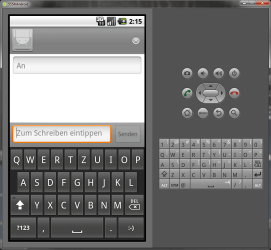
First post from Android, This is neat. Except it has some problems with my German kezboard.
 

My Computer

Computer Manufacturer/Model Number
HP, Dell, Gateway, Toshiba - 4 laptops and 2 desktops
OS
Vista, Windows7, Mint Mate, Zorin, Windows 8
CPU
from 1.6GHz Duo to i7
Monitor(s) Displays
2x HP w2207
Hard Drives
5x HDD, 7x SSD, 12x Externals
Keyboard
with trackball - no mices
Mouse
Trackball mice
Internet Speed
DSL 6000
Go to Settings, then Language and Keyboard, then there should be keyboard options. You can change the input language to a QWERTZ layout if you prefer.
 

My Computer

Computer type
PC/Desktop
Computer Manufacturer/Model Number
Custom Built
OS
Windows 8.1 Pro x64
CPU
Intel Core i7 4790k
Motherboard
MSI Z97S Krait Edition
Memory
8GB Corsair Dominator 1600MHz
Graphics Card(s)
MSI TwinFrozr GeForce GTX770
Sound Card
ASUS Xonar DX/XD 7.1
Monitor(s) Displays
Dell 24" S2409W + Dell 20" E207WFP
Screen Resolution
1920x1080 + 1680x1050
Hard Drives
1x 120GB OCZ Agility 3, 1x 750GB Western Digital Caviar Black, 1x 1TB Western Digital Caviar Blue
PSU
Corsair HX850 modular
Case
Fractal Design Define R4
Cooling
Corsair H60 w/ twin Corsair SP120 fans
Keyboard
Logitech G510S Keyboard
Mouse
Logitech G500S Laser Mouse
Internet Speed
40Mbps
Antivirus
Microsoft Security Essentials
Browser
Google Chrome
Other Info
LG Blu-Ray player
First post from Android, This is neat. Except it has some problems with my German keZboard.
:roflmao:

Nice one, Wolfgang...
 

My Computer

Computer type
Laptop
Computer Manufacturer/Model Number
HP ENVY 17-1150eg
OS
Windows 10 Pro x64 EN-GB
CPU
1.6 GHz Intel Core i7-720QM Processor
Memory
6 GB
Graphics Card(s)
ATI Mobility Radeon HD 5850 Graphics
Sound Card
Beats sound system with integrated subwoofer
Monitor(s) Displays
17" laptop display, 22" LED and 32" Full HD TV through HDMI
Screen Resolution
1600*900 (1), 1920*1080 (2&3)
Hard Drives
Internal: 2 x 500 GB SATA Hard Disk Drive 7200 rpm
External: 2TB for backups, 3TB USB3 network drive for media
Cooling
As Envy runs a bit warm, I have it on a Cooler Master pad
Keyboard
Logitech diNovo Media Desktop Laser (bluetooth)
Mouse
Logitech Performance Mouse MX
Internet Speed
50/10 Mbps VDSL
Antivirus
Windows Defender 4.3.9431.0
Browser
Maxthon 3.5.2., IE11
Go to Settings, then Language and Keyboard, then there should be keyboard options. You can change the input language to a QWERTZ layout if you prefer.
I am not sure which settings you mean. In Windows7, I have, of course, set it to QWERTZ. But in Android it does not honor that. Is there any other setting you were thinking about?

I am also trying to find vBox Guest Additions for Android but could not id any yet.
 

My Computer

Computer Manufacturer/Model Number
HP, Dell, Gateway, Toshiba - 4 laptops and 2 desktops
OS
Vista, Windows7, Mint Mate, Zorin, Windows 8
CPU
from 1.6GHz Duo to i7
Monitor(s) Displays
2x HP w2207
Hard Drives
5x HDD, 7x SSD, 12x Externals
Keyboard
with trackball - no mices
Mouse
Trackball mice
Internet Speed
DSL 6000
Changing the language and keyboard layout in Android vm only changes the layout of the built-in on-screen keyboard, having non whatsoever impact in what layout the host's keyboard is using when typing to Android. Funny enough, even changing the layout in host seems not be working, so when using the host keyboard the English layout is always used even if another layout is chosen (at least I have not found how to change it).

Theoretically, VirtualBox Guest Additions for Linux guests should work with Android, but it's just a theory. I have not found a way to install Guest Additions, nor can I find any information on this from the net.

Kari
 

My Computer

Computer type
Laptop
Computer Manufacturer/Model Number
HP ENVY 17-1150eg
OS
Windows 10 Pro x64 EN-GB
CPU
1.6 GHz Intel Core i7-720QM Processor
Memory
6 GB
Graphics Card(s)
ATI Mobility Radeon HD 5850 Graphics
Sound Card
Beats sound system with integrated subwoofer
Monitor(s) Displays
17" laptop display, 22" LED and 32" Full HD TV through HDMI
Screen Resolution
1600*900 (1), 1920*1080 (2&3)
Hard Drives
Internal: 2 x 500 GB SATA Hard Disk Drive 7200 rpm
External: 2TB for backups, 3TB USB3 network drive for media
Cooling
As Envy runs a bit warm, I have it on a Cooler Master pad
Keyboard
Logitech diNovo Media Desktop Laser (bluetooth)
Mouse
Logitech Performance Mouse MX
Internet Speed
50/10 Mbps VDSL
Antivirus
Windows Defender 4.3.9431.0
Browser
Maxthon 3.5.2., IE11
Go to Settings, then Language and Keyboard, then there should be keyboard options. You can change the input language to a QWERTZ layout if you prefer.
I am not sure which settings you mean. In Windows7, I have, of course, set it to QWERTZ. But in Android it does not honor that. Is there any other setting you were thinking about?

I am also trying to find vBox Guest Additions for Android but could not id any yet.

I mean in the Android settings, sorry. And after testing, it seems the settings within Android only affects the virtual keyboard, not any hardware keyboards.

keyboard.png

Even the emulator keyboard on the right still stays as QWERTY.
 

My Computer

Computer type
PC/Desktop
Computer Manufacturer/Model Number
Custom Built
OS
Windows 8.1 Pro x64
CPU
Intel Core i7 4790k
Motherboard
MSI Z97S Krait Edition
Memory
8GB Corsair Dominator 1600MHz
Graphics Card(s)
MSI TwinFrozr GeForce GTX770
Sound Card
ASUS Xonar DX/XD 7.1
Monitor(s) Displays
Dell 24" S2409W + Dell 20" E207WFP
Screen Resolution
1920x1080 + 1680x1050
Hard Drives
1x 120GB OCZ Agility 3, 1x 750GB Western Digital Caviar Black, 1x 1TB Western Digital Caviar Blue
PSU
Corsair HX850 modular
Case
Fractal Design Define R4
Cooling
Corsair H60 w/ twin Corsair SP120 fans
Keyboard
Logitech G510S Keyboard
Mouse
Logitech G500S Laser Mouse
Internet Speed
40Mbps
Antivirus
Microsoft Security Essentials
Browser
Google Chrome
Other Info
LG Blu-Ray player
I will solve the keyboard question by installing the whole bit on my Sony laptop. That has a QWERTY keyboard - and a lot more muscle than my desktop too.

My initial take on the Android is that I am unimpressed. But for a final judgement I will need to get more into it - especially wait until I can find a Honeycomb .iso. I think MS has a good chance to get well into this market if they do a good job with Win8 - and the help of Nokia.

Today I talked to a guy that had a Windows Phone7 smartphone and was raving about it. He thought that was already better than Android (Froyo) which he had at first but returned it.
 

My Computer

Computer Manufacturer/Model Number
HP, Dell, Gateway, Toshiba - 4 laptops and 2 desktops
OS
Vista, Windows7, Mint Mate, Zorin, Windows 8
CPU
from 1.6GHz Duo to i7
Monitor(s) Displays
2x HP w2207
Hard Drives
5x HDD, 7x SSD, 12x Externals
Keyboard
with trackball - no mices
Mouse
Trackball mice
Internet Speed
DSL 6000
I will solve the keyboard question by installing the whole bit on my Sony laptop. That has a QWERTY keyboard - and a lot more muscle than my desktop too.
I think you are going to notice what both Everlong and I mentioned in our last posts; You can only change the used layout in built-in on-screen keyboard.

I have Android 2.2. guest on an completely Finnish computer (Finnish Windows host, only Finnish keyboard installed on host, Finnish layout chosen in Android guest) but it still uses the standard US International layout when typing with host's keyboard. Somehow this is so hardcoded in Android vm that at least I have not been able to find a solution how to use Finnish layout or even how to type Scandinavian characters ÅåÄäÖö. For that I have to use built-in keyboard.

Kari
 

My Computer

Computer type
Laptop
Computer Manufacturer/Model Number
HP ENVY 17-1150eg
OS
Windows 10 Pro x64 EN-GB
CPU
1.6 GHz Intel Core i7-720QM Processor
Memory
6 GB
Graphics Card(s)
ATI Mobility Radeon HD 5850 Graphics
Sound Card
Beats sound system with integrated subwoofer
Monitor(s) Displays
17" laptop display, 22" LED and 32" Full HD TV through HDMI
Screen Resolution
1600*900 (1), 1920*1080 (2&3)
Hard Drives
Internal: 2 x 500 GB SATA Hard Disk Drive 7200 rpm
External: 2TB for backups, 3TB USB3 network drive for media
Cooling
As Envy runs a bit warm, I have it on a Cooler Master pad
Keyboard
Logitech diNovo Media Desktop Laser (bluetooth)
Mouse
Logitech Performance Mouse MX
Internet Speed
50/10 Mbps VDSL
Antivirus
Windows Defender 4.3.9431.0
Browser
Maxthon 3.5.2., IE11
My initial take on the Android is that I am unimpressed. But for a final judgement I will need to get more into it - especially wait until I can find a Honeycomb .iso. I think MS has a good chance to get well into this market if they do a good job with Win8 - and the help of Nokia.

Well I don't think a virtual machine does Android much justice.
 

My Computer

Computer type
PC/Desktop
Computer Manufacturer/Model Number
Custom Built
OS
Windows 8.1 Pro x64
CPU
Intel Core i7 4790k
Motherboard
MSI Z97S Krait Edition
Memory
8GB Corsair Dominator 1600MHz
Graphics Card(s)
MSI TwinFrozr GeForce GTX770
Sound Card
ASUS Xonar DX/XD 7.1
Monitor(s) Displays
Dell 24" S2409W + Dell 20" E207WFP
Screen Resolution
1920x1080 + 1680x1050
Hard Drives
1x 120GB OCZ Agility 3, 1x 750GB Western Digital Caviar Black, 1x 1TB Western Digital Caviar Blue
PSU
Corsair HX850 modular
Case
Fractal Design Define R4
Cooling
Corsair H60 w/ twin Corsair SP120 fans
Keyboard
Logitech G510S Keyboard
Mouse
Logitech G500S Laser Mouse
Internet Speed
40Mbps
Antivirus
Microsoft Security Essentials
Browser
Google Chrome
Other Info
LG Blu-Ray player
My initial take on the Android is that I am unimpressed. But for a final judgement I will need to get more into it - especially wait until I can find a Honeycomb .iso. I think MS has a good chance to get well into this market if they do a good job with Win8 - and the help of Nokia.

Well I don't think a virtual machine does Android much justice.
I am not sure. I ran Windows7 Beta the whole time in vBox and was very impressed. Now granted, the operation with a touchscreen and in vBox are quite different. But I am talking more about the functional capabilities than the operational capabilities.

As an example, I had quite a long look at many of the available applications and even downloaded some. But they are rather Mikey Mouse. Nothing really very impressive.
 

My Computer

Computer Manufacturer/Model Number
HP, Dell, Gateway, Toshiba - 4 laptops and 2 desktops
OS
Vista, Windows7, Mint Mate, Zorin, Windows 8
CPU
from 1.6GHz Duo to i7
Monitor(s) Displays
2x HP w2207
Hard Drives
5x HDD, 7x SSD, 12x Externals
Keyboard
with trackball - no mices
Mouse
Trackball mice
Internet Speed
DSL 6000
The market for the Vbox version is not the same its actually really well how do you put it...dull as all the apps from the phone can't run from it..as that makes sense. the offcial market goes by model of the phone build number etc so if you think bout its not gonna have no build for the PC ported version.

The only thing the iso is good for is if its loaded on to a netbook or something for fast startup quick access to the web and some other basic things, can't really judge the OS for a phone with that...:P
 

My Computer

Computer type
PC/Desktop
OS
Win7 Home Premium x64 SP1, Archlinux x86_64. Elementary Luna
Need help with accessing wireless network on Android VM

Hi,

This is the first time that I am playing around with Android VM on Win 7. I have followed the instructions and tips in this thread and have gotten it up and running - a big thanks, everyone!

However, I have a problem. I am not able to access the wireless network setting in Android (tried with Ethernet, that worked). Would like to know if that is a general problem with the version or some settings that I can tweak in the VM network settings?

Thanks in advance for your help,

VS

Details:

Dell Latitude XT (touch-screen enabled laptop), running Windows 7 Home Premium 32 bit; with 'Dell Wireless 1505 Draft 802.11n WLAN Mini-Card'

Running Android x86 2.2 Froyo on Oracle Virtual Box version 4.0.4.
 

My Computer

Computer Manufacturer/Model Number
Dell Latitude XT
OS
Windows 7 Home Premium 32bit
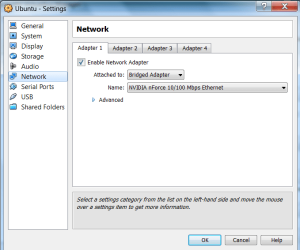
That may be a vBox setting problem. Check whether you have a similar vBox network setting like the picture below. A big problem with Android (versus e.g. Ubuntu that I am running now) is that there are no guest additions.

I played around a bit with Android, but I then deleted it because it was really too limited.
 

Attachments

  • 2011-04-07_1723.png
    2011-04-07_1723.png
    67.3 KB · Views: 20

My Computer

Computer Manufacturer/Model Number
HP, Dell, Gateway, Toshiba - 4 laptops and 2 desktops
OS
Vista, Windows7, Mint Mate, Zorin, Windows 8
CPU
from 1.6GHz Duo to i7
Monitor(s) Displays
2x HP w2207
Hard Drives
5x HDD, 7x SSD, 12x Externals
Keyboard
with trackball - no mices
Mouse
Trackball mice
Internet Speed
DSL 6000
Re: Need help with wireless network on Android VM

Thanks for a quick response, WHS.

Yes, I have been trying out the different options there for the past few days. I have tried NAT and Bridged Adaptor type attachments, and within those tried a couple of Intel Server Adapter Types. Latter was after reading the VB Help, which suggested that Vista and Win 7 support Intel Server adapter type by default -

As for Android versus Linux, I have dual-boot Ubuntu on other machines; but wanted to get a hang of the Android O/S, and see whether it was worthwhile stumping up for a dedicated Android (or Android/ Win7 dual-boot) tablet.

"BEGIN QUOTE 4.2.1.5. Windows Vista networking


If, for some reason, you want to use an AMD PCNet card with Microsoft Windows Vista or later instead of the Intel E1000 card that VirtualBox provides by default, you will need to install a driver for that manually (see Section 6.1, “Virtual networking hardware”).
END QUOTE"
 

My Computer

Computer Manufacturer/Model Number
Dell Latitude XT
OS
Windows 7 Home Premium 32bit
I don't think you will get a good idea on Android in vBox. The operation is really too restricted. I went to the stores and played around with it on different devices (2.2 and 3.0). That is very different
 

My Computer

Computer Manufacturer/Model Number
HP, Dell, Gateway, Toshiba - 4 laptops and 2 desktops
OS
Vista, Windows7, Mint Mate, Zorin, Windows 8
CPU
from 1.6GHz Duo to i7
Monitor(s) Displays
2x HP w2207
Hard Drives
5x HDD, 7x SSD, 12x Externals
Keyboard
with trackball - no mices
Mouse
Trackball mice
Internet Speed
DSL 6000
So far, other than this VM, my experience with Android (xdAndroid) has been limited to running Android via HARET.exe on my Windows 6.1 mobile phone, thanks to the smart folks at XDA Developers. But good as that is, that too is restricted and various functions don't work.

So off to the stores, then. Thanks for pointing this out, WHS.
 

My Computer

Computer Manufacturer/Model Number
Dell Latitude XT
OS
Windows 7 Home Premium 32bit
Back
Top