ANN: Classic Shell 2.9.3 is out - Now with Search!

%L doesn't do anything. Do you mean %1?
Before you use commands in Classic Shell, try them in a command prompt first so you can see if there are any error messages.
Also refer to the Classic Explorer -> Examples for Custom Commands section in the help.
 

My Computer My Computer

At a glance

Windows 7 Home 64, Vista Ultimate 64
Computer Manufacturer/Model Number
Me :) I build all my PCs
OS
Windows 7 Home 64, Vista Ultimate 64
%1 not working also. I found it with FileTypesMan x64. Looks like: "%ProgramFiles(x86)%\Windows Media Player\wmplayer.exe" /prefetch:8 /Play "%L" is working well from command bar and not from Classic Shell.
 

My Computer My Computer

At a glance

Windows 7 Ultimate x64
OS
Windows 7 Ultimate x64
I don't know what to tell you then. I don't know what wmplayer expects on the command line. Maybe somebody else in this forum can come up with something.
 

My Computer My Computer

At a glance

Windows 7 Home 64, Vista Ultimate 64
Computer Manufacturer/Model Number
Me :) I build all my PCs
OS
Windows 7 Home 64, Vista Ultimate 64
Would be nice to have all buttons from command bar in Classic Shell when command bar would be useless. Do update ;)
 

My Computer My Computer

At a glance

Windows 7 Ultimate x64
OS
Windows 7 Ultimate x64
Hello,

first of all I am very happy with Classic Shell, but make it PERFECT :) still few things:

1. How to add 4px margin at the bottom? Please see picture I made.

margin.png

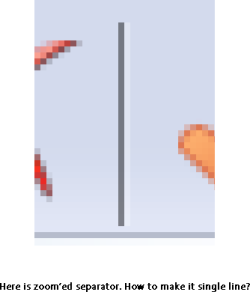
2. How to make separator 1px and in the middle (3px from both sides)? Also see picture.

spacing1.png

Here is zoom'ed separator so you can see clearly its 2 lines and would be nice single line.

separator.png

Thanks
 

My Computer My Computer

At a glance

Windows 7 Ultimate x64
OS
Windows 7 Ultimate x64
Classic Explorer uses the system toolbar and rebar controls. These controls have some built-in metrics. Maybe you can modify the Aero theme files to change those metrics (including the separator image). I don't know how to do it, sorry. Also beware that this will affect all other programs that use toolbars and rebars.
 

My Computer My Computer

At a glance

Windows 7 Home 64, Vista Ultimate 64
Computer Manufacturer/Model Number
Me :) I build all my PCs
OS
Windows 7 Home 64, Vista Ultimate 64
Thanks for the update.

Is it possible to run classic shell without the classic start menu? I just like having the tool bar buttons in explorer.

Thanks :)
 

My Computer My Computer

At a glance

Vista/Windows 7
OS
Vista/Windows 7
Yes, quite possible. In the installer you choose which components you want to install.
If you've already installed the start menu, you can remove it in two ways:
1) Run the installer again in "change" mode, and unselect the start menu.
2) Remove ClassicSartMenu.exe from the Run registry key.
 

My Computer My Computer

At a glance

Windows 7 Home 64, Vista Ultimate 64
Computer Manufacturer/Model Number
Me :) I build all my PCs
OS
Windows 7 Home 64, Vista Ultimate 64
Excellent thanks.
 

My Computer My Computer

At a glance

Vista/Windows 7
OS
Vista/Windows 7
ANN: Classic Shell 3.1.0 - with title bar for IE9!

The latest version of Classic Shell 3.1.0 was just released. Grab it from the usual place: Welcome to Classic Shell

The main new feature is the introduction of the Classic IE9 component. It is a plugin for Internet Explorer 9 that adds the missing title bar and status bar info. You can edit the colors and the font of the title bar to match your custom theme.

Ivo
 

My Computer My Computer

At a glance

Windows 7 Home 64, Vista Ultimate 64
Computer Manufacturer/Model Number
Me :) I build all my PCs
OS
Windows 7 Home 64, Vista Ultimate 64
Dear Ivo,

Thanks a billion for the new IE9 addon. :)

Would it be possible to add a new feature to allow moving the Favorites button to the left, because right now in IE9 it's only possible to move the Refresh button and Stop button to the left side of the Address Bar.

Also, I would like the Favorites pane to stick to the left upon closing and reopening it without having to click the arrow button in the top left corner of the pane again each time, and perhaps it would be nice if the pane were able to close itself upon clicking a favorite. :grouphug:
 

My Computer My Computer

At a glance

8.1 x64i7 4510U8GB DDR3GeForce 820M
Computer type
Laptop
Computer Manufacturer/Model Number
Asus R510L
OS
8.1 x64
CPU
i7 4510U
Memory
8GB DDR3
Graphics Card(s)
GeForce 820M
Sound Card
Eastern Electric Supreme; Emotiva UMC-200; Astell&Kern AK240
Monitor(s) Displays
LG 42LH5000
Screen Resolution
1920x1080
Hard Drives
1TB internal; 45TB external
PSU
Li-ion
Keyboard
Logitech K800
Mouse
Logitech G400
Internet Speed
20Mbit/s up, 200Mbit/s down
Browser
IE 11
Hmm... I'm not sure what you mean. How about a picture?
 

My Computer My Computer

At a glance

Windows 7 Home 64, Vista Ultimate 64
Computer Manufacturer/Model Number
Me :) I build all my PCs
OS
Windows 7 Home 64, Vista Ultimate 64
ie9a.png
 

My Computer My Computer

At a glance

8.1 x64i7 4510U8GB DDR3GeForce 820M
Computer type
Laptop
Computer Manufacturer/Model Number
Asus R510L
OS
8.1 x64
CPU
i7 4510U
Memory
8GB DDR3
Graphics Card(s)
GeForce 820M
Sound Card
Eastern Electric Supreme; Emotiva UMC-200; Astell&Kern AK240
Monitor(s) Displays
LG 42LH5000
Screen Resolution
1920x1080
Hard Drives
1TB internal; 45TB external
PSU
Li-ion
Keyboard
Logitech K800
Mouse
Logitech G400
Internet Speed
20Mbit/s up, 200Mbit/s down
Browser
IE 11
Yeah, sorry. I don't know of a way to do that.
 

My Computer My Computer

At a glance

Windows 7 Home 64, Vista Ultimate 64
Computer Manufacturer/Model Number
Me :) I build all my PCs
OS
Windows 7 Home 64, Vista Ultimate 64
:doh:
 

My Computer My Computer

At a glance

8.1 x64i7 4510U8GB DDR3GeForce 820M
Computer type
Laptop
Computer Manufacturer/Model Number
Asus R510L
OS
8.1 x64
CPU
i7 4510U
Memory
8GB DDR3
Graphics Card(s)
GeForce 820M
Sound Card
Eastern Electric Supreme; Emotiva UMC-200; Astell&Kern AK240
Monitor(s) Displays
LG 42LH5000
Screen Resolution
1920x1080
Hard Drives
1TB internal; 45TB external
PSU
Li-ion
Keyboard
Logitech K800
Mouse
Logitech G400
Internet Speed
20Mbit/s up, 200Mbit/s down
Browser
IE 11
Thanks, Mike but that's how it used to work in IE8. In IE9, unfortunately this functionality is in fact missing. So basically, this time they've put the gas pedal on the passenger's side again (just like they did when they put the Show Desktop button on the right side of the Taskbar in Windows 7, although by now I've already discovered a tweak for that).

The only semi-plausible workaround that I know of involves the creation of a new folder, using the MKLINK command with the /J option to join this folder with
Code:
C:\Users\{Username}\Favorites
and then adding it to favorites. However, it's only semi-plausible because it misses the whole point of reducing the number of bars displayed at the top of the IE window. :sick:
 

My Computer My Computer

At a glance

8.1 x64i7 4510U8GB DDR3GeForce 820M
Computer type
Laptop
Computer Manufacturer/Model Number
Asus R510L
OS
8.1 x64
CPU
i7 4510U
Memory
8GB DDR3
Graphics Card(s)
GeForce 820M
Sound Card
Eastern Electric Supreme; Emotiva UMC-200; Astell&Kern AK240
Monitor(s) Displays
LG 42LH5000
Screen Resolution
1920x1080
Hard Drives
1TB internal; 45TB external
PSU
Li-ion
Keyboard
Logitech K800
Mouse
Logitech G400
Internet Speed
20Mbit/s up, 200Mbit/s down
Browser
IE 11
Thanks, Mike but that's how it used to work in IE8. In IE9, unfortunately this functionality is in fact missing. So basically, this time they've put the gas pedal on the passenger's side again (just like they did when they put the Show Desktop button on the right side of the Taskbar in Windows 7, although by now I've already discovered a tweak for that).

The only semi-plausible workaround that I know of involves the creation of a new folder, using the MKLINK command with the /J option to join this folder with
Code:
C:\Users\{Username}\Favorites
and then adding it to favorites. However, it's only semi-plausible because it misses the whole point of reducing the number of bars displayed at the top of the IE window. :sick:


I didn't know that, thanks. I have not yet installed IE9. I very rarely use IE anyway.

Regards....Mike Connor
 

My Computer My Computer

At a glance

Several, including Windows 7 x64 Ultimate
OS
Several, including Windows 7 x64 Ultimate

My Computer My Computer

At a glance

8.1 x64i7 4510U8GB DDR3GeForce 820M
Computer type
Laptop
Computer Manufacturer/Model Number
Asus R510L
OS
8.1 x64
CPU
i7 4510U
Memory
8GB DDR3
Graphics Card(s)
GeForce 820M
Sound Card
Eastern Electric Supreme; Emotiva UMC-200; Astell&Kern AK240
Monitor(s) Displays
LG 42LH5000
Screen Resolution
1920x1080
Hard Drives
1TB internal; 45TB external
PSU
Li-ion
Keyboard
Logitech K800
Mouse
Logitech G400
Internet Speed
20Mbit/s up, 200Mbit/s down
Browser
IE 11
Very nice program. I really missed the Parent Folder button and especially the ability to Ctrl+click it to open this folder in a separate window, and now it's there again!
 

My Computer My Computer

At a glance

Windows 7 Ultimate 32-biti5-7503GB
OS
Windows 7 Ultimate 32-bit
CPU
i5-750
Memory
3GB
Back
Top