

Rumors of Internet Explorer’s demise have been greatly exaggerated! We encourage all of our customers to stay up-to-date on the latest version of Internet Explorer and we are continuing to make it easier to upgrade than ever before.
Today, we’re announcing two new updates to Enterprise Site Discovery as part of the March 2015 Update: IE8, IE9, and IE10 support and enhanced privacy options. The original feature shipped in November 2014 on IE11, allowing IT Pros to discover which of their Enterprise line of business applications are used—and how. Together with Enterprise Mode IE, this feature helps simplify Enterprise upgrades by helping customers prioritize their testing and understand how their apps leverage technology like document modes and ActiveX. In addition to supporting IE8, 9, 10, & 11, this new update allows IT Pros to specify which zones and domains are included by the Enterprise Site Discovery information gathering. Download the updated Enterprise Site Discovery Toolkit today, which contains scripts and sample queries to help use this feature, and learn more about it on Technet.
Upgrading to the latest version of Windows or browser typically requires Enterprises to do full line of business app compatibility testing with the latest version of Internet Explorer. What makes this a difficult task for most Enterprises is that they often do not know which of their catalog of line of business Web applications are actually used by their employees, as a result all apps are understood to have the same priority. Often times this leads IT Pros to test all of their line of business Web applications, even ones that may not be actively used, which can be a costly and time consuming process. In addition to testing, it can be difficult to mitigate compatibility issues without knowing more about how the application was developed, what document mode is used, which ActiveX controls are needed, and other details.
Enterprise Site Discovery provides a way for an IT Pro to better understand how their users are browsing with Internet Explorer 8, 9, 10, & 11 and discover Web applications that they may not be aware of. This toolkit enables collecting information from Internet Explorer about sites that are visited by Enterprise users. The sites included in this collection can be scoped by zone or domain. This information will help IT Pros prioritize applications, focusing app compatibility testing to facilitate faster upgrades. This is particularly important as customers upgrade to the latest version of Internet Explorer before January 2016. This feature also provides additional information on how the site is designed and used by Internet Explorer; that information can then be used to populate the Enterprise Mode site list, mitigating compatibility issues of critical sites.
Enterprise Site Discovery on IE8, IE9, IE10, and IE11
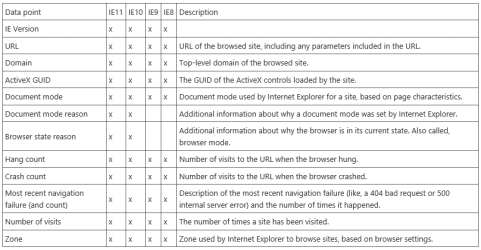
The March 2015 update expands Enterprise Site Discovery beyond Internet Explorer 11 to include Internet Explorer 8, 9, & 10. By default, data collection is turned off. When collection is enabled, data will be collected from all sites visited by users with Internet Explorer unless otherwise configured. Data is collected during each browsing event and is associated to the browsed URL. The fields collected differ based on the version of Internet Explorer as shown below. This data collection has a negligible impact on Internet Explorer performance.
Data collected during each browsing event by browser
By default, Internet Explorer will not collect this data; you have to enable collection if you want to use it. Once enabled, data will be collected on all sites visited by Internet Explorer except while browsing in an InPrivate browsing session or when configured to limit collection to certain zones or domains. Additionally, this data collection is silent and there is no end user notification that information is being collected. You must make sure that you ask the necessary consent and comply with all applicable local laws and regulatory requirements before enabling this in your deployment of Internet Explorer.
Scoping Enterprise Site Discovery to Zones and Domains
This update also adds additional end user privacy configuration options for site discovery. IT Pros will now be able to scope site discovery based on Zones and/or Domains.
The list of Domains and Zones are set in the Powershell script used to configure site discovery. If no zones or domains are specified, discovery will default to capturing data from all sites.
What can I do with this data?
Enterprise Site Discovery provides IT Pros with clearer picture about how IE is being used in their deployment based on actual user data. With this many questions can be answered. Some are:
- What sites are users visiting the most?
- What document mode does the page load in?
- How was that document mode chosen? (IE11 & IE10 only)
- Which ActiveX controls are being used on what sites, and how often?
- Which sites are crashing or hanging when users visit them?
- Are there any sites in the Trusted Sites list that should be moved off?
- Are there any sites that should be added or removed from the Enterprise Mode site list?
How can IT Pros use this update to Enterprise Site Discovery?
- Read up on Enterprise Site Discovery on Technet
- Update Internet Explorer 8, 9, 10, or 11 with the latest Cumulative updates (March 2014 or later)
- Download the Enterprise Site Discovery Toolkit
- Take a look at a few of the sample reports
We’re excited about this toolkit and encourage you to take the toolkit for a spin; try out the data collection functionality and put it through its paces! Let us know your feedback via @IEDevChat or on Connect.
— Deen King-Smith, Program Manager, Internet Explorer

Source: MSDN Blogs
Last edited:
My Computer
At a glance
64-bit Windows 11 Pro for WorkstationsIntel i7-8700K OC'd to 5 GHz64 GB (4x16GB) G.SKILL TridentZ RGB DDR4 3600...ASUS ROG-STRIX-GTX1080TI-O11G-GAMING
- Computer type
- PC/Desktop
- Computer Manufacturer/Model Number
- Self built custom
- OS
- 64-bit Windows 11 Pro for Workstations
- CPU
- Intel i7-8700K OC'd to 5 GHz
- Motherboard
- ASUS ROG Maximus XI Formula Z390
- Memory
- 64 GB (4x16GB) G.SKILL TridentZ RGB DDR4 3600 MHz
- Graphics Card(s)
- ASUS ROG-STRIX-GTX1080TI-O11G-GAMING
- Sound Card
- Integrated
- Monitor(s) Displays
- 2 x Samsung Odyssey G7 27"
- Screen Resolution
- 2560x1440
- Hard Drives
- 1TB Samsung 990 PRO M.2,
4TB Samsung 990 PRO PRO M.2,
TerraMaster F8 SSD Plus NAS
- PSU
- Seasonic Prime Titanium 850W
- Case
- Thermaltake Core P3
- Cooling
- Corsair Hydro H115i
- Keyboard
- Logitech wireless K800
- Mouse
- Logitech MX Master 4
- Internet Speed
- 2 Gb/s Download and 100 Mb/s Upload
- Antivirus
- Malwarebyte Anti-Malware Premium
- Browser
- Google Chrome
- Other Info
- Logitech Z625 speaker system,
Logitech BRIO 4K Pro webcam,
HP Color LaserJet Pro MFP M477fdn,
APC SMART-UPS RT 1000 XL - SURT1000XLI,
Galaxy S23 Plus phone


