Annoyance with Adobe Audition (any version)

Lebon14

Gomen ne Jenna-chan
Guru
VIP
Local time
3:01 AM
Messages
1,324
Location
Canada
Hey there guys. I have some kind of annoyance with Adobe Audition. I'm now trying v3.0.1 (although I'm a v1.5 user).

The annoyance is that in both multitrack view or editing view, the cursor, where I click, isn't going where I click. It's clicking a few pixels to the left. It's VERY annoying. I cannot work with my favorite software like that.

Any suggestion.

P.S I will try to workout this annoyance by myself while waiting for an answer.
 

My Computer My Computer

At a glance

Windows 10 Professional 64-bitRyzen 9 5900XG.Skill 3600Mhz CL16 16GB × 4EVGA GeForce RTX 3070 Ti FTW3 Ultra Gaming
Computer type
PC/Desktop
Computer Manufacturer/Model Number
Custom build
OS
Windows 10 Professional 64-bit
CPU
Ryzen 9 5900X
Motherboard
Gigabyte X570 Aorus Master
Memory
G.Skill 3600Mhz CL16 16GB × 4
Graphics Card(s)
EVGA GeForce RTX 3070 Ti FTW3 Ultra Gaming
Sound Card
On-board
Monitor(s) Displays
Dell Alienware AW3418DW
Screen Resolution
3440x1440
Hard Drives
1×Sabrent Rocket 4 Plus 2TB nvme SSD (System, internal)
2x4TB Western Digital Blue (Internal)
1x4TB HDST 7200RPM (Internal)
PSU
Seasonic Focus Plus 850W Platinum
Case
Corsair 680X
Cooling
Stock fans + 3× Corsair QL120, Corsair H100i Platinum
Keyboard
Logitech K350
Mouse
Logitech M510
Internet Speed
120Mbits dl - 20Mbits up
Antivirus
ESET NOD32 Antivirus
Browser
Firefox (latest version)
Other Info
Headphones : Audio-Technica ATH-M50x
Scanner : Canon Canoscan LiDE 220 + Plustek OptiBook 4800
The only thing I could think of is make sure you have the mouse pointer precision checked in the mouse options in control panel, although it's enabled by default. Or if you have specific options for your mouse to check those options for any cursor accuracy settings. Or any cursor options with the program itself. I can't think of anything other than that, sorry. :confused:
 

My Computer My Computer

At a glance

Windows 7 Ultimate x64 SP1Core i7 920 (D0) @ 4Ghz, *26c idle *65c full ...12GB DDR3 Corsair Dominator -CMD12GX3M6A1600C...Zotac Geforce GTX 770
Computer type
PC/Desktop
Computer Manufacturer/Model Number
Airbot 2.0
OS
Windows 7 Ultimate x64 SP1
CPU
Core i7 920 (D0) @ 4Ghz, *26c idle *65c full load on air
Motherboard
Asus P6X58D Premium - Sata 6Gb/s - USB 3.0
Memory
12GB DDR3 Corsair Dominator -CMD12GX3M6A1600C8 at 1600MHz
Graphics Card(s)
Zotac Geforce GTX 770
Sound Card
ASUS Xonar D2X
Monitor(s) Displays
1 LG 24" Flatron W2453V-PF 1 Samsung 24" P2450H both 2ms RT
Screen Resolution
1920x1080@60hz
Hard Drives
1 Samsung 250GB 840 Evo SSD
1 OCZ Vertex2 180GB SSD
1 TB Samsung Spinpoint F1 7200RPM 32MB cache
2 500GB WD Caviar Blacks 7200RPM 32MB cache (WD5001AALS)

Pioneer DVD Burner DVR-S18M
PSU
Corsair HX1000W
Case
Cooler Master HAF 932
Cooling
Case Fans *3 230mm, *1 140mm/CPU - *Tuniq Tower 120 Extreme
Keyboard
Logitech Wireless MK700
Mouse
Logitech Wireless MK700
Internet Speed
DL 15 Mbps UL 0.98 Mbps
Antivirus
None
Browser
Firefox Nightly
Other Info
Processor-7.7 *RAM- 7.9 *Graphics-7.9 *Gaming Graphics- 7.9 *SSD- 7.8 W.E.I final score= 7.7
*Phone- LG Nexus 5
Is it just Audition or is occurring in other apps?

Although I used to use Audition and I seem to recall it's detection was always a little off - especially around the volume and mixer buttons.
 

My Computer My Computer

At a glance

8 Pro x64i7 3770K 4.6GHz16GB G.Skill Trident X 2666mhzx2 EVGA 780 Ti Superclocked SLI
Computer type
PC/Desktop
Computer Manufacturer/Model Number
Systems by SmartEyeball
OS
8 Pro x64
CPU
i7 3770K 4.6GHz
Motherboard
ASUS P8Z77 WS
Memory
16GB G.Skill Trident X 2666mhz
Graphics Card(s)
x2 EVGA 780 Ti Superclocked SLI
Sound Card
SB X-FI Surround 5.1 PRO USB / ATH-AD900 Headphones
Monitor(s) Displays
x3 Dell U2410 / 58" Samsung
Screen Resolution
5760*1200/ 1920*1200
Hard Drives
2x Intel 520 240GB (RAID 0) * 2x WD Caviar Blacks 2TB (RAID 0) * 2TB WD Caviar Black * Sony Optirac DVD
PSU
Silverstone Strider Evolution 1200W
Case
Thermaltake Level 10 GT Snow Edition
Cooling
Noctua NH-D14
Keyboard
Topre Realforce // Ducky Shine MX Black // Filco Ninja TKL
Mouse
Thermaltake Theron (Highly Recommended) + Razer Imperator
Antivirus
MSE
Browser
IE, FF, WaterFox
Other Info
GT Extreme V2 Sim Racing Cockpit + 40" LCD and K/B Mouse stand ▼
Fanatec CSR Elite Wheel + Clubsport V1 Pedals + CSR shifter/7G-H ▼Saitek X52 Pro ▼ TrackIR 5 Pro
Buttkicker v2 Seat Rumbler with Dedicated 5.1 and Sub Woofer attached to frame ▼
=
Bloody Big Grin
Airbot : It's check obviously (like you said). I haven't installed Logitech's tools but if I remember well, there aren't anything that could help me or maybe the mouse drivers on W7 are a little off... And, no, there aren't any more precision options in Audition only cursor options for working with it.

smarteyeball : Looks like it's just Audition... it doesn't happen in Vista. I never had any problems with audition beside that on Windows 7.
 

My Computer My Computer

At a glance

Windows 10 Professional 64-bitRyzen 9 5900XG.Skill 3600Mhz CL16 16GB × 4EVGA GeForce RTX 3070 Ti FTW3 Ultra Gaming
Computer type
PC/Desktop
Computer Manufacturer/Model Number
Custom build
OS
Windows 10 Professional 64-bit
CPU
Ryzen 9 5900X
Motherboard
Gigabyte X570 Aorus Master
Memory
G.Skill 3600Mhz CL16 16GB × 4
Graphics Card(s)
EVGA GeForce RTX 3070 Ti FTW3 Ultra Gaming
Sound Card
On-board
Monitor(s) Displays
Dell Alienware AW3418DW
Screen Resolution
3440x1440
Hard Drives
1×Sabrent Rocket 4 Plus 2TB nvme SSD (System, internal)
2x4TB Western Digital Blue (Internal)
1x4TB HDST 7200RPM (Internal)
PSU
Seasonic Focus Plus 850W Platinum
Case
Corsair 680X
Cooling
Stock fans + 3× Corsair QL120, Corsair H100i Platinum
Keyboard
Logitech K350
Mouse
Logitech M510
Internet Speed
120Mbits dl - 20Mbits up
Antivirus
ESET NOD32 Antivirus
Browser
Firefox (latest version)
Other Info
Headphones : Audio-Technica ATH-M50x
Scanner : Canon Canoscan LiDE 220 + Plustek OptiBook 4800
Big news.

I ended up trying to go further into this problem and I found... an super easy solution. In short, there are two pointers available the "I" and the arrow. Selecting the arrow resolves the pointing issue on both multi-track editing and single track editor.

Awesome. Welcome back Audition 1.5!
 

My Computer My Computer

At a glance

Windows 10 Professional 64-bitRyzen 9 5900XG.Skill 3600Mhz CL16 16GB × 4EVGA GeForce RTX 3070 Ti FTW3 Ultra Gaming
Computer type
PC/Desktop
Computer Manufacturer/Model Number
Custom build
OS
Windows 10 Professional 64-bit
CPU
Ryzen 9 5900X
Motherboard
Gigabyte X570 Aorus Master
Memory
G.Skill 3600Mhz CL16 16GB × 4
Graphics Card(s)
EVGA GeForce RTX 3070 Ti FTW3 Ultra Gaming
Sound Card
On-board
Monitor(s) Displays
Dell Alienware AW3418DW
Screen Resolution
3440x1440
Hard Drives
1×Sabrent Rocket 4 Plus 2TB nvme SSD (System, internal)
2x4TB Western Digital Blue (Internal)
1x4TB HDST 7200RPM (Internal)
PSU
Seasonic Focus Plus 850W Platinum
Case
Corsair 680X
Cooling
Stock fans + 3× Corsair QL120, Corsair H100i Platinum
Keyboard
Logitech K350
Mouse
Logitech M510
Internet Speed
120Mbits dl - 20Mbits up
Antivirus
ESET NOD32 Antivirus
Browser
Firefox (latest version)
Other Info
Headphones : Audio-Technica ATH-M50x
Scanner : Canon Canoscan LiDE 220 + Plustek OptiBook 4800
lol, good stuff :)
 

My Computer My Computer

At a glance

8 Pro x64i7 3770K 4.6GHz16GB G.Skill Trident X 2666mhzx2 EVGA 780 Ti Superclocked SLI
Computer type
PC/Desktop
Computer Manufacturer/Model Number
Systems by SmartEyeball
OS
8 Pro x64
CPU
i7 3770K 4.6GHz
Motherboard
ASUS P8Z77 WS
Memory
16GB G.Skill Trident X 2666mhz
Graphics Card(s)
x2 EVGA 780 Ti Superclocked SLI
Sound Card
SB X-FI Surround 5.1 PRO USB / ATH-AD900 Headphones
Monitor(s) Displays
x3 Dell U2410 / 58" Samsung
Screen Resolution
5760*1200/ 1920*1200
Hard Drives
2x Intel 520 240GB (RAID 0) * 2x WD Caviar Blacks 2TB (RAID 0) * 2TB WD Caviar Black * Sony Optirac DVD
PSU
Silverstone Strider Evolution 1200W
Case
Thermaltake Level 10 GT Snow Edition
Cooling
Noctua NH-D14
Keyboard
Topre Realforce // Ducky Shine MX Black // Filco Ninja TKL
Mouse
Thermaltake Theron (Highly Recommended) + Razer Imperator
Antivirus
MSE
Browser
IE, FF, WaterFox
Other Info
GT Extreme V2 Sim Racing Cockpit + 40" LCD and K/B Mouse stand ▼
Fanatec CSR Elite Wheel + Clubsport V1 Pedals + CSR shifter/7G-H ▼Saitek X52 Pro ▼ TrackIR 5 Pro
Buttkicker v2 Seat Rumbler with Dedicated 5.1 and Sub Woofer attached to frame ▼
=
Bloody Big Grin
I think the problem you have is with the "snapping" option.
Go to "edit" then click on "snapping" and unselect all the options that are selected...usually one is selected.
This worked for me in 1.5 but I am not sure it will help you out in 3.0.
 

My Computer My Computer

At a glance

windows 7
OS
windows 7
Resurrecting an old thread!

I found this on Google after experiencing the same "inaccurate clicking" you were describing, Lebon14, in Audition 1.5 on Windows 7 Pro. But you say it worked better when using the arrow tool, and not the "I" tool, right? Doesn't seem to make any difference to me. And just to be safe, I turned off all snapping like kaseyp suggested, so I'm kind of stumped!

Any help would be great!

-hoovdan
 

My Computer My Computer

At a glance

Windows 7 Professional
OS
Windows 7 Professional
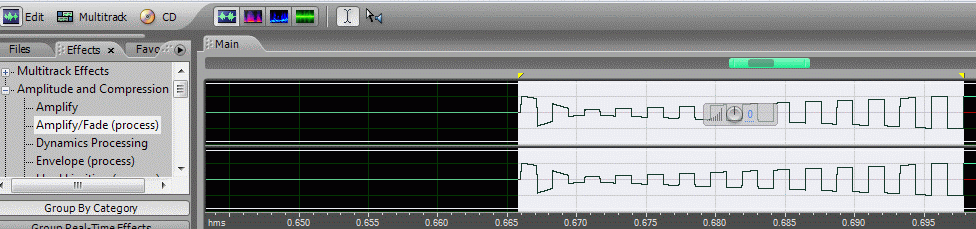
Audition 3.0 has cursor/selection problems for me on both XP and Win7 (v1.5 and the old CoolEdit are fine). Here's a screen-shot of a weird "fade-in" (of 440Hz square) - the left side of the selection should be at 0.0. and increase linearly to the right edge. I've checked snapping, etc.

Update: D'Oh! It was a setting in Edit > Prefs > Smooth [whatever, two checkboxes].
 

Attachments

  • Audition_error1.gif
    Audition_error1.gif
    42.8 KB · Views: 85
Last edited:

My Computer My Computer

At a glance

Windows 7 UltimatePentium Dual-Core CPU E5400 @ 2.70GHz4096MnVidia 8400GS
Computer Manufacturer/Model Number
eMachines ET1831-7
OS
Windows 7 Ultimate
CPU
Pentium Dual-Core CPU E5400 @ 2.70GHz
Motherboard
EMCP73VT-PM
Memory
4096M
Graphics Card(s)
nVidia 8400GS
Sound Card
built-in Realtek
Monitor(s) Displays
Acer 20"
Screen Resolution
1680x1050
Hard Drives
Seagate ST3750528AS ATA 500G
Other Info
Dual-boot with Linux.
Back
Top