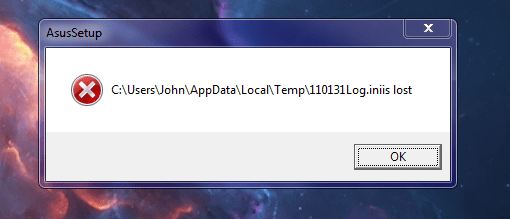
Am getting this annoying message after login - see pic. I have seen some Googles and burrowed into the registry and found an entry for it but am not sure whether i should delete it or not or even if this is what causing the message.
Any ideas please?
Edit: I should have added I think it has something to do with an Asus ?function/feature
Attachments
INISLOST.PNG
25.3 KB
· Views: 81
My Computer
Computer type
PC/Desktop
Computer Manufacturer/Model Number
Own build (new) Desk1 / Asus ROG Win 7 / Desk2 1st build
OS
Desk1 7 Home Prem / Desk2 10 Pro / Main lap Asus ROG 10 Pro 2 laptop Toshiba 7 Pro Asus P2520 7 & 10
One other Desktop (tester) and spare Toshba laptop both with SSD's
Running Kaspersky 2016 ISS on all machines config'd identically
Logitec audio stereo systems on each machine (x3)
Canon MG5250MFC
Router/modem TP-Link running WPA2SK
John, don't uninstall anything.
As the missing file was on the users temp folder, it was probably deleted when cleaning trash.
You have to find what and where it is calling the missing file.
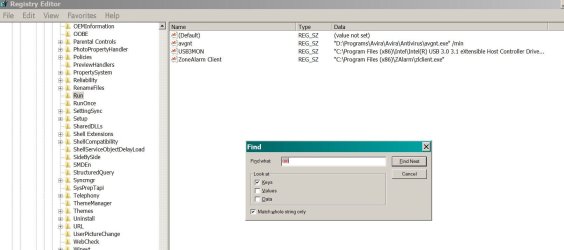
Fist look at startup folder then look on register under Run.
Ok mate I will look and just another little annoyance is if I hit Start and then Computer then go to right clcik Manage the whole lot disappears, so I have to do it a second tiem to get into that what I want.
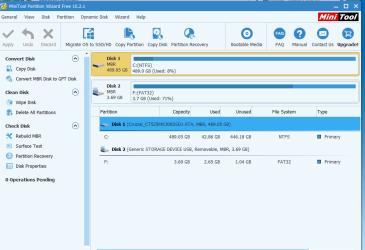
Now I do notice too that in my Partition Wizard there is only one partition see pic/s I was under the impression there should be a small 100mb partition at the beginning. Any ideas please?
Attachments
PW.PNG
26.4 KB
· Views: 1
PW 2.PNG
10.9 KB
· Views: 1
My Computer
Computer type
PC/Desktop
Computer Manufacturer/Model Number
Own build (new) Desk1 / Asus ROG Win 7 / Desk2 1st build
OS
Desk1 7 Home Prem / Desk2 10 Pro / Main lap Asus ROG 10 Pro 2 laptop Toshiba 7 Pro Asus P2520 7 & 10
One other Desktop (tester) and spare Toshba laptop both with SSD's
Running Kaspersky 2016 ISS on all machines config'd identically
Logitec audio stereo systems on each machine (x3)
Canon MG5250MFC
Router/modem TP-Link running WPA2SK
John, The M$ reserved 120M RAW partition is created when you delete all partitions and then create new during installation. If the disk already had a partition and you install win 7 on it, the M$ reserved isn't created.
M$ reserved 120M RAW partition is only used to store the un encrypt key program when you use Bit locker (Ultimate), otherwise is useless.
Am getting this annoying message after login - see pic. I have seen some Googles and burrowed into the registry and found an entry for it but am not sure whether i should delete it or not or even if this is what causing the message.
Any ideas please?
Edit: I should have added I think it has something to do with an Asus ?function/feature
John, don't uninstall anything.
As the missing file was on the users temp folder, it was probably deleted when cleaning trash. You have to find what and where it is calling the missing file.
Fist look at startup folder then look on register under Run.
Gyration wireless, Logitech wireless, Dell USB wired
Mouse
Gyration wireless, Logitech wireless, V7 USB wired
Internet Speed
Spectrum - 100Mbps D / 10Mbps U
Antivirus
Avast, MBAM3, EMET, WinPatrol
Browser
Pale Moon, Firefox, IE
Other Info
2 multi-boot PC's
Mainly HTPC/Office/Gen purpose (no gaming).
Trendnet USB KVM.
LG DVD burner/Blue Ray Player.
Tray system for removable SATA backup drives.
Not currently OCd, under-volted.
I use Hybrid sleep, rarely re-boot or shutdown.
Hauppauge HD-PVR, Avermedia PCIe TV Tuner, Hauppauge PCI TV Tuner.
Gyration wireless, Logitech wireless, Dell USB wired
Mouse
Gyration wireless, Logitech wireless, V7 USB wired
Internet Speed
Spectrum - 100Mbps D / 10Mbps U
Antivirus
Avast, MBAM3, EMET, WinPatrol
Browser
Pale Moon, Firefox, IE
Other Info
2 multi-boot PC's
Mainly HTPC/Office/Gen purpose (no gaming).
Trendnet USB KVM.
LG DVD burner/Blue Ray Player.
Tray system for removable SATA backup drives.
Not currently OCd, under-volted.
I use Hybrid sleep, rarely re-boot or shutdown.
Hauppauge HD-PVR, Avermedia PCIe TV Tuner, Hauppauge PCI TV Tuner.
I had that same popup when I pulled out my Asus MB cd before the PC rebooted, when it rebooted it looked for the cd, couldn`t find it and the message appeared.
Did you try to install any Asus software lately ?
If not look in Task Manager for any Asus related tasks trying to run.
One other Desktop (tester) and spare Toshba laptop both with SSD's
Running Kaspersky 2016 ISS on all machines config'd identically
Logitec audio stereo systems on each machine (x3)
Canon MG5250MFC
Router/modem TP-Link running WPA2SK
One other Desktop (tester) and spare Toshba laptop both with SSD's
Running Kaspersky 2016 ISS on all machines config'd identically
Logitec audio stereo systems on each machine (x3)
Canon MG5250MFC
Router/modem TP-Link running WPA2SK
Hi,
You should be able to use task scheduler.
Once there expand task scheduler library and open the asus folder and delete any existing tasks it shows will probably get rid of the popup message.
My Computer
Computer type
PC/Desktop
Computer Manufacturer/Model Number
Custom assembled by me :}
OS
Win-7-Pro64bit 7-H-Prem-64bit
CPU
i7-5930K 2nd i9-9940x both water blocked VRM's too
2nd ASUS X299 Apex/Intel i9-9940x with Custom water loop/7H-Prem-x64/Corsair 450D case/Ram Trident-z 3600C16 4x8gb / Samsung970Evo plus 500gb SSD/Dual ssd EZ swap evo/PSU EVGA SuperNova 1200w-P2 80+Platinum/GPU Titan Xp /8-ML-140 on push-pull on 2-280GTX rads
One other Desktop (tester) and spare Toshba laptop both with SSD's
Running Kaspersky 2016 ISS on all machines config'd identically
Logitec audio stereo systems on each machine (x3)
Canon MG5250MFC
Router/modem TP-Link running WPA2SK
Ok went into there an deleted the only Asus feature listed and it looked to be a bit like the error listed in that message. ( I did get the pop up on this boot)
Shut down and powered up again and no message will try it once more just to make sure.
Edit: Ok Mike that seems to have done the trick thanks mate what the service was heaven know but the machine is running as good as ever
My Computer
Computer type
PC/Desktop
Computer Manufacturer/Model Number
Own build (new) Desk1 / Asus ROG Win 7 / Desk2 1st build
OS
Desk1 7 Home Prem / Desk2 10 Pro / Main lap Asus ROG 10 Pro 2 laptop Toshiba 7 Pro Asus P2520 7 & 10
One other Desktop (tester) and spare Toshba laptop both with SSD's
Running Kaspersky 2016 ISS on all machines config'd identically
Logitec audio stereo systems on each machine (x3)
Canon MG5250MFC
Router/modem TP-Link running WPA2SK
2nd ASUS X299 Apex/Intel i9-9940x with Custom water loop/7H-Prem-x64/Corsair 450D case/Ram Trident-z 3600C16 4x8gb / Samsung970Evo plus 500gb SSD/Dual ssd EZ swap evo/PSU EVGA SuperNova 1200w-P2 80+Platinum/GPU Titan Xp /8-ML-140 on push-pull on 2-280GTX rads