Annoying message, pls help

titi2

New member
Member
VIP
Local time
1:35 AM
Messages
151
Hi all,
I have sbcglobal.net (sign in thru yahoo email). Everytime I open my sbcglobal email, there’s an annoying message
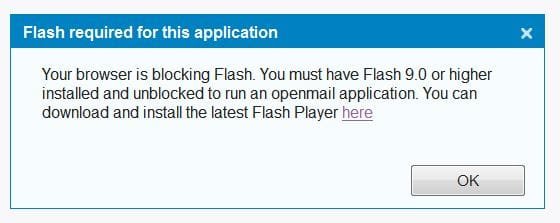
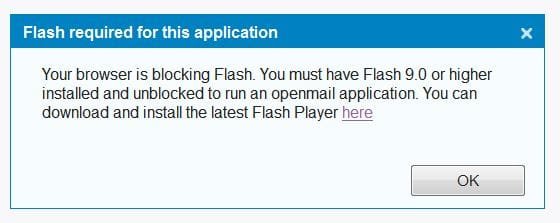
“Your browser is blocking Flash. You must have Flash 9.0 or higher installed and unblocked to run an openmail application. You can download and install the latest Flash Player here “.
I click on it to dl Flash, it says I have the latest Flash version which is 11. I knew i had the latest Flash version.

Does someone run into the same problem or have a solution, pls share. Thanks.
 

My Computer

OS
Windows 7 Professional, SP1
Memory
1.25GB
I'd suggest against following the link, but rather go straight to adobe's site and download from there.

You didn't say whether you're running 32 or 64 bit. If you're running 64 bit, install both the x86 and x64 versions.

Let us know if that fixes it.
 

My Computer

Computer Manufacturer/Model Number
Dell Optiplex
OS
Windows 7 Professional 64 bit
Memory
4096
Thank you. I run Wins 32 bits. It's Firefox 3.6. I don't know why it says Browser is blocking Flash. Yes, I download from the original Adobe Flash website. Do you have adequate info. to diagnose the problem? Thanks.
 

My Computer

OS
Windows 7 Professional, SP1
Memory
1.25GB
Another Yahoo/AT&T Problem

I have the same problem. I tried:
-- downloading from Adobe.com
-- uninstalling previous version of Flash before installing Flash 11
-- rebooting.

None of these has any effect.

BUT: The error shows up ONLY on my AT&T/Yahoo email browser. To date, I haven't found another web page that causes the error message to display.

Theoretically, I've attached a JPEG file showing the error message. (I say "theoretically" because I don't see it from the compose page.)

m3
 

Attachments

  • FlashInstallError20120329.JPG
    FlashInstallError20120329.JPG
    23.3 KB · Views: 5

My Computer

Computer Manufacturer/Model Number
Hewlett-Packard/Pavilion/NP192AA-ABA p6140f
OS
Windows 7 Home Premium 64-bit
CPU
Intel Core2 Quad Q8200
Motherboard
Board: PEGATRON CORPORATION Benicia 1.01
Memory
8184 Megabytes Installed Memory
Graphics Card(s)
?
Sound Card
Realtek High Definition Audio
Monitor(s) Displays
Generic Non-PnP Monitor
Hard Drives
WDC WD10EADS-65L5B1 [Hard drive] (1000.20 GB)
Maxtor 3200 USB Device [Hard drive] (160.04 GB) External BACKUP
PSU
?
Case
?
Cooling
?
Another Yahoo/AT&T Problem

I have the same problem. I tried:
-- downloading from Adobe.com
-- uninstalling previous version of Flash before installing Flash 11
-- rebooting.

None of these has any effect.

BUT: The error shows up ONLY on my AT&T/Yahoo email browser. To date, I haven't found another web page that causes the error message to display.

I've included a screenshot of the error message.

m3
 

My Computer

Computer Manufacturer/Model Number
Hewlett-Packard/Pavilion/NP192AA-ABA p6140f
OS
Windows 7 Home Premium 64-bit
CPU
Intel Core2 Quad Q8200
Motherboard
Board: PEGATRON CORPORATION Benicia 1.01
Memory
8184 Megabytes Installed Memory
Graphics Card(s)
?
Sound Card
Realtek High Definition Audio
Monitor(s) Displays
Generic Non-PnP Monitor
Hard Drives
WDC WD10EADS-65L5B1 [Hard drive] (1000.20 GB)
Maxtor 3200 USB Device [Hard drive] (160.04 GB) External BACKUP
PSU
?
Case
?
Cooling
?
Another Yahoo/AT&T Problem (Redux)

I have the same problem. I tried:
-- downloading from Adobe.com
-- uninstalling previous version of Flash before installing Flash 11
-- rebooting.

None of these has any effect.

BUT: The error shows up ONLY on my AT&T/Yahoo email browser. To date, I haven't found another web page that causes the error message to display.

I've included a screenshot of the error message.

m3

Sorry -- first time in newsgroup, had trouble attaching screenshot.
 

Attachments

  • FlashInstallError20120329.JPG
    FlashInstallError20120329.JPG
    23.3 KB · Views: 2

My Computer

Computer Manufacturer/Model Number
Hewlett-Packard/Pavilion/NP192AA-ABA p6140f
OS
Windows 7 Home Premium 64-bit
CPU
Intel Core2 Quad Q8200
Motherboard
Board: PEGATRON CORPORATION Benicia 1.01
Memory
8184 Megabytes Installed Memory
Graphics Card(s)
?
Sound Card
Realtek High Definition Audio
Monitor(s) Displays
Generic Non-PnP Monitor
Hard Drives
WDC WD10EADS-65L5B1 [Hard drive] (1000.20 GB)
Maxtor 3200 USB Device [Hard drive] (160.04 GB) External BACKUP
PSU
?
Case
?
Cooling
?
Even though the app is properly installed on your machine you may have to make sure it's enabled in your browser. Somewhere in the browser there will be a dialog box or something that will allow you to enable/disable different addons and such. Look for an options/tools/settings button in your browser.
 

My Computer

OS
Windows 7 Ultimate x64
in Firefox 3.6---tools>add-ons>plugins---Shockwave Flash---set to 'enable'
 

My Computer

Computer Manufacturer/Model Number
SALEON model 2.2b
OS
win7 ultimate 32bit
CPU
core2 Extreme QX6850-OCd to 3.15 GHz
Motherboard
ASUS P5G41-M LE
Memory
4 GB
Graphics Card(s)
NVidia 8600 GT
Monitor(s) Displays
23" acer
Hard Drives
one SATA 250GB partitioned equally in half
one SATA 160GB-internal storage
PSU
500W Thermaltake
Case
mini tower

My Computer

Computer type
PC/Desktop
Computer Manufacturer/Model Number
OQO 2+
OS
Windows 8 Pro w/MC 32-bit
CPU
Intel Atom 1.86 GHz
Motherboard
OQO 2+
Memory
2 GB
Graphics Card(s)
Intel GMA 500
Sound Card
IDT
Monitor(s) Displays
LCD
Screen Resolution
800 x 480 (portable) 1280 x 1024 (docked)
Hard Drives
64 GB SSD
PSU
9 Ah Battery (portable) or OQO Brick (docked)
Case
Shirt Pocket Sized
Cooling
Tiny Fan
Keyboard
Slide out (portable) DiNovo Edge (docked)
Mouse
Eraser head (portable) Logitech Bluetooth (docked)
Internet Speed
WWAN or 802.11G (portable) T1 (docked)
Browser
IE 10
Other Info
DVD-RW OQO Docking Station
Is Firefox up to date or Does trying a different browser work?
Or...
If possible, from somewhere you CAN access your mail, you should get your POP3 or IMAP & SMTP settings and use an e-mail client.
 

My Computer

Computer Manufacturer/Model Number
CustomBuild001
OS
7 ultimate x64
CPU
Intel core i7 2600K
Motherboard
ASUS P8Z68-V PRO
Memory
Vengeance™ — 16GB Triple Channel DDR3 PC16000
Graphics Card(s)
GeForce GTX 560 Ti
Monitor(s) Displays
HannsG 22" widescreen (HDMI)
Screen Resolution
1680x1050
Hard Drives
Samsung 1TB x2(RAID1) Deskstar 160G, Buffalo ExHD 500GB
PSU
Corsair 850HX
Case
Antec Three Hundred Gaming Tower Case
Cooling
CPU Freezer 7 Pro Rev. 2...ANTEC 3phase cooling, 2 intake.
Keyboard
microsoft intellitype 6000 v3.0
Mouse
microsoft sidewinder
Internet Speed
50Mb
Other Info
64GB SSD in pipeline for Intel Smart Response Technology.
Using latest Firefox, tried IE as well

I'm using Firefox 11.0; error still appears ONLY with Yahoo! online email browser.

Tried Internet Explorer (V9.something). Flash didn't show up as an add-on. I reinstalled it for IE, got the "successful" message, but still doesn't show on the list of installed add-ons. The error doesn't occur with IE, but I don't know if that's because it's IE or because Flash is being ignored by IE.

I hope to be able to check this out from another computer tomorrow. But I still think it's another problem involving AT&T/Yahoo! and Firefox.
 

My Computer

Computer Manufacturer/Model Number
Hewlett-Packard/Pavilion/NP192AA-ABA p6140f
OS
Windows 7 Home Premium 64-bit
CPU
Intel Core2 Quad Q8200
Motherboard
Board: PEGATRON CORPORATION Benicia 1.01
Memory
8184 Megabytes Installed Memory
Graphics Card(s)
?
Sound Card
Realtek High Definition Audio
Monitor(s) Displays
Generic Non-PnP Monitor
Hard Drives
WDC WD10EADS-65L5B1 [Hard drive] (1000.20 GB)
Maxtor 3200 USB Device [Hard drive] (160.04 GB) External BACKUP
PSU
?
Case
?
Cooling
?
I also have had this problem since yesterday with my yahoo mail box. I usually use Chrome, and after uninstalling and reinstalling browser and Adobe flash, I tried Safari and IE as well... all were most current versions. I also tried a system restore back 2 days. No matter what I do, I keep getting that same Flash error pop up each time I open my inbox. I have also run both Norton antivirus, the microsoft detection tool, as well as Emisoft Anti Malware. All are telling me no viruses, spyware etc. I have no idea what to try next. Help
 

My Computer

OS
Windows 7 64 bit
Who's your Interrnet Service Provider?

I also have had this problem since yesterday with my yahoo mail box. I usually use Chrome, and after uninstalling and reinstalling browser and Adobe flash, I tried Safari and IE as well... all were most current versions. I also tried a system restore back 2 days. No matter what I do, I keep getting that same Flash error pop up each time I open my inbox. I have also run both Norton antivirus, the microsoft detection tool, as well as Emisoft Anti Malware. All are telling me no viruses, spyware etc. I have no idea what to try next. Help

Is AT&T or one of its "family members" (e.g., SBCglobal, PacBell) your ISP?
 

My Computer

Computer Manufacturer/Model Number
Hewlett-Packard/Pavilion/NP192AA-ABA p6140f
OS
Windows 7 Home Premium 64-bit
CPU
Intel Core2 Quad Q8200
Motherboard
Board: PEGATRON CORPORATION Benicia 1.01
Memory
8184 Megabytes Installed Memory
Graphics Card(s)
?
Sound Card
Realtek High Definition Audio
Monitor(s) Displays
Generic Non-PnP Monitor
Hard Drives
WDC WD10EADS-65L5B1 [Hard drive] (1000.20 GB)
Maxtor 3200 USB Device [Hard drive] (160.04 GB) External BACKUP
PSU
?
Case
?
Cooling
?
Well, that shoots down my theory....
 

My Computer

Computer Manufacturer/Model Number
Hewlett-Packard/Pavilion/NP192AA-ABA p6140f
OS
Windows 7 Home Premium 64-bit
CPU
Intel Core2 Quad Q8200
Motherboard
Board: PEGATRON CORPORATION Benicia 1.01
Memory
8184 Megabytes Installed Memory
Graphics Card(s)
?
Sound Card
Realtek High Definition Audio
Monitor(s) Displays
Generic Non-PnP Monitor
Hard Drives
WDC WD10EADS-65L5B1 [Hard drive] (1000.20 GB)
Maxtor 3200 USB Device [Hard drive] (160.04 GB) External BACKUP
PSU
?
Case
?
Cooling
?
I have AT&T. The pop-up still persists. Can someone find a solution for this? Pls share. Thanks.
 

My Computer

OS
Windows 7 Professional, SP1
Memory
1.25GB
Flash not working in Yahoo/ATT

Until they figure out what is wrong I just disabled Flash from the tool/plug ins panel. I have Win 7 64 bit on 3 computers and all have the same message only on the yahoo/att site. Did the Adobe uninstall, reboot, reinstall and reboot. None of it works so just kill the message until they figure it out
 

My Computer

OS
Windows 7 Ultimate x64
Try this to get rid of the error message

Try this to fix this problem, it seems to have worked for me.
This is for IE9 browser, but might work for others as well.

1. Open Control Panel.
2. Type "Flash Player" in Control Panel Search Box
3. Click on Flash Player (32 bit) to open the Flash Player Settings Manager box
4. Click on Advanced tab
5. Click on Delete All button under Browser Data and Settings section.
6. Close, and re-open your browser.

Hope this works for everyone as well as it did for me for getting rid of that message!
 

My Computer

OS
Windows 7 64 bit
Tried it in Firefox, didn't work :( I don't use IE, FF is so much quicker. I'm sure they will figure it out
 

My Computer

OS
Windows 7 Ultimate x64
Back
Top