Annoying pop-up

tonyvella

New member
Member
VIP
Local time
12:26 PM
Messages
161
I am using IE11 and my opening page is Google Canada. Every time I start IE I get a pop-up asking me to install Chrome so I can browse faster. Can I stop this from happening or is it part and parcel of having Google Canada as my opening page? I could easily switch to bing.com if the worse came to worst but I wanted to check whether someone had a solution first.

Thanks in advance for all help.
 

My Computer My Computer

At a glance

windows 7 Home Premium
OS
windows 7 Home Premium
Make sure you are malware free, scan with Malwarebytes Anti-Malware free (doesn't hurt to start free Premium trial).

I get a little box in upper left for Installing Chrome, but it is not a pop-up. Part of the web-page.
Go into Internet options - Privacy - make sure Turn on Pop-up blocker is checked. Then go into it's settings and set Blocking level to Med or High (mine is Med - I guess default)
 

My Computer My Computer

At a glance

Windows 7 Ultimate x64 SP1AMD Phenom 2 1090T2x8GB Kingston HyperX Fury Black 1600Mhz Unga...MSI GTX 970 Gaming 4G
Computer type
PC/Desktop
Computer Manufacturer/Model Number
Custom Build
OS
Windows 7 Ultimate x64 SP1
CPU
AMD Phenom 2 1090T
Motherboard
Gigabyte GA-890FXA-UD5
Memory
2x8GB Kingston HyperX Fury Black 1600Mhz Unganged
Graphics Card(s)
MSI GTX 970 Gaming 4G
Sound Card
Realtek On-Board HD 7.1 Audio / Logitech G35
Monitor(s) Displays
3xAcer GD245HQ
Screen Resolution
1920x1080
Hard Drives
Samsung 850 Pro 512GB SSD - OS /
WD Caviar Black SATA 3 - 1 TBx2 - Dynamic RAID 0 /
WD Caviar Green SATA 2 - 640GBx2 - Dynamic RAID 0 /
WD Caviar Green SATA 2 - 640GB - Internal Backup /
Seagate Barracude SATA 3 - 3TB - External Backup/ Sync
PSU
HighPower 1000W
Case
Cooler Master HAF 932
Cooling
Noctua NH-D14
Keyboard
Logitech G19
Mouse
Logitech G500
Internet Speed
100/4 Mbit Cable (100GB quota)
Antivirus
ZoneAlarm Extreme Security / MBAM Pro / MBAE Free / SAS Free
Browser
IE 11 - Firefox - Chrome
Other Info
Logitech F710/ G27/ G940/ Z5500 // TrackIR 5 // Nvidia 3D Surround Vision
Thank you. Everything is now as you recommended.
 

My Computer My Computer

At a glance

windows 7 Home Premium
OS
windows 7 Home Premium
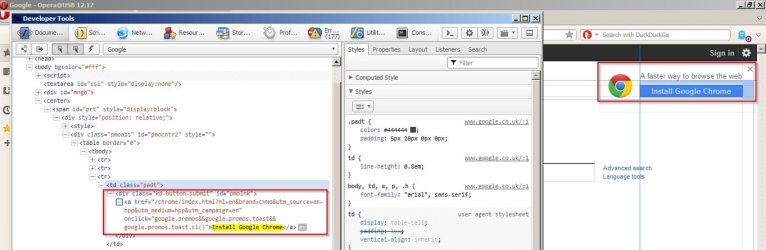
That "Install Google Chrome" box is coded into the webpage.

Google1.jpg

I don't see it if user agent is swithched.

Google2.jpg

One way to get rid of it is to change your browser's user agent string. Not recommended for most users as it can break functionality on some websites. It's possible to either randomize user agent or manually select user agent using add ons depending upon which browser is used. Or it can be permanently changed manually.

Best option for most users - leave user agent alone.

Secret Agent.jpg

Also try https://encrypted.google.com and see if it appears there.
 

My Computer My Computer

At a glance

Microsoft Windows 7 Home Premium 64-bit 7601 ...AMD C-60 APU with Radeon(tm) HD Graphics4.00 GBAMD Radeon HD 6290 Graphics
Computer type
Laptop
Computer Manufacturer/Model Number
ASUS
OS
Microsoft Windows 7 Home Premium 64-bit 7601 Multiprocessor Free Service Pack 1
CPU
AMD C-60 APU with Radeon(tm) HD Graphics
Motherboard
ASUSTeK COMPUTER INC. X501U
Memory
4.00 GB
Graphics Card(s)
AMD Radeon HD 6290 Graphics
Sound Card
(1) AMD High Definition Audio Device (2) Realtek High Defi
Screen Resolution
1366 x 768 x 32 bits (4294967296 colors) @ 60 Hz
Hard Drives
Hitachi HTS545050A7E380 SATA Disk Device
Antivirus
Comodo CIS & FW, SecureAplus App Whitelisting, Threatfire
Browser
Cyberfox 64bit, Opera 64bit, Airfox
Other Info
Spy-The-Spy, HitmanPro.Alert, Norton Connect Safe, MJRegWatcher, BitDefender TrafficLight, Voodoo Shield, Zemana AntiMalware
Back
Top