
WulfyRoxas
New member
Alright so day before yesterday, i was playing minecraft, my computer crashed and i found out my battery is bad,
then today i get on facebook for a while and leave the house for hours
I get back and some of my programs are deleted and in my task manager
"possessive.exe | Owner | network service" is running.
I kept ending it and ending it but it keeps coming back, so i spent several hours hunting all the files i could.
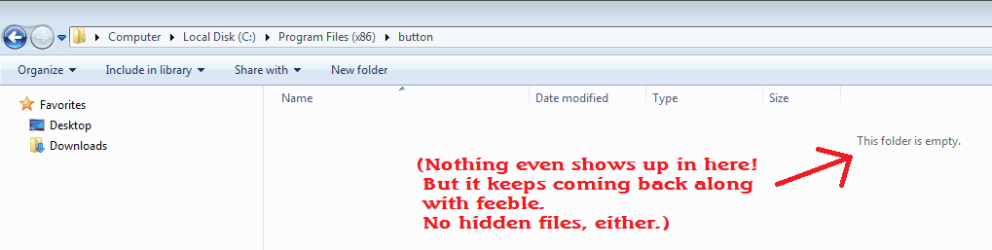
The main part of my issue was that C:\Program Files(x86)\button
C:\Program Files(x86)\feeble
and
C:\Program Files(x86)\tax
were all bug filled folders
when i kept deleting button and feeble, they kept coming back.
i deleted tax and it stayed gone.
i went into button and tax and they bboth have a similar DLL file that when i delete, it stops running, but only for a few seconds.
So i went into safe mode and did ENDLESS kinds of scans and checks and found so much stuff and deleted so much stuff that my computer is practically BRAND NEW
all traces and start locations of feeble and button were gone as far as the eye could see, even in window temp files.
i started back up and BOOM here they are again, wrecking havoc to my computer all over again!
I searched on google and NO ONE has had this issue and its tearing my well-being apart
I would just format the computer but i cant, ive got too much important programs and files on here that i need, and i dont have two hardrives or an external one to back them up to, so i need to get rid of feeble and button.
Ive tried and tried, scanned and scanned, deleted and deleted, uninstalled and double checked, ive done EVERYTHING but once I run windows normally, POOF, its back, and starts deleting some programs and killing computer performance.
I really don't know what to do.
I'll attach images of the inside of these folders, not that i think it would help.
Also i tried searching the forums for a place to put "virus issues" but oh, didnt find one, so im posting in the general section.

then today i get on facebook for a while and leave the house for hours
I get back and some of my programs are deleted and in my task manager
"possessive.exe | Owner | network service" is running.
I kept ending it and ending it but it keeps coming back, so i spent several hours hunting all the files i could.
The main part of my issue was that C:\Program Files(x86)\button
C:\Program Files(x86)\feeble
and
C:\Program Files(x86)\tax
were all bug filled folders
when i kept deleting button and feeble, they kept coming back.
i deleted tax and it stayed gone.
i went into button and tax and they bboth have a similar DLL file that when i delete, it stops running, but only for a few seconds.
So i went into safe mode and did ENDLESS kinds of scans and checks and found so much stuff and deleted so much stuff that my computer is practically BRAND NEW
all traces and start locations of feeble and button were gone as far as the eye could see, even in window temp files.
i started back up and BOOM here they are again, wrecking havoc to my computer all over again!
I searched on google and NO ONE has had this issue and its tearing my well-being apart
I would just format the computer but i cant, ive got too much important programs and files on here that i need, and i dont have two hardrives or an external one to back them up to, so i need to get rid of feeble and button.
Ive tried and tried, scanned and scanned, deleted and deleted, uninstalled and double checked, ive done EVERYTHING but once I run windows normally, POOF, its back, and starts deleting some programs and killing computer performance.
I really don't know what to do.
I'll attach images of the inside of these folders, not that i think it would help.
Also i tried searching the forums for a place to put "virus issues" but oh, didnt find one, so im posting in the general section.
My Computer
- Computer type
- Laptop
- Computer Manufacturer/Model Number
- Asus
- OS
- Windows 7 Home Premium (SP1) 64-Bit
- Antivirus
- Windows Defender
- Browser
- Chrome
